 Yazar:
I’m writing this Whatbox review as someone who has spent a lot of time experimenting with different tohum kutuları.
If you’re looking to boost your torrenting speeds, hide your IP from busybodies, or store and stream large media files, a seedbox can solve a lot of headaches. But is this the right seedbox for you? If you don’t feel like it, I’ll share some Whatbox alternatives as well, to help you out!
By the end of this article, you’ll know if Whatbox is right for you.
İçindekiler
1. What is Whatbox

Whatbox is a cloud-based seedbox provider that lets you download, organize, and stream files from servers in the Netherlands, the United States, or Singapore.
A seedbox is basically a remote machine that handles torrenting tasks so your home internet doesn’t get overwhelmed by giant downloads. You log into your account online, add torrent links or magnet URLs, and let the seedbox do its thing. Later, you can stream the media directly or move it to your local drive via protocols like SFTP or Rsync.
I gave Whatbox’s US-based server a go, and it felt pretty solid for everyday torrenting. They’re talking 40 Gbps for HDD plans and 100 Gbps for NVMe plans, which should speed up those big downloads. However, keep in mind those are shared speeds, so the more people use them, the slower your downloads will get.
The interface has a bunch of torrent clients, so you can pick your favorite. They’ve also got apps like Plex, Sonarrve Radarr covered.
Privacy is another reason many folks want a seedbox, and Whatbox has a built-in OpenVPN feature plus a vekil. It’s not as advanced as services that provide a dedicated IP or multiple VPN locations, but it’s enough if you’re just worried about your home IP.
2. Özellikler
Bir seedbox'a para harcarken torrent istemcileri, otomasyon araçları, medya akışı, veri aktarım yöntemleri ve genel güvenlik gibi alanlarda başarılı olup olmadığını görmek isterim. İşte her birine daha yakından bir bakış.

a. Multiple Torrent Clients
Whatbox teklifleri:
For my personal use, I often stick with Deluge because it’s easy to navigate and gives me all the information I need about the health of the torrent. Some people prefer the look of Transmission. Others like ruTorrent, especially if they’re used to a uTorrent-like interface. Having these options means you can choose what feels comfortable.
Bu neden önemli: Farklı torrent istemcileri bazen oran takibi ve eklenti desteği gibi görevleri benzersiz şekillerde ele alır. Eğer favoriniz burasıysa, kendinizi evinizde hissedeceksiniz.
b. Automation Tools
Whatbox aşağıdakiler için yerleşik desteğe sahiptir:
- Sonarr (TV shows)
- Radarr (Movies)
- Lidarr (Müzik)
- Bazarr (Subtitles)
- FlexGet (General scripting/automation)
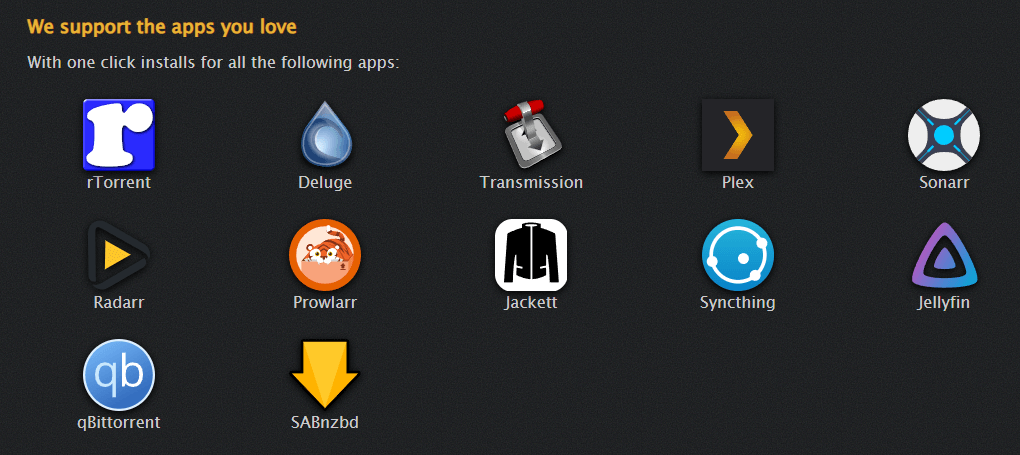
I used Sonarr for new episodes of my favorite TV shows and Radarr for a backlog of older movies. The setup was straightforward. I liked that once I entered the shows I wanted, Sonarr automatically found them and dropped them into my torrent client. When the downloads were complete, Sonarr organized them into neat folders for me. This is especially helpful if you have a large collection and don’t want to manually rename files.
FlexGet can be powerful if you’re comfortable editing YAML files. I played around with it to set custom rules for file naming and to filter out certain torrents. It’s overkill for beginners, but it’s cool that it’s available. Learn how to set it up and use it in: Full Guide to FlexGet
c. Media Streaming
You’ll find support for Plex, Jellyfin, and Emby. These platforms let you watch your shows, movies, and other media without downloading them to your home computer. For me, Plex is the way to go. Installing it on Whatbox was simple: I activated Plex from the dashboard, pointed it to the folders containing my media, and was able to stream content to my phone, laptop, or TV.
A word of caution: There is no hardware-accelerated transcoding. Everything is CPU-based. If you typically store large 4K files, be aware that the Seedbox will have trouble transcoding them. For me, a single 1080p stream was fine, but I did notice slowdowns when trying to watch something in 4K.
d. Data Transfer and Connectivity
Seedbox'ın torrentleri işlemesine izin verdikten sonra, bu dosyaları uzakta tutmak veya bilgisayarınıza aktarmak isteyebilirsiniz. Whatbox destekler:
- FTP, SFTP
- Rsync
- SSH
- SSH Tünelleme
- WebDAV
I’ve stuck with SFTP (using FileZilla) because it’s pretty simple. You log in with your Whatbox credentials, then select the files you want to move. Speeds depend on how far you are from the server and how busy their network is. I also tested SSH and Rsync for fast syncing of multiple directories. This is useful if you’re transferring 100GB or more and want to easily resume if your connection drops.
e. Güvenlik
Whatbox has an OpenVPN option so you can route some of your internet traffic through the seedbox. You’ll also find a proxy setup, which can be useful for certain torrent clients or web browser tasks.
They don’t advertise a zero-logging policy, nor do they mention an offshore location that can circumvent DMCA notices. If you are concerned about takedown requests, this could be a sticking point.
f. Wiki and Community Support
There’s a wiki that explains how to install applications, use Sonarr, or do advanced tasks. Overall, it’s covering the basics, but don’t expect detailed step-by-step guides.
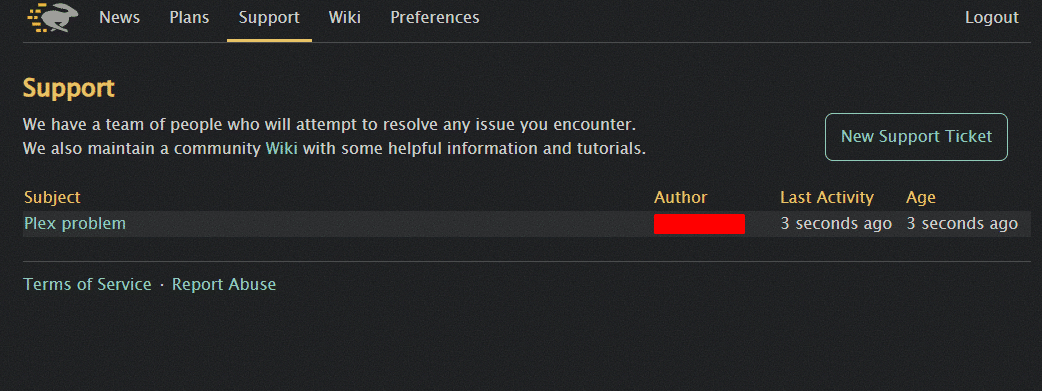
The technical support itself is ticket-based, and there is no live chat option. This might be important if you prefer immediate help.
3. Fiyatlandırma
For the HDD plans, the basic monthly option starts at around 14 EUR. That gets you 2 TB of storage and 5 TB of upload.
It goes up to 59 EUR for 21.70 TB of storage and 40 TB of upload. These plans share a 40 Gbps connection, and you can select either the Netherlands, the US, or Singapore as your server location.
Daha hızlı disk performansına ihtiyacınız varsa NVMe planları start at around 28 EUR for 950 GB of storage and 50 TB of upload.
They can climb up to a very high price if you want loads of space. These share a 100 Gbps connection, which might be appealing if you’re dealing with many giant torrents all at once.
Hatırlanması gerekenler:
- Ödeme avro cinsindendir. ABD'de iseniz döviz kurlarına dikkat edin.
- Hayır dedicated IP on the standard plans.
- You can pay monthly or yearly but monthly feels safer if you just want to test.
I found the pricing average for seedboxes in this range. If you need advanced features, you might look elsewhere or pay more. If you just want a big chunk of storage, these plans are straightforward.
4. Whatbox Alternatives
Bazı kişiler Whatbox'ın kapsamayabileceği özel özellikler ister. Diğerleri ise farklı fiyatlandırma veya 7/24 destek istiyor. İşte Whatbox'ın test ettiğim diğer birkaç hizmetle karşılaştırması.
a. RapidSeedbox

Today, I’m using RapidSeedbox because I wanted a seedbox with more control and features. You can have a full remote desktop that feels like a computer in the cloud, which is valuable if you run specialized applications or prefer a more visual interface. They also allow crypto payments, which can help protect your privacy if you don’t want your credit card tied to a seedbox.
Live chat support is another plus. Whenever I ran into issues, I got help right away. This service also accepts offshore hosting in some plans, which gives you that extra sense of security if you’re worried about DMCA or takedowns.
It can be a bit pricier than Whatbox, though, especially if you pick a higher-tier plan with all the bells and whistles. Despite the costs, the dedicated IP and extensive app library may justify the expense if you have heavier usage.
| RapidSeedbox vs. Whatbox | RapidSeedbox | Whatbox |
|---|---|---|
| Özel IP | Evet | Hayır |
| Canlı Sohbet Desteği | Evet | Hayır (bilet bazlı) |
| Windows RDP Seçeneği | Evet | Hayır |
| Kripto Ödemeleri | Evet | Hayır |
| Fiyatlandırma | Daha yüksek kademeler | Orta sınıf |
| Kullanım Kolaylığı | Kolay | Kolay |
Looking for the best Whatbox alternative?
Discover a powerful and reliable Seedbox solution with RapidSeedbox! Enjoy lightning-fast speeds, robust security, and seamless torrenting with a feature-rich service that outperforms the competition.
b. Ultra.cc

Denedim. Ultra.cc (formerly UltraSeedbox) a while back when I was looking for a simple dashboard to install automation apps like Sonarr or Radarr. They’ve got a bunch of plans with different storage and bandwidth amounts.
Some of the plans even include dedicated IP addresses, which a lot of people like if they’re after some extra privacy. The setup is pretty quick: you log in, install your favorite apps from the built-in panel, and then you’re ready to start seeding or streaming.
I found it pretty fast and easy to use, and the interface wasn’t confusing at all. I really liked the one-click app installs, which made setting up Plex or other media tools a breeze.
The only thing to keep in mind is that you might pay more if you want a plan that’s on par with what you can get at a standard level from other providers. Also, if you need advanced support like live chat, you might find that they rely more on tickets.
| Ultra.cc vs. Whatbox | Ultra.cc | Whatbox |
|---|---|---|
| Özel IP | Belirli planlarda mevcuttur | Teklif edilmedi |
| Uygulama Yükleme Seçenekleri | One-click | Manuel veya Wiki-tabanlı |
| Arayüz Kolaylığı | Kolay anlaşılır gösterge paneli | Ayrıca basit |
| Plan Çeşitliliği | Many tiers, pricier | Orta seviye kademeler |
| Destek | Bilet tabanlı (aktif topluluk) | Bilet tabanlı (Wiki) |
| Sunucu Konumları | Öncelikle AB, biraz ABD | Hollanda, ABD, SG |
c. Yabani Barındırma

Feral Hosting has been around for a while, so I decided to put it to the test to see how it compares in terms of speed and reliability. They’ve got a solid reputation for stable performance and a large user base.
You can run torrent clients like rTorrent and Deluge, and they also support Plex for streaming. They offer preset slots with different storage space and speeds, so you can choose a plan that fits your needs.
One of the good things about Feral is the variety of scripts and community tools that users share in the forums. If you’re comfortable with code, you can find some great advanced setups. But if you’re into a nicely designed dashboard, the interface will disappoint you.
They do have ticket support, but it isn’t super fast. If you’re into a simpler approach with more direct guidance, you might find Whatbox easier.
| Feral Hosting vs. Whatbox | Feral Hosting | Whatbox |
|---|---|---|
| Topluluk | Güçlü forumlar, kullanıcı betikleri | Wiki |
| Arayüz | Daha fazla manuel adım | Basit |
| Hızlar | Kararlı, yuvaya göre değişir | Paylaşılan 40/100 Gbps |
| Uygulamalar | rTorrent, Deluge, Plex desteği | rTorrent, Deluge, vb. |
| Destek | Bilet sistemi, daha yavaş yanıt | Bilet sistemi |
| Acemi Dostu | Medium, biraz forum araştırması | Daha yüksek, doğrudan Wiki |
d. Seedboxes.cc

Seedboxes.cc'yi denedim (ve onları gözden geçirdi) when I was looking for something simple. They’ve got a control panel that makes it easy to install popular apps in just a few steps.
They’ve also got servers in different locations around Europe and North America. Overall, I was content with the speeds for casual downloading.
Their support is ticket-based, and while I got replies in a reasonable time, it’s not as immediate as a live chat. If you’re cool with waiting on email-style exchanges, you’ll be fine.
Keep in mind that most of their plans don’t include advanced features like dedicated IP addresses, so if you’re looking for a bit more privacy than the standard shared IP, you might want to look elsewhere.
| Seedboxes.cc vs. Whatbox | Seedboxes.cc | Whatbox |
|---|---|---|
| Kontrol Paneli | Kolay anlaşılır arayüz | Web tabanlı gösterge paneli |
| Sunucu Konumları | Avrupa & Kuzey Amerika | Hollanda, ABD, Singapur |
| Otomasyon | Sonarr, Radarr, daha fazlası | Sonarr, Radarr, Lidarr, FlexGet |
| Özel IP | Çoğu planda standart değildir | Hiç teklif edilmedi |
| Destek | Bilet bazlı, orta hızda | Bilet bazlı, benzer hız |
| Fiyatlandırma | Orta ila yüksek kademeler | HDD/NVMe genelinde orta sınıf |
Özet
Each of these providers has a special place in the world of seedboxes. If you need a dedicated IP, RapidSeedbox and Ultra.cc are worth checking out, even if they’re sometimes pricier.
Feral Hosting and Seedboxes.cc tend to be easier to figure out and use, and they still offer good speeds and app support.
The best choice for you depends on what you really need — 24/7 support, unique automation tools, or the security of a dedicated IP. They’re all good for torrenting and media management, but the details on privacy, support channels, and advanced setup can vary.
Be sure to check their specific plans, see how current users feel, and think about the level of control you need so you pick a service that truly matches your style.
5. FAQ About Whatbox
a. Is Whatbox safe to use?
Whatbox uses secure protocols like SFTP, SSH, and OpenVPN, and I haven’t seen any red flags while using them. However, they don’t promote features like a dedicated IP, offshore hosting, or a clear zero-logging policy. If you need higher anonymity, consider a provider with more privacy features.
b. Can I stream my media through Whatbox?
Yes, you can set up Plex, Jellyfin, or Emby on your Whatbox server. I mostly use Plex for streaming and have found it reliable as long as you’re cool with CPU-based transcoding, which can sometimes have a hard time with large 4K files.
c. Does Whatbox support app automation?
Yes, Whatbox supports app automation. I’ve set up Sonarr, Radarr, and Bazarr. You can also install FlexGet for more advanced automation. These apps help by automatically grabbing new episodes, managing your movie library, and fetching subtitles.
d. How’s the pricing compared to other seedboxes?
Whatbox’s pricing is on par with a lot of mid-range seedbox providers. Plans start at 14 EUR per month for HDD storage and around 28 EUR for NVMe, with prices going up based on how much storage and monthly upload you need. If you’re looking for advanced privacy or dedicated IP addresses, you might end up paying more for a different service.
e. What if I need a live chat or immediate support?
Whatbox doesn’t offer live chat support. They rely on ticket-based support and community help through IRC and Discord. If you need 24/7 real-time support, RapidSeedbox might be a better match.
6. Whatbox Review and Alternatives – Final Words
I was looking for a service that was fast, had a bunch of apps for automation, and had a nice interface, and Whatbox almost delivers on all of that.
It’s easy to manage torrents and stream media without hogging your home bandwidth. If you need advanced privacy, dedicated IPs, or a Windows RDP environment, though, you might want to look into a different seedbox.
But if you’re just looking for a spot to seed and stream, Whatbox is a solid everyday choice. It’s easy to manage, the speeds are solid, and I liked having apps like Sonarr and Radarr in one place.
Whether you’re new or a long-time user, I hope this Whatbox review helps you see what it’s all about.
Not satisfied with Whatbox? There’s a better option!
Upgrade to RapidSeedbox for superior performance, unlimited bandwidth, and full privacy. Experience effortless torrenting with a high-speed, secure, and feature-packed Seedbox built for power users like you.
 English
  Français
  Español
  Tiếng Việt
  简体中文
简体中文  Русский
  Türkçe
  Bahasa Indonesia
  日本語
日本語  العربية
  Português
  Українська
0Yorumlar