 Qua
Qua
Last week, thousands of Instagram users woke up to find their accounts suddenly disabled. No warnings. No clear reason. Many hadn’t broken any rules.
Likely cause? Meta’s new AI moderation system.
It makes quick decisions—often without human review—and even Meta admits up to 20% of removals are mistakes.

This guide isn’t just about Instagram account recovery. It’s about protecting your privacy and keeping access to a platform you depend on. This guide will help you stay ahead of Instagram’s shifting rules.
Content Disclaimer: This content is for educational purposes only. It does not promote or encourage any activity that violates Instagram’s Terms of Service or community guidelines. Users are solely responsible for how they apply this information. Always prioritize ethical use and platform compliance.
Mục lục
- Types of Instagram Bans (And How to Identify Them)
- Common Reasons Why Instagram Bans Accounts
- How to Recover Your Banned Instagram Account
- How to Avoid Getting Banned Again
- Final Thoughts + Latest Instagram Policy Changes in 2026
1. Types of Instagram Bans (And How to Identify Them)
Instagram doesn’t always tell you exactly what type of restriction you’re facing. Here’s how to identify each ban type and what it means for your account access.
- Shadow Ban: Your content becomes invisible to others. This ban slashes reach, engagement, and growth, without you knowing it.
- Temporary Action Block: Instagram restricts specific actions (like, follow, post) for 24 hours to 30 days, usually after rule violations.
- Full Account Suspension: Your account is disabled pending review. This ban locks you out and hides your profile from everyone.
- Permanent Account Deletion: Instagram erases your account and content for serious or repeated violations. There is ‘almost’ no chance of recovery.
- IP Ban: Instagram blocks your entire network. This ban makes all accounts on that connection inaccessible.
a. Shadow Ban
A shadow ban is Instagram’s most subtle restriction method. Your account remains accessible to you, but your content becomes virtually invisible to others. Posts don’t appear in hashtag searches, your reach plummets, and engagement drops dramatically.

How to identify a shadow ban:
- Sudden drop in likes, comments, and story views
- Posts not appearing in hashtag feeds when searched by others
- Significant decrease in new follower growth
- Stories are receiving far fewer views than usual
Real users on Reddit have reported shadow bans lasting anywhere from two weeks to several months. One business owner shared that their engagement dropped by 90% overnight, with posts that previously received hundreds of likes getting fewer than 10.
b. Temporary Action Block
This is Instagram’s way of putting you in “time-out.” You can access your account, but certain actions are restricted for a specific period, typically ranging from 24 hours to 30 days.

Common symptoms include:
- Unable to like, comment, or follow new accounts
- Restrictions on posting content or stories
- Messages stating “Action Blocked” when attempting activities
- Limited access to Instagram features like Live streaming
These blocks often escalate with repeated violations. First-time offenders might face a 24-hour restriction, while repeat violations can result in weeks-long limitations.
c. Full Account Suspension
Your account is temporarily disabled pending investigation. This is more serious than an action block and typically occurs when Instagram suspects significant policy violations.
Signs of account suspension:
- Unable to log into your account
- The account shows as “disabled” when accessed
- Followers see your profile as unavailable
- Appeal options are available through Instagram’s help system
Suspensions can last from several days to 180 days, depending on the perceived severity of violations. During this time, your content remains hidden from all users.

d. Permanent Account Deletion
The most severe penalty is that Instagram completely removes your account and all associated content. This action is typically reserved for serious violations like impersonation, illegal activities, or repeated policy breaches.
Characteristics of permanent deletion:
- The account is completely inaccessible with no login option
- The username becomes available for others to claim
- All photos, videos, and messages are permanently lost
- Very limited appeal options are available
Recovery from permanent deletion is extremely rare and usually requires compelling evidence that the ban was issued in error.
e. IP Bans
Instagram can restrict access based on your internet address, affecting all accounts accessed from that connection. This is the most comprehensive type of ban, targeting the network level rather than individual accounts.
IP ban indicators:
- Unable to access Instagram from specific Wi-Fi networks
- Login pages refresh without error messages
- Access works when switching to mobile data or different networks
- Message stating “The IP address you are using has been flagged as an open proxy.” Learn more about this in: What is an Open Proxy?
IP bans often affect users who manage multiple accounts or use automation tools. The restriction can impact anyone sharing the same network connection. Learn more about: Instagram proxies [Best for Instagram scraping and automation]
2. Common Reasons Why Instagram Bans Accounts
Understanding why Instagram issues bans helps you avoid behaviors that trigger their automated systems. The best place to start is in Instagram’s own Help Desk and ToS. But if you are looking for an overview of the reasons why Instagram bans accounts, then keep reading.
Here are the most frequent causes behind account restrictions.
a. Spammy Behavior
Instagram’s algorithms are designed to detect unnatural engagement patterns. Mass following, unfollowing, or liking content in short time periods triggers spam detection systems. The platform monitors engagement velocity closely. Following more than 50 accounts per hour or liking hundreds of posts rapidly can flag your account for review. Even legitimate users get caught when they engage too enthusiastically with content.
b. Violations of Community Guidelines
Instagram’s community guidelines cover a lot of content restrictions. Violations include harassment, hate speech, graphic violence, and adult content. However, the interpretation of these guidelines has become increasingly strict. Content that was acceptable months ago might now trigger violations due to updated policy enforcement. Political content, for example, faces enhanced scrutiny from automated moderation systems.
c. Automation & Bots
Using third-party apps to automate Instagram activities is one of the fastest ways to get banned. This includes services that automatically like posts, or follow or unfollow users. This ban also goes out to scheduling content outside of Instagram’s approved tools. Instagram actively scans for automation signatures in user behavior. Even using legitimate scheduling tools incorrectly can trigger bot detection algorithms. Learn more about this in: Instagram Bot Accounts: A Guide to Success
d. Impersonation
Creating accounts that mimic brands or other users (like celebrities) without permission violates Instagram’s authenticity policies. This includes using similar usernames, profile photos, or claiming to represent someone else. In addition, the parody accounts require clear labeling to avoid impersonation violations. Business accounts must accurately represent the actual business or organization. Learn more about using Instagram proxies for businesses.
e. Copyright & Age Restrictions
Posting copyrighted content without permission or falsifying your age during account creation can result in immediate bans. Instagram uses advanced content recognition technology to identify copyrighted material. For example, media like music, images, and videos are automatically scanned against copyright databases. Even brief clips from movies or songs can trigger violations.
Red Flag Activities That Trigger Bans:
| Activity | Mức độ rủi ro | Detection Method |
| Mass following/unfollowing | High | Velocity monitoring |
| Using automation tools | Very High | Behavior analysis |
| Posting copyrighted content | High | Content recognition |
| Buying fake followers | High | Account authenticity checks |
| Using banned hashtags | Medium | Hashtag scanning |
| Multiple account violations | Very High | Cross-account linking |
🧩 Banned Without Warning?
If Instagram’s IP bans caught you off guard, here’s a smarter way to stay connected—quietly and reliably.
→ See how it works3. How to Recover Your Banned Instagram Account
Recovery success depends on quick action and following the correct appeal process.
I would recommend reading Instagram’s help desk articles (Check your account status) to ensure you’re not currently facing any restrictions.
If and when you are ready to recover, here’s your step-by-step guide to getting your Instagram account back.
a. How to Check Ban Status
Before attempting recovery, confirm your account status and the type of restriction you’re facing.
- Step 1: Attempt to log in. Try accessing your account from the Instagram app or website. The error message you receive will indicate the type of ban and available options.
- Step 2: Check your email. Instagram typically sends notification emails explaining the reason for account restrictions. These emails contain important appeal links and reference numbers.
- Step 3: Review Account Status. If you can access your account, check Settings > Account > Account Status to see any policy violations or restrictions.

b. Appealing a Ban
The appeal process varies depending on your ban type, but following the right steps gives you the best shot at recovery.
If your account gets disabled, submit an appeal through Instagram’s official form at Instagram Help Desk. Enter your username, email, and a clear explanation of why you think the ban was a mistake. For policy violations, use the in-app appeal option. When you get a violation notice, tap “Request Review” and explain the context behind your content. And finally, if you’re dealing with a copyright claim you believe is wrong—or you had permission to use the content—submit a counter-notice through Instagram’s copyright form to challenge it.
| 🚨 Essential Appeal Tips: If you’re appealing a ban, keep it simple. Send just one request, be clear and honest, and submit any ID they ask for right away. Stay calm and professional—it helps your case get real attention. |
c. What to Do If the Appeal Fails
If your initial appeal doesn’t work, don’t panic—there are still a few ways to keep pushing for recovery.
First, if you’re Meta Verified on Facebook, use that to your advantage. You can access live chat support, which gives you a real person to talk to—something you won’t get through the usual appeal forms. For business accounts, try reaching out through the Facebook Business Help Center. This route sometimes opens doors that aren’t available to personal users.
If you’re still stuck, wait about 7 to 10 days, then resubmit your appeal. Add any new details or context that might help your case land better the second time around. And finally, keep a record of everything—emails, appeal submissions, and any reference numbers. These can help if you need to escalate the issue later.
d. Creating a New Account (Safely)
If recovery efforts fail, creating a new account requires careful planning to avoid immediate re-banning.
- Use a different device and network: Instagram tracks device fingerprints and IP addresses. Access from a new device and a different internet connection reduces the risk of linking to your banned account.
- Choose a completely different username: Avoid any similarity to your previous username or email address.
- Start with organic growth: Don’t immediately try to rebuild your following aggressively. Gradual, natural growth patterns are less likely to trigger automated systems.
- Wait before adding contacts: Importing contacts from your phone or Facebook immediately can link your new account to the banned one.
3. Instagram IP Bans: What They Are and How to Bypass Them
An IP ban represents Instagram’s most complete restriction method. They don’t just target an individual account, but they block access at the network level. Understanding how these IP bans work is important if you are managing multiple accounts or experiencing persistent access issues.
What is an IP Ban?
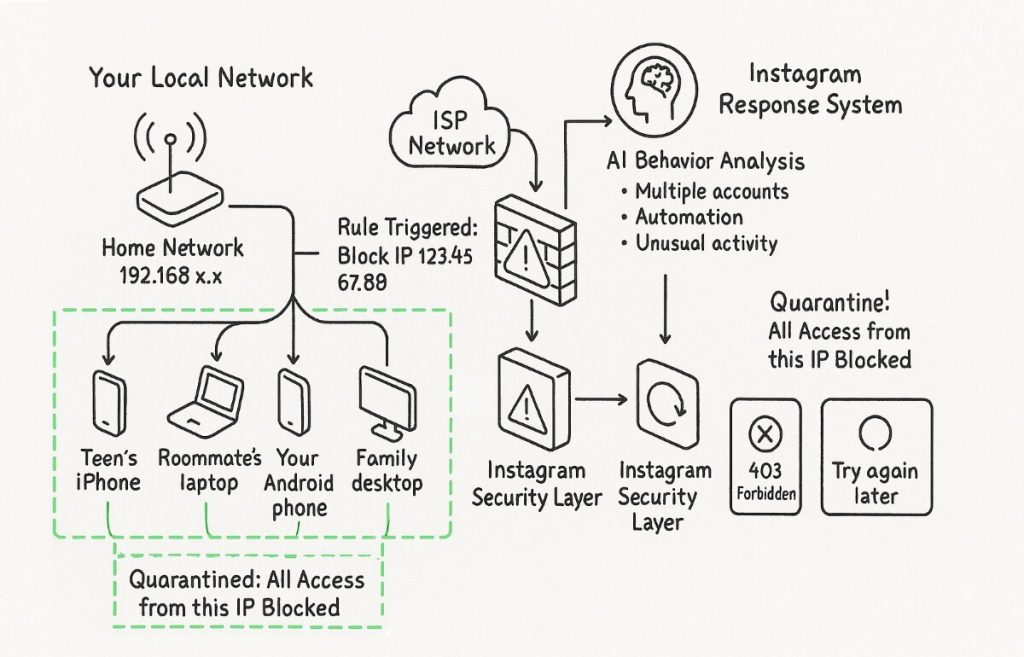
An IP ban blocks your internet address from accessing Instagram entirely. This means every account accessed from your network becomes totally inaccessible. This affects anyone connecting from the same network, including family members or coworkers.
Instagram implements IP bans when it detects patterns suggesting coordinated inauthentic behavior. This often happens when multiple accounts from the same address violate policies or show signs of automation. The platform’s systems assume the same entity controls all accounts from that address.
| 🕵️♂️ Sneaky Bans: Modern IP bans go deeper than you’d think. Instagram now uses device fingerprinting—tracking things like your browser setup, screen size, and even installed fonts. So, just switching your IP might not be enough to get back in. |
Shared IP, Shared Ban
The following image shows how multiple devices on a home network (LAN: 192.168.x.x) share a single public IP (123.45.67.88). This public IP can be blocked by Instagram’s security systems if suspicious activity is detected. An AI system flags behaviors like automation or multiple accounts. It triggers a firewall rule that quarantines the IP. As a result, all devices receive access errors like “403 Forbidden” or “Try again later.”
How to Confirm if You’re IP Is Banned
I would recommend first starting by switching from Wi-Fi to mobile data. If Instagram works on cellular, your network is likely blocked. Then, you can test other devices on the same connection. If none can access Instagram—but they work fine elsewhere—that points to an IP-level restriction.
Watch for clues in error messages, too. Some mention “flagged as an open proxy,” while others just reload endlessly. Lastly, if several accounts stop working at once on the same network, that’s a strong sign your IP has been flagged.
Solutions (Use of Proxy, Mobile Network, or VPN)
There are different ways you can follow to attempt to restore access when facing IP restrictions, but each approach has important considerations. Read the following considerations along with the disclaimer before trying one of these solutions.
If you’re trying to get around an IP restriction, proceed carefully—each method has its risks. Always follow Instagram’s terms of service. Using automation or mass account creation, even with a new IP, could trigger more advanced tracking. Also, some workarounds might break your internet provider’s rules. So weigh the risks before acting—a quick fix could cause bigger issues later.
| Tuyên bố miễn trừ trách nhiệm: We don’t endorse breaking Instagram’s platform rules. These methods should only be used to regain legitimate access to your accounts. Always prioritize compliance with Instagram’s community guidelines and terms of service. |
- Residential proxy services provide the most reliable solution for IP bans. These services route your connection through real household internet connections. They make your traffic appear as a regular ‘home user’. Unlike datacenter proxies, residential IPs are rarely detected or blocked by Instagram’s systems. When choosing a proxy service, I would recommend you prioritize providers that offer dedicated residential IPs rather than shared connections.
- Mobile network switching offers a temporary workaround. Your cellular provider assigns different IP addresses as you move between towers or restart your device. This method works for short-term access but isn’t ideal if you are a regular user.
- VPN services can bypass IP bans but come with detection risks. Instagram actively identifies and blocks many VPN providers, particularly those using datacenter VPN IP addresses. If you choose a VPN, don’t forget to select services that offer residential IP options and rotate servers regularly.
- The router restart method might work if your internet provider uses dynamic IP assignment. Unplugging your router for several hours can sometimes result in a new IP address when you reconnect.
Datacenter Proxy vs Residential Proxy to access Instagram?
The following image compares two proxy paths: Datacenter Proxy on the left and Residential Proxy (Dedicated) on the right. The datacenter route is blocked at Instagram’s security wall due to a high-risk, shared IP. In contrast, the residential proxy path flows through a real household IP and grants access to Instagram.

4. How to Avoid Getting Banned Again
Prevention remains your best defense against Instagram bans. Following these practices significantly reduces your risk of triggering automated enforcement systems.
a. Best Practices for Staying Safe
To stay safe on Instagram, it helps to understand how their AI spots unusual behavior. Remember this: Instagram’s AI watches for fast engagement, repeating content patterns, and sudden activity spikes.
What can you do? Start by verifying your identity—add a phone number, turn on two-factor authentication, and complete your profile. Verified accounts tend to get more leniency and appeal success. Also, stay within safe activity limits. Keep follows under 50 per hour, likes under 100, and comments under 20 to avoid spam flags.
Use Instagram’s native tools like Creator Studio for scheduling. Third-party apps can sometimes trigger automation alerts if they’re not fully approved. Finally, keep your login routine consistent. Sudden changes in location or device access can lead to security checks or flags.
b. Smart Posting & Engagement Tips
Instagram’s AI keeps a close eye on what you post and how you interact. These tips help you stay safe without shrinking your reach:
When posting content:
- Check hashtags first. Search them to see if recent posts show up—if not, they’re likely banned.
- Avoid hot-button topics during high-alert times (elections, health crises, global events). Even accurate info can get flagged.
- Give credit when reposting. Tag creators, use Instagram’s collab features, and get permission when needed.
- Back up important posts. If content gets removed by mistake, you’ll have proof and can repost easily.
When engaging with others:
- Stick to authentic interactions. Focus on accounts that make sense for you or your brand.
- Skip follow-for-follow games. These trigger bans faster than they boost growth.
- Vary your activity. Like, comment, and follow in a natural rhythm—don’t rush through it.
- Avoid generic comments. Repeated phrases like “Nice post!” scream bot behavior to Instagram.
c. Tools That Can Help
Managing Instagram safely doesn’t have to be a headache—here are legitimate tools to streamline your strategy while keeping you compliant:
- Instagram Insights: Use native analytics to track content performance and audience behavior—no need for risky third-party tools.
- Creator Studio: The Official scheduling tool that interfaces directly with Instagram is the best. This way, you stay within automation rules.
- Content planning apps (e.g., Notion hoặc Trello): Plan your grid and posting schedule without directly posting for you. This helps you stay compliant and organized.
- Hashtag research platforms (like Display Purposes or Hashtagify): Identify trending, safe hashtags and avoid banned or problematic ones.
- RapidSeedbox rotating proxies: If you manage multiple accounts, these proxies rotate your IP address automatically. These proxies are perfect for helping you avoid IP flags without breaking rules.
| ⏳ Slow and Steady Wins Instagram. Remember: authentic growth takes time, but it builds engagement that Instagram’s systems won’t question. Focus on valuable content and genuine connections—not shortcuts. |
5. Final Thoughts + Latest Instagram Policy Changes in 2026
In 2025, Meta reworked how it handles content moderation. AI now makes most decisions instantly, which speeds things up, but also increases mistakes. False flags are more common, especially for non-English content.
One big change: human fact-checkers are out, and community-driven moderation is in. Similar to X’s Community Notes, users now help decide what’s visible. That means strong community ties matter more than ever. In addition, the policy enforcement has also become less consistent. With Meta’s trust and safety teams spread across the globe, how rules are applied can vary by region, especially outside the U.S.
Privacy-wise, Meta now trains its AI on user activity. Your posts, comments, and interactions shape the system that could restrict you. This feedback loop makes your engagement behavior more important than ever.
Looking ahead, expect even more advanced moderation. Meta is building tools that analyze not just content, but how you behave—your engagement patterns, who you interact with, and even your cross-platform activity.
For privacy-minded users, there’s another shift to watch: Instagram now relies heavily on device fingerprinting. It tracks your hardware setup, not just your IP, making old bypass methods like VPN and proxy rotation less reliable.
Seen these changes yourself?
Noticed a ban or flag that seemed off?
Share your experience in the comments.
Your story helps others understand how Instagram moderation is evolving—and how to stay one step ahead.
🕵️♀️ Browse Like a Real User
Don’t just mask your IP—blend in with traffic that looks and feels authentic to Instagram’s systems.
→ Try residential now English
  Français
  Español
  Tiếng Việt
  简体中文
简体中文  Русский
  Türkçe
  Bahasa Indonesia
  日本語
日本語  العربية
  Português
  Українська
Account ban method
Hi Abhishek, can you share more details?
Mu account is ban unban kasa kara