 By
By
Are you losing competitive advantage because rivals react to pricing faster? List crawling is the most reliable way to collect structured web data at scale. It can power market intelligence, price monitoring, financial services, and data-driven decisions. This guide shows how to design a resilient pipeline: tooling choices (no-code, API-first, Python), anti-detection tactics (proxies, fingerprinting hygiene), and SEO safeguards (robots.txt, crawl budget).
| Don’t burn your IP! Repeated crawling from one address invites blocks. Spread the load… 👉 Stay Online |
TL;DR
- What is list crawling: Extract structured items from URL lists (products, jobs, directories).
- Stack: Python/Requests/BS4 or Scrapy; no-code (Octoparse); API-first (Scrapfly); proxies (RapidSeedbox).
- Anti-detection: Rotate IPs/agents, session reuse, human-like timing.
- SEO: Respect robots.txt, protect crawl budget, avoid infinite scroll traps.
- ROI: Strong for pricing/research; validate legality and ethics first.

Compliance Disclaimer: This guide is educational, not legal advice. Collect only lawful, public data; respect robots.txt/TOS and TDM-reservation signals. Don’t scrape paywalled/login areas or sensitive/personal data. Where privacy laws apply (GDPR/CCPA/LGPD, etc.), establish lawful basis, minimize data, secure storage, and honor data-subject requests.
Table of Contents
- List Crawling Market Growth and Use Cases
- Understanding List Crawling Fundamentals
- Technical Implementation and Mechanics
- Languages and Framework Comparison
- List Crawling Tech Stack: From No-Code to Enterprise
- SEO Implications and Crawl Budget Optimization
- Overcoming Modern Anti-Detection Systems
- List Crawling FAQ
- Final Take
1. List Crawling Market Growth and Use Cases
List crawling is a go-to strategy for pulling structured data from the web at scale. Think product listings, job boards, directories, and search results. So, instead of grabbing messy, mixed content like general scraping, with list crawling you can zero down on consistent patterns. This makes it faster and more reliable for business use.
The numbers back it up. The global web scraping market hit $1.01 billion and is on track to reach $2.49 billion by 2032. So, where does all that growth come from? Usually companies that use list crawling for price tracking, competitive intel, market research, among other things.
The payoff is real. The majority of e-commerce brands see 5–15% revenue bumps by plugging in live pricing data. While in the same case, research firms report 40–60% higher success rates when they pair crawling with strong anti-detection tools. But it’s not all a free ride. To win with list crawling, you have to deal with tough challenges, such as anti-bot systems and technical hurdles that have gotten more complex every time.
List Crawling Use Cases
List crawling is delivering real ROI across industries. Here’s where it shines most:
- E-commerce price monitoring: Dynamic pricing powered by list crawling helps retailers stay ahead. Companies using live competitor data consistently outperform 74% of rivals and often hit break-even on their scraping investment in 3–6 months.
- Market research & intelligence: Firms use list crawling to track trends and monitor competitors. They can also pull large datasets for analysis. With structured inputs, research accuracy and efficiency improved significantly.
- Financial services: Hedge funds and financial institutions spend close to $900K a year on alternative data (much of it collected through advanced crawling setups). Applications include market sentiment and risk monitoring.
- Other high-value areas: Lead generation from directories, job board monitoring, content aggregation for media, real estate, and recruitment all benefit from scalable, structured data extraction.
2. Understanding List Crawling Fundamentals
List crawling is a focused subset of web scraping. But, instead of pulling random content from across a site, list crawling extracts structured items (think product listings, job boards, or directories). In many cases, that specialization matters. While, general web scraping wrestles with messy and varied layouts. List crawling, by contrast, works with consistent structures, which makes it faster and easier to scale.
List Crawling vs. General Web Scraping
| Aspect | List Crawling | General Web Scraping |
| Data Structure | Homogeneous, structured lists | Heterogeneous page content |
| Success Rate | 85–95% (with proper setup) | 60–75% on average |
| Processing Speed | 3–5x faster per data point | Slower, varied parsing |
| Maintenance | Lower — consistent patterns | Higher — frequent updates |
| Business ROI | 5–15% revenue lift typical | Variable, harder to measure |
| Common Uses | Pricing, inventory, directories | News, content, mixed data |
📊 Market snapshot: The alternative data market is worth $4.9B (28% annual growth). Meanwhile, enterprise adoption of scraping for AI and ML projects jumped from 45% to 65% in just one year.
How the Process Works
List crawling turns structured list pages into clean datasets. It accomplishes this by moving URLs through a polite queue, fetching and recognizing list patterns, then extracting item fields reliably. Each batch is validated against a schema and delivered in the exact format you need.

- URL List Prep: Identify target pages with structured lists
- Queue Management: Organize crawl sequence, set priorities
- Pattern Recognition: Locate list containers via CSS selectors/XPath
- Item Extraction: Parse each item based on detected patterns
- Data Validation: Check completeness and accuracy
- Export: Deliver data in the required business format
High-volume crawl lanes 🚦
When throughput matters, wide IPv6 space supports efficient parallel requests.
Use IPv63. Technical Implementation and Mechanics
If you think list crawling is just about pulling data, think again. List crawling is about building the right system. The most advanced setups are able to cut fingerprinting detection by up to 75% using browser fingerprint management and smart request randomization. In the end, your technical design will determine whether a crawl succeeds or gets blocked.
| ⚠️ Common Pitfalls in Crawling: When building list crawlers, there are several issues that can derail performance (if you’re not careful). To begin with, hardcoded selectors often fail the moment a site changes its layout. In addition, memory leaks may creep in when headless browser sessions aren’t closed properly. Moreover, relying on single-threading limits throughput and slows down large-scale crawls. Finally, weak error handling (such as treating temporary glitches the same as permanent failures) can waste resources and stall progress. |
Step-by-Step Technical Guide
List crawling operates through a four-phase technical process that differs significantly from traditional web scraping approaches. The process begins with URL list preparation and queue management, followed by optimized request-response cycles designed specifically for list structures. Advanced systems implement sophisticated HTML structure identification techniques using CSS selectors and XPath expressions to locate list containers and individual item patterns.

Phase 1: URL Queue Management
The starting point of any crawler is deciding what to visit and in what order.
- Input: seed URLs, sitemaps, search results.
- Queue: structure holding pending URLs.
- De-duplication: avoid re-crawling the same page.
- Priority/Politeness: throttle requests to avoid bans.
Example:
|
1 2 3 4 5 6 7 |
from collections import deque class ListCrawler: def __init__(self): self.queue = deque() # URLs pending self.visited = set() # prevent duplicates self.results = [] # extracted items |
Phase 2: Request Optimization
Modern list crawlers handle pagination well, covering over 62% of sites with numbered pages or infinite scroll. The challenge is keeping data consistent while managing dynamic loads and AJAX pagination.
Modern crawlers must work smoothly with both classic pagination and infinite scroll. Three essentials:
- Session Management: reuse cookies/headers across requests.
- Adaptive Timing: random 1–3s delays mimic human browsing.
- Error Recovery: retries with exponential backoff.
Example:
|
1 2 3 4 5 6 7 8 9 10 11 12 13 14 15 16 17 |
import requests, time, random session = requests.Session() session.headers.update({"User-Agent": "ListCrawler/1.0"}) def fetch(url, retries=3): for attempt in range(retries): time.sleep(random.uniform(1, 3)) # adaptive timing try: r = session.get(url, timeout=15) if r.ok: return r except requests.RequestException: time.sleep(2 ** attempt) # exponential backoff return None |
Phase 3: Data Extraction Patterns
Modern extraction pipelines handle nested HTML, dynamic CSS, and encoded content. Advanced systems can cut fingerprinting detection by 75% using browser spoofing and request randomization. The best results come from layering multiple anti-detection tactics (not relying on just one.)
Once content is fetched, the next step is structuring it.
- Use CSS selectors/XPath to isolate list containers.
- Normalize extraction patterns for consistency.
Example:
|
1 2 3 4 5 6 7 8 9 10 |
from bs4 import BeautifulSoup html = "<ul><li><a href='/p1'>Item 1</a></li></ul>" soup = BeautifulSoup(html, "html.parser") for link in soup.select("li a"): print(link.get_text(strip=True), link["href"]) |
Phase 4: Anti-Detection Integration
Sites deploy defenses; crawlers need to adapt. Common tactics:
- User-Agent Rotation: cycle realistic browser headers.
- Proxy Rotation: swap IPs every 10–15 requests.
- Behavioral Mimicking: simulate scrolls, clicks, or irregular timing.
Example:
|
1 2 3 4 5 6 7 8 9 10 11 12 13 14 |
import random import requests USER_AGENTS = [ "Mozilla/5.0 (Windows NT 10.0; Win64; rv:118.0)", "Mozilla/5.0 (Macintosh; Intel Mac OS X 13_5)", ] headers = {"User-Agent": random.choice(USER_AGENTS)} resp = requests.get("https://example.com", headers=headers, proxies={"http": "http://proxy:port"}) |
| ⚡ Performance Tip: Use connection pooling and session reuse to speed up crawls by 3–5x at scale. |
4. Languages and Framework Comparison
Python still leads the crawling stack. Beginners often start with BeautifulSoup + Requests for simplicity, while Scrapy handles production-scale and asynchronous pipelines.
For JavaScript-heavy sites, tools like Playwright (or Puppeteer) have become the go-to for rendering dynamic content. At the next level, frameworks such as Crawlee offer fingerprint rotation and retry logic. This framework is hitting 90%+ success rates against basic anti-bot defenses. And for teams that want power without infrastructure headaches, Scrapfly delivers a fully managed, enterprise-ready solution.
The table below breaks down these trade-offs.
| Framework | Best For | Learning Curve | Performance | Anti-Detection |
| BeautifulSoup + Requests | Beginners, small projects | Low | Moderate | Manual setup required |
| Scrapy | Production scale | High | Excellent | Built-in |
| Playwright | JavaScript-heavy sites | Moderate | Good | Advanced fingerprinting |
| Scrapfly API | Enterprise, no maintenance | Low | Excellent | Fully managed |
Success Rates By Implementation Method:
As the chart shows, API services deliver the highest success rate (92%), followed closely by custom Scrapy and proxy setups at 87%. Lighter options like BeautifulSoup (76%) and Selenium (68%) perform well but face more challenges at scale (especially around detection and reliability). This highlights how tool choice directly impacts crawl resilience.

5. List Crawling Tech Stack: From No-Code to Enterprise
The right tool for list crawling depends on your needs. You might be a beginner dragging and dropping templates or a developer building custom crawlers in Python.
Pitfalls when choosing a list crawling tool: When choosing list crawling tools, several pitfalls can trip up teams. Some underestimate complexity by starting with simple tools that can’t handle enterprise-scale needs, while others over-engineer by using heavy frameworks for small, one-off projects. It’s also common to overlook total cost (focusing on software pricing but ignoring the development hours required) or to fall into vendor lock-in by relying on proprietary solutions without an exit plan.
Here’s a look at the most useful platforms in play right now.
a. Octoparse (No-Code Scraping)
Octoparse is a Chinese-based SaaS company that offers a fully no-code web scraping solution. It provides 469+ pre-built scraping templates and an easy drag-and-drop interface. The tool is ideal for non-programmers who need to extract data from sites. Octoparse can handle pagination and structured lists quickly without requiring coding knowledge.
Pricing & Plans:
| Plan | Price/Month | Pages/Month | Features |
| Starter | $89 | 10K | Basic extraction |
| Professional | $249 | 100K | Advanced features |
| Enterprise | Custom | Unlimited | Dedicated support |
b. Scrapfly (API-First Enterprise)
Scrapfly is a cloud-based scraping web data API provider, made for developers. It focuses on two core strengths: it delivers Web Data Collection APIs with proxy rotation, rendering, and anti-bot bypass, and it provides extraction and screenshot services with managed infrastructure. It removes the need for having to build or maintain your own systems.
Pricing Structure:
- Credit-based model: $30-500+/month
- 1000 scraping credits = ~$30
- Includes: Proxy rotation, browser rendering, retry logic
c. RapidSeedbox (Proxy Provider):
RapidSeedbox provides IPv6 and IPv4 datacenter proxies, rotating residential proxies, and mobile proxies. The company is known for making advanced proxy infrastructure accessible for data scraping, list crawling, SEO, and automation. Proxies are the backbone of list crawling at scale. A premium proxy provider like RapidSeedbox ensures crawlers are less likely to get blocked, thanks to features like IP diversity, rotation, and location targeting.
RapidSeedbox IPv6 Proxy Pricing
- 100 IPs: $15/mo ($0.15/IP)
- 400 IPs: $35/mo ($0.09/IP)
- 1,000 IPs: $60/mo ($0.06/IP)
- 10,000 IPs: $300/mo ($0.03/IP)
- 20,000 IPs: $500/mo ($0.025/IP)
- 50,000 IPs: $1,000/mo ($0.02/IP)
Unlimited bandwidth, IP rotation, dedicated IPv4 – 2 months free on yearly plans
d. Screaming Frog (SEO-Focused Crawling Tools):
Screaming Frog is a UK-based company offering the SEO Spider, a desktop application that crawls websites to audit SEO and extract data. Though aimed at SEO professionals, its XPath and CSS selector support makes it excellent for extracting structured lists like product categories, metadata, or internal links.
Screaming Frog Pricing
- Free: Crawl up to 500 URLs (limited features)
- Paid License: £199/year per user (unlimited, all features)
- Volume Discounts: £189 (5–9), £179 (10–19), £169 (20+)
e. BeautifulSoup (Python Library for Parsing Documents):
BeautifulSoup is an open-source Python library developed by Leonard Richardson. It’s widely used for parsing HTML and XML documents. BeautifulSoup offers simple methods to navigate and search through page structures. This tool is perfect for extracting lists from static HTML.
f. Scrapy (Python Framework For Building Crawlers):
Scrapy is an open-source Python framework maintained by Scrapinghub (now Zyte). It provides a complete toolkit for building production web crawlers.Scrapy includes queue management, asynchronous processing, and spider definitions that make it powerful for crawling large lists of URLs.
g. Selenium WebDriver (Browser Automation):
Selenium is an open-source project supported by the SeleniumHQ community, originally developed for testing. It automates browsers like Chrome or Firefox. In addition, it can handle infinite scrolls, dynamic content, and heavily JavaScript-dependent sites that traditional libraries struggle with. This tool is heavier on resources.
| 💡 Expert tip: begin with managed API services for proof-of-concept, then move to custom development once you’re handling high-volume, long-term workloads. |
6. SEO Implications and Crawl Budget Optimization
Google’s concept of crawl budget matters most for very large sites—typically those with more than 10,000 frequently updated pages or over 1 million moderately changing URLs. Crawl budget is shaped by two factors:
- Crawl capacity → how much load a server can handle.
- Crawl demand → how valuable or fresh Google perceives the content.
Server Response Time Impact
The following image illustrates that crawl rates decline sharply when server response times exceed 2 seconds. This shows how important fast performance is for SEO.
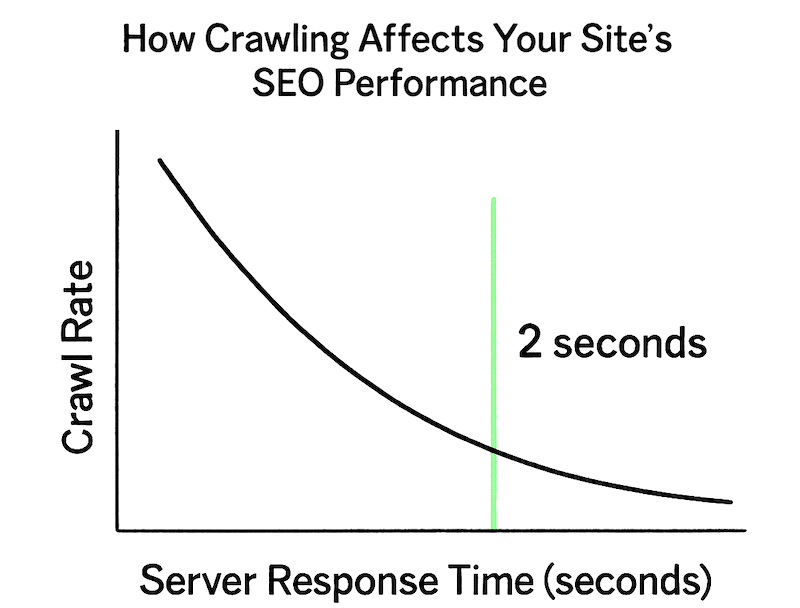
Server response time directly impacts crawl allocation, with sites responding under 2 seconds receiving significantly higher crawl budgets. Fast-loading sites can see 4x increases in crawl rates following performance improvements, while slow pages exceeding 2 seconds cause Google to severely limit crawl budget allocation.
Crawling vs. Indexing
It’s important to note that crawling does not guarantee indexing. Even if Googlebot visits a page, it must still evaluate, consolidate, and decide whether the content has user value. Pages considered low-value—such as faceted navigation, duplicates, or infinite scroll traps—drain crawl budget and may reduce overall visibility.
- Crawling ≠ Indexing: Pages must be evaluated, consolidated, and assessed for user value
- Low-value URLs including faceted navigation waste crawl budget
- Duplicate content patterns negatively impact overall site performance
SEO Optimization Strategies for List-Heavy Sites
robots.txt Best Practices
Robots.txt is primarily a traffic management tool, not a content-hiding mechanism. Google clarifies that blocked pages may still appear in results if linked elsewhere. Best practice is to block only non-critical resource files that don’t affect page rendering, while avoiding robots.txt for temporary crawl budget reallocation.
|
1 2 3 4 5 6 |
User-agent: Allow: /products/ Disallow: /products/filter* Disallow: /products/sort* Disallow: /admin/ # Crawl-delay is non-standard; support varies. Prefer server-side rate control. |
An example of robots.txt is shown below:

XML Sitemap Optimization
XML sitemaps optimized for list-based content should:
- Include only URLs targeted for indexing
- Utilize lastmod tags for frequently changing pages
- Maintain accuracy through regular updates
- Separate product listings from navigation pages
Common SEO Pitfalls with List Crawling
Even well-planned list crawling can backfire if it clashes with SEO. Here are some of the most common pitfalls that drain crawl budgets or weaken site performance.
- Infinite Scroll Implementation: Poor implementation can waste crawl budget on duplicate content
- Faceted Navigation: Creating unlimited URL variations through filter combinations
- Ignoring Crawl Errors: Not monitoring 4xx/5xx errors in large product catalogs
- Duplicate Title Tags: Failing to differentiate similar product listings
| ⚠️ Important Update: Google deprecated the Crawl Rate Limiter tool in January 2024 in favor of automatic optimization, though emergency crawl reduction remains possible through 503/429 HTTP status codes. |
7. Overcoming Modern Anti-Detection Systems
The anti-bot landscape has intensified significantly, with detection systems now employing machine learning, behavioral analysis, and advanced browser fingerprinting techniques. Modern anti-bot systems analyze over 20 different browser characteristics including TLS fingerprints, WebGL signatures, canvas rendering patterns, and hardware-based indicators.
| ⚠️ Common Anti-Detection Pitfalls: Many crawlers get caught by simple mistakes. Such mistakes can be reusing the same user agent across requests, sending traffic with perfectly timed intervals, mismanaging proxy pools, or burning through IPs too fast. Another trap is over-relying on CAPTCHA solving instead of preventing those challenges in the first place. |
How Anti-Detection Systems Work
Modern protection systems employ sophisticated analysis across multiple vectors:
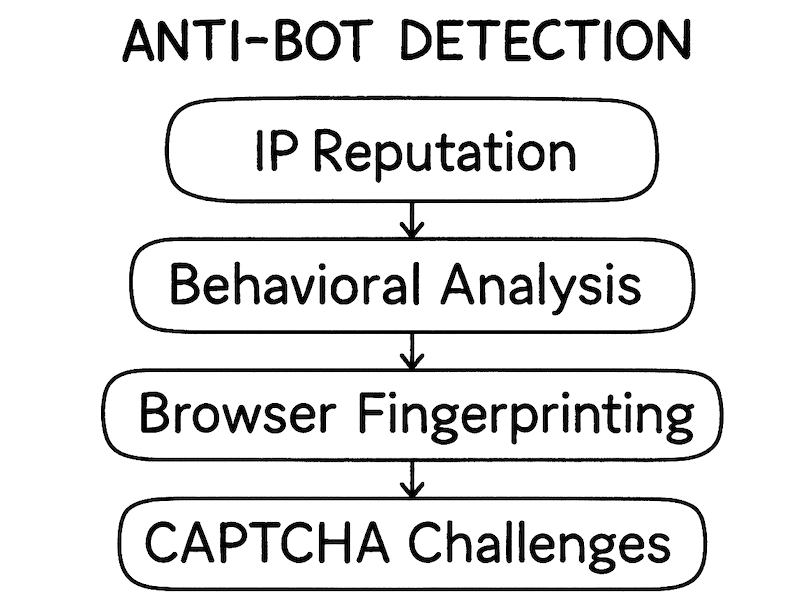
- IP Reputation Scoring: Geographic filtering and historical behavior analysis
- Behavioral Pattern Recognition: Mouse movement tracking, keystroke timing analysis
- Browser Fingerprinting: Hardware signatures, screen resolution, timezone validation
- Challenge-Response Systems: Dynamic JavaScript execution and CAPTCHA integration
Advanced Evasion Strategies and Tools
Proxy Network Configuration:
Successful anti-detection strategies require multi-layered approaches combining proxy networks and human-like behavior simulation. Premium proxy services achieve 99.95% success rates with 0.41-second response times, while advanced stealth libraries maintain 87% success rates through modular evasion techniques.
The following image shows a simple bar chart comparing proxy success rates: datacenter proxies perform at around 45%, while residential proxies achieve 89% and mobile proxies lead with 94%. This graph shows that more realistic IP sources correlate with higher reliability.

| Proxy Type | Success Rate | Cost/GB | Best Use Cases |
| Datacenter | 45-60% | $0.50-2 | Low-risk testing |
| Residential | 85-94% | $3-15 | E-commerce scraping |
| Mobile/4G | 92-96% | $8-25 | Social media, high-risk |
| ISP Residential | 90-95% | $2-8 | Balanced performance |
Rate Limiting Intelligence
Rate limiting detection occurs at approximately 8-10 requests per hour for Google search results, with violations resulting in cascading protective measures:
- Initial throttling triggers additional monitoring
- Dynamic limits adjust based on server load
- Behavioral analysis identifies automated patterns
Anti-Detection Implementation Guide
Modern anti-bot systems are sharp (fingerprinting, and tracking behavior) A strong anti-detection setup keeps your crawlers invisible and your data pipelines running smoothly.
Residential proxy setup
Proxies are the first line of defense. By routing traffic through residential IPs and rotating them intelligently, crawlers blend in with real user activity instead of standing out as bots.
Stealth browser configuration
Here is a Python code snippet showing a basic setup for an anti-detection web crawler.
|
1 2 3 4 5 6 7 8 9 10 11 12 13 14 15 16 17 18 |
# Professional anti-detection configuration import undetected_chromedriver as uc from fake_useragent import UserAgent class StealthCrawler: def __init__(self): self.setup_browser() self.setup_proxies() self.ua = UserAgent() def setup_browser(self): options = uc.ChromeOptions() options.add_argument('--no-sandbox') options.add_argument('--disable-dev-shm-usage') self.driver = uc.Chrome(options=options) |
Behavioral Simulation Patterns
Beating detection is all about acting and looking human. Subtle details like request timing, scrolling, and session persistence make all the difference between getting flagged and slipping by unnoticed.
The most effective implementations focus on prevention rather than reaction:
- Realistic request timing with jitter (2-8 seconds)
- Human-like scroll patterns and page interaction
- Session persistence across related requests
- Natural progression through site navigation
| 💡 Expert Strategy: Focus on behavioral optimization! This prevents most CAPTCHA triggers before they happen. Human-solving services run about $0.50 per 1,000 reCAPTCHA v2s, but prevention will always be cheaper (and smarter). |
8. List Crawling FAQ
E-commerce price monitoring and competitive intelligence lead the way. Companies using real-time pricing see 5–15% revenue gains and 10–20% marketing ROI improvements, often breaking even in 3–6 months.
Market research uses it for competitor analysis, trends, and sentiment. B2B firms rely on directory scraping for high-converting leads. Hedge funds spend nearly $900K yearly on alternative data for sentiment, compliance, and risk tracking. Content aggregation powers job boards, real estate, and news. Academia uses it for citations and datasets, while healthcare monitors drug prices, trials, and regulatory updates.
The hiQ v. LinkedIn case confirmed scraping public data isn’t a CFAA violation, though TOS breaches may still apply. GDPR is the strictest, requiring consent or legitimate interest, with fines up to €20M or 4% of turnover. CCPA is lighter for firms not selling data but still enforces deletion and opt-out rights. Laws in Canada (PIPEDA), Brazil (LGPD), and U.S. states add further obligations. Learn more in: is web scraping legal?
High-risk or large-scale scraping usually requires a Data Protection Impact Assessment. Compliance should follow privacy-by-design, with encryption, access controls, authentication, audits, and incident response plans built in. In some cases, appointing a Data Protection Officer is mandatory.
AI-driven tools like ScrapegraphAI and Diffbot adapt to site changes and parse multimedia. Predictive scraping anticipates updates, while cloud-first platforms (ScrapingBee, Bright Data, Zyte) and serverless options (AWS Lambda, Google Cloud Functions) dominate infrastructure. Real-time streaming and event triggers enable live data flows, and mobile scraping is growing with SSL bypass methods. Meanwhile, anti-detection tech, residential proxies and stealth browsers (fuels the escalating arms race against bot defenses.)
9. Final Take
List crawling is, not only tech, but where business smarts and speed crash into each other. The winners? They’re the ones who move fast and play by the rules—respecting privacy and platform limits.
The payoff’s real. If you are in e-commerce, marketing, finance, or research, the ROI’s already there. But if you want long-term value (not just short-term wins) you’ve got to bake in ethics and compliance from day one.
With the right tools and tactics, and of course a clear framework, list crawling stops being risky.
It starts being your edge.
Scale List Crawling safely 🧩
Blend traffic, cut blocks, and keep extraction steady across changing targets.
Start rotation
0Comments