 By
By
Is Stremio safe? Yes, the official Stremio app is generally safe to install and use when you download it from official sources and stick to trusted add-ons. If you use Stremio with a seedbox, VPN, or other privacy-focused setup, you can also reduce some of the risks linked to torrent-based streaming. The real risks come from unofficial add-ons, privacy exposure, copyright issues, and fake APKs pretending to be Stremio.
Stremio is a media center app that lets you organize, discover, and stream video content through an add-on system. The app itself isn’t the same thing as every add-on you can install inside it, and that’s where most safety confusion starts.
Table of contents
- What Is Stremio?
- Is Stremio Safe? Quick Answer
- Stremio Safety: Key Facts
- Is the Official Stremio App Safe to Install?
- Are Stremio Add-ons Safe?
- Official Add-ons vs Community Add-ons
- Is Stremio Legal?
- Does Stremio Use Torrents?
- Can Your ISP See Stremio Activity?
- Is Stremio Safe Without a VPN?
- Stremio vs Seedbox: How a Seedbox Improves Safety
- How to Use Stremio Safely
- Stremio Safety Checklist
- Common Stremio Safety Mistakes
- Is Stremio Safe for Android TV and Fire TV?
- Is Stremio Safe for Privacy?
- Is Stremio Safe for Kids?
- Stremio Alternatives: If Safety Is Your Main Concern
- Is Stremio Safe? TL;DR Summary
- Frequently Asked Questions About Stremio Safety
- Final Thoughts on Using Stremio Safely
What Is Stremio?
Stremio is a media center and streaming aggregation app that organizes movies, TV shows, live TV, and video channels from different sources through add-ons. It works by giving users one interface where they can discover content, install add-ons, save titles to a library, and watch supported streams across devices.
Stremio is available across major platforms, including desktop, mobile, and TV devices. The official Google Play listing describes Stremio as an app that aggregates video content from different services through an add-on system.
The key safety point is pretty straightforward: Stremio is the platform, while add-ons are the content connectors. Official add-ons, community add-ons, torrent add-ons, subtitle add-ons, and catalog add-ons can create very different safety, privacy, and legal profiles.
Is Stremio Safe? Quick Answer
Stremio is safe when installed from the official Stremio website, Google Play, or another trusted app store, and when used with legitimate add-ons. Stremio’s official website says its add-on system was designed with security in mind because add-ons do not run code locally on your device.
That doesn’t mean every Stremio setup is risk-free. A clean Stremio installation with official add-ons is very different from a setup filled with unknown community add-ons, torrent sources, or manually downloaded APK files.
If you want the safest setup, use the official app, keep it updated, avoid modded versions, review add-ons before installing them, and use a seedbox or VPN when your workflow involves torrent-based streaming.
Stremio Safety: Key Facts
- What it is: A media center app with an add-on-based streaming system.
- Main safety risk: Untrusted add-ons, fake APKs, torrent visibility, and copyrighted streams.
- App safety: The official Stremio app is generally safe when downloaded from trusted sources.
- Add-on safety: Official add-ons are safer than unknown community add-ons.
- Privacy risk: Torrent-based streams can expose your IP address to peers.
- Legal risk: Streaming copyrighted content without permission can create legal problems depending on your country.
- Best protection: Official downloads, trusted add-ons, updates, VPN or seedbox, and legal content sources.
- Difficulty level: Beginner-friendly, but privacy-safe use requires attention.
- Last updated: May 19, 2026.
Is the Official Stremio App Safe to Install?
The official Stremio app is safe to install when downloaded from Stremio’s official website, Google Play, or a trusted platform store. Stremio provides official downloads for Windows, macOS, Linux, Android, Android TV, iOS, TV platforms, and web use.
The risk increases when users download Stremio from random APK sites, Telegram groups, file mirrors, or “modded” app repositories. Fake or modified APK files can include ads, trackers, malware, or outdated code. That risk is not unique to Stremio; it applies to any streaming app installed outside official distribution channels.
Stremio was briefly suspended from Google Play in late 2025 and returned in January 2026. Stremio’s own blog said the app was suspended for 19 days and became available again on Google Play on January 13, 2026.
For most users, the safest rule is this: download Stremio only from Stremio.com or the official app store for your device.
Are Stremio Add-ons Safe?
Stremio add-ons are usually safer than traditional browser extensions because, according to Stremio’s official explanation, they don’t run code locally on your device.
That design reduces the risk of an add-on directly infecting your device. A Stremio add-on isn’t the same as installing a random executable file on your computer.
But “safer by design” doesn’t mean “safe in every possible way.” Add-ons can still send users to unreliable streams, misleading titles, copyrighted content, low-quality sources, or services that log activity. Community add-ons also vary widely in quality and purpose.
The best way to stay safe is to think of add-ons like browser extensions. Install only the ones you understand, get rid of the ones you don’t use, and avoid add-ons that promise access to new releases, premium content, or unreleased media in a way that seems suspicious.
Official Add-ons vs Community Add-ons
Official Stremio add-ons are usually safer than community add-ons because they are maintained within Stremio’s official ecosystem, while community add-ons are created by third parties. Stremio’s help documentation shows that users can browse both official and community add-ons from inside the app.
Official add-ons are better for users who want a low-risk setup. They are usually focused on legitimate catalogs, subtitles, public sources, and supported integrations.
Community add-ons are more flexible, but that flexibility creates more risk. Some community add-ons may rely on torrents, debrid services, third-party APIs, or sources that are not clearly licensed. Others may be useful and harmless, but you need to evaluate them before installing.
Here’s a good practical rule: official add-ons are the default choice for safety; community add-ons require extra judgment.
Is Stremio Legal?
Stremio itself is legal, but what you stream through Stremio depends on the add-ons and sources you use. The Stremio app is a media center platform, not a guarantee that every stream shown by every add-on is legally available in your country.
This is a common pattern you see with many media tools. A browser is legal, but not every website is legal. A torrent client is legal, but not every torrent is legal. Stremio is legal software, but some add-ons may surface copyrighted content without proper permission.
As long as you’re using official add-ons, public domain sources, content you are licensed to access, or your own media workflows, Stremio can be part of a legitimate streaming setup. If you use add-ons to access copyrighted movies, shows, or live channels without permission, you might be opening yourself up to legal risk.
The safest legal answer is simple: use Stremio only with content you have the right to watch.
Does Stremio Use Torrents?
Stremio can use torrents when you install add-ons that are based on torrents, but Stremio itself is not only a torrent app. The official app is a media center with add-ons, and the type of streaming you get depends on the add-ons you install.
Some add-ons provide HTTP streams, some provide catalogs, some provide subtitles, and some connect to torrent or debrid-based sources. Community Stremio catalogs list categories such as torrents, HTTP streams, subtitles, debrid, live TV, anime, and other content types.
This is important for privacy. HTTP streams and torrent streams behave differently. With torrent-based streaming, your IP address can become visible to other peers in the swarm. With HTTP streaming, your IP is usually visible to the server or service you connect to, not to a public peer swarm.
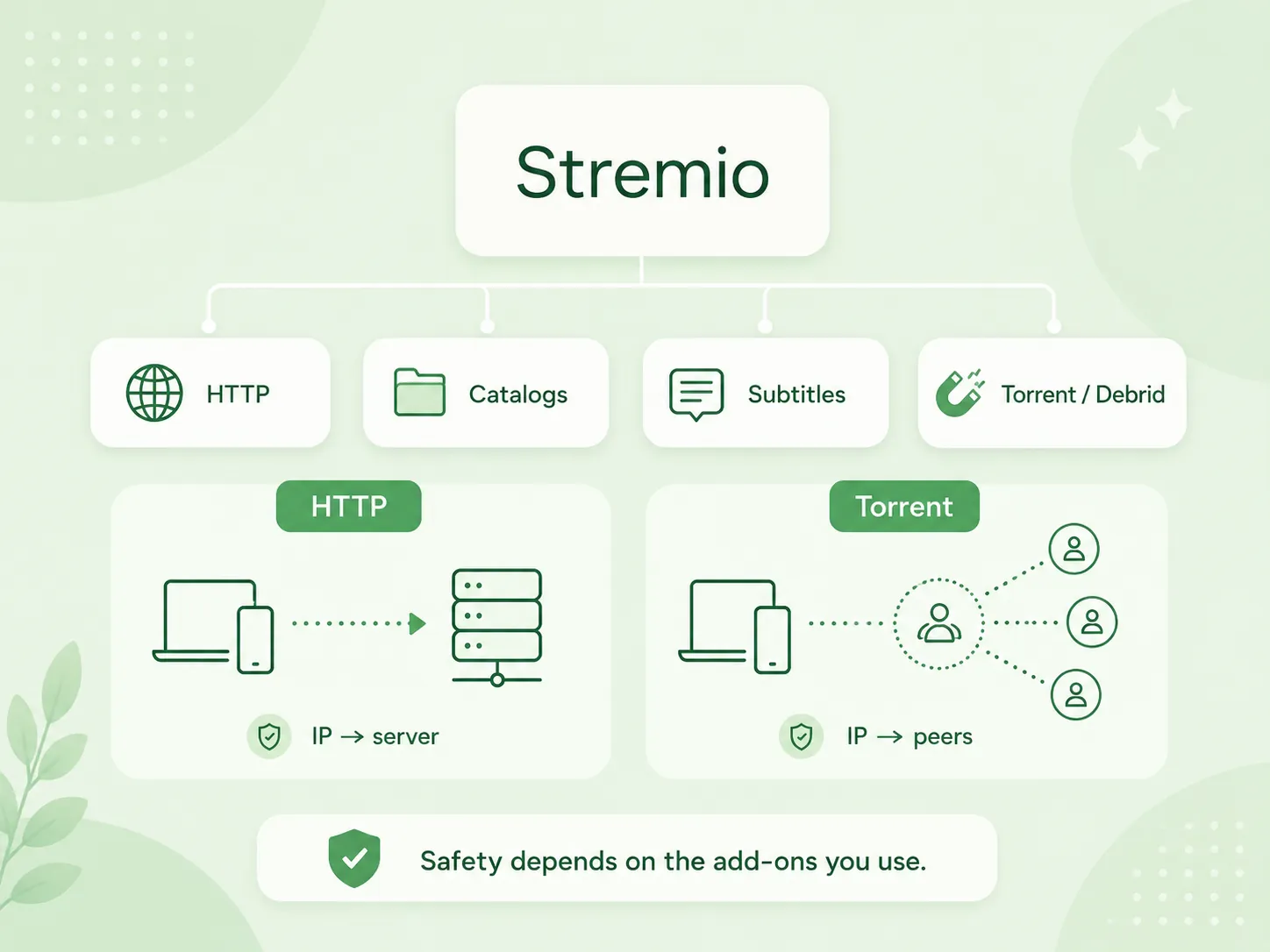
If you are asking “Is Stremio safe?” because you are worried about torrents, the better question is: which add-ons are you using, and do they expose your IP address?
Can Your ISP See Stremio Activity?
Your ISP can see that you’re connecting to online services, and with torrent-based add-ons, your IP address may also be visible to other torrent peers. This is why privacy-conscious users often pair Stremio with a VPN, seedbox, or debrid workflow.
Stremio’s privacy page says they collect data needed to create an account and provide access to their services, including an email address and password for account creation. It also says passwords are stored in a secure, cryptographically hashed state.
Stremio has also stated in a privacy update that it does not collect personal data in Guest Mode and does not collect history or logs of what add-ons or sources users stream from.
That’s good for keeping your account private, but it won’t stop your ISP from seeing your network activity. If you want more privacy, you need network-level protection, like a VPN or a seedbox.
Is Stremio Safe Without a VPN?
Stremio can be safe without a VPN if you use official add-ons, legal sources, and non-torrent streams, but a VPN or seedbox is safer for torrent-based workflows. The need for a VPN depends on how you use Stremio.
If you only use Stremio for official catalogs, public sources, or subscription services you already have access to, a VPN may not be necessary. Your main risks are account privacy, app updates, and add-on trust.
If you use torrent-based add-ons, your IP address might be visible to other peers. In that case, a VPN can hide your home IP from peers and your ISP. A seedbox can go one step further by handling torrent traffic on a remote server instead of your home connection.
If you’re using RapidSeedbox, you’ll see that it’s got a major advantage: a seedbox keeps your heavy downloading and torrent-related activity away from your local device and home network.
Stremio vs Seedbox: How a Seedbox Improves Safety
A seedbox makes Stremio safer by moving bandwidth-heavy and torrent-related tasks to a remote server instead of your home network. Just because you can do something doesn’t mean it’s automatically legal or safe. But it can improve privacy, performance, and separation from your local device.
A seedbox is basically a remote server with strong bandwidth, storage, and always-on availability. In a Stremio workflow, a seedbox can help you avoid relying on home upload speed, local storage, or direct torrent activity from your personal IP address.
This is great if you’re already using Stremio for media workflows with large files, private trackers, or remote storage. You can use the seedbox as the backend and Stremio as the viewing layer.
If you’re looking for a practical setup, I’d suggest checking out our Stremio seedbox guide. It explains how Stremio can work with a remote server instead of relying solely on your local device.
Looking for a safer way to store and access your media files?
While Stremio safety depends on add-ons, streams, and third-party sources, Rapidseedbox gives you a dedicated Seedbox environment for fast downloads, private file management, and remote media access, helping you keep your setup cleaner, more secure, and easier to control.
How to Use Stremio Safely
The safest way to use Stremio is to combine official downloads, trusted add-ons, legal content sources, regular updates, and privacy protection for torrent-based workflows. You do not need to be technical, but you do need a few basic rules.
Download Stremio From Official Sources
Install Stremio from the official Stremio website, Google Play, or another trusted app store. Avoid modded APKs, unofficial builds, and “premium unlocked” versions. Stremio’s download page recommends using the latest available version for optimal performance.
Start With Official Add-ons
Use official add-ons first. They give you a cleaner baseline and help you understand how Stremio works before adding community sources. Once you understand the add-on system, you can evaluate community add-ons more carefully.
Research Community Add-ons Before Installing
Do not install random add-ons just because they appear in a list. Check what the add-on does, who maintains it, what sources it uses, and whether it requires external accounts or tokens.
Avoid Suspicious APKs and Fake Stremio Apps
If a website promises a “modified Stremio APK”, “ad-free hacked version”, or “premium Stremio”, avoid it. Stremio is already free, so fake premium versions are usually a red flag.
Use a VPN or Seedbox for Torrent-Based Workflows
If you’re using Stremio with torrents, make sure you protect your IP address. A VPN can protect your home IP, while a seedbox can move torrent-related traffic to a remote server.
Keep Stremio Updated
It’s important to keep your apps updated because they can have security bugs like any other software. Stremio is still putting out app updates, including for Android TV and Stremio Web, even in 2026.
Stremio Safety Checklist
Use this quick checklist before trusting your Stremio setup:
| Safety Question | Safer Answer |
|---|---|
| Where did you download Stremio? | Official website or trusted app store |
| Are you using official add-ons? | Yes, whenever possible |
| Are community add-ons researched? | Yes, before installing |
| Are you using torrent-based streams? | Only with privacy protection |
| Is your app updated? | Yes, the latest stable version |
| Are you using legal sources? | Yes, you’ve got the right to access that content. |
| Are you using a fake APK? | No |
| Do you understand each add-on? | Yes |
If you cannot answer these questions clearly, your Stremio setup is not as safe as it should be.
Common Stremio Safety Mistakes
Installing Too Many Add-ons
Installing too many Stremio add-ons makes your setup harder to trust and harder to troubleshoot. More add-ons can mean duplicate results, unreliable streams, and unclear source quality.
Start with a small setup. Add one new add-on at a time. If something breaks, you will know which add-on caused the problem.
Assuming Every Stream Is Legal
Stremio does not automatically verify that every stream shown by every add-on is legally licensed. Some add-ons may surface content from sources that do not have distribution rights.
If a new movie appears in high quality before it is available on legitimate streaming platforms, treat that as a red flag.
Ignoring IP Exposure
Torrent-based Stremio add-ons can expose your IP address to peers. This is one of the most common privacy mistakes users make when moving from normal streaming apps to torrent-based streaming workflows.
Use a VPN or seedbox if you use torrent-based add-ons.
Downloading From Random APK Sites
Fake Stremio APK files are more dangerous than the official Stremio app. If you sideload Stremio on Android TV or Fire TV, use the official Stremio download page rather than a random mirror.
Forgetting Updates
Outdated media apps can create avoidable security risks. Stremio’s own download page recommends using the latest available version, and this is a simple but important habit.
Is Stremio Safe for Android TV and Fire TV?
Stremio is generally safe for Android TV and Fire TV when installed from official or trusted sources, but sideloading increases the need for caution. Android TV users can use Google Play when available, while Fire TV users may need to sideload the APK.
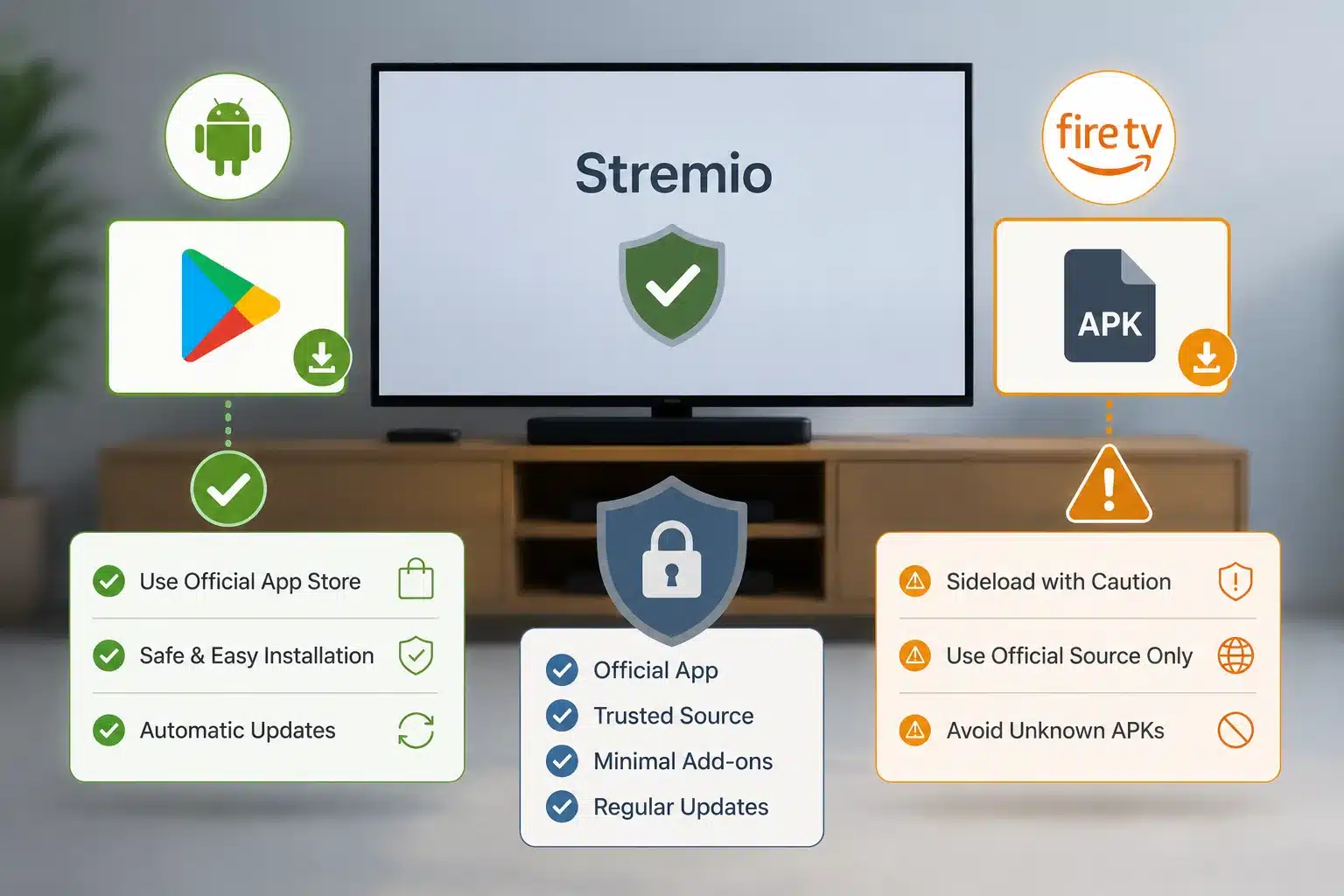
Stremio’s January 2026 update confirmed that the Android app returned to Google Play after a 19-day suspension. That matters because app store availability makes installation easier and safer for many users.
With Fire TV, sideloading is common because not every app is always available in Amazon’s store. If you sideload, download the APK from Stremio’s official download page and avoid mirrors.
The safest TV setup is boring: official app, official download source, minimal add-ons, regular updates, and no suspicious builds.
Is Stremio Safe for Privacy?
Stremio is reasonably privacy-friendly at the app level, but your streaming privacy depends on add-ons, account mode, and network protection. Stremio says Guest Mode doesn’t require any personal data, and it doesn’t make calls to its backend in that mode. However, Guest Mode does remove some useful sync features.
When you create an account, Stremio collects the data needed to provide the service, such as your email address and password. Stremio’s privacy policy says passwords are stored in a secure, cryptographically hashed state.
That is different from traffic privacy. Your ISP can still see that your device connects to online services. Torrent peers can see your IP address if you use torrent-based add-ons without protection.
For better privacy, use Guest Mode when you do not need sync, avoid unnecessary add-ons, and use a VPN or seedbox for torrent-heavy workflows.
Is Stremio Safe for Kids?
Stremio is not automatically a child-safe streaming environment because add-ons can expose different types of content depending on what is installed. The app itself is a media center, not a parental control platform.
If you’re having kids use the same device, keep the setup simple. Avoid community add-ons you have not reviewed. Do not install adult, torrent, or unknown source add-ons on a shared family device. Use device-level parental controls where available.
Parents should also remember that Stremio is not the same as Netflix, Disney+, or other closed streaming platforms. The content experience changes depending on the add-ons installed.
A safer family setup uses official add-ons only, separate device profiles where possible, and no unreviewed community add-ons.
Stremio Alternatives: If Safety Is Your Main Concern
The safest Stremio alternative depends on what risk you want to reduce: privacy risk, legal risk, malware risk, or add-on risk. No media app removes every risk, but different tools give you different control.
| Alternative | Best For | Safety Tradeoff |
|---|---|---|
| Plex | Personal media libraries | Requires server setup and remote access planning |
| Jellyfin | Open-source self-hosted media | More technical setup |
| Kodi | Local playback and add-ons | Add-on ecosystem can also be risky |
| Netflix/Disney+/Prime Video | Licensed streaming | Less control and fragmented catalogs |
| Seedbox + Plex | Private remote media server | Needs paid hosting and setup |
If you already own a media library, Plex or Jellyfin is safer than relying on unknown streaming add-ons. If you want remote media access, a seedbox plus Plex can give you better control than a random add-on-based setup.
Is Stremio Safe? TL;DR Summary
- What it is: Stremio is a media center app that organizes and streams video content through an add-on system.
- Is Stremio safe? The official Stremio app is generally safe when downloaded from official sources and used with trusted add-ons.
- Main risk: The biggest risks come from unofficial add-ons, torrent-based streams, fake APKs, privacy exposure, and copyrighted content.
- Privacy: Stremio offers Guest Mode and says it does not collect personal data in Guest Mode, but network privacy still depends on your ISP, add-ons, and whether torrents are involved.
- Best protection: Use official downloads, keep the app updated, install fewer add-ons, avoid suspicious sources, use legal content, and protect torrent-based workflows with a VPN or seedbox.
Stremio is safe as an app, but your Stremio setup is only as safe as the add-ons, sources, and privacy tools you use.
Frequently Asked Questions About Stremio Safety
Is Stremio safe to use?
Stremio is safe to use when you download the official app and use trusted add-ons. The main risks come from fake APKs, unreviewed community add-ons, torrent-based sources, and copyrighted streams. Use official downloads, keep Stremio updated, and avoid suspicious add-ons.
Can Stremio give you malware?
The official Stremio app is not known as malware, and Stremio says add-ons do not run code locally on your device. Malware risk mainly comes from fake Stremio APKs, modded versions, suspicious downloads, or unsafe third-party sources pretending to be Stremio.
Do I need a VPN for Stremio?
You do not always need a VPN for Stremio, but you should use a VPN or seedbox if your setup involves torrent-based add-ons. Torrent streaming can expose your IP address to peers, while official or legal HTTP sources have a different privacy profile.
Is Stremio legal?
Stremio itself is legal software. The legal risk depends on what add-ons and streams you use. Official add-ons and properly licensed sources are safer. Add-ons that provide access to copyrighted content without permission can create legal problems depending on your country.
Are Stremio community add-ons safe?
Some Stremio community add-ons may be safe, but they require more caution than official add-ons. Check what the add-on does, who maintains it, what sources it uses, and whether it relies on torrents or questionable streams before installing it.
Final Thoughts on Using Stremio Safely
Is Stremio safe? Yes, but only if you treat it like a flexible media platform instead of a closed streaming service. The app itself is not the main problem; careless add-on choices, fake APKs, exposed torrent traffic, and illegal streams are the real risks.
Here’s some practical advice for you: start with the official app, use fewer add-ons, keep everything updated, and use a seedbox or VPN if torrents are part of your workflow. That setup gives you the best of both worlds – convenience and privacy, along with the ability to stay in control.
Disclaimer: This article is for informational and educational purposes only. Stremio is a legal media center application, but the safety and legality of your setup depend on the add-ons, sources, and services you choose to use. RapidSeedbox does not encourage or support copyright infringement, piracy, or access to content without proper rights. Always use Stremio, seedboxes, VPNs, and related tools in compliance with your local laws and the terms of service of the platforms you access. This article should not be taken as legal advice.
Want a safer, more reliable way to manage media beyond Stremio?
Stremio safety depends on the add-ons and sources you use, but a Rapidseedbox Seedbox gives you a more private, remote environment for handling downloads, organizing files, and accessing your media without putting extra strain on your home connection.
0Comments