 Qua
Qua
A torrent box (sometimes written torrentbox or called a torrent server) is a dedicated computer or cloud machine that runs a BitTorrent client 24/7. It downloads and seeds torrents for you remotely, so your main PC stays free, and your home IP address stays hidden.
I’ve used torrent boxes for years to keep heavy downloads off my main PC. If you’re tired of slow speeds, noisy hardware, or privacy worries, a torrent box can help. In this guide I’ll show you what a torrent box is, how it works, and how you can set one up safely.
Mục lục
- What is a Torrent Box?
- How Does a Torrent Box Work?
- Torrent Box Benefits
- How to Set Up Your Torrent Box
- How to Optimize Your Torrent Box
- How to Fix Common Issues
- Lời Kết
1. What is a Torrent Box?
A torrent box is a small dedicated computer or remote server that handles all your BitTorrent traffic for you. You’ll also see people call it a torrent machine or BitTorrent box. Instead of letting your main computer do the heavy lifting, the torrent box runs your torrents 24/7 and keeps the messy work in one place.
Here’s what most people actually use a torrent box for:
- Building a media library with movies, TV shows, and music you can stream later.
- Keeping private tracker ratios healthy by seeding all day without leaving your PC on.
- Downloading large PC games without cooking your main machine.
- Centralizing downloads so every device at home can pull files from one place.

When people say torrent box, torrent server, or seedbox, they usually mean the same idea: a machine that runs torrents remotely. The difference is more about who manages it. A DIY torrent box is something you maintain yourself, while a seedbox is a hosted torrent server someone else keeps online for you.
Torrent Box vs Torrent Server vs Seedbox
A torrent box, torrent server, and seedbox all describe machines that run torrents for you, but they’re not always set up the same way. A torrent box is the general idea, a torrent server is the technical term, and a seedbox is a hosted torrent box you rent from a provider.
Torrent box (or torrentbox)
A torrent box is any dedicated device you set up to handle torrent traffic. It might be a Raspberry Pi, an old PC, or a remote VPS. You control the hardware, the torrent client, and how it’s configured.
Torrent server
A torrent server is just the more technical name for the same thing. It’s a server that runs a BitTorrent client and exposes a web UI or remote interface. When you see people talk about “spinning up a torrent server,” they’re usually describing a more advanced or scripted setup.
Seedbox
A seedbox is a managed torrent box that you rent from a provider. The company hosts the server, installs the torrent clients, and gives you a web dashboard so you can start torrenting right away. Think of it as a cloud torrent box for people who don’t want to maintain the server themselves.
2. How Does a Torrent Box Work?
Here’s a step-by-step explanation of how a torrent box operates:
a. Adding Torrent Files
You start by adding torrent files or magnet links to your torrent box. These files are like maps that tell the torrent box where to find the pieces of the file you want to download.
b. Connecting to Peers
Once you add the torrent file, the torrent box will connect to other computers (called “peers”) that have the file you’re looking for. This network of peers is coordinated by a tracker, which helps the torrent box find and connect to the right peers.
c. Downloading Pieces
The file you’re looking for is split up into smaller parts, which the torrent box then downloads from different peers. Since it’s downloading from multiple sources simultaneously, it can get the file faster than if it were downloading from just one place.
d. Uploading Pieces
While the torrent box is downloading, it’s also sharing pieces of the file it has already downloaded with other peers. This helps keep the network strong and ensures that everyone can get the files they need. This process is called trì hoạt.
e. Storing Files
Once you’ve downloaded the files, they’re stored on the Torrent Box hard drive or, if you’re using a remote service, on a server. You can access them from any internet-connected device, which is really handy.
f. Managing and Organizing
Torrent boxes usually come with software that makes managing your downloads a breeze. You can set it up to automatically organize your files into different folders, making it easy to find what you’re looking for later.
g. Remote Control and Remote Torrenting
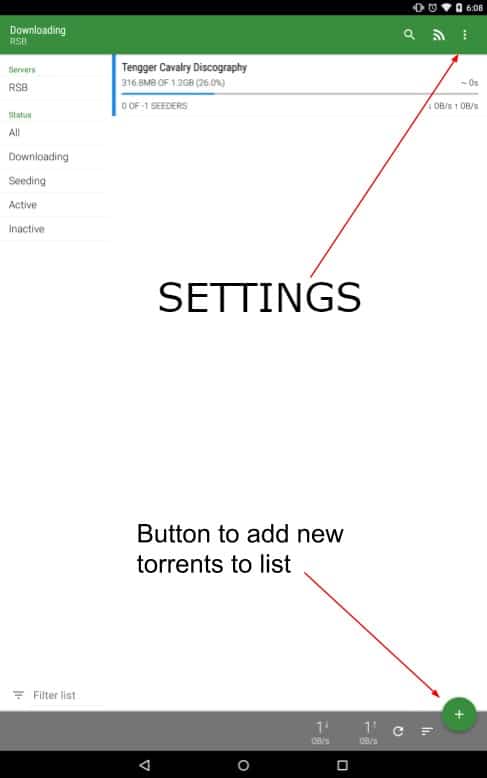
One of the best things about a torrent box is remote torrenting. You log into your torrent server from a browser or app and start, stop, or pause downloads from anywhere. As long as you have internet access, you can babysit your torrents from your phone, laptop, or work PC without touching the box itself.
3. Torrent Box Benefits
There are lots of reasons to use a torrent box. It can really improve your downloading experience. Here are the main benefits:
a. High-Speed Downloads
One of the main reasons to use a torrent box is that it offers high-speed downloads. Most torrent boxes are optimized with high-speed servers that can handle large amounts of data quickly. This means you can download large files in a fraction of the time it would take using a traditional torrent client on your home computer. These speeds are often made possible by dedicated bandwidth, so your downloads won’t be competing with other network traffic.
b. Improved Privacy
Another great thing about using a torrent box is that it keeps your privacy intact. When you download torrents directly to your home network, your IP address is visible to other peers in the swarm, which could lead to your ISP or other third parties monitoring you. A torrent box, especially one provided by a seedbox service, acts as an intermediary. It downloads the torrents on its own servers, keeping your home IP address hidden. This extra layer of privacy can help keep you safe from legal issues and monitoring.
c. 24/7 Operation
Torrent boxes are designed to run all the time, 24/7. Unlike your personal computer, which you might turn off or put to sleep, a torrent box keeps going all the time. This means your downloads and uploads keep going all the time, so you get the most out of them and get the best seeding ratios. Continuous operation is especially useful for keeping a good standing on private torrent trackers, where high seeding ratios are often required.
d. Energy Efficiency
Many torrent boxes, particularly those based on hardware like the Raspberry Pi, are built to be energy efficient. It’s way more efficient to run a low-power device dedicated to torrenting than to keep a power-hungry desktop or laptop running 24/7. This not only reduces your electricity bill but also lessens your environmental impact. Seedbox services also typically run on efficient servers designed to handle heavy workloads without excessive power consumption.
e. Remote Access
A torrent box lets you access your downloads from anywhere. Whether you’re at home, at work, or on the road, you can manage your torrents from any internet-connected device. Seedbox services usually have web-based interfaces that you can access from anywhere, so it’s easy to add new torrents, check download progress, manage your files, or even access your Seedbox remote desktop.

f. Reduced Wear and Tear on Personal Devices
By offloading torrenting tasks to a dedicated torrent box, you can significantly reduce wear and tear on your personal devices. Continuous downloading and uploading can strain your computer’s hard drive and other components, leading to faster wear and potential hardware failures.
Using a torrent box means your main computer is free from the heavy lifting, prolonging its lifespan and ensuring it remains available for other tasks.
g. Better Management and Organization
Torrent boxes usually have advanced software tools that help to manage and organize downloads better. With features like automated RSS feeds, download scheduling, and file organization, these tools make the torrenting experience smoother. For example, you can make rules to download new episodes of the shows you like right when they become available. This way, you always get them and don’t miss any episodes.
h. Improved Seeding Ratios
For people who use private torrent trackers, keeping a good seeding ratio is very important. A torrent box can improve your seeding ratios and help you maintain this. Because torrent boxes can work non-stop and usually have faster upload speeds than home internet, they are better for seeding torrents. This means you maintain a good reputation on trackers and also help the whole torrenting community.
All in all, using a torrent box gives many benefits like faster downloads, better privacy, working all the time without stopping, and saving energy. If you decide to make your own or use a seedbox service that you pay for, a torrent box can make downloading torrents easier and safer. It helps keep what you’re doing private and makes sure everything runs smoothly anytime day or night.
4. How to Set Up Your Torrent Box
Setting up a torrent box is easy and can make your torrenting experience better. Here’s a step-by-step guide to get you started, whether you want to do it yourself or use a service.
a. Option 1: DIY Torrent Box
For those who love hands-on projects, setting up your own torrent box can be both fun and cost-effective. Here’s how to do it:
1. Choose Your Hardware
You can use a Raspberry Pi, an old computer, or any other low-power device. I recommend starting with a Raspberry Pi since it’s dirt cheap and has an awesome community for support.
2. Install the Operating System
For a Raspberry Pi, you should download and install an OS like Raspbian hoặc LibreELEC.
- Download the OS: Visit the official Raspbian or LibreELEC website and download the latest version.
- Flash the SD card: Use a tool like balenaEtcher to flash the OS image onto an SD card.
- Insert and boot: Insert the SD card into your Raspberry Pi and power it on.
3. Install and Configure the Torrent Client
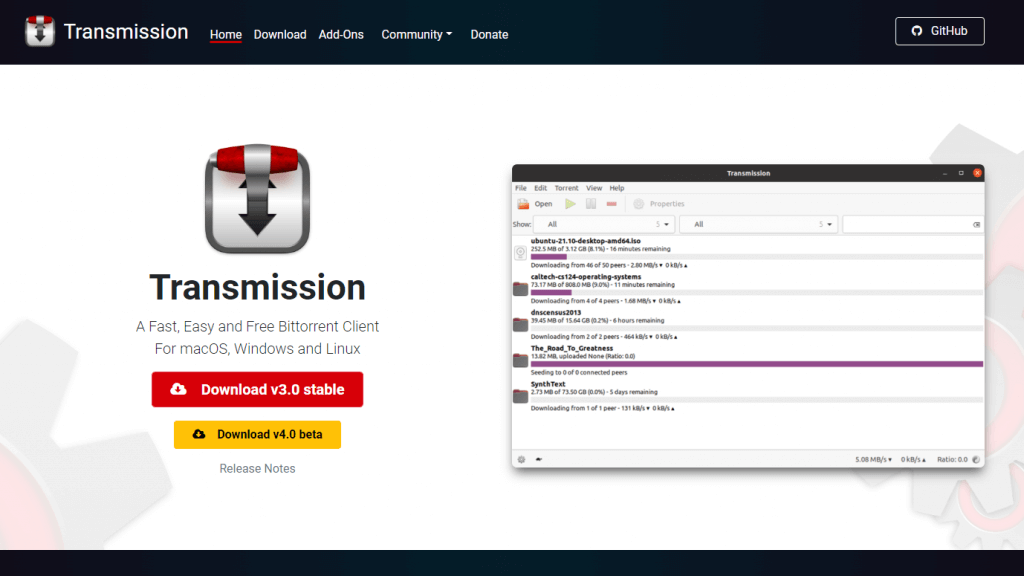
Once the OS is running, install a torrent client such as Transmission hoặc qBittorrent.
- Install Transmission: Open the terminal and type:
sudo apt-get update sudo apt-get install transmission-daemon - Configure Transmission: Edit the configuration file to set your download directories and preferences:
sudo nano /etc/transmission-daemon/settings.json
4. Access and Manage Your Torrent Box
You can manage your torrent box remotely by using a web interface.
- Enable the web interface: Check if the web interface is enabled in the configuration file.
- Access via browser: Open your browser and type your torrent box’s IP address followed by the port number (default is 9091 for Transmission): arduino
http://192.168.1.xxx:9091
b. Option 2: Subscribe to a Seedbox Service
If you prefer a hassle-free solution, subscribing to a seedbox service is an excellent choice. Here’s how to get started:
1. Choose a Seedbox Provider
Select a reliable provider with good reviews, such as RapidSeedbox.
2. Subscribe to a Plan
Find a plan that works for you. The different providers have different options based on storage size, speed, and extra features.
3. Access Your Seedbox
Once you’ve subscribed, you’ll get login details to access your seedbox via a web interface. This lets you manage your torrents from any device with an internet connection.
4. Install and Configure Torrent Clients
Most seedboxes come pre-configured with popular torrent clients like Deluge hoặc ruTorrent. Here’s how to get started:
- Log into the Web Interface: Use your provided credentials to log into the web dashboard.
- Add Torrents: Upload your .torrent files or paste magnet links directly into the client to start downloading.
5. How to Optimize Your Torrent Box
To get the most out of your torrent box, consider these options:
a. Automation with RSS Feeds
Set up RSS feeds to download your favorite shows and movies automatically. You can use the built-in RSS feature in your torrent client or an external tool like Flexget, which is also supported by Rapidseedbox’s OCI.
b. Efficient File Management
Organize your files to maximize your storage usage. Use categories to sort your downloads automatically. Also, you can move completed downloads to external storage if your seedbox supports it.
c. Monitoring and Alerts
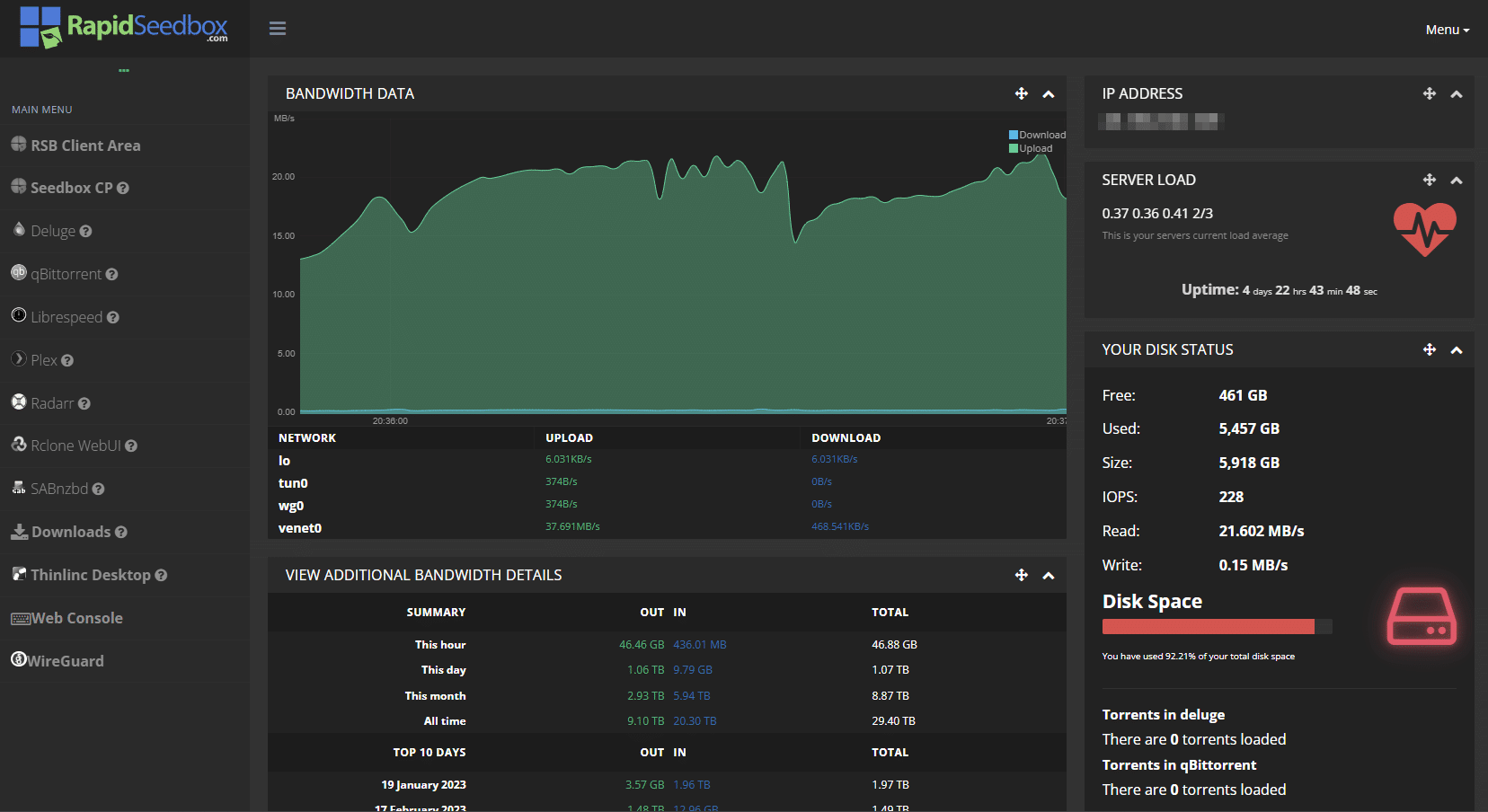
Keep an eye on your seedbox activity to stay informed. You can set up email or push notifications for completed downloads or errors. You can also use the built-in tools or third-party apps to monitor your bandwidth and storage usage.
f. Power Efficiency
This applies only to DYI torrent boxes, but consider reducing the power consumption by enabling sleep modes or using energy-efficient hardware.
6. How to Fix Common Issues
Chances are, you might encounter some common issues. Here’s how to address them:
a. Slow Download Speeds
If your torrents are downloading slowly, consider these factors:
DYI
- Bandwidth limitation: Double-check with your ISP to make sure they aren’t throttling your bandwidth. Use a VPN to hide your torrent traffic.
- Port Forwarding: It’s a good idea to open the necessary ports on your router to improve connectivity. Most torrent clients have specific port ranges that they recommend, so it’s best to follow their guidelines.
Premium Seedbox
- Make sure you’re on a plan with enough bandwidth. Seedbox providers often have different tiers, so upgrading might help.
- Sometimes, the provider might have some network issues. Check their status page or give them a call if you think this might be the case.
b. Not Enough Storage
This is arguably the most common problem people face. Running out of storage space can stop your downloads in their tracks. Here’s what you can do to avoid that:
DYI
- External Drives: Connect external hard drives to expand your storage.
- Clean Up: Regularly delete old torrents and files you no longer need.
Premium Seedbox
- If you frequently run out of space, consider upgrading to a higher storage plan.
- Regularly delete old torrents and files you no longer need to free up space.
c. Security Concerns
While using a torrent box improves security, there’s a huge difference between DYI torrent boxes and premium seedboxes security-wise. Here’s what you can do:
- Enable VPN: Consider using a VPN to encrypt your traffic.
- Regular Updates: Keep your torrent client and seedbox software updated to protect against vulnerabilities.
Torrent Box FAQ
Almost. A torrent box is any dedicated machine that runs torrents for you. A seedbox is a hosted torrent box you rent from a provider, with the server, software, and uptime managed for you.
Yes. You can turn a Raspberry Pi, old PC, or mini PC into a torrent box by installing Linux or LibreELEC and adding a client like Transmission or qBittorrent. The main work is configuring storage, remote access, and basic security.
A torrent server is a computer that runs a BitTorrent client and exposes a web or remote interface. Instead of downloading torrents on your laptop, you offload them to this server and control everything from a browser.
Remote torrenting is as safe as the way you secure your torrent box. Use strong passwords, HTTPS where possible, a VPN if your ISP is aggressive, and keep your OS and torrent client updated to patch known bugs.
A torrent box hides your home IP from the swarm, but it doesn’t change local laws or ISP policies. I still recommend a VPN for either the box, your own connection, or both, so there’s an extra layer between torrent traffic and your real identity.
7. Final Words
Torrent boxes are one of my favorite ways to keep downloads fast, tidy, and off my main machines. When a torrent box does the heavy lifting, you get speed and control without turning your daily laptop into a 24/7 torrent rig.
If you pick sensible hardware, choose a solid torrent client, and spend a bit of time on security, your torrent box becomes a set-and-forget download hub. You can build it yourself at home or rent a managed torrent server from a seedbox provider if you’d rather skip the maintenance work.
Torrent boxes are a great way to manage your downloads efficiently.
Want to supercharge your torrenting with a Torrent Box?
RapidSeedbox offers powerful and easy-to-use Torrent Boxes designed for fast, secure, and efficient downloads. Take control of your torrenting experience and enjoy seamless performance today!
 English
  Français
  Español
  Tiếng Việt
  简体中文
简体中文  Русский
  Türkçe
  Bahasa Indonesia
  日本語
日本語  العربية
  Português
  Українська
01 bình luận