 By
By
Limited-edition sneakers sell out in seconds. Even the best bots fail without the right setup. That’s where sneaker proxies come in—they mask your IP, create the look of multiple buyers, and give you a fair shot at securing pairs before stock disappears. In this guide, we’ll break down how proxies work with bots, which types to consider, features to watch, and the top providers in 2026.

Table of Contents
- What Sneaker Proxies Do
- How They Work with Bots
- Proxy Types Compared
- Key Features To Look For
- Top Providers in 2026
- Best Practices: Do’s and Don’ts
- Sneaker Proxies: FAQs
- Final Words
Content Disclaimer: This content is for informational purposes only. Using sneaker proxies may violate retailer terms of service, and results are not guaranteed. Always review legal, ethical, and compliance considerations before applying these methods.
1. What Sneaker Proxies Do?
Sneaker proxies are just proxy servers tuned for one job: helping bots buy sneakers (especially limited-edition shoes). They hide your real IP so every task looks like it’s coming from a different person in a different place.
When you connect through a proxy, the sneaker websites can’t see your actual IP address. Instead, they see the proxy’s IP. This lets you create multiple accounts and run multiple bot tasks without getting banned for suspicious activity. The key here is that proxies allow you to simulate multiple users buying shoes, rather than one person (or bot) making dozens of purchase attempts from the same location.
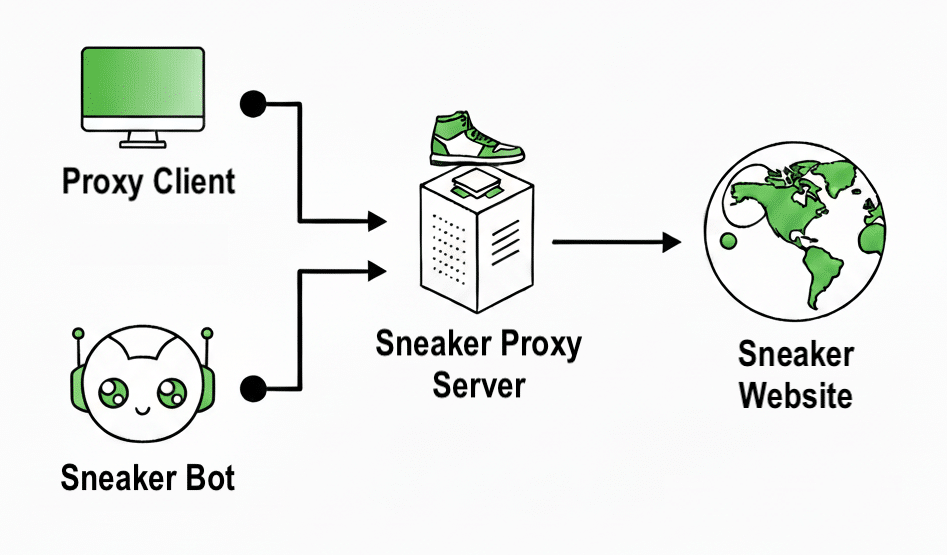
How Sneaker Proxies work with Sneaker Bots?
The sneaker bot automates purchases → it routes requests through the sneaker proxy server → which assigns different IPs → so the sneaker website sees many unique buyers, not just one.
2. How Sneaker Proxies Work with Bots
Without proxies, your bot is just another customer in line.
But with a proxy, you become dozens of customers with different identities and locations, dramatically increasing your chances of copping.
Here’s the step-by-step process of how proxies integrate with your sneaker bot setup:
- Bot Configuration: You load your proxy list into your sneaker bot (Nike SNKRS, Cyber, Wrath, etc.) → Tag proxies by region/site, and pre-test latency + auth so only fast, working IPs make it into the list before a drop.
- Task Assignment: Each bot task gets assigned to a different proxy IP address. → Cap tasks per IP (usually 1–3), diversify subnets/ASNs, and stagger task start times to avoid detectable burst patterns.
- Multiple Sessions: Your bot creates separate sessions that appear as different users to sneaker websites. → Keep each session’s cookies, user agent, and timezone consistent—and never reuse them across accounts to prevent correlation.
- Rotation and Persistence: Proxies can rotate IPs or maintain the same IP for queue-based drops. → Use sticky sessions for queues/timed checkouts; switch to short-interval rotation for restocks or when sites rate-limit by IP.
- Ban Avoidance: If one proxy gets banned, your other tasks continue running on clean IPs. → Implement automatic health checks and fallback pools; on 429/timeouts, back off and swap region/subnet instead of hammering the same IP.
3. Sneaker Proxies Types (Compared)
Choosing the right proxy type can make or break your sneaker bot setup. Each option—residential, ISP, datacenter, and mobile—comes with its own balance of speed, stealth, and cost. Some are nearly invisible to detection systems, while others trade anonymity for raw speed.
Below, we’ll compare the main types side by side and explain when each one makes sense, so you can match the right tool to the right drop.
| Proxy Type | Speed | Stealth | Price Range | Best For |
| Residential | Medium | Excellent | $2-15/GB | Nike SNKRS, Yeezy, Supreme |
| ISP | High | Very Good | $2-8/IP | Shopify, queue-based drops |
| Datacenter | Very High | Poor | $0.10-0.50/IP | CAPTCHA solving, monitoring |
| Mobile | Medium | Excellent | $9-20/GB | Social media verification |
- Residential Proxies: Use real IP addresses from homes and businesses. These are nearly impossible to detect because they come from actual users’ internet connections. Perfect for strict sites like Nike SNKRS.
- ISP Proxies: Combine the speed of datacenter proxies with the legitimacy of residential IPs. They don’t rotate, so they are ideal for drops where you need to stay in queue.
- Datacenter Proxies: Fastest option but easily detected by modern anti-bot systems. Still useful for CAPTCHA harvesting and stock monitoring.
- Mobile Proxies: Use cellular network IPs with extremely high trust scores. Expensive but nearly undetectable.
4. Key Features to Look For
When evaluating proxy providers, the difference between a solid investment and wasted spend comes down to a few essentials.
Here are the core factors to weigh:
- Speed vs. Reliability Balance
- IP Pool Size
- Geographic Locations
- Session Control
- Trial Options
- Customer Support
Speed matters, yet reliability is what drives results. For example, a fast proxy with weak uptime won’t help when systems need to stay online around the clock. In addition, large IP pools reduce the risk of detection. They give your operations cleaner connections across more regions. Likewise, location targeting can be critical—servers closer to your users or data sources can cut delays and improve accuracy.
Beyond performance, control and support should never be an afterthought. Specifically, session flexibility (whether sticky or rotating) affects how well proxies handle different tasks, from queue systems to automated checks. Moreover, before signing off on a provider, testing is non-negotiable. Trials or refund options let you validate performance before scaling. Finally, look for responsive, 24/7 support that actually understands proxy use cases—because downtime at the wrong moment can cost more than the proxy service itself.
Don’t Miss the Next Drop ⚡
Sneaker proxies that rotate automatically help you avoid bans and stay in line longer.
Secure a Spot →5. Best Sneaker Proxy Providers in 2026
Based on extensive testing with real sneaker bots, here are the top providers:
| Provider | Best For | From | Pros | Cons |
| RapidSeedbox | Fast + cheap sneaker bots | $7/mo | Affordable, SOCKS5, easy setup | Mostly US/UK, slows on drops |
| Oxylabs | Enterprise scale | $8/GB | Huge pool, advanced targeting | Pricey, complex |
| Bright Data | Big teams, heavy use | $3.57/GB | 150M+ IPs, full tools | Expensive, strict |
| Webshare | Budget teams | $3.50/GB | Free tier, simple | Smaller pool, limited support |
| IPRoyal | Value + global reach | $1.75/GB | Very cheap, wide coverage | Smaller pool, fewer tools |
a. RapidSeedbox
Best for: Teams that need speed and affordability in IPv4/IPv6 dedicated proxy access.
Price: Residential plans start at $7/month; dedicated proxies from $0.89/IP; rotating options around $3.49/GB.

Founded in 2011, RapidSeedbox began as a hosting and seedbox company and later expanded into proxy services. Today it offers both rotating and dedicated proxies, managed through a straightforward dashboard. While proxy services are a secondary line to its hosting business, the infrastructure behind them is mature and stable.
Strengths
- Affordable proxy packages optimized for automation and sneaker tasks
- SOCKS5 support, IP rotation, and an intuitive dashboard
- Live-chat support with a clear refund policy
- Strong hosting and backend experience from its seedbox legacy
Weaknesses
- Focused on US/UK sneaker and retail sites rather than broad worldwide reach.
- Speeds can dip during big sneaker drops, a common trade-off for budget providers.
b. Oxylabs
Best for: Enterprises that need ethically sourced proxies at scale, with advanced compliance and targeting features.
Price: Residential proxies start at $8/GB; ISP proxies from $2.10/IP; custom enterprise plans available.

Founded in 2015 in Lithuania, Oxylabs has become one of the largest proxy providers worldwide. Its platform delivers residential, ISP, datacenter, and mobile proxies, paired with advanced tools like enterprise-grade APIs, data tools, and compliance-first policies. This providers has been designed for scale. It also supports global targeting down to ZIP and ASN level, making it a fit for organizations running high-volume, complex proxy operations.
Learn more in: Oxylabs Review (+Alternatives)
Strengths
- Network of 102M+ ethically sourced IPs across all proxy types
- Advanced targeting (ZIP, ASN, latitude/longitude) with flexible session control
- Trusted brand reputation with compliance initiatives and account managers
- Enterprise APIs, scraping support, and AI-driven tooling
Weaknesses
- Premium pricing puts it out of reach for smaller budgets
- Technical setup and features require expertise to leverage fully
- Best suited for enterprise use cases rather than casual buyers
c. Bright Data
Best fit: Large organizations and data-heavy teams that need scale and automation.
Pricing: Residential proxies from $3.57/GB (or $4.20 pay-as-you-go); ISP proxies from $1.80/IP or $18/month for 10 IPs.

Bright Data (once known as Luminati) is one of the oldest players in the proxy world, with a network that spans 150+ million IPs across residential, mobile, ISP, and datacenter options. It’s built for serious automation—APIs, a proxy manager, browser extensions, and enough customization to fit into complex workflows.
Learn more in: Bright Data Proxy Alternative: 7 Best Options To Try
Strengths:
- Enormous IP coverage with targeting down to city, ZIP, or ASN
- Enterprise-grade control suite: APIs, session options, proxy manager, browser tools
- Hands-on support with account managers and 24/7 service
Weaknesses:
- Premium cost—likely too steep for smaller budgets
- Complex setup that needs onboarding time
- Strict usage rules and pricing that can frustrate casual or infrequent users
d. Webshare
Best fit: Small B2B teams or budget-conscious enterprises looking for privacy-first proxies with clear pricing.
Price: Rotating residential from $3.50/GB, static from $6/month (20 IPs), datacenter from $2.99/month (100 IPs), plus a free tier with 10 proxies and 1 GB/month.

Webshare focuses on simplicity. This service aims to provide privacy at a cost-efficient price. It avoids third-party data sharing and offers straightforward, scalable pricing. You don’t need long onboarding or KYC forms—teams can get up and running in minutes.
Learn more in: Webshare Review [+ Alternatives]
Strengths:
- Low entry cost with free tier and competitive per-GB rates
- Privacy-first design with encrypted traffic
- Quick onboarding and easy-to-use dashboard
Weaknesses:
- Smaller IP pool (~80M across 45 countries)
- Support leans on documentation; limited live help
- Performance slightly behind enterprise-grade providers
e. IPRoyal
Best fit: Companies that want value and flexibility without overspending—especially smaller B2B teams or cost-sensitive enterprises.
Price: Residential proxies from $1.75/GB; sneaker proxies from $1/IP; ISP from $2.40/proxy; datacenter from $1.39/proxy.

IPRoyal is a newer but fast-growing provider with global reach in 195+ countries. It offers multiple proxy types, including sneaker-focused IPs, at prices well below many competitors. Interfaces are simple, plans are transparent, and customer service has a strong reputation.
Learn more in: IPRoyal Review: Is it Worth a Shot?
Strengths:
- Extremely competitive pricing across proxy types
- Wide geographic footprint (residential, ISP, datacenter, sneaker)
- Unlimited concurrent sessions and sticky rotation
- Responsive and well-rated support team
Weaknesses:
- Smaller IP pool compared to other providers like Bright Data or Oxylabs
- Missing advanced scraping APIs and enterprise-level tooling
- Still maturing—good value now, but infrastructure may lack depth of older providers
6. Sneaker Proxy Best Practices: Do’s and Don’ts
Running sneaker bots is more than just adding more bandwidth. It’s also about setting up proxies the right way so they don’t trip alarms.
Here’s what experienced users suggest focusing one and avoiding:
✅ Do This
- Rotate with purpose, not speed: Don’t flip IPs on every request. Use sticky sessions for 5–10 minutes—especially on queue-heavy sites like Yeezy Supply.
- Keep tasks per IP low: 3–5 tasks per IP is safe. Push it further and sites start flagging activity.
- Run test drops first: Try your setup on smaller releases before betting everything on a high-demand drop like Jordan 1 Chicago.
- Mix proxy types: ISP proxies work better for queues. Residential proxies shine during checkout. Match the stage to the proxy.
- Track performance: Watch success vs. failure rates. Double down on subnets that perform, drop the ones that don’t.
- Rotate between tasks, not during: If you’re using rotating proxies, only switch between tasks. Mid-checkout switches almost always kill success.
🚫 Avoid This
- Free proxies: They’re slow, shared, and usually banned before you touch them. Learn more in: Paid Proxy Servers or Should You Get a Free Proxy?
- Recycled (“burned”) IPs: Some providers resell flagged addresses. Always ask how often they refresh IPs.
- Wrong geography: Running EU proxies for US drops adds latency. Always match proxy region to store region.
- Overlapping subnets: If multiple users hit the same store from the same block, it’s a red flag. Go for exclusive or semi-dedicated IPs.
- Skipping HTTPS support: Many cheap tools only handle HTTP. Modern sneaker sites need full SSL/HTTPS to connect.
Bottom line: Winning drops isn’t just about speed. It’s about smart proxy setup—and knowing where the pitfalls are.
7. Sneaker Proxies: FAQ
Yes, using bots and proxies is legal in most countries. However, some retailers prohibit them in their terms of service. You’re not breaking laws, but you could get your orders canceled. Learn more in: Are Proxies Illegal?
Nike has the strictest anti-bot protection. Only premium residential proxies from top providers like RapidSeedbox, Oxylabs or Bright Data consistently work. Expect to pay $8-15/GB for proxies that can handle Nike.
Start with 10-20 proxies for small drops, 50-100 for major releases. The ratio should be roughly 1 proxy per 3-5 bot tasks.
Rarely. Most major sneaker sites now detect and ban datacenter IPs immediately. They’re only useful for CAPTCHA solving and stock monitoring.
Rotating proxies change IP addresses frequently, while sticky proxies maintain the same IP for a set period. Sticky is better for checkout flows and queues.
8. Conclusion
Sneaker proxies don’t guarantee wins, but they stack the odds in your favor. Residential and ISP options from providers like RapidSeedbox, Oxylabs, and Bright Data are proven choices.
We would recommend starting small, testing on minor drops, and scaling up once you see what works. That way, when a high-demand release lands, you’re ready.
Sneaker Proxies That Just Work ✅
No endless retries. Clean residential IPs rotate on their own and pass more filters.
Start Now →
0Comments