 By
By
IPv6 on AWS offers a massive pool of free addresses to scale scraping without breaking budgets. In contrast with IPv4 on AWS which is scarce and costly. This guide walks you through the essentials for deploying IPv6 in AWS for scraping, from setting up dual-stack VPCs, choosing the right compute (EC2, Fargate, or Lambda), deciding between static or rotating IPs, and even getting new IPv6s. The result: lower costs and a network that scales for the long run.

Table of Contents
- IPv6 on AWS: Quick Wins for Scraping
- Architecture at a Glance
- Minimal Setups (Copy/Paste)
- Static vs Rotating: Pick Your Pattern
- Bring Your Own IPv6 (BYOIP)
- Region & Target Considerations
- Security & Compliance (Don’t Skip)
- Monitoring & Costs
- FAQ: AWS IPv6 for Scraping
- Final Words
Content Disclaimer: This article is for educational and informational purposes only. Deploying IPv6 on AWS for scraping must comply with AWS policies, local regulations, and the terms of service of target websites. RapidSeedbox does not endorse or encourage misuse of IPv6 addresses. Use the guidance responsibly at your own discretion.
1. IPv6 on AWS: Quick Wins for Scraping
Moving to IPv6 on AWS pays off almost immediately. The first win is cost. AWS now charges for every public IPv4 address, while IPv6 addresses remain free. That doesn’t mean there’s no catch. Some services still rely on IPv4, data transfer fees still apply, and you may need NAT or translation, which adds a bit of overhead. Even so, the savings add up fast once you shift traffic toward IPv6.
The second win is scale. With IPv6, each VPC gets trillions of addresses. That removes the old ceiling on how many scrapers, apps, or services you can run at once. Instead of juggling limited addresses or fighting collisions, you can expand without hitting those limits. In practice, it means you can keep growing without duct tape fixes at the network layer.
For small to mid B2B teams, the path is straightforward:
- Enable dual-stack VPCs so every subnet supports both IPv4 and IPv6.
- Run on EC2 or Fargate to see exactly which IPs handle traffic.
- Add an Egress-Only Gateway to keep outbound secure.
- Pick your IP strategy: static for partners who need allowlists, or rotating for spreading load and avoiding blocks.
- If you own IPv6 ranges, use BYOIP to boost reputation and keep parity with on-prem.
- Keep it light on automation: Terraform for deploys, CloudWatch/Lambda to recycle IPs, and a simple monitor to track which ones stay healthy.
| 🧰 Why IPv6 for Scraping (Quick Wins): Cost: Avoid AWS public IPv4 charges; IPv6 is plentiful. Scale: /64 per subnet → effectively unlimited addresses for rotation. Resilience: Distribute load across many egress IPs; lower per-IP footprint. |
Bottom line: Start small, scale sideways, and pick AWS regions close to your targets for less lag and fewer flags.
2. Architecture at a Glance
Before picking tools, lay the network base. Start with a dual-stack VPC for IPv4 and IPv6, add outbound-only routes, and lock security groups so safety is built in. Then choose compute: EC2 gives control with multiple IPs per host, Fargate scales containers cleanly with one IP each, and Lambda handles bursts with less control but little ops work. Think of it as layers — network first, compute second (matched to your workload).
a. Network Foundation (VPC)
Start with a solid base. Use a dual-stack VPC for IPv4 and IPv6, set outbound-only routes, and lock down security groups. Get this right once, and the rest stays stable.
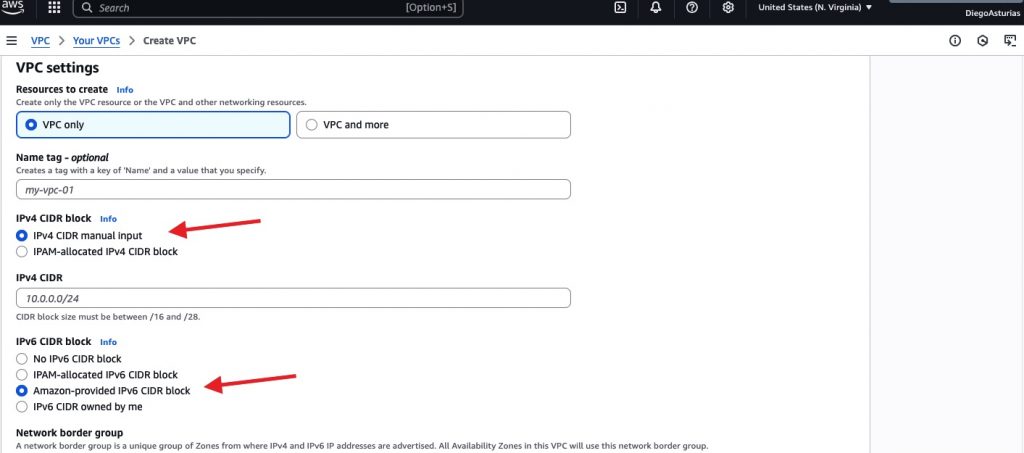
- Start with a dual-stack VPC: Add IPv6 (/56) alongside IPv4. For IPv4, select the default option: IPv4 CIDR manual input, for IPv6, select Amazon-provided IPv6 CIDR block. If you are bringing your own IPv6, select IPv6 CIDR owned by me.
- Subnets get /64 blocks: Decide if they’re public or private.
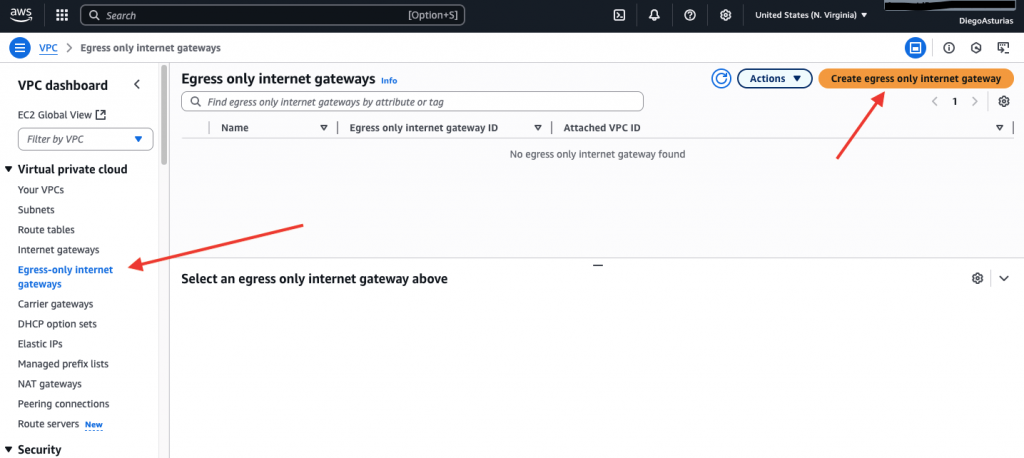
- Control egress: Use an Egress-Only Internet Gateway so traffic goes out over IPv6 but nothing comes in unsolicited.
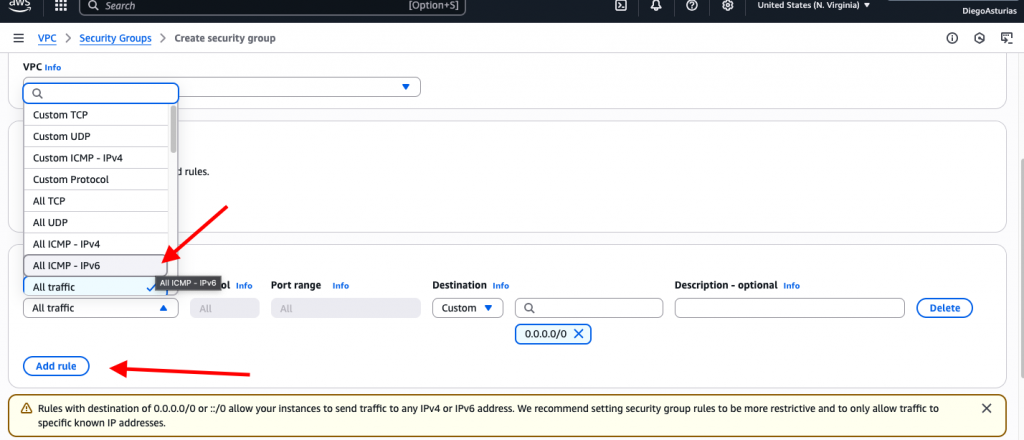
- Security Groups: allow the outbound traffic you need; only add IPv6 inbound rules if you explicitly want them.
👉 This gives you a secure baseline: dual-stack networking with safe outbound-only IPv6.
b. Compute Options (pick 1 to start)
Your compute layer decides control and scale. EC2 offers flexibility with multiple IPs per box. Fargate scales containers with one IP each. Lambda is simple and bursty but less controllable. Pick based on steady jobs, container growth, or quick runs.
| Use Case | EC2 | Fargate (ECS) | Lambda |
| Control over IPs | ✅ Many IPv6/ENI, bind per request | ✅ 1 IPv6 per task, scale by tasks | ⚠️ VPC required; IP may vary per invoke |
| Rotation style | Many per host or many hosts | Many tasks = many IPs | Natural variability across invokes |
| Ops effort | Medium | Low–Medium | Low (event-driven) |
| Long jobs | ✅ | ✅ | ❌ (15-min cap) |
Quick starts
- EC2: simplest for static and multi-IP rotation on one box.
- Fargate: easy horizontal scaling; one task = one clean IPv6.
- Lambda: event bursts; expect changing IPv6 per warm/cold start.
The following image shows the entire network architecture (choose between EC2, Fargate, or Lambda). The choice depends on your specific use case.

3. Minimal Setups (Copy/Paste)
So, are you ready to launch fast? These are the bare-minimum commands to stand up IPv6 scraping on AWS.
As example, we are giving one snippet for EC2, one for Lambda, one for Fargate. All these snippets are focused on getting you from zero to running with outbound-only IPv6 in minutes.
a. EC2: enable IPv6 & assign more IPs
- VPC → Edit CIDRs → Add IPv6 /56 → Subnet /64
- Launch instance with Auto-assign IPv6
|
1 |
aws ec2 run-instances \ --image-id ami-xyz --instance-type t3.small \ --subnet-id subnet-abc --ipv6-address-count 1 \ --security-group-ids sg-123 |
- Add extra IPv6s to rotate:
|
1 |
aws ec2 assign-ipv6-addresses \ --network-interface-id eni-0123456789abcdef0 \ --ipv6-address-count 2 |
- Outbound-only:
- Create Egress-Only IGW; route ::/0 → egress-only-igw.
b. Lambda: allow IPv6 egress (in VPC)
|
1 |
aws lambda update-function-configuration --function-name scraper-fn \ --vpc-config SubnetIds=[subnet-abc],SecurityGroupIds=[sg-xyz],Ipv6AllowedForDualStack=true |
- Subnets must be dual-stack; route ::/0 to IGW or Egress-Only IGW.
c. Fargate: IPv6 by default in dual-stack subnets
- Task definition: “networkMode”: “awsvpc”
- Run tasks in IPv6 subnets; each task gets its own IPv6.
4. Static vs Rotating: Pick Your Pattern
So, which one to choose? Static or rotating? Here is a quick view to help you decide.
| Pattern | Best For | Trade-off |
| Static | Allowlists, stable sessions | ✅ Simple, predictable❌ Easy to block under high traffic |
| Rotating | High volume, rate-limit avoidance | ✅ Distributes load, resilient❌ More ops, risk of cloud-wide bans |
Static (One Fixed Identity)
A static IPv6 works like a fixed office address (it’s predictable and stable). It’s perfect for when partners need to allowlist you or when apps require sessions to stick to one source. The setup is straightforward, assign each EC2 instance or Fargate task an IPv6, and if needed, pin a specific address from your subnet.
The upside is simplicity: it’s low-ops and easy to monitor. The downside is risk. With high traffic, a static address can get flagged or blocked fast.
Checklist for Static:
- ✅ Dual-stack subnets with Egress-Only IGW
- ✅ Assign one fixed IPv6 per host; confirm with curl -6
- ✅ Watch for rate limits and backoff if traffic spikes
Rotating (Many Changing Identities)
Rotating IPv6 is different. It is more like running a fleet of delivery vans. Instead of sending all your traffic from one address, you spread requests across many (so no single IP gets flagged). This is great when your volumes are higher, when you need to dodge rate limits, or when you want extra resilience against throttling.
There are a few patterns to make it work. One option is multi-IP per host, where you assign dozens of IPv6s to a single EC2 instance and bind requests to each address in turn. Another is the multi-host pool, where you run a set of EC2s or Fargate tasks, each with its own IPv6, and then round-robin jobs through a queue. A third path is the Lambda swarm, where you fire off parallel Lambdas through Step Functions or SQS, with each invocation often landing on a different IPv6 by default.
Practical Rules for Safe IPv6 Rotation
- Rotate per short session, not every request: Reuse connections for natural behavior.
- Track errors/CAPTCHAs per IP: Auto-retire “hot” addresses when they trip defenses.
- Beware of wide bans: Some targets block entire AWS ranges, not just single IPs.
- Define a clear rotation policy: For example, switch IPs every 100 requests or every 5 minutes.
- Bind requests to specific source IPs: Use tools like curl –interface or socket options in code.
- Monitor per-IP health in real time: Replace or cool down IPs when error rates spike.
5. Bring Your Own IPv6 (BYOIP)
Sometimes you don’t want your scrapers to look like “just another AWS instance.” BYOIP lets you run AWS workloads using your own IPv6 block, so traffic appears as if it comes from your organization, not from Amazon’s generic ranges. This can improve reputation, continuity, and reduce the risk of blanket AWS bans. Learn more about BYOIP: What It Is And Why Use It?
What you need:
- A publicly routable /48 (or larger) IPv6 prefix
- A clean reputation (no spam/abuse history)
- An RPKI ROA authorizing AWS’s ASN to announce your prefix
| 💡 Tip: If your organization doesn’t already hold IPv6 space, you don’t have to go through an RIR allocation process from scratch. Services like RapidSeedbox’s IP rental offer IPv6 ranges that can be leased and onboarded into AWS, giving you BYOIP benefits without the heavy lift of registry management. |
How it works (high-level):
- Verify ownership of the prefix
- If it’s your company’s block → prove it through RDAP records or a DNS TXT record.
- If it’s a rented block (e.g., via RapidSeedbox IPv6 rental) → You will receive a Letter of Authorization (LOA). The provider updates the RIR records or DNS on your behalf so AWS can validate you as the authorized user.
- Provision the prefix in AWS through the BYOIP process. AWS checks the records and confirms control.
- Associate the prefix with a VPC: AWS usually slices it into /56s for subnets.
- Decide how it’s advertised:
- Advertised globally: AWS announces your prefix to the internet via BGP.
- Non-advertised: You keep it for private routing only (VPN or Direct Connect).
Key limitations:
- A brought prefix is tied to one region at a time. If you want multi-region use, split a larger block (e.g., break a /44 into multiple /48s).
- BYOIP is not supported in AWS China regions.
BYOIP Made Easy 🔑
No IPv6 block? Rent clean prefixes and use them on AWS without registry hassle.
👉 Rent IPv66. Region & Target Considerations
IPv6 may be “supported everywhere” on AWS, but the fine print matters. Regions differ in service coverage, quotas, and even how traffic is treated. Skip the checks, and you risk downtime and higher latency. Plus, if you don’t know what’s AWS giving you; you also risk partial failures in your scraping stack.
Here are the key factors you should review before locking in a region:
- Geolocation: Latency and block risk drop when your AWS region sits close to the target site’s infrastructure. IPv6 blocks are geolocated too, so us-west vs eu-central can lead to very different treatment abroad.
- Service Support: Not every AWS service has IPv6 endpoints in all regions. Confirm EC2, Fargate, load balancers, S3, and private endpoints you rely on actually support dual-stack or IPv6-only.
- IPv4-only Targets: Many sites and APIs still don’t resolve AAAA records. Without fallback, scrapers will fail. Dual-stack subnets and IPv4 logic solve this; NAT64/DNS64 is possible but adds overhead.
- Regional Quotas: Each region caps IPv6 resources differently, addresses per ENI, route entries, prefix lists, and subnets all have limits. Check quotas early and request bumps if you expect scale.
- Infrastructure Dependencies: Monitoring, DNS, libraries, or custom code may assume IPv4 and break silently under IPv6. Validate agents, tools, and integrations before rollout.
- Regulatory Constraints: Regions like China or GovCloud have unique legal and technical restrictions. In some countries, poor IPv6 deployments or censorship policies may blunt effectiveness.
| Next Steps: Build a service support matrix for your target region, test quotas, and run a small proof of concept before scaling. Add fallback logic for IPv4-only targets, and verify routing if you’re bringing your own IPv6 ranges. |
7. Security & Compliance (Don’t Skip)
Rotating or exposing large IPv6 spaces increases the attack surface. So, security and compliance aren’t really optional, but should be mandatory. You need visibility and audit trails to stay safe and meet policy.
What to put in place:
- Egress-Only IGW: Allow outbound IPv6 but block unsolicited inbound traffic by default.
- VPC Flow Logs + ACLs:
- Capture IPv6/IPv4 flows at ENI, subnet, or VPC level to spot anomalies.
- Include pkt-srcaddr/pkt-dstaddr in logs to differentiate secondary IPv6s.
- Use Network ACLs for stateless deny rules (ranges, countries). Security groups remain stateful.
- Per-IP Logging: Record which source IP handled each request. This is essential if rotating and very useful for debugging and partner audits.
- Respect Targets: Build in throttling and exponential backoff. Also, don’t forget to honor robots.txt/ToS. This will help prevent bans and compliance issues.
- Network Firewall (optional): Insert AWS Network Firewall in central VPCs to filter both IPv6 and IPv4.
- IAM Least Privilege: Restrict who can touch VPC networking (BYOIP, IGWs, security groups). Limit roles to minimum required.
| Bottom line: Build IPv6 scraping with the same strength as production apps — outbound-only by default, full visibility on flows, and strict IAM control. |
8. Monitoring & Costs
IPv6 saves you on Elastic IPv4 fees, but hidden costs and performance risks sneak in if you don’t watch closely.
What to monitor?
- Per-IP Health: 403s, CAPTCHA hits, timeouts. Track latency and success ratios; retire “hot” IPs quickly.
- Infra Metrics: CPU/network load on EC2/Fargate/Lambda; container cold-starts; ENI/IP address quotas.
- Cost Levers & Traps:
| Item | Watch Out For |
| NAT Gateway | Dual-stack fallbacks send IPv4 via NAT, adds per-hour + data fees. Favor IPv6-only egress paths. |
| Data Transfer | Cross-AZ and cross-region traffic adds up. Keep scraper–target flows local. |
| Logging | Flow Logs/S3/CloudWatch at high volume = $$$. Use custom formats, sampling, filters. |
| Compute Waste | Idle/oversized instances, long Lambdas. Right-size, use Spot, keep containers busy. |
| Elastic IPv4 | AWS charges for every public IPv4. Stick to IPv6, or BYOIP to avoid these costs. |
👉 Takeaway: Treat IPv6 as cost-efficient and abundant, but keep tight guardrails (Egress-Only IGW, Flow Logs) and track metrics (per-IP health, NAT usage, logging volume) to avoid compliance gaps and hidden spend.
9. FAQ: AWS IPv6 for Scraping
No. Prefer IPv6-enabled targets (AAAA record). If IPv4-only, you’ll need IPv4 or NAT64 (which removes IPv6 diversity).
Dozens per ENI are typical (quota varies by type/account). You can request increases.
Usually this can be considered an overkill. Short sessions per IP look more natural and reuse connections.
Yes, bu only if you need non-AWS reputation/branding or persistent allowlists. Otherwise start with AWS-provided IPv6.
Yes. Dual-stack is often the safest setup — use IPv6 where possible for scale, and fall back to IPv4 only when a site lacks IPv6. This avoids coverage gaps.
No. IPv6 allocation is free, unlike IPv4 Elastic IPs which are billed. You only pay for the compute and bandwidth you actually consume.
10. Final Words
IPv4 is now a bottleneck — scarce and taxed by AWS. IPv6, by contrast, is abundant, free to allocate, and ready for production scraping. Migrating your workloads to IPv6 on AWS is far more than just scale; it’s about resilience and reducing bans.
To make it actionable, here’s your print-ready checklist for rolling out IPv6 the right way:
- Network baseline: Dual-stack VPC + /64 subnets, Egress-Only IGW for secure outbound traffic
- Compute choice: EC2 (multi-IP), Fargate (multi-task), or Lambda (bursts)
- Strategy: Decide Static vs. Rotating; bind or fan-out accordingly
- IP health: Track per-IP metrics; auto-cooldown or replace when errors spike
- Region fit: Align region to target geolocation; plan for IPv4-only sites when needed
- Security: Lock down SGs; enable logging and per-IP attribution
- Costs: Avoid NAT64 unless required; use Spot/Auto Scaling for savings
- (Optional): BYOIP verified and provisioned for reputation and continuity
👉 Bottom line: IPv6 is the smarter path forward. Start small and cost-aware — then scale as your scraping needs grow.
Cut Costs 💰
IPv4 is billed hourly — IPv6 isn’t. Shift your budget toward growth, not address fees.
See options
0Comments