 By
By
A seedbox OpenVPN setup lets you connect your computer to a VPN server running on or alongside your remote seedbox. Once connected, traffic from your device is sent through the encrypted VPN tunnel and out through the seedbox server’s IP address.
That sounds pretty much like a normal commercial VPN to me, but there’s one key difference: your seedbox still does the remote downloading and seeding on its own. OpenVPN sets up a secure network tunnel between your device and the seedbox, but it doesn’t change local torrenting into remote seedbox torrenting.
This guide will tell you exactly how the setup works, when it’s useful, how to configure it, and when a standalone VPN is the better choice.
Table of Contents
- What Is a Seedbox OpenVPN Setup?
- How Does OpenVPN Work With a Seedbox?
- Seedbox vs OpenVPN: What Does Each One Protect?
- Why Use OpenVPN With a Seedbox?
- How to Set Up OpenVPN on a Seedbox
- Seedbox OpenVPN Setup: What Is Different?
- Should You Run OpenVPN Yourself on a Seedbox?
- Seedbox OpenVPN vs Standalone VPN
- OpenVPN vs WireGuard on a Seedbox
- Seedbox OpenVPN Problems
- Is a Seedbox With OpenVPN More Private?
- Do You Need OpenVPN If You Already Have a Seedbox?
- The Best Seedbox OpenVPN Setup Is the One You Can Verify
- Frequently Asked Questions
What Is a Seedbox OpenVPN Setup?
A seedbox OpenVPN setup combines two different technologies:
- A seedbox is a remote server used for downloading, seeding, storing, transferring, and sometimes streaming files.
- OpenVPN is a VPN protocol and software ecosystem that creates encrypted network tunnels between devices.
When your seedbox provider runs an OpenVPN server on the seedbox host, your computer can connect to it using an OpenVPN-compatible client and a configuration profile, commonly an .ovpn file.
The basic architecture looks like this:
Your device → encrypted OpenVPN tunnel → seedbox server → internet
Then your public-facing traffic exits through the seedbox-side connection rather than directly through your normal home IP address.
Just so you know, OpenVPN doesn’t actually provide a VPN service itself. The OpenVPN instructions make this clear: the client app connects to a compatible VPN server or service by importing a connection profile.
Seedbox OpenVPN is basically a private encrypted tunnel from your local device to your remote seedbox environment. It can route local traffic through the seedbox IP, while the seedbox continues running torrent clients and other applications remotely.
How Does OpenVPN Work With a Seedbox?
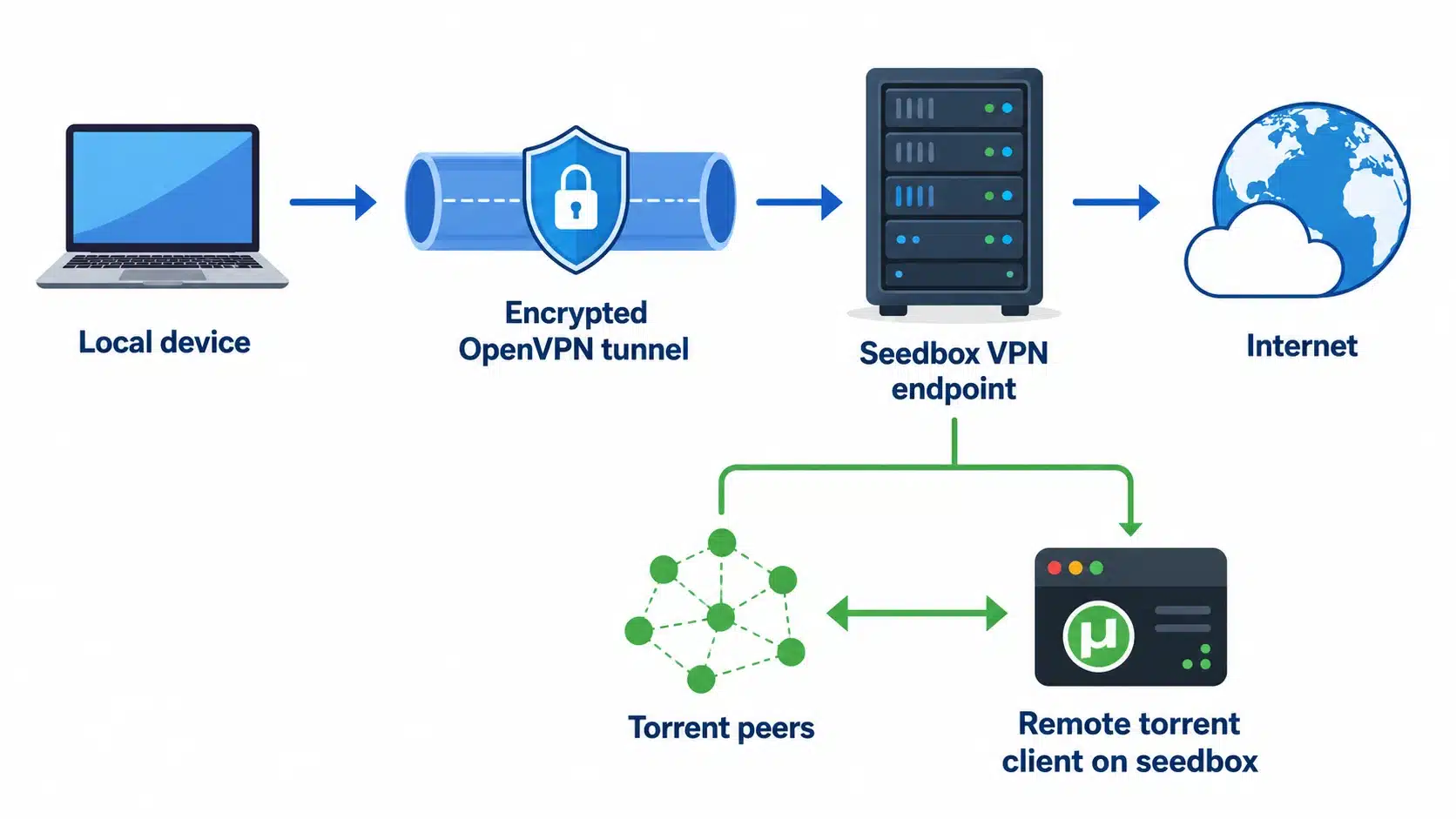
The best way to get your head around how it’s set up is to keep the remote seedbox activity separate from your local VPN traffic.
Without OpenVPN
When you add a torrent to your seedbox:
- You access the seedbox through its web interface or another remote connection.
- The torrent client runs on the remote server.
- The seedbox connects to peers.
- Files are stored on the remote server.
- You later transfer or stream the files to your own device.
The torrent swarm interacts with the seedbox server, not with a torrent client running on your home computer.
With OpenVPN connected
When you also hook your local device up to your seedbox’s VPN server:
- Your device establishes an encrypted tunnel to the seedbox.
- Traffic covered by the VPN configuration enters that tunnel.
- The seedbox-side server forwards the traffic.
- External services see the relevant exit IP rather than your normal home public IP.
These are related but separate functions.
The seedbox handles remote workloads. OpenVPN handles a network tunnel from your device.
The thing is, a VPN connection doesn’t automatically move your locally running software to the seedbox. If you open a torrent client on your laptop, it’ll still be running locally even when its traffic is routed through a VPN.
Seedbox vs OpenVPN: What Does Each One Protect?
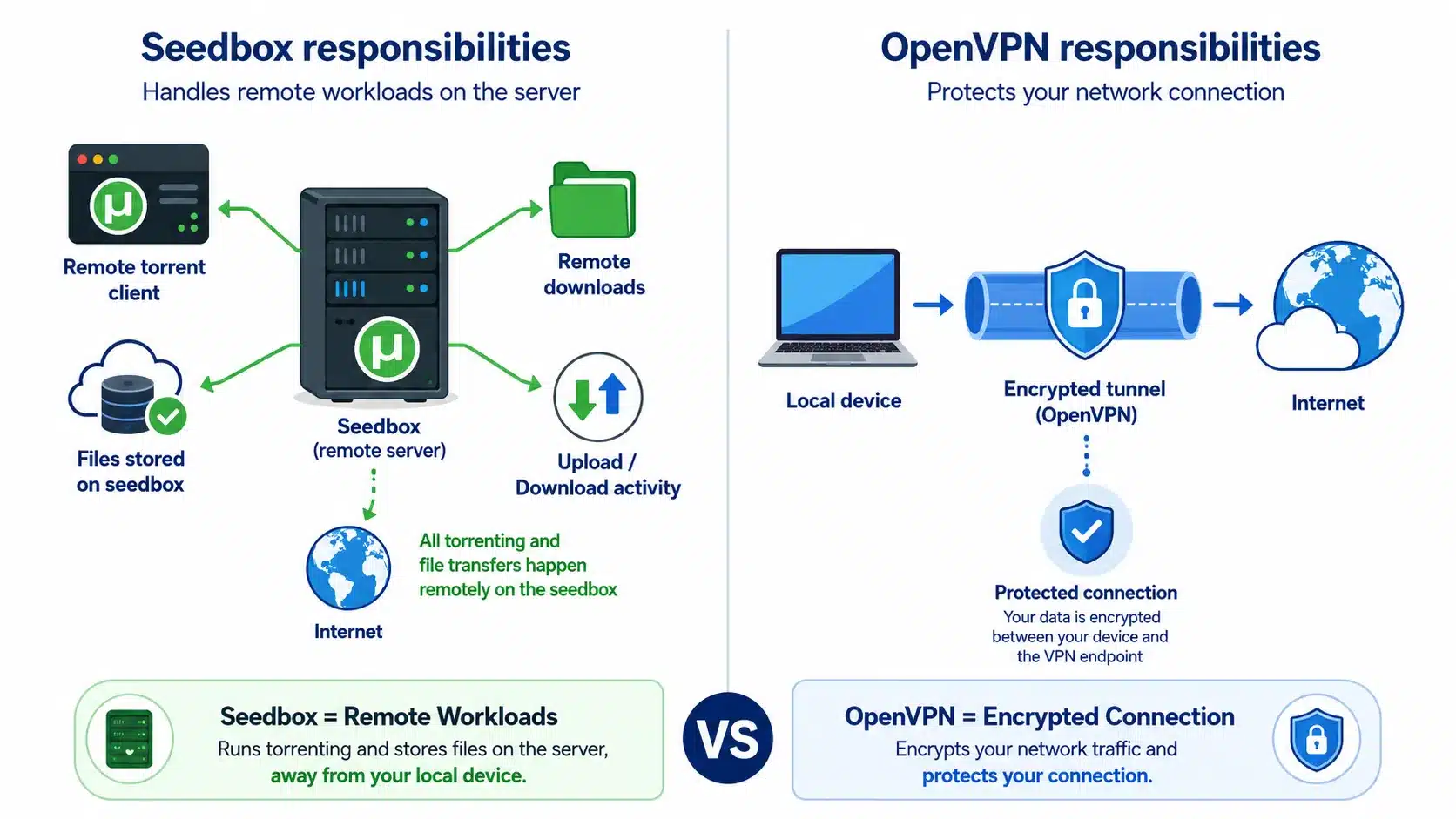
A seedbox and OpenVPN are two different solutions for different problems.
| Feature | Seedbox | OpenVPN to Seedbox |
|---|---|---|
| Runs torrent client remotely | Yes | No |
| Uses remote server resources | Yes | No |
| Keeps seedbox transfers off your local torrent client | Yes | Not applicable |
| Creates encrypted VPN tunnel from local device | No, not by itself | Yes |
| Can route local traffic through remote server | No, not by itself | Yes |
| Uses seedbox-side IP for routed local traffic | Not applicable | Yes |
| Keeps working when your PC is off | Yes | VPN client connection does not |
| Best for 24/7 remote seeding | Yes | No |
For a lot of users, remote torrenting is already the main reason for choosing a seedbox. The torrent client runs in the data centre rather than on your home computer. A VPN is useful if you want to encrypt traffic between your device and a VPN endpoint, or if you want local traffic to go through a remote server.
For a deeper comparison, see our guide to seedbox vs VPN for torrenting.
Why Use OpenVPN With a Seedbox?
There are a few good reasons to combine them, but it’s not something everyone needs to do.
1. Route local traffic through your seedbox IP
Once the VPN tunnel is up and running and set up to handle the right traffic, outside services will see the seedbox-side exit IP instead of your usual public IP.
It’s useful if you want a remote exit point that always stays the same and is tied to your server.
But there’s one important thing to bear in mind: a built-in seedbox VPN is usually not the same as a commercial multi-location VPN network. As the RapidSeedbox documentation explains, its built-in VPN exits from the seedbox IP, so you get a single server location rather than a menu of countries and cities. Set up is useful for:
- routing through your server;
- using a consistent remote IP;
- encrypting the client-to-server tunnel;
- accessing network resources through the seedbox environment.
It’s not as good if you’re mainly interested in switching between lots of different locations.
2. Encrypt traffic between your device and the VPN endpoint
OpenVPN creates an encrypted tunnel between the VPN client and server.
This is really handy on networks you’re not 100% trusting, like shared networks, because the traffic inside the tunnel isn’t sent to the VPN endpoint like regular, unencrypted IP traffic.
Just be careful about the boundary, ok? Just because you’ve got a VPN tunnel doesn’t mean that every website or internet service is encrypted between your device and them. Once traffic has left the VPN server, its security still depends on the destination protocol, like HTTPS.
3. Use one remote server for multiple jobs
A capable seedbox can serve several different roles:
- remote downloader;
- 24/7 seeding server;
- file storage system;
- media server;
- application host;
- VPN endpoint.
This can make things easier for users who already have a remote server and don’t need a big standalone VPN network.
4. Keep remote torrenting separate from your home connection
The main benefit comes from the seedbox, not OpenVPN.
When the torrent client runs on the remote server, peer-to-peer activity is handled by that remote environment. Then your home device can interact with the seedbox through remote access and file transfer methods, so you don’t have to do the torrent workload locally.
You can use OpenVPN on top of that, but don’t think it’s the whole story – the seedbox itself is the real deal.
How to Set Up OpenVPN on a Seedbox
The exact interface you get depends on the provider. A standard provider-managed workflow usually involves:
- an active seedbox with OpenVPN support;
- a VPN connection profile;
- an OpenVPN-compatible client;
- The credentials required by the server.
If you use RapidSeedbox, OpenVPN is already set up as the standard VPN protocol in the supported seedbox environments, as the current Help Center says. WireGuard is a whole other thing and you might need to fiddle with it manually or get admin access. The setup process is pretty straightforward.
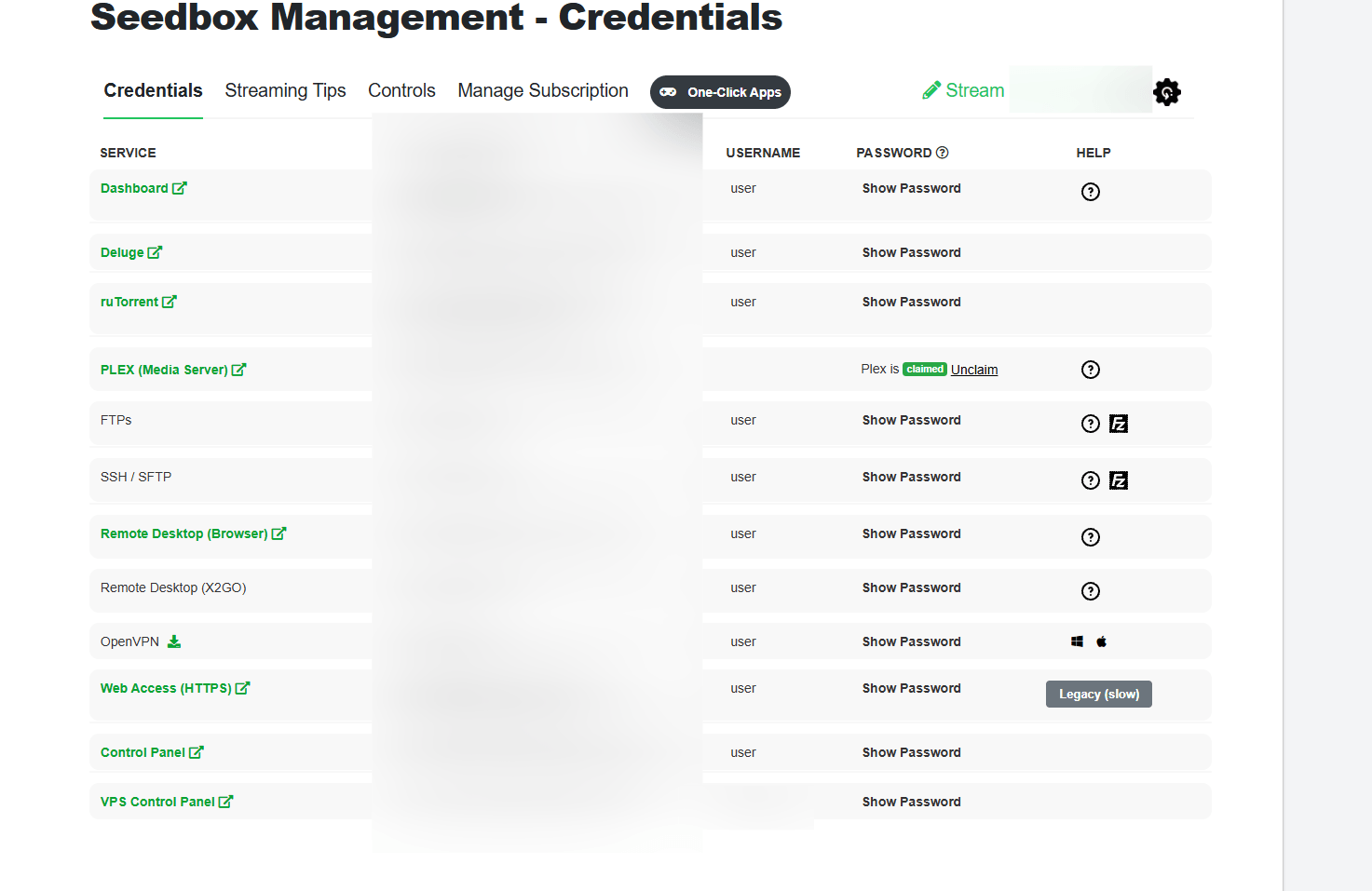
1. Get your .ovpn connection profile
Log in to your seedbox provider’s client area and locate the VPN or credentials section.
Just download the configuration profile we’ve provided for your server. OpenVPN profiles usually use the .ovpn extension.
Just don’t go replacing one random configuration file from another server. The profile has all the connection info you need to get to the right VPN endpoint.
2. Install a compatible OpenVPN client
Install an OpenVPN-compatible client on your local device.
The official OpenVPN Connect client lets you import connection profiles, and OpenVPN provides client documentation for most major operating systems. The software can depend on your platform and provider documentation. Don’t just blindly follow an old tutorial, because VPN clients, operating-system permissions, and compatibility requirements change.
3. Import the connection profile
Open your VPN client and import the downloaded .ovpn profile.
Depending on the client, this may involve:
- opening the profile directly;
- selecting Import Profile;
- dragging the file into the application;
- adding it to the client’s configuration directory.
The way OpenVPN Connect works is that you import a connection profile from the VPN service or server administrator.
4. Enter the correct VPN credentials
Start the connection.
If prompted, enter the OpenVPN username and password supplied by your seedbox provider.
Do not assume these are identical to:
- your seedbox billing account password;
- your SSH root password;
- your torrent client password;
- your FTP or SFTP credentials.
Use the credentials explicitly assigned to the VPN connection.
5. Connect and verify the tunnel
After connecting, check the client status.
If the connection is successful, it should show a state like ‘Connected’. Then check that your public IP has changed to the expected remote IP.
Do not stop at the green connection icon. A proper verification process should confirm:
- the public IP address;
- DNS behavior;
- whether the applications you care about actually use the tunnel;
- whether traffic still works when the VPN disconnects unexpectedly.
Once all is finished, confirm the connected state and check that the visible IP corresponds to the seedbox/VPN endpoint.
Seedbox OpenVPN Setup: What Is Different?
RapidSeedbox already gives users a way to get OpenVPN, so they don’t have to set up a VPN server from the beginning.
OpenVPN is the default pre-configured VPN protocol for its seedboxes. The connection is designed as a private link between the local computer and the seedbox environment.
Here’s the typical flow:
- Open your RapidSeedbox account area.
- Locate your seedbox credentials and OpenVPN configuration.
- Download the provided
.ovpnprofile. - Install the appropriate local VPN client.
- Import the profile.
- Connect with the supplied VPN credentials.
- Verify the resulting public IP and connection behavior.
Windows and macOS have separate provider-specific instructions because the client workflow differs between platforms. key limitation: one seedbox location is not a VPN network
This is where things often get a bit mixed up.
If your VPN server runs on your seedbox host, your exit location is tied to that server. RapidSeedbox sets itself apart from its separate VPN service, which is all about having multiple VPN server locations and a wider range of VPN-specific use cases. The built-in seedbox connection is great for:
- a tunnel to your seedbox;
- traffic routed through that server;
- a consistent seedbox-side IP;
- a combined remote server and VPN workflow.
Choose a standalone multi-server VPN when you primarily want:
- geographic server switching;
- multiple country options;
- an infrastructure designed specifically for general VPN traffic.
For a broader look at integrated services, see our guide to choosing a seedbox with VPN support.
Should You Run OpenVPN Yourself on a Seedbox?
Sometimes. But a self-managed installation is a different project from importing a provider-supplied .ovpn file.
A manual OpenVPN server deployment may require you to manage:
- server packages;
- public key infrastructure;
- certificates and keys;
- authentication;
- IP forwarding;
- routing;
- firewall rules;
- UDP or TCP transport;
- DNS handling;
- certificate revocation;
- software updates.
OpenVPN can be set up in routed or bridged configurations and can use UDP or TCP, which makes it flexible but also easy to misconfigure when you’re responsible for the full server stack. Ubuntu’s current server docs, for instance, see OpenVPN deployment as a server configuration task involving PKI and network decisions rather than a one-click client setup.
Use a provider-managed OpenVPN when:
- it is already included;
- you want the simplest setup;
- you do not need custom routing;
- you do not want to maintain VPN infrastructure.
Self-host OpenVPN when you:
- have root access;
- understand Linux networking;
- need custom routes or access rules;
- need control over authentication and certificates;
- your provider explicitly permits the configuration.
Before you install anything, it’s a good idea to check your seedbox plan and provider policy. Shared environments can sometimes restrict what you can do with networking operations.
Looking for a faster, always-on setup for your OpenVPN and download workflows?
Upgrade to a RapidSeedbox Seedbox and move bandwidth-heavy tasks to a powerful remote server built for speed and continuous access. Manage files from anywhere, keep large transfers running 24/7, and enjoy a smoother Seedbox OpenVPN setup without putting extra strain on your home device or connection.
Seedbox OpenVPN vs Standalone VPN
The better choice depends on what you are actually trying to achieve.
| Need | Better fit |
|---|---|
| Remote 24/7 torrent client | Seedbox |
| High-speed remote seeding | Seedbox |
| Local encrypted VPN tunnel to your server | Seedbox OpenVPN |
| Use seedbox IP for routed local traffic | Seedbox OpenVPN |
| Switch between many countries | Standalone VPN |
| VPN apps optimized for everyday device use | Standalone VPN |
| Combine remote torrenting and a server-side VPN endpoint | Seedbox with OpenVPN |
| Run local torrent client through a VPN | Standalone VPN or suitable VPN service |
The biggest mistake is treating these as interchangeable products.
A seedbox changes where an application runs.
A VPN changes how selected network traffic travels between endpoints.
Those are fundamentally different mechanisms.
OpenVPN vs WireGuard on a Seedbox
OpenVPN is not the only VPN protocol you may encounter. WireGuard is another common option, but availability depends on the provider and server permissions.
The practical differences are often:
| Area | OpenVPN | WireGuard |
|---|---|---|
| Ecosystem maturity | Long-established | Newer design |
| Configuration | Often profile-based | Typically key/interface-based |
| TCP support | Yes | No, WireGuard uses UDP |
| Compatibility with older environments | Often strong | Depends on platform |
| Codebase and protocol design | More complex | Intentionally smaller and simpler |
| Provider support | Common | Increasingly common |
Do not pick a protocol solely from benchmark claims found online. Real-world performance depends on:
- CPU resources;
- latency;
- server load;
- route quality;
- client hardware;
- provider configuration.
Usually, OpenVPN is the default pre-configured option, while WireGuard is optional and may require administrative permissions for manual setup.
Seedbox OpenVPN Problems
A VPN might show you as “connected” even if your actual setup isn’t working as expected.
Here are the failures to look at first.
The public IP does not change
Possible causes include:
- the profile only routes a specific subnet;
- a split-tunnel configuration is active;
- the expected default route was not installed;
- another VPN or network tool is interfering;
- the OpenVPN connection did not complete correctly.
First, check if the profile is supposed to handle all internet traffic. Not every VPN tunnel is a full-tunnel internet VPN.
DNS requests use an unexpected resolver
Just because the public IP address has changed doesn’t mean DNS is working properly.
Just check the DNS separately. How DNS behaves depends on the operating system, VPN client, profile and server-side configuration.
Don’t just copy any old “DNS leak fix” into an .ovpn profile without checking if it’ll work with your platform first. Just so you know, configuration directives can be operating-system-specific, version-sensitive or irrelevant to your client.
The connection is slower than expected
Some speed loss is normal because the VPN adds:
- encryption work;
- encapsulation overhead;
- an additional network path;
- latency to the VPN endpoint.
But a dramatic slowdown may point to:
- a distant seedbox location;
- poor routing;
- an overloaded server;
- CPU constraints;
- TCP-over-TCP effects in a TCP-based setup;
- MTU problems.
Don’t forget that your seedbox might have a super-fast data centre port, but the path between your device and the seedbox might still limit your local VPN connection.
Do not assume every OpenVPN client automatically stops all traffic after a disconnect.
If you’re dealing with applications where tunnel failure is a concern, it’s better to test the behaviour rather than relying on the label in the interface.
Your credentials are rejected
Make sure you’re using the VPN details your provider gave you.
Common mistakes include using:
- account login credentials;
- SSH credentials;
- torrent web UI credentials;
- an old password;
- a profile belonging to another server.
Is a Seedbox With OpenVPN More Private?
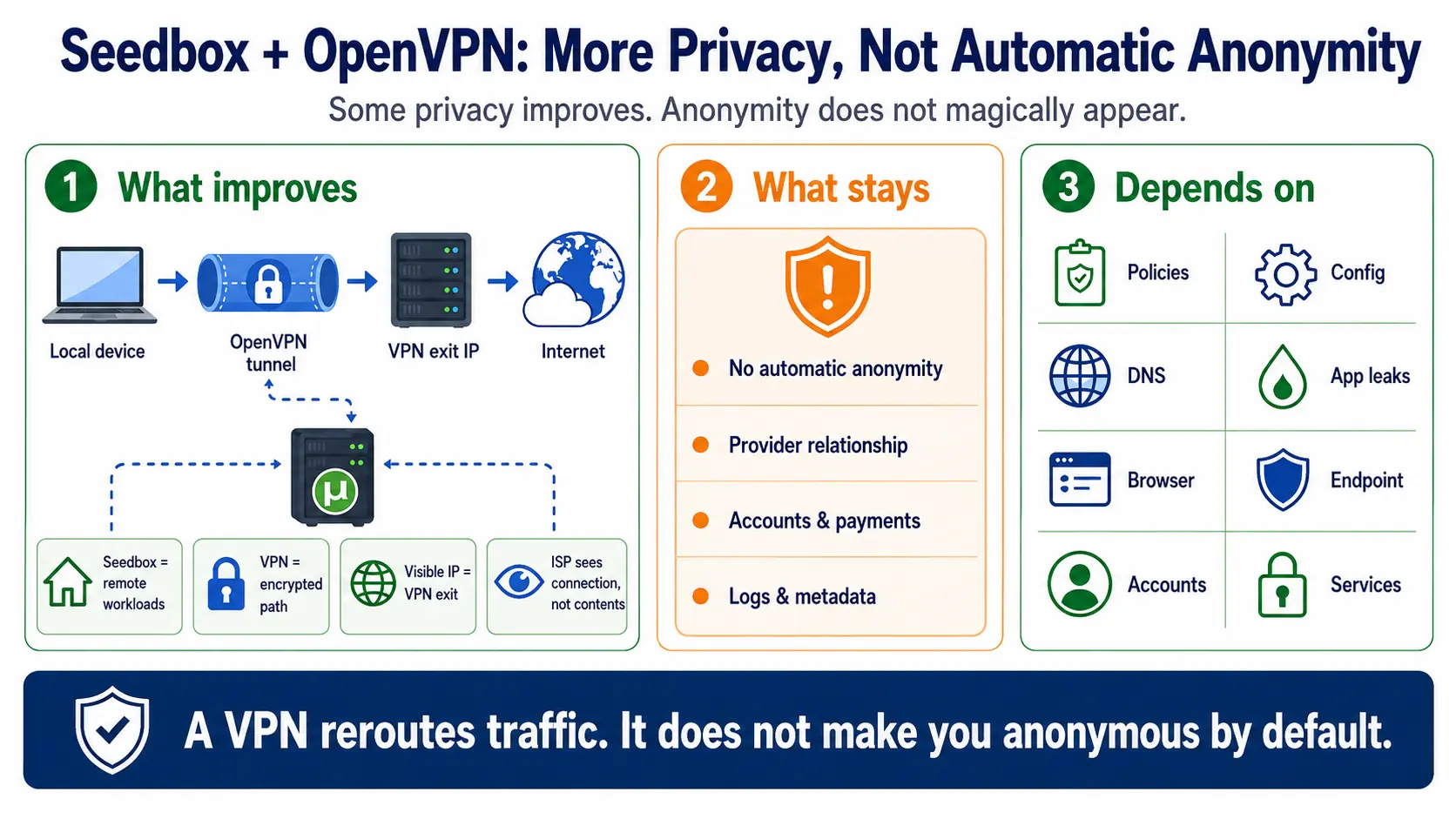
It can improve privacy for specific parts of your network architecture, but avoid the vague idea of “double anonymity.”
A more accurate explanation is:
- The seedbox moves supported remote workloads away from your home computer.
- OpenVPN creates an encrypted tunnel between your client and the VPN endpoint.
- The VPN exit server becomes the visible source IP for traffic routed through it.
- The provider relationship still exists. A VPN does not make infrastructure ownership, authentication, payment, logs, or account metadata magically disappear.
Your ISP might not be able to see what’s going on in a properly encrypted VPN tunnel, but they can usually spot that your connection is talking to a remote IP address.This visibility limit is part of the built-in VPN design. So it depends on the whole system, including:
- provider policies;
- account model;
- server configuration;
- DNS behavior;
- application leaks;
- browser behavior;
- endpoint security;
- the services you log in to.
A VPN changes network routing. It does not make you anonymous by default.
Do You Need OpenVPN If You Already Have a Seedbox?
For many users, no.
You may not need it when you:
- do all your torrenting remotely;
- access the seedbox through secure protocols;
- already use another trusted VPN;
- do not need local traffic routed through the seedbox;
- only want remote downloads and streaming.
OpenVPN becomes more useful when you:
- want your device to route traffic through the seedbox server;
- want an encrypted VPN tunnel to that endpoint;
- need access to a private network path;
- want one remote server to handle several roles.
The Best Seedbox OpenVPN Setup Is the One You Can Verify
A good seedbox OpenVPN setup is more than a green “Connected” indicator.
You should know:
- where the torrent client is running;
- which traffic enters the VPN tunnel;
- what public IP is visible;
- how DNS behaves;
- what happens when the tunnel drops;
- whether the seedbox VPN is a single-location endpoint or a broader VPN network.
If you want remote downloads and an integrated VPN endpoint, a seedbox with pre-configured OpenVPN can take a lot of the server administration out of running your own VPN.
RapidSeedbox gives you OpenVPN set up as part of its seedbox package, so you can download the connection profile, connect from a supported client, and use the seedbox-side endpoint without having to build the whole VPN server stack yourself.
The bottom line is simple: use the seedbox for remote workloads and OpenVPN when you specifically need a VPN tunnel to that remote environment. They work well together because they solve different problems.
Frequently Asked Questions
Can I use OpenVPN with a seedbox?
Yes, when the seedbox provider offers a VPN endpoint or when your server access and provider policies allow you to run your own OpenVPN server. Provider-managed setups are usually easier because the server-side configuration is already handled.
Does a seedbox need a VPN?
Not necessarily. A seedbox already runs supported applications remotely, which is different from running those applications locally through a VPN. Add a VPN only when you need an encrypted tunnel or to route remote traffic.
Can I use my seedbox as a VPN?
Yes, when a VPN server is available on the seedbox host and the provider supports that use case. Your local device connects with a compatible client and routes configured traffic through the remote endpoint.
Does OpenVPN hide my home IP address?
If you’ve got your traffic routed through the VPN tunnel, external destinations usually see the VPN exit IP instead of your usual public IP. This won’t make you anonymous, and traffic outside the tunnel can behave differently.
Is OpenVPN free?
You can get the open-source OpenVPN software without buying a commercial VPN subscription, but you’ll still need access to a compatible VPN server. Just so you know, a seedbox provider might include that endpoint with a paid plan.
Is OpenVPN better than WireGuard for a seedbox?
Neither of these protocols is better per se. OpenVPN is compatible with a lot of different systems and has a well-established ecosystem. WireGuard uses a different, simpler protocol design, which makes it a good choice for modern deployments. Your provider support, server access, client compatibility, and network conditions matter more than a generic winner label.
Can I torrent through seedbox OpenVPN?
Basically, if a locally running application uses a VPN tunnel and the provider allows it, it can. But that’s not the same as seedbox torrenting. The main idea behind the seedbox is to run the torrent client remotely on the seedbox itself.
Does OpenVPN slow down a seedbox?
Using OpenVPN to connect your local device can sometimes make your VPN connection slower because of encryption, latency, routing, and local connection limits. Just to be clear, this doesn’t automatically mean that the seedbox’s independent remote torrent workload runs at the same reduced speed.
Want to use OpenVPN without slowing down your local connection or tying up your own device?
Run your downloads and remote workflows on a high-performance RapidSeedbox Seedbox. Get fast servers, 24/7 remote access, and a dedicated environment that makes it easier to manage Seedbox traffic alongside OpenVPN while keeping demanding transfers off your home connection.
0Comments