 By
By
What if the core of your data strategy is costing 10–50x more than it should? For companies still leaning on IPv4 proxies, that’s the reality. This is no fiction. The free IPv4 addresses ran out in 2011 (IPv4 address exhaustion), yet businesses keep clinging to them as prices climb and bans pile up. IPv4 proxies are getting expensive and increasingly limited, with bans and ballooning budgets draining scraping operations.
This article shows why IPv6 subnets are the smarter way moving forward: they offer massive address pools, lower costs, better security, and fewer bans. By the end, you will understand the differences between subnet sizes, compare IPv4 vs IPv6 proxy economics, and see how IPv6 supports scalability and long-term strategy. If you’re still relying on IPv4, the time to rethink your proxy stack is now.
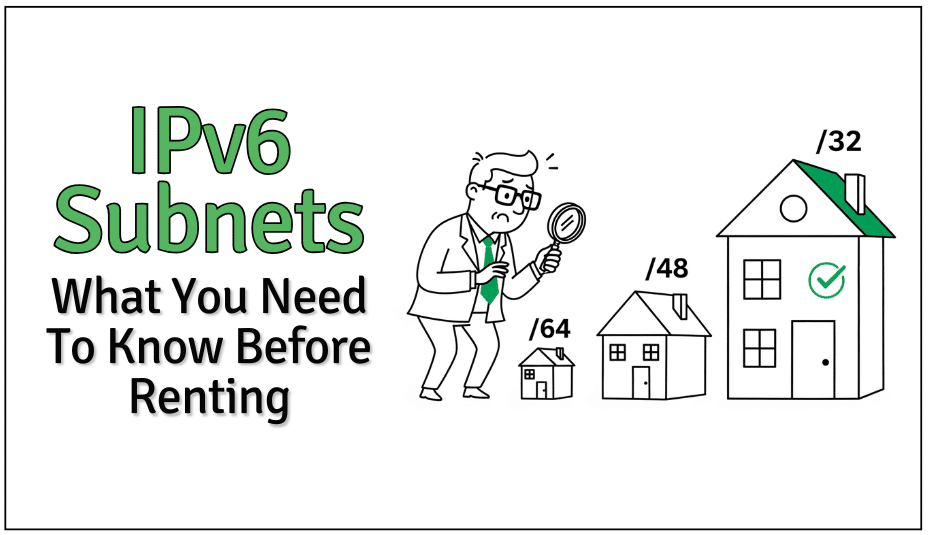
Table of Contents
- The IPv4 Bottleneck: Why Current Proxy Solutions Are Failing
- IPv6 Subnets, Explained: What You Should Know Before You Rent
- IPv6 vs IPv4 Proxies: What You’re Really Paying For
- Why IPv6 Is a Game-Changer for Scraping at Scale
- Technical Fit: What to Know Before Switching to IPv6
- Best Practices Before Renting IPv6 Subnets
- Frequently Asked Questions
- Final Words.
Content Disclaimer: This article is for informational purposes only and does not constitute technical and financial advice. Proxy use must comply with all applicable laws and target-site terms of service. RapidSeedbox is not responsible for how readers implement or use the information provided.
1. The IPv4 Bottleneck: Why Current Proxy Solutions Are Failing
IPv4-based proxy setups come with high friction (and high costs). You often need several types of proxies such as residential and datacenter from different vendors, each with its own API, auth system, and pricing. That of course only slows things down and multiplies vendor bills.
Scarcity makes things worse. There are only about 4.3 billion IPv4 addresses (and finding one is a constant battle). Demand is high and clean, unbanned IPs go for premium rates. Ban risk is rising too: more sites use fingerprinting, not just IP reputation. One bad IPv4 or one blocked subnet can degrade a lot of your proxy pool.
Switching to IPv6 subnets can slash costs by up to 70-80% in high-volume operations, while improving success rates dramatically. Clean, fresh IP addresses are much easier to come by. But that is not the only benefit, you also get lower bans and better reliability.
2. IPv6 Subnets, Explained: What You Should Know Before You Rent
You don’t need to be a network engineer to make smart proxy choices, but you do need to understand the basics of IPv6 subnets. Here’s a quick breakdown to help you avoid overspending or underutilizing your setup.
What Makes IPv6 Different (and Better)
- Massive scale: IPv4 has ~4.3 billion addresses. IPv6 has 340 undecillion. That’s a 38-digit number. That means, no NAT translation and no scarcity.
- Built for rotation: Instead of having a hard time managing a limited list of static IPs, you can generate fresh ones on demand within your subnet. Rotation works better with IPv6, because you’re not stuck cycling through a limited pool of static addresses. IPs can be randomly generated from within your subnet, avoiding detection by pattern. This lets you mimic human traffic. With IPv6 rotation, there is no obvious “proxy smell.”
- Low footprint: Most sites haven’t caught up to IPv6-level blocking. That means cleaner, lower-ban traffic (for now.)
Learn more about this topic in: All the differences between IPv6 and IPv4
Subnet Sizes: How Much Is “Enough”?
IPv6 allows for subnet sizes ranging from a single IP (/128) all the way up to the entire internet (/0), but let’s be real: most of that doesn’t matter when you’re renting or building proxy infrastructure.
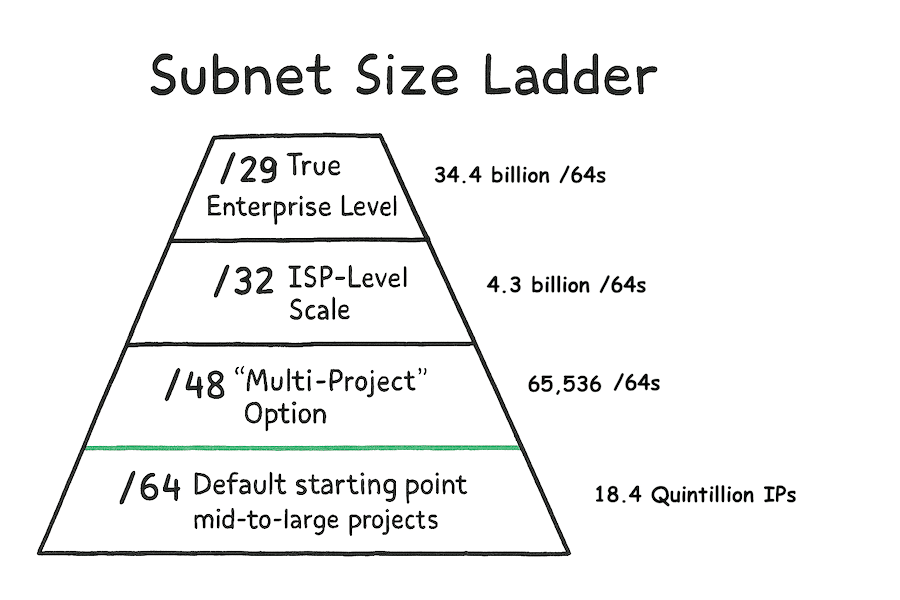
- /64 : Default Starting Point: A /64 subnet holds 18.4 quintillion IPs. Defined as the standard size in RFC 4291, it’s the most common allocation from proxy providers. With near-endless rotation, a /64 fits mid-to-large scraping projects and delivers what feels like an unlimited stream of fresh IPs.
- /48 : The Multi-Project Option: A /48 equals 65,536 individual /64s, usually assigned to organizations or service providers. It’s ideal for teams juggling multiple clients or verticals. You can carve the block into dedicated /64s for projects, workloads, or teams, giving each its own clean pool of addresses.
- /32 : ISP-Level Scale: A /32 contains 4.3 billion /64 networks. This tier is common for telecoms, cloud providers, and large platforms. It suits enterprises running proxy infrastructure at massive scale, or those reselling subnets downstream.
- /29 : Registry or Backbone Level: A /29 spans eight /32s, adding up to tens of billions of /64s. These allocations go to ISPs and backbone operators. For scraping or proxy work, it’s far beyond practical need, sitting firmly in the territory of providers serving entire industries.
- Other Sizes: IPv6 includes other options, but most aren’t relevant here. A /56, for instance, sometimes shows up in residential ISP setups. At the other extreme, a /128 is just one address, useless for rotation or scraping at any meaningful scale.
💡 Tip: Unless you’re managing infrastructure across regions or clients, a /64 or /48 will give you more than enough firepower.
| ⚠️ One Note of Caution: Not all targets support or treat IPv6 traffic the same. Some sites may eventually catch up with IPv6 blocking. For now, though, there’s a clear window of opportunity. |
Other sources of information on IPv6 subnets and addresses:
- What is IPv6: The Fundamentals
- IPv6 Address Types: A Comprehensive Guide
- IPv4 and IPv6 Subnetting Cheat Sheet
- Migration to IPv6: Benefits and Techniques
3. IPv6 vs IPv4 Proxies: What You’re Really Paying For
When you zoom out and look at the economics of proxy infrastructure, the gap between IPv4 and IPv6 is huge. Especially if you’re scaling past a few thousand concurrent requests.
Here’s a side-by-side breakdown that shows how each option stacks up:
| Proxy Type | Price per IP | Ban Resistance | IP Pool Size | Scalability | Best For |
| IPv4 Datacenter | $0.50–$2.00 | Medium | Limited | Poor | Basic automation |
| IPv4 Residential | $3.00–$15.00 | High | Medium | Poor | Ad verification, niche tasks |
| IPv6 Datacenter | $0.05–$0.30 | Very High | Massive | Excellent | High-volume scraping |
| IPv6 Residential | $0.50–$2.00 | Very High | Large | Good | Privacy-focused data collection |
The economics become clear when scaling your operations. For example, an organization requiring 10,000 concurrent connections would spend $30,000-150,000 monthly on IPv4 residential proxies, compared to $500-3,000 for equivalent IPv6 coverage. This 10-50x cost reduction allows completely new business models around data collection and analysis. Learn more in: IPv6 Proxies at 50%: What Businesses Must Do Next
Ban resistance represents another critical differentiator. IPv6 subnets often fly under the radar of detection systems built primarily for IPv4 traffic patterns. When bans do occur, the massive address space allows immediate rotation to clean IPs within the same subnet. This helps maintain operational continuity without switching providers or purchasing additional proxy packages. Learn more in: IPv6 Proxies: The Answer to Proxy Bans
| ⚡ Reality check: If you’re scaling and still using IPv4, you’re overspending. IPv6 gives you massive IP pools, lower ban rates, and smoother ops (for a fraction of the cost). The numbers don’t lie: it’s time to rethink your proxy strategy. |
4. Why IPv6 Is a Game-Changer for Scraping at Scale
Let’s say you’re running competitive price tracking across 50,000 products a day. With IPv4, you’re likely going over three different proxy vendors: for example one for residential for Amazon, another one for datacenter for smaller sites, and the third for rotating IPs for social platforms. It gets complex. And on top of that the costs start to mount. Each one comes with its own setup fees, APIs, auth quirks, and rate limits.
Here’s what that looks like every month:
- $45,000 in proxy spend
- 40+ engineering hours managing integrations
- 15+ hours lost to ban-related troubleshooting
- $8,000 in opportunity cost from delayed data during IP churn
Now compare that to a unified IPv6 subnet provider.
You’re looking at ~$6-8,000/month all-in. Forget about vendor sprawl and multi-API headaches. And the engineering time you save? At $150–$200/hour for senior devs, that pays for the switch you are trying to bring in, in just one quarter. Learn more in: How IPv6 Proxies Cut Scraping Costs by 70%
But in reality, it’s not just about cutting costs, you are also unlocking speed. With IPv6, you can collect fresher data, and more often. For example, instead of scraping competitor prices once an hour, you could do it every 15 minutes. This fuels dynamic pricing that captures more margin across thousands of SKUs.
And last but not least, you get unmatched scalability. On the one hand, IPv4 costs scale linearly with traffic. IPv6 doesn’t. That means you’re no longer capped by proxy overhead, and you can finally pursue the kind of data-driven strategies that used to feel out of reach.
5. Technical Fit: What to Know Before Switching to IPv6
Switching to IPv6 is not difficult, but it is not exactly plug-and-play either. Most modern scraping tools support it, but a smooth rollout depends on your infrastructure.
Before you rent a subnet, here’s what to double-check:
- Tool support: Selenium, Puppeteer, Scrapy, most major frameworks already handle IPv6. Older systems might need updates.
- ISP & network setup: IPv6 often needs to be enabled manually. That includes firewalls and proxy managers.
- Protocol support: Look for SOCKS5, not just HTTP. It’s key if you’re tunneling non-HTTP traffic.
- Rotation & address management: IPv6 uses ranges (not static IPs). Your stack should be ready to rotate dynamically.
- Auth methods: Expect a mix: user/pass, tokens, IP whitelisting. Make sure your systems can handle the type your provider uses.
Here’s the deeper breakdown. If your infrastructure is even somewhat current, you’re likely already IPv6-ready under the hood. Tools like Scrapy and Puppeteer work out of the box. But network-level things (like your ISP or firewall) might have IPv6 turned off by default. You’ll want to confirm that traffic can flow end-to-end before rollout.
The other piece is your proxy provider. True IPv6 support means SOCKS5 compatibility and dynamic rotation across subnet ranges. That’s a step up from the static IPv4 lists you might be used to. It also changes how your API integrates. Some providers use token-based auth, others still rely on username/password. Either way, knowing this upfront helps you skip the last-minute configuration panic.
| Bottom line? If you prepare for these five areas, the switch will go smooth and save time down the line. |
6. Best Practices Before Renting IPv6 Subnets
The payoff to move to IPv6 is huge, but only if you evaluate carefully before scaling. Here’s how to do it right:
a. Define Your Needs First
Start by mapping your actual use case, what sites you’re scraping and how often. Then think about scale. Those pieces set the foundation for picking the right subnet size and choosing a provider.
b. Run a Technical Checklist
Before signing anything, confirm the basics:
- Subnet size: Does /64, /48, or /32 match your rotation needs?
- Protocols: Do you get SOCKS5 plus HTTP/HTTPS support?
- API integration: How responsive are endpoints? How’s auth handled?
- Bandwidth limits: Any hidden throttling or data caps?
- Geo coverage: Does the provider cover the regions you need?
- Clean IPs: Can they prove the subnet hasn’t been abused before?
c. Test Before You Scale
Always run a pilot. Spin up a smaller pool and see how it performs against your real targets. Track ban rates, latency, rotation speed, and other important metrics. A strong provider should let you flip through addresses quickly without dropping connections or having login problems. If geo-location is important to you, confirm that IPs resolve to the right regions.
d. Evaluate the Vendor
A subnet is only as good as the provider behind it. Look at:
- Scale: Can they handle your growth curve?
- Support: How fast do they fix issues?
- Docs: Do they give clear, updated guides?
- SLAs: What uptime guarantees do they commit to?
- Compliance: Do they meet your industry’s security/privacy bar?
- Pricing transparency: Any hidden API, bandwidth, or support fees?
e. Keep Security (and Privacy) in Mind
IPv6 offers near-infinite addresses, but sloppy implementation can still create patterns that sites detect. Make sure providers use cryptographically random rotation (not sequential). Also, consider configuring DNS correctly so your infrastructure isn’t leaking IPv4 queries. And if anonymity is a priority, ask about shared subnets or masking options to avoid standing out.
f. Budget Beyond Sticker Price
People believe IPv6 pricing is one-size-fits-all, but it is not. Some charge per subnet, others by bandwidth or concurrent sessions. Add in the potential setup fees or integration costs. The flip side? You’re cutting vendor sprawl, engineering hours, and ban-related downtime. For many teams, the move pays for itself within the first quarter. Learn more in: IPv6 Proxies at 50%: What Businesses Must Do Next
7. Frequently Asked Questions
Most modern sites support IPv6, but not all. Roughly 35–40% of major websites run fully on IPv6, while others still route traffic through IPv4. Always test your target sites during a pilot.
Often yes. IPv6 can run faster thanks to newer infrastructure and less congestion. Real performance still depends on your provider’s network and the site you’re hitting.
Subnet bans are rare. If it happens, you can rotate to unused addresses instantly. Good providers also swap or replace ranges if needed.
Not usually. Tools like Selenium, Scrapy, and Puppeteer already support IPv6. You may just need to tweak configs. Older systems might need updates.
IPv6 is typically 60–90% cheaper at scale. That said, residential proxies may still win for edge cases like social media scraping or ad verification where IP “appearance” matters.
Yes. Many mobile carriers already run on IPv6, so traffic looks natural. With SOCKS5 support, you can tunnel almost any protocol through IPv6.
8. Conclusion
IPv4 proxies have turned into a costly bottleneck (eating budgets and slowing data work). IPv6 flips that equation.
Why?
With it, you get near-infinite clean IPs and lower costs. You also get fewer bans and smoother scaling. Teams that switch to IPv6 save money and move faster. They also gain a lasting edge while others stay stuck in the IPv4 scarcity spiral.
Don’t wait until migration becomes painful, test an IPv6 subnet today and see the payoff start almost immediately.
0Comments