 By
By
Big data work can get messy fast. IP bans and CAPTCHAs, they can all slow you down. But this is where residential proxy rotation comes into place. It fixes that by sending your traffic through real home connections that switch on their own. So, they make everything look like normal browsing. It keeps scraping and testing smoothly without setting off alarms. This guide walks through how rotation works, why residential IPs matter, what to check in a provider, and how to stay compliant while keeping your data operations fast, stable, and ethical.
TL;DR — Residential Proxy Rotation in a Nutshell
- What Are Rotating Residential Proxies (and How They Work?) → Rotating residential proxies disguise your activity by routing traffic through real home IPs that change automatically, making bots look human.
- How IP Rotation Works → Rotation frequency decides how “human” your automation appears—fast switching hides patterns, while sticky sessions keep logins stable.
- Why Residential IPs Matter → Websites naturally trust household IPs over datacenter ones, which is why real, ethically sourced addresses drastically reduce CAPTCHAs and bans.
- Common B2B Use Cases → Businesses rely on rotation to collect data, verify ads, test globally, and protect brands; because static IPs can’t scale or stay hidden.
- How to Pick a Proxy Provider → The safest proxies come from providers that balance speed, geo-diversity, session control, and consent-based IP sourcing—not just the biggest pool.
- Residential Proxy Rotation: Provider Comparison→ Enterprise tools like Bright Data and Oxylabs dominate in scale, but RapidSeedbox wins in practical ROI: transparent pricing, uptime, and ethics.
- Best Practices to Setting Residential Rotating Proxies → Success depends on behavior: rotate IPs and headers, spread traffic across regions, and monitor session health like uptime or error rates.
- Legal and Ethical Side → Proxy use stays legal when it’s consent-based and transparent—scraping public data is fine, but personal or private info crosses the line.
Content Disclaimer: This content is for informational purposes only. It doesn’t provide legal advice, endorsements, or guarantees of third-party services. Always ensure your residential proxy rotation practices comply with applicable data privacy laws and website terms before implementation.
1. What Are Rotating Residential Proxies (and How They Work)?
A proxy is like a middleman between you and the web. You send a request, the proxy talks to the site, and then it hands you back the result. A rotating residential proxy hides your real IP and replaces it with one from an actual home. This means, an actual address assigned by a real ISP to a regular customer.
The “rotating” part means the IP doesn’t stay still. It flips after each request or after a set period.
That shuffle makes it much harder for sites to spot automated activity. Instead of a single machine hammering a target, they see what looks like normal visits from thousands of homes.
Here’s how the main types differ:
- Static residential proxies: One IP that stays steady until you swap it. Reliable for logins but risky if it gets flagged.
- Rotating residential proxies: IPs change on their own. They change either per request or in sticky sessions that last five to sixty minutes.
- Datacenter proxies: These are the best if you are looking for cost-efficient speed. They are fast and cheap but easy to detect.
- Mobile proxies: Use 4G or 5G networks. They are extremely trusted but usually expensive.
| The short version? Rotating residential proxies give you authenticity and scale without setting off alarms. |
Rotating residential proxies work like this:
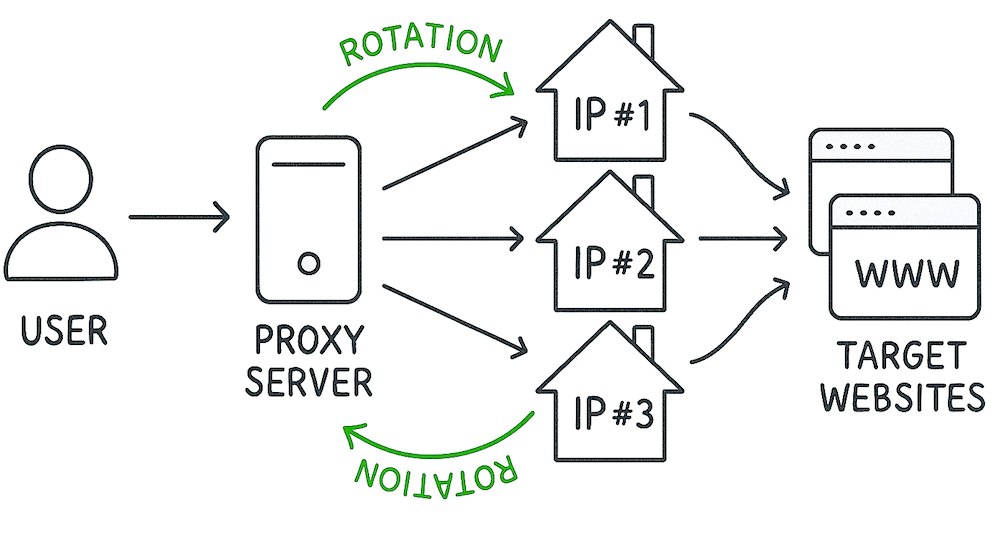
- User → Proxy Server: Your request first goes to the proxy server, not directly to the website.
- Proxy → Residential IPs: The proxy routes your request through real home IPs (IP #1, IP #2, IP #3).
- Rotation: Each new request automatically switches to a different residential IP. The idea is to keep your activity anonymous and avoid blocks.
- Access → Target Websites: The websites see traffic coming from real households, not from a data center. This way you stay undetected.
2. How IP Rotation Works
Rotation keeps your activity fresh and tough to trace. It’s the quiet trick that makes large-scale automation look like regular browsing.
- Per-request rotation: Every new connection uses a different IP. That’s perfect for heavy scraping runs or short bursts of traffic. If one IP gets blocked, the next request leaves under a new identity. Providers can change IPs after a set number of requests or instantly (some even flip with every single HTTP call).
- Sticky rotation (session persistence): With sticky session proxies, you hang onto the same IP for a while (ten, thirty, sometimes sixty minutes) before it rotates again. It’s the right move for sites that expect you to stay logged in or hold cookies.
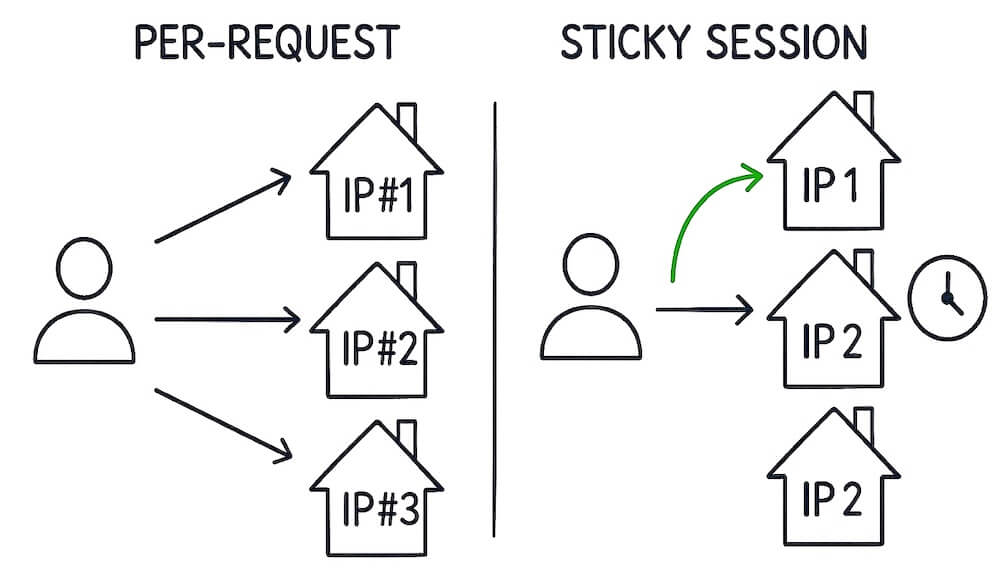
Providers like Rapidseedbox (and others) let you pick the mode that fits. You can even run parallel sessions under different IPs. This is quite handy when you’re managing multiple accounts or testing setups side by side.
Quick rotation gives you cover. Sticky sessions give you footing. Most real setups mix both, switching based on how each site behaves.
| Fun fact: Some proxy networks handle over a hundred million residential IPs, keeping the pool diverse and minimizing reuse risk. Learn more in: What Is IP Rotation and Why It Still Matters |
3. Why Residential IPs Matter
It is a fact: Websites trust traffic from homes more than traffic from data centers. A home IP looks like a real person behind it. This is usually someone browsing, not scraping. That trust right there, means fewer blocks and far fewer CAPTCHAs.
But how those IPs are gathered matters just as much. The good providers pay users or partner directly with ISPs. The shady ones hide SDKs in free apps and quietly siphon bandwidth.
An example of a stark case was RSOCKS, a proxy network seized by the U.S. Department of Justice in 2022. It secretly turned millions of hacked computers, phones, and IoT devices into residential proxies without consent. That is right! A massive botnet disguised as a service. Source: TechCrunch
Ask Where the IPs Come From
We always recommend asking where the IPs come from before you buy. Since these IPs rely on real internet connections, speeds can fluctuate. You trade a bit of stability for credibility. Most people think that’s a fair deal. Remember this: real homes build real trust. That’s the whole point.
Key Benefits
Rotating residential proxies do a lot of the heavy lifting for you:
- They hide you convincingly. Traffic blends with everyday users.
- They rotate on their own. You don’t have to keep changing IPs manually.
- They succeed more often. Residential IPs rarely hit blocks.
- They scale up fast. Large IP pools handle millions of requests per day.
- They adapt to regions. Route through the countries or cities you need.
- They throw off trackers. Constant rotation and subnet shifts break patterns.
- They’re easy to manage. Dashboards, APIs, and browser tools cover most setups.
They’re steady, low-maintenance, and built for serious data collection — without the constant “access denied” grind.
4. Common B2B Use Cases for Residential Proxy Rotation
This is where rotating residential proxies start to prove their worth. Not in theory, but in the messy, real-world stuff that breaks most automation.
- Web scraping. You can pull product data, inventory, reviews, pricing at scale without watching your IP burn out halfway through. If one request trips a block, no problem, the next slips right past it. Learn more in: The Ultimate Guide to Web Scraping [Updated]
- Price monitoring. Competitors tweak prices by region and hour. With rotation, you see it all, the shifts they’d rather you didn’t.
- SEO tracking. Search results change depending on who’s asking and where they are. You want to see what someone in Berlin sees, or Tokyo? This is how you do it. Learn more in: The SEO Proxy: What is it and Why Do You Need it?
- Ad verification. Ads don’t always show up the way you think. Rotation lets you confirm what actually runs where. And, you can also call out the junk placements before they burn your budget.
- Social automation. Managing a handful of accounts is fine until the platforms start sniffing patterns. Different IPs keep those lines from crossing. It also keeps your campaigns alive.
- App and QA testing. You can pretend to be a user in another city and even on another continent. That’s how you find the bugs hiding in local versions or regional APIs.
- Brand protection. Protect your brand from things like fake stores, counterfeit listings, or even quiet theft at scale. Rotation lets you go undercover. You can find the bad actors before they find you.
If your work depends on clean, region-specific data, this is the backbone. Residential proxy rotation keeps the feed steady and believable.
One more thing, scale. Some networks handle mind-bending size, rotating through tens of millions of home IPs every day. RapidSeedbox alone provides over 6.9 Million worldwide rotating residential IPs across more than 100 countries.
5. How to Pick a Proxy Provider
Not every proxy company deserves your trust. Some look slick on the surface, but once you dig in, you might find recycled IPs, shady sourcing, zero accountability and poor support. A good one strikes a balance between speed and ethics. You don’t need flashy proxy dashboards, just solid groundwork.
Before you sign up, walk through the basics. Not the marketing lines, but the details that actually help you decide whether your rotation will runs smoothly or collapse mid-project.
| Criteria | Why It Matters | What to Look For |
| IP Pool Size & Diversity | Larger pools mean fewer reused IPs and fewer bans. | Go for hundreds of thousands or more, ideally spread worldwide. |
| Session Control | Rotation flexibility keeps automation stable. | Make sure you can set per-request or sticky modes and run multiple sessions. |
| Geo-Targeting | You can’t test globally with local IPs. | Confirm access to key countries or cities before you commit. |
| Speed & Reliability | Lag ruins scraping and testing. | Look for low latency, high uptime, and proven success rates. |
| Protocol Support | Broad support avoids compatibility headaches. | HTTP, HTTPS, and SOCKS5 — you’ll want all three. |
| Ethical Sourcing | Consent matters, both legally and morally. | Stick with providers who pay users or partner with ISPs. |
| Integration Tools | Easy management saves hours. | APIs, dashboards, and extensions make scaling simple. |
| Support & Pricing | Transparency beats “unlimited” gimmicks. | Fair pricing, clear limits, and real support teams. |
That’s the checklist!
But don’t treat it like a shopping cart. Pick proxies the way you’d pick a good host: for uptime and long-term reliability, not shiny claims or bargain rates.
Scale Without Getting Flagged 🚀
Handle millions of requests quietly. Let residential proxy rotation take care of the switching.
Start Safe Scaling →6. Residential Proxy Rotation: Provider Comparison
a. RapidSeedbox

RapidSeedbox focuses on reliable performance and wide IP coverage. It offers rotating residential proxies that are easy to configure and fast enough for most enterprise-grade automation. While it doesn’t yet provide city-level targeting, its network uptime remains strong and consistent. Most B2B teams appreciate how transparent the pricing is: no hidden overage fees, predictable bandwidth billing, and clean flexible REST API for integration. When you want solid speed and honest pricing rather than layered upsells, RapidSeedbox is the dependable pick.
b. Bright Data (formerly Luminati)

Bright Data is the heavyweight of the proxy industry. It runs one of the largest residential proxy pools in the world (more than 150 million IPs across 195+ countries) and allows targeting by city, state, or even ZIP code. Its infrastructure supports HTTP, HTTPS, and SOCKS5, plus automatic CAPTCHA resolution and advanced rotation options. Pricing sits at the top end of the market, typically $8 per GB for pay-as-you-go plans and around $3–4 per GB at scale. It’s powerful and deeply customizable — but the setup can feel heavy for smaller or mid-sized B2B operations.
Learn more in: Bright Data Proxy Reviews and Alternatives
c. Oxylabs

Oxylabs targets enterprise clients that need speed and throughput. It maintains around 175 million residential IPs and includes ISP, datacenter, and mobile pools to handle almost any task
Residential pricing averages $3.50–$5.40 per GB, depending on volume and contract length. The platform offers an intuitive dashboard, flexible API, and strong performance under load. However, its IP diversity can narrow in smaller markets (making rotations occasionally repeat). It’s an excellent option for high-volume workflows but less practical for teams that just need reliable, region-based targeting at a lower entry cost.
Learn more in: Oxylabs Review (+Alternatives)
d. PacketStream

PacketStream runs on an ethical peer-to-peer model. It pays real users to share bandwidth and passes that access to buyers through its rotating residential proxy pool. The big draw is price: only $1 per GB, with no subscriptions or time limits. Transparency is also its hallmark: simple interface and no data-harvesting tricks. The trade-off is speed. During heavy network load, connections can lag, and the smaller IP pool limits freshness. PacketStream works best for small-scale scraping rather than intensive enterprise data gathering.
Learn more in: PacketStream Review (+Alternatives)
e. Webshare and IPRoyal (Decodo)
Both Webshare and IPRoyal appeal to users testing residential proxies for the first time. They’re budget-friendly and easy to set up but often show higher block rates and slower refresh times. In short, they’re good entry-level tools but rarely hold up under consistent B2B workloads.

Webshare combines static and rotating proxy options with modest coverage and pricing flexibility. Learn more in: Webshare Review [+ Alternatives]

IPRoyal’s residential pool starts around $7 per GB, and offers basic rotation and API integration. Learn more in: IPRoyal Review: Is it Worth a Shot?
7. Best Practices To Setting Up Residential Rotating Proxies
Proxies aren’t plug-and-play. How you set them up decides whether you slip by unnoticed or trip every alarm on the site.
We always recommend the following:
- Start with the basics. Match your rotation mode to the job. Sticky sessions fit anything that needs continuity (think: logins, carts, cookies, etc). Per-request rotation is for big scrapes or wide crawls where each page hit should look brand new.
- And when you’re done, close your sessions properly. Don’t leave half-open connections hanging or old IPs floating around. Let them go back into the pool clean, ready for the next run.
- Spread your traffic. Don’t keep hammering the same subnet or region. Mix it up! For example: different blocks and different countries. That randomness looks more human and keeps anti-fraud systems guessing.
- Change more than just IPs. Rotate headers, user-agents, referrers, even viewport sizes if you can. Sites don’t only track IPs; they track patterns. So, if you still have the same fingerprint but different IP, websites still see a bot.
- Keep an eye on your metrics. Bandwidth, concurrency, success rates, latency. Graph them, log them, notice when the lines start to drift. Small hiccups often warn you before big failures hit.
- If a request fails (timeout, 403, 429) don’t brute-force it. Retry with a new IP, maybe after a short delay. Add some jitter so your retries don’t look mechanical.
- Always test small before you scale. Start with a handful of pages on a single region. Once it’s stable, push the load up gradually.
| The gist? Vary your moves. Clean up after yourself. And don’t forget to watch your numbers. That’s how you stay invisible and keep performance steady over time. |
8. Legal & Ethical Side
Proxies themselves aren’t illegal. Misusing them can be. So, the difference usually comes down to consent and privacy. (Learn more in: Are Proxies Illegal?).
A trustworthy provider tells you where their IPs come from. For example paid participants, ISP partners, verifiable opt-ins. If that info’s missing or vague, consider walking away.
Then there’s compliance. Regulations like GDPR in Europe or CCPA in California set the boundaries. Public data, like product listings or stats, is usually fine. But personal data? Not without consent.
Always respect a site’s Terms of Service. Just because something’s technically possible doesn’t mean it’s allowed. Keep internal logs of what you collect and under which rules. It’s protection for you if questions ever come up.
Some proxy networks are now introducing ethical-sourcing certifications (early steps toward standard transparency). Those seals might soon be the shortcut for spotting legit providers.
9. Frequently Asked Questions About Residential Proxy Rotation
It depends on how hard you’re hitting the site. Light scraping? Switch every five to ten requests. Heavy crawls? Rotate each time. For logins or carts, hold a sticky session for ten to thirty minutes so cookies don’t break. The goal isn’t constant change — it’s enough variation to stay unnoticed.
Session control keeps you on the same IP for a while. Rotation swaps that IP out. Together they decide how long you stay visible in one spot before moving. The best setups let you tweak both — stable when you need to log in, restless when you’re gathering data fast.
It makes you look local. If you’re testing ads or prices, you’ll see what users in Tokyo or Berlin actually see — not the global average. Without it, data skews. Local differences vanish.
Small pools repeat IPs too often, and that’s how you get flagged. Bigger, more diverse pools spread the load and keep your footprint light. A few hundred thousand IPs is the floor; millions are safer if you’re running parallel threads or scraping at scale.
Most providers use login credentials or IP whitelisting. Password auth is flexible — good for APIs or scripts. Whitelisting fits locked-down servers. Either way, wrap it with HTTPS or SOCKS5 so nothing sensitive travels in the open.
10. Final Words
Rotating residential proxies started as a niche developer tool. Now they’re the backbone for modern data work: scraping, testing, market research, and brand protection.
Always remember!
Don’t buy based on bandwidth alone. Look at things like IP quality, rotation control, geo options, ethical sourcing, and long-term reliability.
End the CAPTCHA Cycle 🔁
Rotate IPs the human way and stop wasting hours solving verification puzzles.
Enable Smooth Rotation →
0Comments