 By
By
Modern scraping fails without IP diversity. Backconnect proxy networks solve that with one gateway that rotates clean IPs and supports short sticky sessions. This guide explains the model, how it works, when to use it vs ISP/static/datacenter, and how to configure rotation, geo, and pacing. You’ll get a quick vendor comparison, setup checklist, and practical do’s/don’ts to keep sessions stable and control $/GB across workloads.
Start with one gateway! Spin up rotating residential IPs with short sticky sessions and geo-accurate exit.
TL;DR / Key Takeaways
- What it is: A backconnect proxy gives you one gateway that routes requests through a rotating IP pool (residential/mobile/datacenter) per request or on a timer—no manual proxy lists.
- Why it matters: Rotation + big pools = fewer bans, better geo, and simpler ops. Use sticky sessions for logins/carts to keep sessions stable.
- Who it’s for: Web scraping, ad verification, SEO/SERP, QA, brand protection at scale.
- Who it’s not for: Workloads needing a single stable IP for days or ultra-low latency—choose ISP/static DC instead.

Table of Contents.
- What Is a Backconnect Proxy Network?
- Backconnect Proxy: Setup & Implementation Checklist
- When to Use Backconnect vs. Static/ISP/DC
- Best Backconnect Proxy Providers (Fast TL;DR Guide)
- FAQ: Backconnect Proxy Network
Disclaimer: This article is informational, not legal advice. Your use of any proxy—including RapidSeedbox—must comply with applicable laws, website terms, and ethical data practices; do not access non-public data or scrape sensitive data without a lawful basis. RapidSeedbox services (residential, mobile, datacenter; rotation/sticky) are provided as-is, subject to its Terms and KYC (Know Your Customer), with no warranties; If unsure, consult legal counsel.
1. What Are Backconnect Proxy Networks?
A backconnect proxy gives you one proxy address (the “gateway”). Behind it, the provider runs a large IP pool and automatically picks the exit IP for each request (rotation), or holds the same IP for a short sticky window when session continuity is required.
- Before: Single proxy → repeated requests from one IP → CAPTCHAs/blocks
- After: One gateway → requests spread across a rotating IP pool → higher success
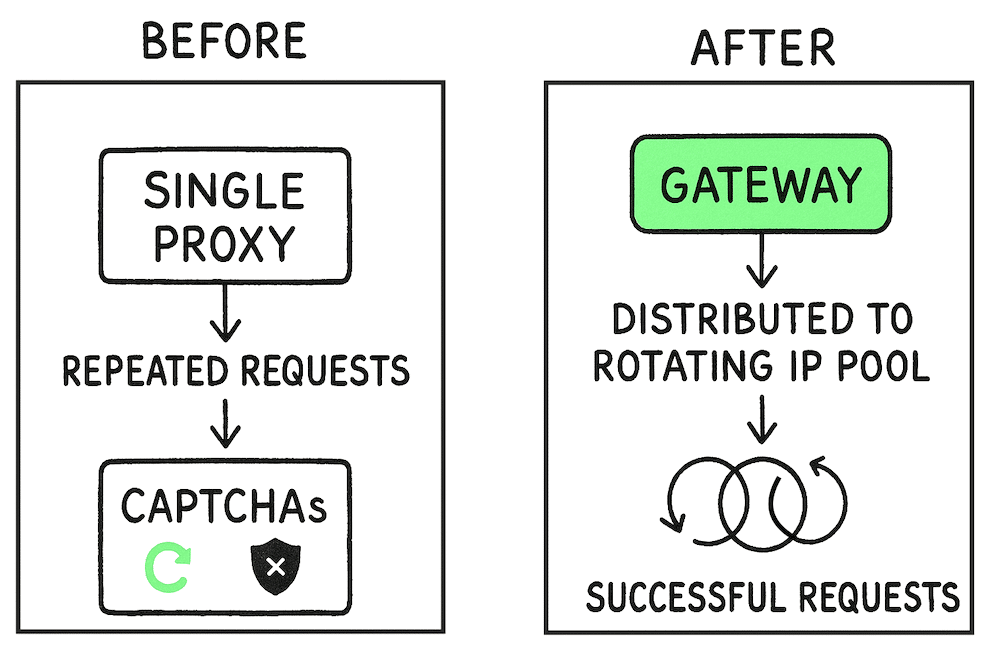
So, what makes this setup stand out?
For starters, it just works. Success rates stay high because clean IP pools and automatic rotation keep bans to a minimum. You don’t have to babysit proxy lists or swap burned-out IPs (one config handles it all). And if you need geo targeting, to target a specific country, city, or even carrier, you can handle it with backconnect proxy networks.
In addition the sticky sessions are ready on demand, so logins and cart flows stay smooth. And when it’s time to scale, you can ramp up threads without worrying over proxy limits. The best part? All the behind-the-scenes stuff (rotation, health checks, failover) it’s handled for you. So you stay focused on results, not maintenance.
How it works (at a glance)

- You point your app to one “Backconnect” proxy gateway (e.g., gw.provider.com:10000).
- The gateway selects an exit IP from a large pool based on your rules (country/city/ASN, sticky time, etc.).
- On the next request, it can rotate to a new IP automatically—or hold the same IP for a configured “sticky” window.
Common Use Cases
Here’s where backconnect proxies earn their place: real-world tasks that need scale and fewer blocks.
- Web scraping / list crawling: Rotate per request to spread load and avoid IP throttles; use city targeting when results vary by locale and sticky 5–10 min only for logged-in flows.
- Ad verification: Residential/mobile exits mimic real users across geos and carriers; build test matrices (country → city → carrier → device) and capture screenshots + timestamps.
- SEO/SERP tracking: City-level exits yield locally accurate, de-personalized results; rotate per query and store exit IP + geo with rankings.
- Market research & price monitoring: Precise geo exits reveal regional pricing; use short sticky for pagination and sample multiple times to smooth A/B tests.
- Brand protection: Diverse IPs uncover geo-hidden counterfeit listings; log evidence (screenshots, seller IDs, exit IP/geo) for faster takedowns.
- QA & localization testing: Simulate real users via city/ASN targeting to validate content, taxes, and flags; keep 10–15 min sticky for sessioned flows.
- Social media ops: Assign a unique residential IP identity per account with timed sticky windows; pair with browser-fingerprint variance and human pacing.
2. Backconnect Proxy: Setup & Implementation Checklist
The idea: you use one proxy address (the “gateway”).
Behind it, the provider has a big pool of IPs. Each request can leave through a different IP (IP rotation), or the same IP for a short time (a “sticky” window) when you need session continuity.
Setup in 3 steps
- Point your app to the gateway (e.g., gw.provider.com:10000).
- Choose rules in your credentials/URL: rotation mode (per request or sticky N minutes), geo (country/city/ASN), and protocol (HTTP/HTTPS/SOCKS5).
- Send requests; the gateway applies your rules and picks exit IPs automatically.
Implementation Checklist
a. Rotate vs. Stick:
- Rotate per request → bulk scraping or enumerating lists. Ideal for minimizing bans.
- Gotcha! Rotating mid-session can break logins/carts. So use sticky for those steps. Also, expect occasional swaps/timeouts on rotation → add retries with small jitter.
- Sticky (5–15 min) → logged-in flows or carts. Also, for pagination where the site expects one consistent user.
- Gotcha! Rotating mid-session breaks state—keep sticky during auth/checkout.
b. Match Geo Precisely:
Select country → city → (ASN/carrier) when results depend on location.
- Gotcha! Tight city/ASN filters can shorten IP availability—if a sticky drops, re-acquire a new sticky in the same geo.
c. Control Pace:
Cap concurrency per domain, add jittered retries and exponential backoff.
- Gotcha! Datacenter pools get banned more—expect higher retry rates; blend in residential for tougher endpoints.
d. Track Context:
Log exit IP, city/ASN, session ID, sticky duration with every request for debugging and audits.
- Gotcha: Residential/Mobile is GB-metered—set budgets/alerts; compress responses where possible.
| 🛠️ Practical implementation tips! Rotation alone isn’t enough on modern bot defenses. We recommend using a combination of sticky windows for auth flows, header/device variance, controlled concurrency, randomized timing, and geo-appropriate exits. And remember: Avoid “every-request rotate” on sites that bind sessions to IP; prefer 5–10 min sticky. Also, we recommend to check vendor docs for stickiness limits. |
3. When to Use Backconnect vs Static/ISP/DC
Different targets need different identities. Some sites punish repeat IPs (that’s when you need rotation), others expect one user over time (this is where you need stability). Cost also swings a lot: residential/mobile = higher $/GB but higher success; datacenter = cheap and fast but easier to flag. Use the quick rules and examples below to pick the right lane.
Quick Decision Rules:
- If the site blocks fast or shows CAPTCHAs often → use backconnect residential (or Mobile for the toughest app/geo checks).
- If you must look like the same user for hours/days → use ISP (static residential).
- If the site is lightly protected and you need huge volume at low cost → use Datacenter (backconnect or static).
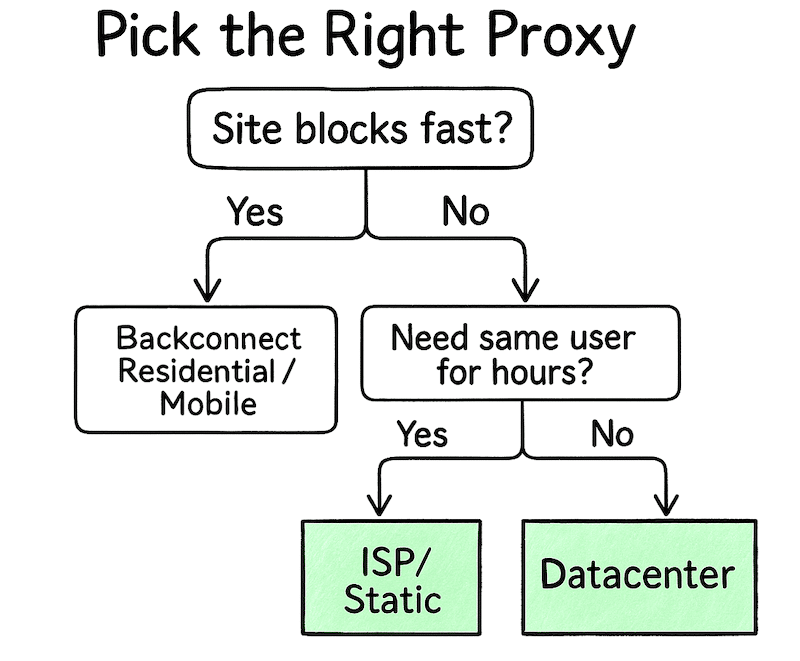
What each option is best at?
- Backconnect Residential (rotating/sticky): Best for protected e-commerce sites, classifieds, ticketing, city SERPs. Why use it? Its big diverse pool hides patterns, the sticky 5–15 min for carts/logins.
- Backconnect Mobile (rotating/sticky): Best for ad verification by carrier, mobile app flows, and geo-locked content. Why use it? The mobile ASN/carrier reputation is hardest to flag.
- ISP / Static Residential: Best for allow-lists, merchant dashboards, long audits, and strict partner APIs. Why use it? Residential ranges + stable identity for days/weeks.
- Datacenter (static/rotating): Best for cheap, fast volume on lenient sites, internal tools, sitemaps. Why use it? It provides the lowest cost and lowest latency (huge concurrency.)
Scale without noise 📈
Backconnect proxy networks spread requests quietly—less throttling and smoother throughput—using rotating residential proxies for steady, wide geographical coverage.
Start rotating IPs4. Best Backconnect Proxy Providers
Choosing the right backconnect proxy can mean the difference between constant blocks and smooth, scalable data collection. Below is a quick, vendor-aware snapshot you can act on now.
Comparisons TL;DR
| Provider | Best for | Pricing | Key win | Watch-outs |
| RapidSeedbox | Simple backconnect across DC/Res/Mobile | Res/Mob $/GB; DC per-IP | One gateway, easy rotate/sticky toggles | Smaller res/mobile pools; no “unlocker” |
| Bright Data | Hardest targets, enterprise | $/GB (enterprise) | Huge pool, deep geo, Unlocker | Pricey; strict KYC |
| Oxylabs | High success, city/ASN control | $/GB tiers | Fast network, sticky entries, great docs | Costly at low volume |
| Decodo (Smartproxy) | Value + long sticky | PAYG $/GB + tiers | Easy dashboard, good price/perf | Fewer advanced extras |
| SOAX | Flexible sticky, carrier tests | $/GB + paid trial | Clean pools, precise geo | Smaller active pool |
a. RapidSeedbox
- Best For: Teams that want a simple, backconnect-style workflow (one gateway, provider-side rotation + sticky) across datacenter, residential, and mobile in a single vendor.
- Pricing: Residential/Mobile are typically $/GB, while Datacenter (IPv4/IPv6) is usually per-IP with strong bulk value. Exact rates vary by plan. Confirm current tiers and any trial/pilot options with sales.
- Use Case: Backconnect-style rotating/sticky across residential/mobile/DC

RapidSeedbox provides rotating and sticky proxies that behave like a backconnect gateway. That means you point your client at one host:port, choose rotation or sticky and geo in credentials. And then, the service routes requests through the right exit IPs automatically.
Key Features:
- One-endpoint rotation (per-request) and sticky sessions for login/cart flows
- HTTP & SOCKS5 support across products
- Country-level geo targeting options may be available per plan
- Unified dashboard/API; easy toggles for rotation vs. sticky
- Robust datacenter (IPv4/IPv6) inventory for high-volume, low-cost tasks
Why do we recommend it?
Setup is fast and predictable—flip between rotation and sticky without rewriting your client. You can run a mixed stack (DC for cheap volume, residential/mobile for harder targets) under one roof, with consistent session controls. It’s a pragmatic balance of flexibility, cost control, and operational simplicity for data teams.
- Pros: Single gateway; per-request rotate; ~30-min sticky; simple UI/API
- Cons: Smaller res/mobile pools than giants; no “unlocker” suite
b. Bright Data
- Best For: Enterprises that need the largest IP variety and the most granular geo.
- Pricing: Primarily $/GB with higher entry tiers and strong volume discounts. Expect KYC/verification and enterprise contracts for full-feature access. $/GB (enterprise tiers)
- Use Case: Enterprise backconnect (res/mobile/ISP/DC)

Bright Data is a full web-data platform offering residential, mobile, ISP, and datacenter proxies with backconnect-style gateways (rotate per request or hold sticky sessions). It also bundles “unlocker”/scraper products that handle anti-bot hurdles beyond IP rotation.
Key Features:
- Massive multi-network IP coverage (res/mobile/ISP/DC)
- Gateway rotation + sticky; deep country/city/ASN/carrier targeting
- Web Unlocker / scraper APIs; robust dashboard & Proxy Manager
- Strong compliance/KYC, enterprise SLAs and support
Why do we recommend it?
If you’re facing the toughest sites, Bright Data pairs a breadth of IPs with battle-tested unblocking tools. It’s premium, but minimizes internal engineering on anti-bot edge cases and scales cleanly for global operations.
Learn more from this provider in: BrightData Proxy Review and Alternatives
- Pros: Huge pool; deep geo; Web Unlocker
- Cons: Premium price; strict KYC
c. Oxylabs
- Best For: Technical teams that want high success rates and strong enterprise support without a full scraping “suite.”
- Pricing: $/GB tiered plans with business trials and volume discounts. Mid-to-premium pricing at low tiers; competitive at scale.
- Use Case: Rotating & sticky via backconnect entry

Oxylabs provides residential, mobile, ISP, and DC proxies with backconnect entries for rotation or sticky sessions. It focuses on performance, documentation, and integrations (including scraper APIs) rather than heavy lock-in tooling.
Learn more about this provider in: Oxylabs Review + Alternatives
Key Features:
- Backconnect rotation + sticky, city/ASN targeting
- Fast networks, high concurrency; clear docs & examples
- Scraper APIs/unblocking helpers; enterprise support & SLAs
- Broad protocol support and tooling
Why do we recommend it?
Oxylabs hits a sweet spot of reliability and control: excellent performance and granular geo. It’s a top choice when you want enterprise-grade proxies with straightforward engineering integration.
- Pros: City/ASN geo; strong docs/support
- Cons: Pricier at low tiers
d. Decodo (Smartproxy)
- Best For: Cost-conscious teams that still want a serious residential pool and long sticky options.
- Pricing: Pay-as-you-go $/GB and monthly tiers keep entry costs low; discounts at higher volumes. Great value for testing and scaling.
- Use Case: Value rotating with long sticky

Decodo (formerly Smartproxy) offers residential/ISP/DC proxies with gateway rotation and notably long sticky windows. Its dashboard and guides are beginner-friendly while still supporting advanced use.
Learn more about this provider in: SmartProxy Review and Alternatives
Key Features:
- Rotating per request + long sticky sessions
- Country/city (and often ASN/ZIP) targeting
- Simple dashboard, browser extensions, API
- Fast setup; strong documentation and support
Why do we recommend it?
You get much of the “big vendor” capability without the enterprise overhead or price. It’s ideal for pilots, SMBs, and teams optimizing $/GB while keeping success rates solid.
- Pros: Good price/perf; easy dashboard
- Cons: Fewer extras than BD/Oxy
e. SOAX
- Best For: Flexible rotation control and mobile/residential coverage where minute-level sticky and carrier/ASN options matter.
- Pricing: $/GB tiers with modest minimums and frequent promos; paid short trial options for validation. Competitive mid-market pricing.
- Use Case: Flexible rotation; protocol variety

SOAX provides residential and mobile proxies with backconnect-style rotation and user-defined sticky durations. It emphasizes clean pools, precise geo, and operational flexibility (including UDP/QUIC support in some flows).
Key Features:
- Per-request rotation + minute-level sticky
- Country/city/ASN (and carrier on mobile) targeting
- Clean IP focus; broad protocol support
- Straightforward dashboard and API
Why do we recommend it?
SOAX shines when you need fine control over session length and geo without heavy enterprise lock-in. It’s a practical pick for ad verification, mobile/app testing, and city-accurate scraping where flexible sticky windows pay off.
- Pros: Good geo; minute-level sticky
- Cons: Smaller active pool than giants
| ⚠️ Important! TCO & Lock-In: Backconnect = $/GB variable cost + engineering time for anti-bot behavior. Enterprise suites (unlockers/scraper APIs) raise ARPU but reduce internal maintenance — trade spend for reliability. |
5. FAQ: Backconnect Proxy Network
One gateway that routes requests through a rotating IP pool (residential/mobile/DC). Rotate per request or keep sticky sessions for a set time.
The tech is legal; but use matters. Follow site TOS and privacy laws (GDPR/CCPA); choose ethically sourced IPs; expect KYC with top vendors.
When you need a stable identity for long durations or the lowest latency. Use backconnect for scale and tougher targets.
Typically ~10–30 minutes, depending on provider and plan—check docs.
HTTP(S) is enough for web scraping; SOCKS5 helps for non-HTTP traffic or specific tools. Discover more about SOCKS5 proxies.
No. We recommend pairing rotation with header/device variance, pacing, and real browser stacks on tougher sites.
Enterprise/hardest targets: Bright Data, Oxylabs. Value/speed to deploy: Decodo (Smartproxy). Flexible sticky & mobile: SOAX. All-in one with simple gateway flow: RapidSeedbox.
Carrier-level checks 📱
Backconnect proxy networks use mobile proxies to validate ads and app flows on real carrier paths with precise geo.
Run carrier tests
0Comments