 By
By
In the past, managing multiple proxies in your browser meant delving into complex network settings each time you wanted to switch connections. FoxyProxy solves this problem with a comprehensive browser extension that automates proxy management across Chrome, Firefox, and other browsers.
Does FoxyProxy deliver on its promise of seamless proxy switching, or are there better alternatives for managing your proxies? This review will examine the features, performance, and real-world usability of FoxyProxy. We’ll also introduce you to powerful alternatives that may better suit your needs.
🧭 FoxyProxy switches proxies — it doesn’t power them.
Upgrade to clean, fast IPs built for scale and scraping — get 25% off RapidSeedbox Proxies. Get Real Proxy PowerTable of Contents
- What is FoxyProxy?
- FoxyProxy Features and Capabilities
- Performance and Reliability
- FoxyProxy Versions and Pricing
- Best FoxyProxy Alternatives
- FAQ
- Final Thoughts
1. What is FoxyProxy?

FoxyProxy is a Firefox and Chrome extension developed by the same team since 2006 that switches an internet connection across one or more proxy servers. Unlike basic proxy tools, FoxyProxy automates proxy management with a rule-based system.
The extension enables users to establish complex switching rules based on URLs, browser tabs, containers, or manual selection. This feature is particularly valuable for users who need to access different proxy servers for different websites or tasks, as it eliminates the need to constantly change browser settings.
a. Key Highlights
- Multi-browser support: Available for Chrome, Firefox, Edge, and other Chromium-based browsers
- Advanced rule system: Automatically switch proxy by browser tab, URL patterns, Firefox container, private browsing window, or manually select from a drop-down list
- Visual organization: Customize colors and country flags to make it easy to see which proxy is in use
- Open source: No remote code is used in this extension. Open source software
- Cross-device sync: Import/export settings or sync across browsers using Firefox Sync
b. Market Reputation and Trust
The same few people have owned and consistently developed FoxyProxy since 2006. It has never been sold. This long-term commitment provides users with confidence in the program’s stability and ongoing development.
The extension’s open-source nature ensures transparency, with all code available on GitHub. Regular updates ensure compatibility with the latest browser versions and security requirements, including support for Manifest Version 3 on Chrome.
2. FoxyProxy Features and Capabilities
FoxyProxy stands out with advanced features that go far beyond simple proxy on/off functionality. Here’s what sets it apart in the competitive browser extension market.
a. Intelligent Proxy Switching
The extension’s most powerful feature is its rule-based switching system:

- URL pattern matching: define URL patterns with wildcards or regular expressions to automatically route specific websites through designated proxies
- Per-tab proxies: set individual proxies per tab: assign up to 4 proxy servers for use on 4 different tabs
- Container support: Firefox users can assign different proxies to different containers for enhanced privacy segmentation
- Incognito mode control: Select a specific proxy to use only in private browsing, giving you control over which sessions go through a proxy
b. Visual and Organizational Tools
FoxyProxy makes proxy management intuitive through visual cues:
- Color coding: Assign custom colors to different proxies for instant identification
- Country flags: Visual indicators show which country’s proxy is currently active
- Toolbar integration: point-and-click of colored icons enables quick switching
- Pattern testing: Built-in tester validates URL patterns before implementation
c. Advanced Configuration Options
Power users benefit from sophisticated configuration capabilities:
- Multiple protocol support: HTTP, HTTPS, SOCKS4, and SOCKS5 proxy protocols
- Authentication management: Secure handling of proxy credentials with built-in authentication
- WebRTC control: enable or disable WebRTC directly within the extension to prevent websites from discovering your real IP
- DNS configuration: Control DNS routing through proxy servers for enhanced privacy
d. Import/Export and Backup Features

The extension provides robust data management:
- Settings synchronization: Import/Export all of your settings, or just URL patterns, to share with others. Optionally synchronize proxy settings with your other Firefox instances when you use Firefox Sync
- Bulk management: Import proxy lists from files or other sources
- Cross-platform sharing: Transfer configurations between different browsers and devices
3. Performance and Reliability
Although FoxyProxy’s performance depends on your underlying proxy infrastructure, the extension itself introduces minimal overhead to browsing speeds.
a. Speed and Efficiency
The extension operates efficiently with several performance advantages:
- Lightweight design: Although outdated, the design allows for minimal memory usage and CPU overhead
- Fast Rule Processing: Pattern matching happens instantly without noticeable delays
- Native Browser Integration: Uses browser APIs for optimal performance
- Efficient Authentication: Streamlined proxy authentication prevents connection delays
b. Reliability Factors
FoxyProxy demonstrates strong reliability metrics:
- Stable development: 19+ years of continuous development ensures mature, tested code
- Regular updates: Consistent updates maintain compatibility with browser changes
- Error handling: Graceful fallback when proxy connections fail
- Connection management: Automatic retry mechanisms for failed proxy connections
c. Real-World Usage Scenarios

The extension excels in several practical applications:
- Web scraping operations: Developers use FoxyProxy to rotate through different proxy servers automatically based on target websites, preventing IP blocks during data collection.
- Geo-restricted content access: Users create rules that automatically route streaming services through region-specific proxies while keeping general browsing on their main connection.
- Privacy-conscious browsing: Privacy advocates configure different proxies for different types of websites, ensuring banking goes through trusted connections while social media uses anonymous proxies.
- Development and testing: Web developers test applications from different geographic locations by quickly switching between proxy servers representing various regions.
4. FoxyProxy Versions and Pricing
FoxyProxy offers multiple versions to suit different user needs, with most functionality available completely free.
a. FoxyProxy Standard (Free)
The primary version includes all major features:
- Full rule-based switching capabilities
- Support for all proxy protocols
- Visual customization options
- Import/export functionality
- Pattern testing tools
- Container and incognito mode support
b. FoxyProxy Basic (Free)
The differences between the free extensions are negligible. The Basic extension has fewer filters in the pop-up interface, but both extensions use the same browser window UI. The main limitation is the lack of advanced pattern testing features.
c. Cost Comparison
| Feature | FoxyProxy Standard | FoxyProxy Basic | Premium Alternatives |
|---|---|---|---|
| Price | Free | Free | $5-20/month |
| Rule-Based Switching | ✓ | ✓ | ✓ |
| Pattern Testing | ✓ | ✗ | ✓ |
| All Proxy Protocols | ✓ | ✓ | ✓ |
| Built-in Proxies | ✗ | ✗ | ✓ |
Ready to power FoxyProxy with premium infrastructure?
FoxyProxy’s advanced features shine brightest with reliable proxy services. Our high-speed proxies provide the stable foundation your rule-based switching needs. Get unlimited bandwidth, 99.9% uptime, and 24/7 support across 100+ global locations.
5. Best FoxyProxy Alternatives
Although FoxyProxy is excellent for managing proxies, there are several alternatives that offer different approaches to browser-based proxy usage and system-wide proxy management.
1. RapidSeedbox Proxy Service

RapidSeedbox provides a premium proxy infrastructure that serves as a comprehensive alternative to managing proxies through browser extensions. It provides direct, system-level proxy configuration with superior performance and reliability.
Key Strengths:
- Premium proxy infrastructure: High-speed dedicated IPv4 and IPv6 proxies with unlimited bandwidth
- Global coverage: Servers in 100+ countries, including the US, UK, Germany, France, Mexico, Canada, and more
- Multiple proxy types: Datacenter and residential proxies with both static and rotating options
- 24/7 expert support: Dedicated assistance with proxy setup, configuration, and troubleshooting
- 99.9% uptime guarantee: Enterprise-grade infrastructure for mission-critical applications
- System-wide coverage: Works across all applications, not just browsers
- No extension dependencies: Direct proxy configuration without browser extension limitations
Best for: This is ideal for users who prefer system-level proxy management with guaranteed performance, businesses that require reliable proxy infrastructure, and anyone who wants premium proxy services without extension dependencies.
Pricing: Starting at €15/month for 100 IPs with unlimited bandwidth, with volume discounts available.
2. Proxy SwitchyOmega
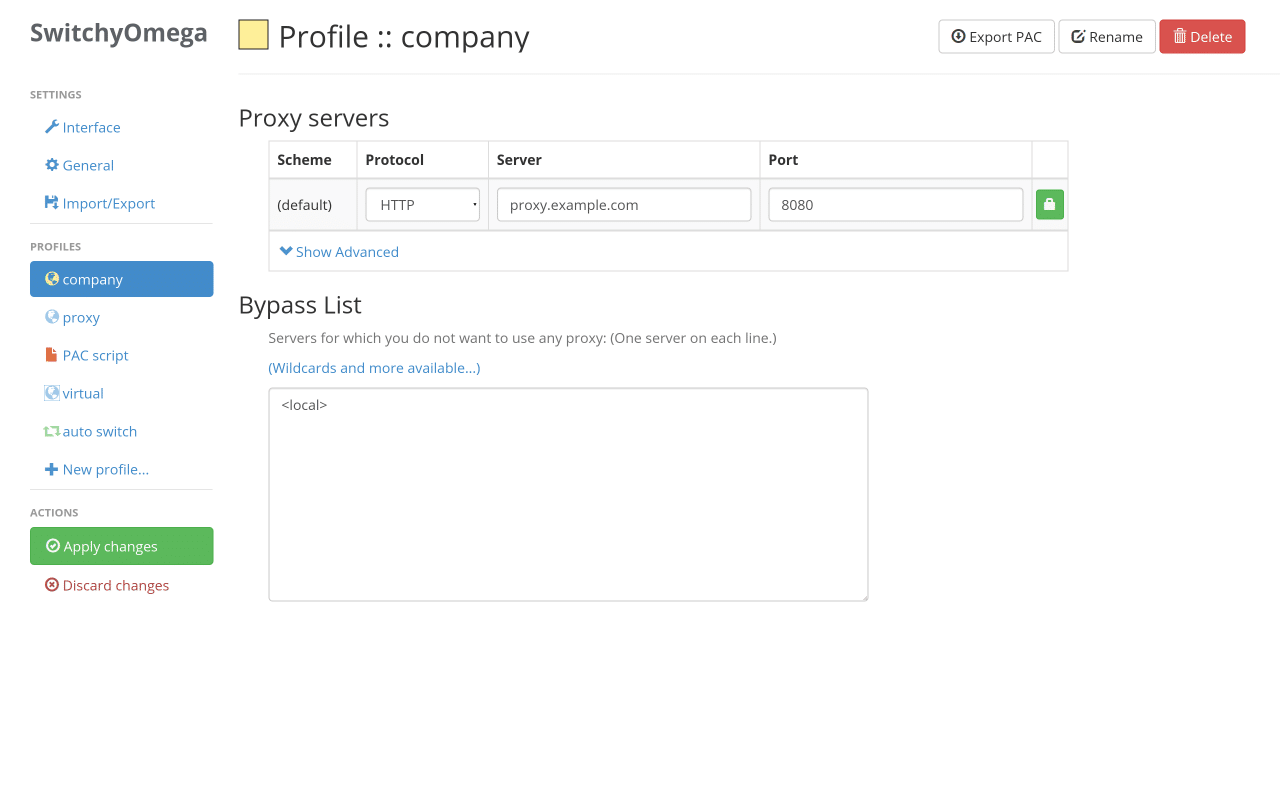
A popular open-source alternative with a different design philosophy:
Key Features:
- Advanced PAC script support
- Sophisticated rule systems
- Active community development
- Chrome and Firefox compatibility
Strengths:
- More granular control over routing rules
- Better suited for complex corporate environments
- Strong community support and documentation
Limitations:
- Steeper learning curve than FoxyProxy
- More complex setup process
- Interface can overwhelm beginners
Best For: Advanced users who need complex routing configurations and don’t mind spending time on setup.
3. Proxy Helper

Proxy Helper is a simple Chrome extension that allows you to manage your proxy settings directly in the browser, eliminating the need to adjust your system settings. This open-source tool has over 200,000 users and is compatible with Chrome’s native API.
Key Features:
- Multi-protocol support that works with socks4, socks5, HTTP, HTTPS, and QUIC proxy settings
- PAC script integration to set up automatic proxy rules
- Simple, clean interface
- Native Chrome API integration
Strengths:
- Quick performance through Chrome’s native proxy API
- Minimal resource usage
- Easy setup for beginners
Best For: Users wanting simple proxy switching without complex features.
4. Decodo (Smartproxy) Browser Extension

Combines extension functionality with built-in proxy service:
Key Features:
- Integrated proxy service (no separate proxy provider needed)
- Automatic geo-location selection
- One-click country switching
- Built-in IP rotation
Strengths:
- No need to manage separate proxy services
- Beginner-friendly interface
- Good for casual privacy users
Limitations:
- Limited to Smartproxy’s infrastructure
- Less flexibility than FoxyProxy
- Subscription required for full functionality
Best For: Casual users who want simple geo-switching without technical complexity.
5. Webshare Proxy Extension

Quality free proxies included with browser extension functionality:
Key Features:
- Free proxy servers included
- Simple switching interface
- No complex setup required
- Basic authentication support
Strengths:
- Includes free proxy access
- Very easy to set up
- Good for testing proxy functionality
Limitations:
- Limited server locations in the free tier
- Basic feature set compared to FoxyProxy
- Free proxies may have speed limitations
Best For: Users who want to test proxy functionality without investing in premium services.
Comparison: FoxyProxy vs Top Alternatives
| Feature | FoxyProxy Standard | RapidSeedbox Service | Proxy SwitchyOmega | Proxy Helper |
|---|---|---|---|---|
| Ease of Use | High | Very High | Medium | Very High |
| Rule Complexity | Advanced | System-Level | Very Advanced | Basic |
| Built-in Proxies | No | Premium Service | No | No |
| Protocol Support | All Major | HTTP/HTTPS/SOCKS5 | All Major | All Major |
| Mobile Support | Limited | Full System | Limited | Chrome Only |
| Community Support | Strong | 24/7 Professional | Very Strong | Good |
| Learning Curve | Medium | Low | High | Very Low |
| Best For | Extension Users | Premium Performance | Enterprises | Beginners |
🔧 Love FoxyProxy’s switcher? Feed it better IPs.
RapidSeedbox Proxies plug right in — faster, safer, and 25% off for readers. Upgrade My Proxy Source6. Frequently Asked Questions (FAQ)
Yes, FoxyProxy is safe to use. The same team has continuously developed the extension since 2006, and it has never been sold. It’s completely open source, and all of the code is available on GitHub for transparency. There have been no reported security incidents or cases of fraud associated with FoxyProxy itself.
The most common reasons FoxyProxy fails to work include:
– Browser compatibility issues: Ensure you have the latest version of both Firefox/Chrome and the FoxyProxy extension
– Extension conflicts: Other privacy, security, or networking extensions may interfere with FoxyProxy. Try disabling other extensions temporarily
– Incorrect proxy settings: Double-check that you’ve entered the correct proxy server address, port, username, and password
– Firewall or antivirus interference: Security software may block FoxyProxy. Try temporarily disabling it to test
– Corrupted installation: Uninstall and reinstall FoxyProxy from the official browser extension store
Yes, FoxyProxy works with virtually any proxy service that provides standard HTTP, HTTPS, SOCKS4, or SOCKS5 proxies. This includes both free and premium proxy services. However, the quality of your experience will depend entirely on your proxy provider’s infrastructure. Premium services like RapidSeedbox proxies offer better reliability, speed, and customer support compared to free proxy services, which often have limitations.
The FoxyProxy browser extension is primarily designed for desktop browsers, such as Chrome, Firefox, and Edge, which you can also use with RapidSeedbox’s proxies. Although you can install FoxyProxy on mobile Firefox browsers, its functionality is limited. To set up a comprehensive mobile proxy, you’ll need to configure your device’s network settings. Refer to our iPhone proxy setup guide for detailed mobile configuration instructions. Alternatively, consider premium proxy services that provide system-wide coverage across all devices and applications.
7. Final Thoughts
FoxyProxy is one of the most capable browser extensions for proxy management. It offers advanced features that satisfy both casual and power users. With its 19-year development history, open-source transparency, and extensive feature set, it is a reliable option for those in need of sophisticated proxy switching capabilities within their browser.
Choose the FoxyProxy extension if you:
- Need advanced rule-based proxy switching
- Want extensive customization options within your browser
- Prefer open-source software
- Already have reliable proxy services
- Require per-tab or container-based proxy assignment
- Want browser-specific proxy management
Consider RapidSeedbox proxy service if you:
- Want premium proxy performance without browser extension dependencies
- Need guaranteed uptime and professional support
- Prefer system-level proxy configuration
- Require both desktop and mobile proxy access
- Want unlimited bandwidth with dedicated IPs
- Need proxies for business-critical applications
Successful proxy usage depends on your priorities: sophisticated, browser-based management or premium infrastructure with guaranteed performance. FoxyProxy excels at complex, rule-based switching within your browser, while RapidSeedbox provides enterprise-grade proxy infrastructure that works system-wide, across all applications and devices.
Skip the extension complexity and go direct with enterprise proxies?
While browser extensions manage connections, premium proxy infrastructure delivers guaranteed performance. Experience system-wide proxy coverage with dedicated IPs, unlimited bandwidth, and professional support. Perfect for businesses and power users who demand reliability.
0Comments