 By
By
Looking to build a massive lead database from Google Maps?
Google Maps is packed with business gold—locations, contacts, reviews, websites—just waiting to be scraped. And with the right tools, it’s easier (and safer) than you think.
This guide shows you how to pull that data legally and efficiently using top tools like Outscraper (and other alternatives)—plus proxies like RapidSeedbox to stay stealthy. Plus, if you’re targeting new clients or feeding your CRM, this method delivers qualified leads fast.
So….let´s dive in and turn Maps into your best lead source yet.

⚠️ Disclaimer. This guide is for informational purposes only. Scraping data from Google Maps may violate Google’s Terms of Service. While we discuss publicly available data and industry practices, it’s your responsibility to ensure compliance with applicable laws, platform rules, and privacy regulations like GDPR or CCPA. We do not encourage misuse of scraping tools or proxies. Always prioritize ethical data collection, respect opt-outs, and avoid accessing or storing personal or sensitive information. Use the methods outlined here at your own risk. If in doubt, consult legal counsel or use licensed data sources.
Table of Contents
- Can You Really Scrape Google Maps Data?
- What Data Can You Extract from Google Maps?
- The Best Google Maps Scraping Tools (2026)
- How to Scrape Google Maps Step-by-Step
- Legal and Ethical Considerations
- Maps Scraper: FAQ
- Final Thoughts
1. Can You Really Scrape Google Maps Data?
Yes, you can extract data from Google Maps—but how you do it makes all the difference. The platform shows public business info like addresses, contact details, hours, and customer reviews. But Google doesn’t make it easy to collect at scale.
I’ve used modern scraping tools— like Selenium for browser automation and APIs for direct data pulls—and one thing I know: they work. Still, Google’s defenses are tough: rate limits and IP blocks can shut you down fast. That’s why smart map scrapers use residential proxies to spread requests across multiple IPs. So, it looks like normal user behavior. This is perfect because you can avoid detection and keep your data flowing smoothly.
| Businesses of all kinds tap into Google Maps for various valid reasons. I’ve seen sales teams build prospect lists, marketers fuel campaigns, and analysts track local trends. The real challenge? Doing it efficiently—without crossing the line. |
So, how does a maps scraper work?
See image below. Map scrapers work by automating search requests. They are just like a real user typing into Google Maps. The scraper grabs structured details like business names, addresses, phone numbers, ratings, and map coordinates—directly from the page’s HTML or JavaScript responses.

2. What Data Can You Extract from Google Maps?
Google Maps is more than just directions—it’s packed with structured business info that can power your lead gen and outreach.
- Core Contact Info: Most listings include the basics: business name, full address, phone number, and website. That’s everything you need to start a conversation. In many cases, you’ll also find email addresses, operating hours, categories, and short descriptions of the services offered.
- Engagement & Reputation Signals: You’ll also see what customers really think. Listings often show star ratings, review counts, and full reviews—real feedback you can use to measure the business quality. Google sometimes would even highlight peak visiting hours, so you can tell when foot traffic is highest.
- Competitive & Strategic Insights: Some entries go deeper. You might be able to spot social media links, price ranges, and even menus for restaurants. Professional services sometimes list offerings in detail. Even review comments can reveal what products people love—or complain about.
- Location Intelligence: Each listing comes with geodata like coordinates and nearby landmarks. Let´s say you want to know if a café is next to a subway stop or a cluster of competitors… With this in mind, you can use location intel to see that at a glance. Even parking details and public transit options offer clues about accessibility.
- Photos and Virtual Previews: Google Maps can also give you more than just “text.” Listings often include things like storefront shots or product images. Some even offer 360° tours and videos—great for judging brand quality or customer vibe without ever stepping inside.
3. The Best Google Maps Scraping Tools (2026)
Selecting the right maps scraper tool determines your success rate and efficiency when extracting business data.
| Tool | Best For | Starting Price | Key Strength |
| Outscraper | Flexible, pay-as-you-go use | Free tier; $3/1K rows | Easy export + GUI & API combo |
| ParseHub | No-code visual scraping | Free; $189/month | Point-and-click interface |
| ScrapeFly | Developers using APIs | Free trial; $100/month | Built-in anti-bot + proxy handling |
| Bright Data | Enterprise-scale extraction | $1.50/1K; $499/month | High accuracy + enterprise support |
a. Outscraper: Professional-Grade Extraction
Outscraper leads the market with the best Google Maps data extraction capabilities. The platform handles business listings and review extraction. It also comes with both GUI interfaces for beginners and API access for developers.

Features:
- No monthly subscription — use only what you need.
- GUI + full-featured API access.
- Exports in CSV/Excel/JSON/Parquet.
- Advanced filters & data enrichments.
Pricing: Pay‑as‑you‑go; free tier covers the first 500 places, then $3 per 1,000 records.
b. ParseHub: Visual Scraping Interface
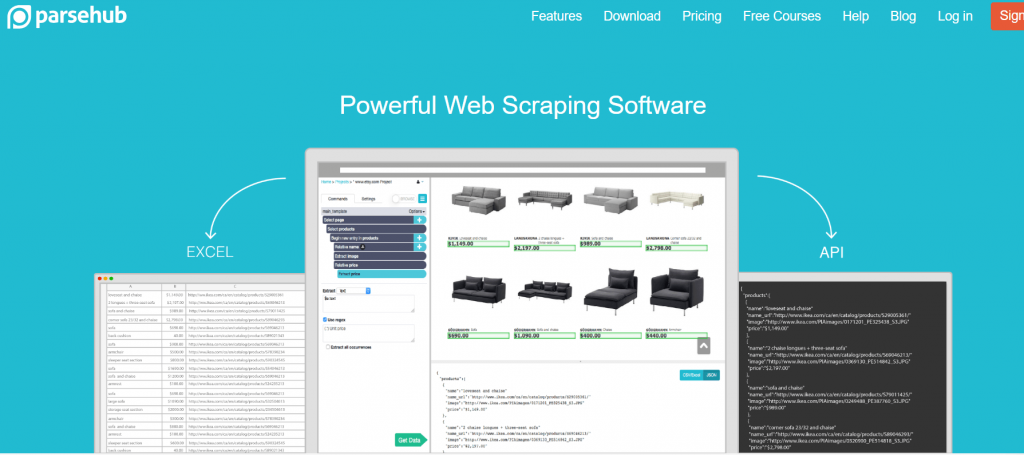
ParseHub gives you an easy-to-use visual interface for creating custom scrapers by clicking on desired data. One of the best things about this platform is that it automatically handles JavaScript rendering and pagination.
Features:
- Visual point-and-click scraper; no code required.
- Handles AJAX, JavaScript, sessions, redirects
- Supports IP rotation, pagination, and scheduling.
- Integrates with Dropbox, Amazon S3, Parabola
Pricing: Free plan (200 pages/run), Standard at $189/month, Professional at $599/month
Read our full review of ParseHub.
c. ScrapFly: API-First Approach
ScrapFly is the best scraping-as-a-service through APIs platform. It is perfect if you are a developer integrating Maps data into applications. ScrapFly handles proxy rotation and anti-bot detection automatically.

Features:
- API-first scraper with easy JS rendering and proxy support.
- IP rotation built-in, strong anti-bot/Cloudflare bypass
- Comprehensive credit billing—tracks cost per feature
- Developer-friendly tools: docs, dashboard, SDK, integrations (e.g., Make)
Pricing: Free trial with credits; PRO $100/mo, STARTUP $250/mo, ENTERPRISE $500/mo
d. Bright Data: Enterprise Solution
Bright Data is the right solution for large-scale operations. It offers enterprise infrastructure with pre-built Google Maps scrapers and massive proxy networks.

Features:
- Real-time extraction of place info, reviews, hours, menus, categories.
- Full proxy + CAPTCHA bypass, geo-targeting, retries
- High success rate, sub‑5‑second response, pay‑upon‑success billing.
- Enterprise-grade SLAs, 24/7 support, tailored onboarding.
Pricing: Pay-as-you-go at $1.50 per 1k results; Growth at $1.27/1k for $499/mo; Business at $1.12/1k for $999/mo; Premium $1.05/1k for $1 999/mo; plus enterprise tier
Interested in this vendor? Learn more about BrightData Proxy Alternatives
🛡️ Blocked Again? Here’s Why
Scraping Google Maps without rotating IPs leads to rate limits and shutdowns. Don’t let your scraper get flagged.
Avoid Blocks Now4. How to Scrape Google Maps Step-by-Step
For illustration purposes, I’ll walk you through how to pull business data from Google Maps using Outscraper—a simple, no-code tool. You can, of course, use other methods or platforms depending on your workflow, but this is a great place to start if you want fast results without touching code.
The No-Code Method (Using Outscraper)
Step 1: Create and Log In
- Sign up at Outscraper.
- Log in to the dashboard and go to Businesses & POI > Google Maps Data Scraper.

Step 2: Choose a Category and set location
- From that window, you will see many options.
- Type or select a business category (e.g., “Real Estate Agency”). Optionally check “Exact match” for precise results.
- You can also choose a country and state (e.g., United States > California).
- Click the ZIP codes mode for broader coverage and better result limits.
- Optionally use a custom location input with ZIP and country code.
- Define how many results to extract (e.g., 50). Enter “0” for no limit (all available results).

Step 3: Configure Output
- Choose:
- Language
- Output format (CSV, Excel, JSON — CSV is great for Google Sheets)
- Add a custom tag for future reference

Step 4: Review & Confirm
- Click “Get Data” to preview:
- Estimated time
- Number of results
- Approximate cost (e.g., $0.15 for 50 results)
- If satisfied, click “Get Data” to start scraping.

Step 5: Monitor & Download
- Go to the Tasks page. Wait for completion (usually 5–15 minutes).
- When status turns green (Success), click “Google Map Data” to download the CSV.
| 📊 Pro Tip: After scraping, clean and import your data into your CRM or email marketing platform with key details like ratings or reviews. Segment your email outreach by industry or location, and tag leads by source to track conversions and sharpen your strategy. |

For more information on how to scrape map data, check OutScraper´s YouTube Channel and the amazing tutorial video:
Other Ways to Scrape Google Maps
Outscraper keeps things simple, but if you need more control or want to scale, there are other routes.
Tools like ScrapeFly and BrightData let you pull data via API (perfect for automation). For deeper scraping, Puppeteer or Playwright simulate real browsing behavior. And if you’re handy with code, Selenium or BeautifulSoup in Python give you full flexibility—especially with proxy support.
Whatever method you choose, don’t forget the basics:
- Use residential proxies and rotate IPs to avoid Google rate-limits.
- Simulate human behavior with random delays—2 to 5 seconds works well.
- And always monitor for CAPTCHA. If they start popping up, slow your requests or switch IPs.
5. Legal and Ethical Considerations
Let´s begin with the basics: Google’s Terms of Service explicitly prohibit scraping or automated access to their services without prior written permission:
“You may not access or use our Services using a method other than the interface and the instructions that we provide.” Google ToS
So, automated extraction of Google Maps content technically violates these terms. But still, courts (e.g., hiQ Labs v. LinkedIn, 2022) have ruled that scraping publicly available data may not constitute a violation of the Computer Fraud and Abuse Act (CFAA). This is especially true when the data is publicly available or viewable, or in other words, is not protected by logins or paywalls. That said, platform-specific ToS violations can still lead to account bans or IP blocks.
Best Practices for Ethical Scraping
Scraping can be powerful, but it comes with responsibility. To stay compliant (and respectful), here’s what to keep in mind:
- First, slow things down. Add a 3–5 second delay between each request to avoid hammering the server. It’s a small step that goes a long way.
- Second, rotate your IPs, ideally using residential proxies. This helps mimic real user behavior and reduces the chance of getting blocked. Learn more about IP rotation.
- Third, focus only on public business info—like names, addresses, phone numbers, or emails already listed for customer contact. Stay away from anything behind a login or marked private.
- Fourth, if a business asks not to be contacted, respect that. Keep a simple opt-out or removal list to avoid reaching out again.
- And finally, skip scraping reviews, photos, or personal details. These can raise privacy red flags and may violate laws like GDPR or CCPA.
| 🚨 Compliance Tip: If you want to skip all the risk, you can just buy licensed data from trusted sources or Google Partners. Focus on services like lead gen or analytics, and always log your scraping activity for audits. |
Want to learn more? Read Google Maps Platform Terms of Service
6. Maps Scraper: FAQ
It starts with targeted searches—instead of pulling every business, focus on your ideal customers, like “Italian restaurants with 4+ stars in Beverly Hills.” After scraping, enrich the data by cross-checking with LinkedIn or company websites, and use review sentiment to spot high-priority leads. Finally, segment and personalize your outreach using details from the listing.
You can skip scraping entirely by buying licensed data from trusted sources like Google Partners, ZoomInfo, or Apollo. These platforms offer verified business databases—often with emails and direct contacts—though they tend to cost more and offer less customization.
Absolutely. LinkedIn is great for B2B targeting thanks to its detailed company profiles and networks. For local or B2C leads, Facebook and Instagram often have up-to-date info. You can also check industry associations or government databases for accurate, sector-specific records.
The Google Places API has strict limits. You can’t access full review text, emails, or certain business categories. Plus, usage costs can add up fast, and data freshness isn’t always ideal. It’s reliable, but not always flexible enough for lead generation or large-scale research.
7. Final Thoughts
Scraping Google Maps is a lead gen game-changer when done right. Tools like Outscraper and ScrapeFly make it easy to pull valuable business data, while proxies from services like RapidSeedbox keep you compliant and under the radar.
So, are you ready to start getting a steady stream of quality leads?
Are you ready to take the leap? And build targeted campaigns and enrich your CRM?
🕵️ Scrape Without Being Seen
Your maps scraper should stay invisible to Google. Residential proxies keep your data flow under the radar.
Go Stealth English
  Français
  Español
  Tiếng Việt
  简体中文
简体中文  Русский
  Türkçe
  Bahasa Indonesia
  日本語
日本語  العربية
  Português
  Українська
0Comments