 By
By
If you’re building web apps that need to scale and stay secure, knowing the difference between reverse proxies and load balancers can make all the difference. Although they do, often team up—they’re not the same thing.
In this guide, I’ll break down what each one does, when to use them, and why smart setups often use both. By the end, you’ll know how to handle traffic like a pro.

Table of Contents
- How Each Works: Architecture & Use Cases
- Key Differences and Benefits Compared
- Real-World Examples & Tools
- Choosing the Right One: Decision Guide
- Final Words
1. How Each Works: Architecture & Use Cases
Understanding how reverse proxies and load balancers operate at different layers of the network stack is essential for making smart infrastructure decisions.
a. Reverse Proxy Architecture
A reverse proxy sits between clients and backend servers. It acts as an intermediary that forwards client requests to one or more backend servers. From the client’s perspective, the reverse proxy appears to be the actual web server—the real backend servers remain completely hidden. Learn more about this topic in: What is a reverse proxy?
When I implement reverse proxies in production environments, they typically operate at Layer 7 (Application Layer) of the OSI model. This means they can inspect and manipulate HTTP/HTTPS traffic, examining headers, URLs, and even content before making routing decisions.
Here’s what happens when a client makes a request through a reverse proxy:
- The client sends a request to what it thinks is the web server
- The reverse proxy receives and potentially modifies the request
- Proxy forwards request to appropriate backend server(s)
- The backend server processes the request and sends the response
- Proxy receives the response and may cache, compress, or modify it
- Modified response is sent back to the client

Common Use Cases for Reverse Proxies:
- SSL termination – Handle encryption/decryption to reduce backend server load
- Content caching – Store frequently requested content for faster delivery
- Request compression – Reduce bandwidth usage through gzip compression
- Security filtering – Block malicious requests before they reach backend servers
- API gateway functionality – Manage API versioning, authentication, and rate limiting
For other types of proxies, like forwarding proxies, check this guide: All Types of Proxies
b. Load Balancer Architecture
Load balancers can work across different layers of the OSI model. But the core function is traffic distribution for high availability and performance. At Layer 3 (Network), they route traffic based on IP addresses. At Layer 4 (Transport), they factor in both IP addresses and ports, like TCP or UDP. And at Layer 7 (Application), they get more specific, using things like HTTP headers and URLs to decide where to send requests.
Load Balancer Request Flow:
- Client request arrives at the load balancer’s virtual IP address
- The load balancer selects the appropriate backend server using the configured algorithm
- Request is forwarded to the selected server
- Server processes request and sends response directly to client (or back through load balancer)

Primary Load Balancing Algorithms:
Load balancers use different algorithms to direct traffic efficiently. Each one has its own strength, depending on the setup:
- Round Robin – Sends requests to servers in order, one after another.
- Least Connections – Chooses the server with the fewest active connections. Great for handling uneven loads.
- Weighted Round Robin – Assigns more traffic to stronger servers based on set weights.
- IP Hash – Routes users to the same server based on their IP, which helps with session stickiness.
| 🛠️ Heads up! In modern cloud setups and microservices architectures, the lines between reverse proxies and load balancers have started to blur. Tools like Kubernetes Ingress controllers often handle both roles at once. Cloud providers—think AWS with its Application Load Balancer or API Gateway—offer built-in solutions that blend these functions seamlessly. Plus, with service meshes like Istio managing traffic behind the scenes and API gateways handling microservice chatter, today’s container platforms bake in both capabilities from the start. |
2. Key Differences and Benefits Compared
While reverse proxies and load balancers perform similar functions (overlapping functionality), their core purposes and strengths are different.
Let me break down the key distinctions based on my experience implementing both in production environments.
| Aspect | Reverse Proxy | Load Balancer |
| Primary Purpose | Content acceleration, security, caching | Traffic distribution, high availability |
| OSI Layer Focus | Layer 7 (Application) | Layer 3–7 (Network to Application) |
| Content Manipulation | Yes | Limited |
| Caching Capability | Advanced caching | Basic or none |
| SSL/TLS Handling | SSL termination, certificate management | Termination or pass-through |
| Security Features | WAF, DDoS, IP filtering | Health checks, failover |
| Session Management | Cookie manipulation | Algorithm-based persistence |
| Compression | Built-in compression | Limited |
| API Management | Rate limiting, auth, versioning | Basic routing |
Performance Differences
- Reverse proxies bring several performance perks to the table. For starters, caching helps reduce strain on backend servers by serving up frequently accessed content directly from memory. Compression cuts down on bandwidth use and speeds up load times, while SSL termination offloads the heavy lifting of encryption from your app servers. Add connection multiplexing into the mix, and you get efficient reuse of backend connections.
- Load balancers shine when it comes to spreading the load. They support horizontal scaling by distributing traffic across multiple servers. Built-in health checks help boot out any failed instances automatically. Plus, with geographic routing, users connect to the closest server, which improves speed. Smart routing also keeps any one server from getting slammed.
Security and Reliability Features
- Reverse proxies double as a security gate. They hide your backend setup from the public, offer Web Application Firewall (WAF) features, and can filter out DDoS attacks. They also allow fine-grained access control using IPs, headers, and other rules.
- Load balancers boost reliability. They offer high availability through redundancy and handle failovers automatically. They’re also perfect for zero-downtime deployments, slowly shifting traffic to new versions. For added resilience, they support disaster recovery through cross-region failovers.
Scalability Considerations
From my experience managing high-traffic systems, the way you scale reverse proxies and load balancers can differ a lot.
- Reverse proxies scale vertically by upgrading hardware or horizontally by adding more proxy nodes. You can even push them to the edge using CDNs and spread cached content across multiple locations.
- Load balancers, on the other hand, scale out by adding more backend servers. They also work well with auto-scaling tools in the cloud. For global traffic, GSLB helps spread users across regions. Plus, backend servers can register or drop out dynamically, keeping things flexible.
| 🔍 Final Verdict: Reverse Proxy vs. Load Balancer: From what I’ve learn, reverse proxies and load balancers each play their own part. Proxies handle caching, security, and content tweaks, while load balancers focus on spreading traffic and keeping things online. I’ve found the best setups not only choose one, but they use both. The proxy takes care of the front end; the load balancer keeps the back end running smoothly. |
🧠 Smart Choice, Faster Routing
Boost speed and control by combining load balancers with residential proxies.
Try Smart Proxies →3. Real-World Examples & Tools
It’s a lot easier to learn how reverse proxies and load balancers work when you see them in action.
From my own time working on real-world deployments, here are some tools and setups that’ve worked best across different use cases.
a. NGINX
NGINIX is like a Swiss army knife— it can work as both a reverse proxy and a load balancer. In my deployments, I’ve seen NGINX handle millions of requests per hour while maintaining excellent performance. Learn more about this topic in: NGINX Proxy Manager
NGINX as a Reverse Proxy:
|
1 2 3 4 5 6 7 8 9 10 |
server { listen 80; server_name example.com; location / { proxy_pass http://backend-server; proxy_set_header Host $host; proxy_cache my_cache; proxy_cache_valid 200 1h; } } |
NGINX as a Load Balancer:
|
1 2 3 4 5 6 7 8 9 10 11 |
upstream backend_pool { server 192.168.1.10:8080; server 192.168.1.11:8080; server 192.168.1.12:8080; } server { listen 80; location / { proxy_pass http://backend_pool; } } |
b. HAProxy
HAProxy is one of the best tools for high-performance load balancing scenarios. I’ve deployed HAProxy in environments handling over 100,000 concurrent connections, and I can tell, it provides remarkable stability. HAProxy’s a solid pick if you need speed and control. It handles both TCP and HTTP really well, checks server health constantly, and gives you deep stats to keep an eye on everything. Plus, it works at both Layer 4 and Layer 7, so it’s super flexible.
Real-World HAProxy Configuration:
|
1 2 3 4 5 6 7 8 9 10 11 12 13 14 |
global maxconn 4096 defaults mode http timeout connect 5000ms timeout client 50000ms timeout server 50000ms frontend web_frontend bind *:80 default_backend web_servers backend web_servers balance roundrobin server web1 192.168.1.10:8080 check server web2 192.168.1.11:8080 check |
Choosing between NGINX and HAProxy can be tough, but hey! We made this guide to help sort things out: NGINX vs HAProxy: Which one to choose?
c. Cloud-Native Solutions
AWS Application Load Balancer (ALB): I recommend ALB for your AWS deployments because it provides managed Layer 7 load balancing with minimal configuration overhead.

What do you get?
- Path-based routing – Route /api/* to API servers, /static/* to CDN
- Host-based routing – Route different domains to different target groups
- SSL/TLS termination with automatic certificate management
- Integration with Auto Scaling for dynamic backend management
Cloudflare as a Reverse Proxy: Cloudflare works as a global reverse proxy service.

Here are all the perks:
- DDoS protection – Absorb and filter malicious traffic
- Global CDN – Cache content at edge locations worldwide
- SSL/TLS encryption – Provide free SSL certificates and termination
- Performance optimization – Minify CSS/JS and optimize images
d. Microservices and Container Environments
- Istio Service Mesh: Istio acts like a supercharged traffic manager for your microservices (In Kubernetes). It uses Envoy proxies to automatically handle load balancing, retries, circuit breaking, and service-to-service security—all while giving you solid metrics and tracing. It’s perfect for complex setups where you want tight control over how services talk to each other. Learn more on its official site

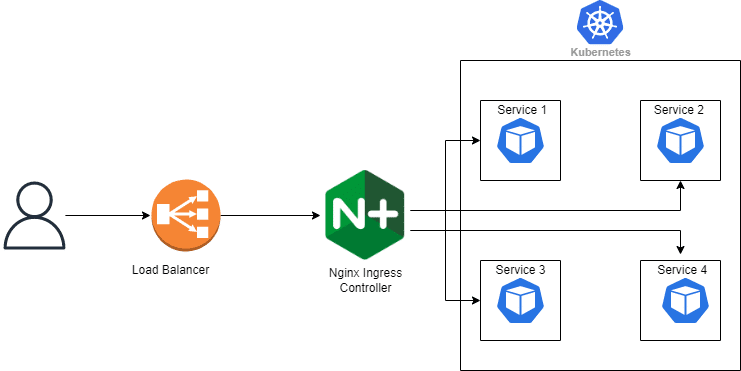
- NGINX Ingress Controller: For Kubernetes clusters, the NGINX Ingress Controller is a versatile tool that combines reverse proxy and load balancing in one. It dynamically detects pod changes and updates routing rules on the fly. Think host/path-based rules, SSL termination, rate limiting, and auth.
e. API Gateway Integration
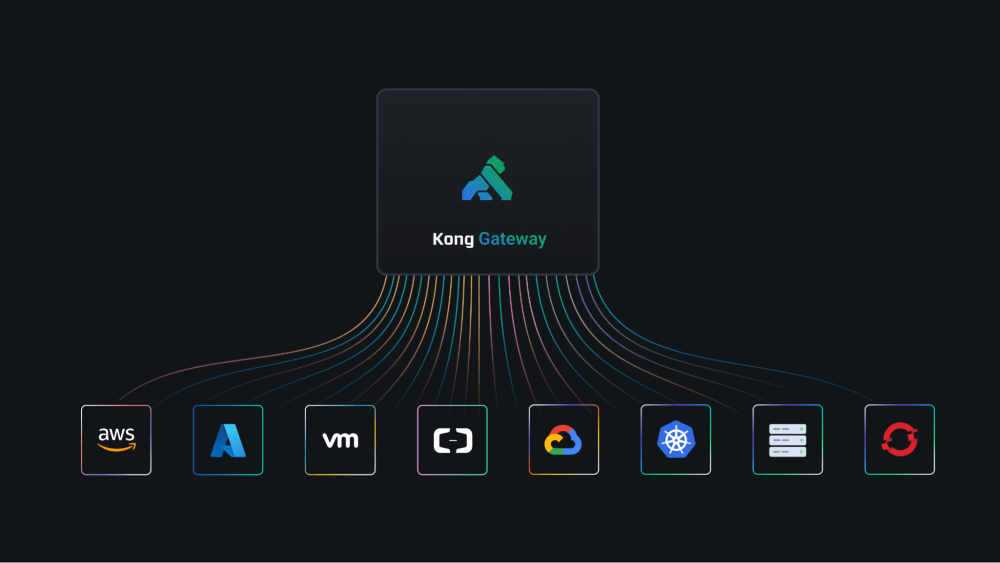
Kong API Gateway: Kong (open source API Gateway) combines reverse proxy and load balancing for API management.
What can you get?
- Rate limiting – Control API usage per consumer
- Authentication – JWT, OAuth, API key validation
- Transformation – Request/response modification
- Analytics – Detailed API usage metrics
| 🚦 Quick Take: Performance in Practice: Based on my benchmarks the tool choice would really depend on traffic levels. For high loads (10,000+ RPS), HAProxy offers the best raw performance, while NGINX balances speed and features. Cloud load balancers are simple to manage and are great, but may lock you into one provider. For smaller deployments (under 1,000 RPS), NGINX works great as an all-in-one; Cloudflare handles global traffic well, and cloud services are cost-effective with less upkeep. Bottom line? Match the tool to your traffic and needs—there’s no one-size-fits-all. |
4. Choosing the Right One: Decision Guide
Deciding between a reverse proxy, a load balancer, or both depends on your traffic, architecture, and goals.
Here’s a simplified guide to help you choose:
a. Key Questions
Start by asking the following questions:
- Question 1: What’s your current and projected traffic volume?
- <1,000 RPS: NGINX can handle both roles.
- 1,000–10,000 RPS: Use a load balancer with reverse proxy features.
- >10,000 RPS: Separate, specialized tools for each.
- Question 2: Do you need to distribute traffic across multiple servers?
- One: Reverse proxy for SSL, caching, and routing.
- Many: Load balancer is essential.
- Microservices: Use both.
- Question 3: What security features do you require?
- SSL termination: Either load balancers or reverse proxies work.
- WAF, DDoS, compliance (PCI/HIPAA/GDPR): Reverse proxy preferred.
b. Tech Stack Shortcuts
Use this table to quickly align your deployment environment with the right reverse proxy and load balancing setup, tailored for scale, architecture, and complexity.
| Environment | Use Case / Scale | Recommended Setup |
| Kubernetes | Small deployments | NGINX Ingress Controller |
| Medium complexity | Istio Service Mesh | |
| Enterprise | Dedicated API Gateway + Service Mesh | |
| AWS | Simple web apps | Application Load Balancer (ALB) |
| APIs | API Gateway + ALB | |
| High performance | Network Load Balancer (NLB) + NGINX | |
| Multi-cloud | CDN layer | Cloudflare (Reverse Proxy) |
| Regional traffic | Cloud provider load balancers | |
| Application layer | Self-managed reverse proxy | |
| Traditional Infra | On-premises | HAProxy + NGINX combination |
| Hybrid cloud | Cloud load balancer + on-premises reverse proxy | |
| Edge locations | CDN reverse proxy + regional load balancers |
c. Decision Flowchart
Here’s a practical decision flow I use when consulting on infrastructure architecture:

d. Heads-Up: Cost Counts
💸 For tight budgets, self-managed NGINX does the job well and costs nothing. Cloud services are pricier but reduce upkeep. A hybrid setup—cloud for the critical parts, DIY for the rest—can offer balance. On the enterprise side, bigger budgets mean access to tools like HAProxy or F5, plus managed services that free up your team. Some go multi-vendor for top features, but that can add complexity.
e. When to Use Both
In my experience, successful large-scale deployments almost always use both technologies in complementary roles. (This layered approach provides redundancy and optimal performance):
Typical Enterprise Architecture:
- Edge Layer: CDN reverse proxy (Cloudflare, AWS CloudFront)
- Load Balancing Layer: Geographic and application load balancers
- Application Layer: Reverse proxy for SSL termination and caching
- Service Layer: Internal load balancing for microservices
5. Final Words
After working with reverse proxies and load balancers in all kinds of deployments, I’ve learned this: knowing their roles makes a huge difference.
- Reverse proxies are great for things like caching, SSL, and content tweaks.
- Load balancers keep traffic flowing and services available, especially at scale.
The truth is, you don’t have to pick one. Most solid setups use both—maybe a cloud load balancer up front, reverse proxies for traffic shaping, and a final layer to split requests between app servers.
I always recommend the following: Start with what you need now. You can always layer in more as things grow. So, if you’re running something small or managing a bigger system, a smart mix of both tools will pay off.
🚀 Boost Speed, Lower Risk
High-performance IPv4 and IPv6 proxies that blend perfectly with load balancers. Fast, private, and built to win.
Explore Plans →
0Comments