 By
By
Managing a growing collection of TV shows can take a lot of time. It’s often a struggle because you have to download them manually, the quality can be inconsistent, and you’re always trying to keep up with new releases. That’s where a seedbox Sonarr setup really shines. It’s a sweet solution for automatically acquiring and organizing your favorite shows.
This guide will look at how a seedbox works with Sonarr to improve your TV show management, so you can have a steady, high-quality, and easy experience.
Table of Contents
- What is a Seedbox Sonarr Setup?
- Seedbox with Sonarr: Key Facts
- Why Automate TV Show Downloads with Sonarr and a Seedbox?
- Best Seedboxes for Sonarr Automation (2026)
- How to Set Up Sonarr with Your Seedbox: A Step-by-Step Guide
- Troubleshooting Common Seedbox Sonarr Issues
- Conclusion
What is a Seedbox Sonarr Setup?
A seedbox Sonarr setup is an automated system that uses a remote, high-speed server, or seedbox, to download TV shows. Sonarr, a popular TV show management application, then manages and organizes the shows.
It’s usually used to automatically identify, download, and organize TV series episodes, ensuring consistent quality and maintaining privacy, all without using up local bandwidth or storage during the download process.
Seedbox with Sonarr: Key Facts
- What it is: An automated system combining a remote seedbox server with the Sonarr application for hands-free TV show acquisition and organization.
- How it works: Sonarr monitors RSS feeds for new TV show episodes, sends download requests to the seedbox, which then downloads the content at high speeds, and Sonarr subsequently organizes the files.
- Main components: Seedbox service, Sonarr application, a torrent client (e.g., rTorrent, Deluge) on the seedbox, and indexers (e.g., Prowlarr, Jackett).
- Key benefits: Fully automated TV show downloads, consistent quality, efficient organization, enhanced privacy, and reduced local bandwidth usage.
- Difficulty level: Intermediate.
- Best for: TV show enthusiasts, users with large media libraries, and those seeking a hands-off approach to media management.
- Alternatives: Manual torrenting, other media management tools like Radarr (for movies) or SickChill.
- Last updated: April 30, 2026
Why Automate TV Show Downloads with Sonarr and a Seedbox?
With so much TV content out there, it’s hard to keep track of new episodes, manage downloads, and keep your library organized. The Sonarr seedbox combo tackles these head-on, offering a solid and speedy way to automate your TV show downloads. This will save you time and make your media library better and more consistent.
The Power of Automation: Never Miss an Episode
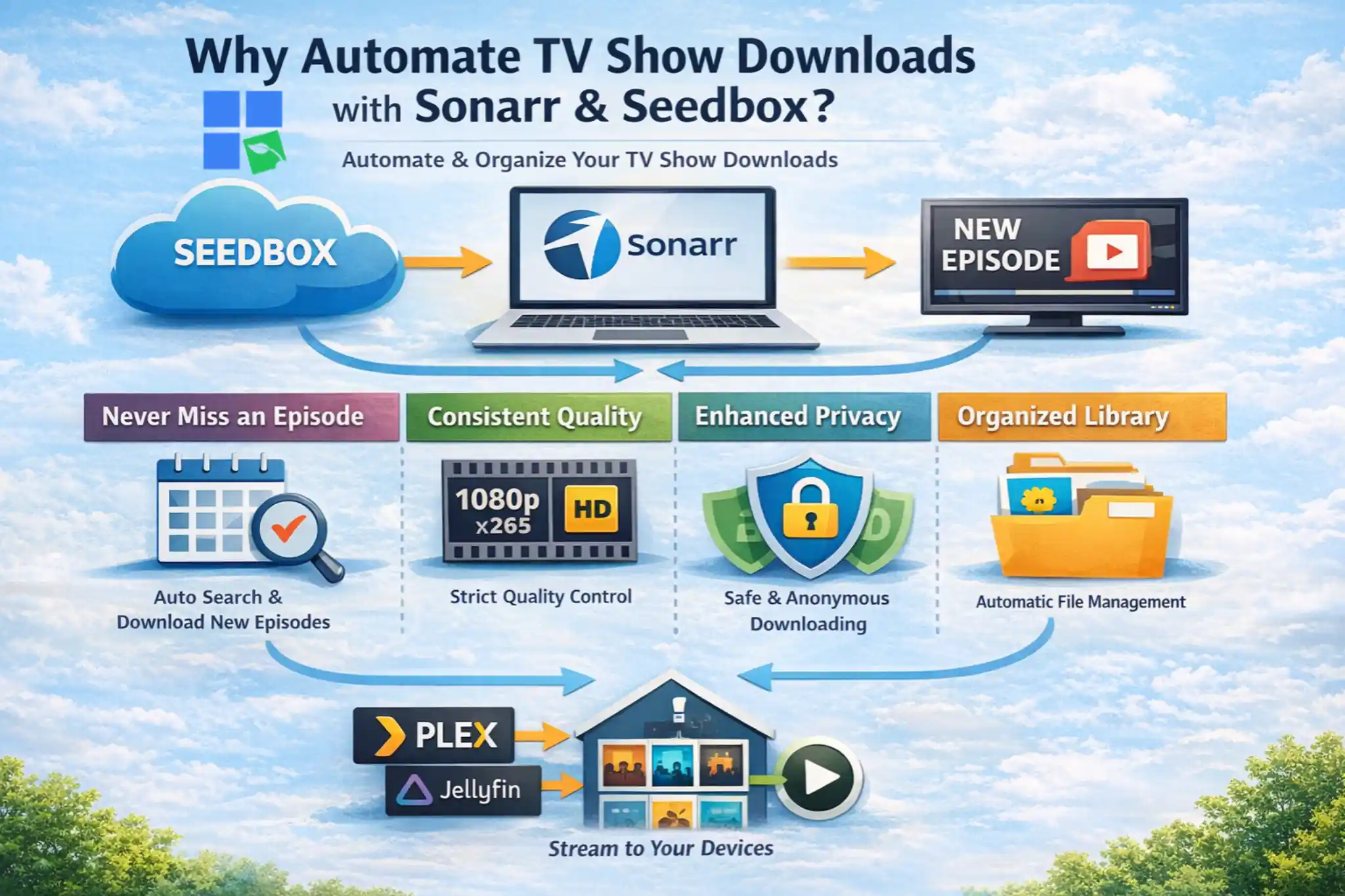
Sonarr is designed to be a set-it-and-forget-it solution for managing your TV shows. It keeps track of your favorite TV shows, finds new episodes as they come out, and automatically searches for new releases on different indexers (like torrent sites or Usenet providers).
Once you find an episode that meets your quality preferences, Sonarr tells your seedbox to download it. This means you won’t have to search for episodes, download them, and rename them yourself. You’ll never miss an episode, and your library will always be up-to-date. This automation is a key strength of the Sonarr pairing.
Consistent Quality and Format
One of the frustrations of manual downloading is the inconsistency in video quality, audio tracks, and file formats. Sonarr lets you set strict quality profiles (like 1080p, x265, specific audio codecs). It’ll only download episodes that match these criteria, and if a better quality version becomes available later, it can automatically upgrade your existing files. This makes sure you get the same great picture quality across all your shows, which is a huge plus when you’re using your seedbox and Sonarr setup.
Enhanced Privacy and Security
If you torrent directly from your home IP address, you could be at risk of privacy issues, like your ISP monitoring you and getting in trouble for copyright infringement. A seedbox is like a privacy shield, and it handles all your torrenting activities on a remote server. Your local IP address is never exposed to the torrent swarm.
All communication between your local Sonarr instance (if running locally) and the seedbox is encrypted, typically via secure protocols like SFTP or HTTPS. This strong privacy layer is a big reason why a lot of users choose a seedbox Sonarr configuration, especially with providers like RapidSeedbox that make anonymity a top priority.
Bypassing ISP Throttling and Bandwidth Limitations
ISPs often throttle internet speeds for users downloading a lot of torrents, which can lead to slow downloads and a less-than-ideal internet experience. If you offload torrent downloads to a seedbox, you’ll be able to get around these restrictions.
Seedboxes are hosted in data centers with super high-speed connections (often 1 Gbps or 10 Gbps), which lets torrents finish in minutes. Your local internet connection is then just used for managing Sonarr and securely transferring the finished files from the seedbox, which uses hardly any bandwidth and avoids getting in trouble with your ISP.
Efficient Media Management and Organization
Sonarr is great for more than just downloading. It’s also awesome at organizing your media. Once an episode is downloaded to your seedbox, Sonarr can automatically rename the file according to your preferred naming conventions, move it to the correct series folder, and even integrate with media servers like Plex or Jellyfin to update your library. This organization is a lifesaver for big collections, making it a breeze to browse and find what you’re looking for. The seedbox and Sonarr work together seamlessly, keeping your media library tidy and accessible without you having to do anything.
Best Seedboxes for Sonarr Automation (2026)
Picking the right seedbox provider is key to setting up a smooth and efficient Sonarr seedbox setup. The ideal provider offers high-speed connections, ample storage, robust security, and excellent support for automation tools. Here’s a list of the best seedbox providers for Sonarr automation.
1. RapidSeedbox

RapidSeedbox is known as one of the best options for people interested in media automation. It’s an awesome environment for Sonarr and other *arr stack applications. It’s all about top-notch performance, easy-to-use features, and solid support, making it a perfect fit for automating your TV show library.
- High-Performance Infrastructure: RapidSeedbox boasts servers with 1 Gbps to 10 Gbps network connections and massive storage, ensuring lightning-fast torrent downloads and uploads. This speed is critical for Sonarr to quickly acquire new episodes and for efficient post-processing.
- One-Click App Installation: A significant advantage of RapidSeedbox is its extensive library of one-click install applications. Sonarr, Radarr, Prowlarr, Jackett, and various torrent clients (rTorrent, Deluge, qBittorrent) can be installed with minimal effort directly from your client area. This simplifies the setup process, especially for users new to seedboxes.
- Unlimited Bandwidth: All plans provide unlimited bandwidth on all plans, allowing Sonarr to download and your torrent client to seed without worrying about data caps.
- Robust Security and Privacy: RapidSeedbox prioritizes user privacy with secure access protocols (HTTPS, SFTP, SSH) and a strict no-logs policy. This ensures that your automated media acquisition remains private and secure from external monitoring.
- Excellent Customer Support: Their knowledgeable support team is available 24/7 to assist with any setup or troubleshooting issues related to Sonarr, torrent clients, or general seedbox operation. This level of support is invaluable for maintaining a smooth automated workflow.
Tired of slow downloads breaking your Sonarr automation flow?
Upgrade your Sonarr experience with a powerful RapidSeedbox Seedbox. Automate your TV show downloads at ultra-fast speeds, eliminate ISP throttling, and enjoy seamless integration with your favorite tools – all in a secure, always-on environment built for peak performance.
2. SeedHost.eu

SeedHost.eu is another popular seedbox provider that’s known for its high-powered hardware and solid community reputation. They’ve got a range of plans with good bandwidth and storage options, so they’re great for demanding Sonarr setups.
- Powerful Hardware: SeedHost.eu provides high-end servers with fast CPUs and ample RAM, which is beneficial for running Sonarr and multiple other applications simultaneously without performance degradation.
- Generous Bandwidth: Their plans typically include very high bandwidth allocations, often unmetered, which is excellent for maintaining good seeding ratios and rapid downloads.
- Extensive App Support: While not always one-click, SeedHost.eu supports a wide array of applications, including Sonarr, Radarr, and various torrent clients, with clear guides for installation.
- Advanced Features: They cater to more advanced users with features like SSH access, custom scripting, and a robust API for deeper integration.
3. Feral Hosting

Feral Hosting is a popular choice for users who want a good balance of performance and affordability. They’re known for their fast connections and simple pricing.
- High-Speed Network: Feral Hosting provides excellent network speeds, up to 20 Gbps, ensuring quick downloads and efficient seeding for Sonarr-managed torrents.
- Simple Pricing: Their plans are generally easy to understand, offering good value for the resources provided.
- Good App Compatibility: Sonarr and common torrent clients are well-supported, and their knowledge base offers guidance for setup.
- Reliable Uptime: Feral Hosting maintains a reputation for stable service and good uptime, which is crucial for continuous Sonarr automation.
4. Whatbox

Whatbox has been around for a while and has a solid reputation as a seedbox provider. A lot of users like it because it has a simple interface and it’s reliable. They’re great for Sonarr automation.
- User-Friendly Interface: Whatbox provides an intuitive web interface that makes managing your seedbox and installed applications relatively easy.
- Solid Performance: Their servers offer good speeds and reliability, suitable for automated TV show downloads and seeding.
- Pre-installed Apps: Whatbox often includes popular applications like Sonarr and various torrent clients as part of their standard offerings, simplifying the initial setup.
- Community and Support: They have a responsive support team and a helpful community forum for troubleshooting and advice.
How to Set Up Sonarr with Your Seedbox: A Step-by-Step Guide
Setting up Sonarr with your seedbox might seem overwhelming at first, but if you break it down into steps, you can create a fully automated TV show management system. This guide will walk you through the essential configuration, focusing on common practices that apply to most seedbox providers, including RapidSeedbox.
Prerequisites
Before you begin, ensure you have the following:
- An active seedbox account: Preferably with a provider like RapidSeedbox that supports one-click app installations or easy manual setup of Sonarr and torrent clients.
- Sonarr installed on your seedbox: If you don’t see Sonarr as a one-click install, you can install it manually via SSH (refer to your seedbox provider’s documentation).
- A torrent client installed and configured on your seedbox: Common choices include rTorrent, Deluge, or qBittorrent. Ensure it’s accessible via a web interface.
- Access to indexers: These are sources (torrent trackers or Usenet providers) that Sonarr will use to search for TV show episodes. You’ll need API keys or login credentials for these.
Once you have all these in place, follow the step-by-step guide below:
1. Access and Configure Sonarr
Once Sonarr is installed on your seedbox, you’ll typically access its web interface via a URL provided by your seedbox provider (e.g., https://your-seedbox-ip/sonarr ).
a. Initial Setup Wizard
Upon first launch, Sonarr might present an initial setup wizard. Follow the prompts to set basic preferences like UI language and authentication.
b. General Settings
Go to Settings > General.
- Security: Set up a username and password for Sonarr access to protect your instance.
- Updates: Configure update preferences. It’s generally recommended to use Automatic updates for Stable versions.
2. Add Download Client to Sonarr
Sonarr needs to know how to communicate with your seedbox’s torrent client to start downloading stuff. This is a key step in the process of integrating the seedbox with Sonarr.
Go to Settings -> Download Clients.
- Click the + icon to add a new download client.
- Select your torrent client: Choose the torrent client installed on your seedbox (e.g., rTorrent, Deluge, qBittorrent).
- Configure client details:
- Host: This will be your seedbox’s IP address or hostname. Your seedbox provider will supply this.
- Port: The port number for your torrent client’s web UI or API. Again, check your seedbox provider’s documentation.
- Username/Password: Credentials for accessing your torrent client.
- Category: Set a category (e.g., tv-sonarr) within your torrent client. Sonarr will use this to label its downloads, making it easier to manage and ensuring Sonarr only processes its own downloads.
- Remote Path Mappings: This is important if Sonarr is running on your seedbox but needs to interact with a local media server, or if your seedbox uses a different path structure than Sonarr expects. If you’ve got Sonarr and your torrent client on the same seedbox, it might be easier. But if Sonarr is on your seedbox and you’re moving files to a local Plex server, you’ll need to map the remote path on the seedbox to the local path on your Plex server. For example, if your seedbox downloads to /home/user/downloads/tv and your local Plex server sees this as /mnt/seedbox/tv, you’d map /home/user/downloads/tv (remote) to /mnt/seedbox/tv (local). A lot of seedbox providers, RapidSeedbox included, have guides that cover this.
4. Test and Save: Click Test to ensure Sonarr can connect to your torrent client. If successful, save the configuration.
3. Add Indexers to Sonarr
Indexers are the sources Sonarr uses to find TV show episodes. These can be public or private torrent trackers, or Usenet providers. To get the best results, it’s best to use a mix of reliable indexers.
- Go to Settings > Indexers.
- Click the + icon to add a new indexer.
- Select the indexer type: Choose Torznab for most torrent trackers or Usenet for Usenet providers.
- Configure indexer details:
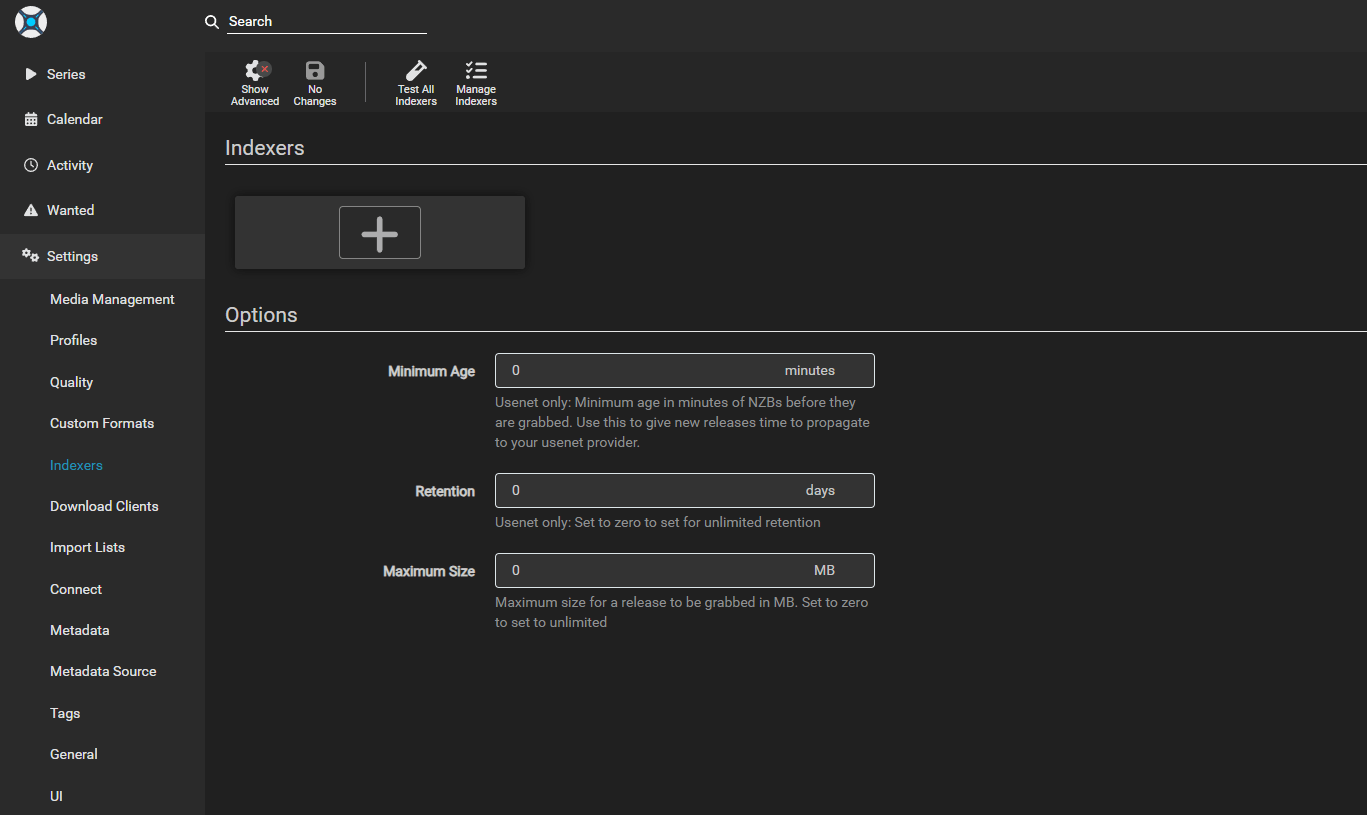
- Name: A descriptive name for your indexer.
- URL: The URL of the Torznab feed or Usenet provider.
- API Key: Your personal API key for the indexer (essential for private trackers).
- Categories: Specify the categories Sonarr should search within (e.g., TV categories).
5. Test and Save: Click Test to verify the connection and then Save.
Consider using Prowlarr or Jackett as a single point of entry for all your indexers. These applications aggregate multiple indexers into a single Torznab feed, simplifying management within Sonarr.
Step 4: Add TV Series and Quality Profiles
Now that Sonarr can download, you need to tell it what to download and in what quality.
a. Quality Profiles
Go to Settings > Quality Profiles.
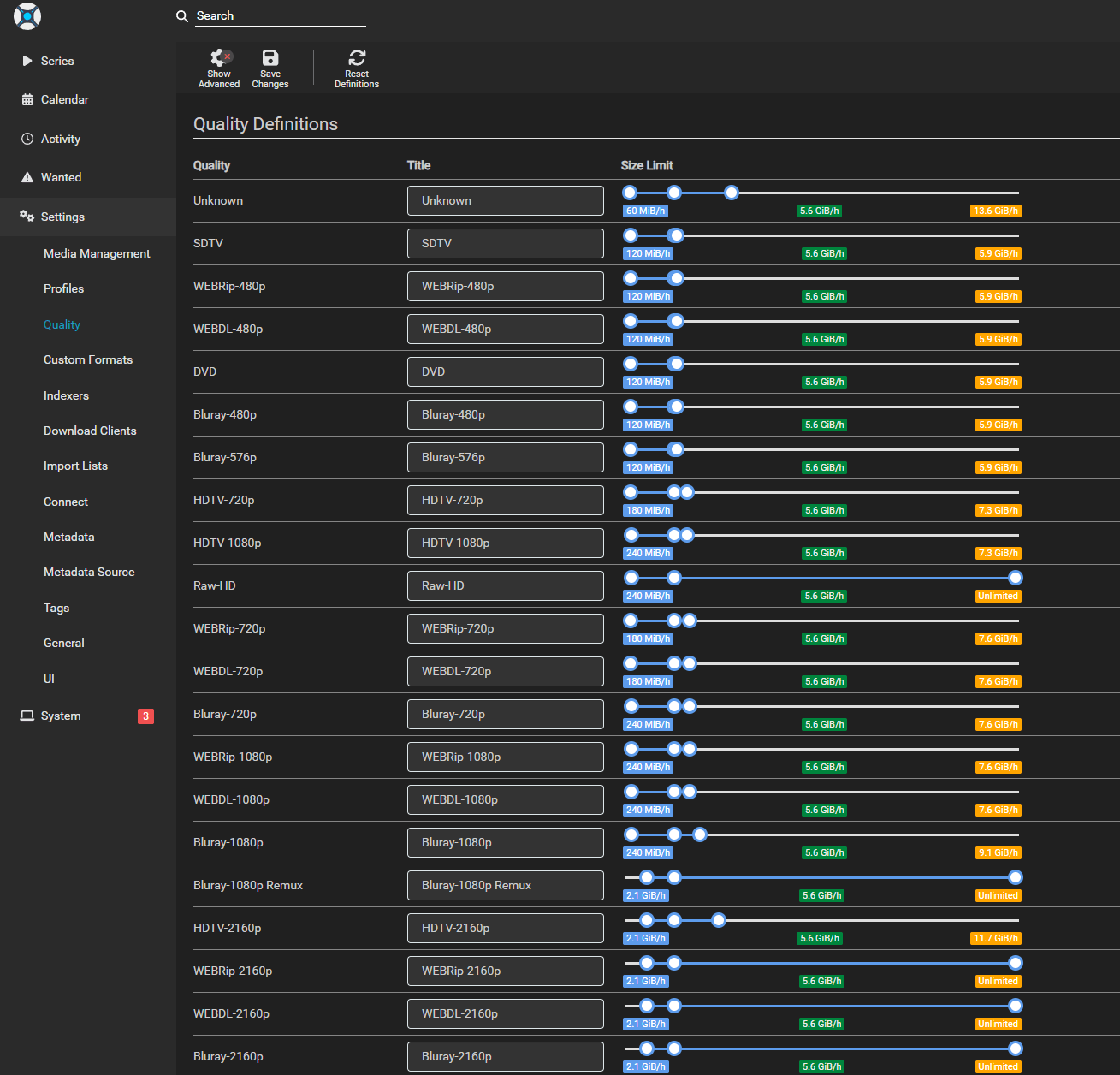
- Create or edit profiles: Define your preferred video and audio quality settings (e.g., 1080p, 720p, x265, AAC). You can set a minimum and maximum quality for each profile.
- Size limit: Adjust the files’ size limit.
b. Add TV Series
- Go to Series and click Add New.
- Search for a TV series: Sonarr will search its configured indexers.
- Select the series: Choose the correct series from the search results.
- Configure series settings:
- Path: The root folder on your seedbox where the series will be stored (e.g., /home/user/media/tv).
- Quality Profile: Assign one of your defined quality profiles.
- Monitor: Choose whether to monitor all episodes, only new episodes, or specific seasons.
- Season Folder: Enable this to organize episodes into season-specific subfolders.
- Add Series: Click Add Series to start monitoring.
Sonarr will now start searching for existing and upcoming episodes of your selected series, sending download requests to your seedbox’s torrent client, and organizing them once they’re done.
5. Media Management and Post-Processing
Once your seedbox downloads an episode, Sonarr takes over for post-processing.
Go to Settings > Media Management.
- Enable Rename Episodes: This allows Sonarr to automatically rename downloaded files according to your preferences.
- Set Root Folders: Define the primary folders where your TV shows are stored on your seedbox. Sonarr will move and organize files within these folders.
- Import Extra Files: Configure Sonarr to import additional files like subtitles, NFOs, or artwork.
Troubleshooting Common Seedbox Sonarr Issues
Even if you’ve set everything up meticulously, you might run into problems with your seedbox Sonarr automation. Here are some common problems and their solutions to help you keep things running smoothly.
1. Sonarr Not Sending Downloads to Seedbox
Problem:
Sonarr identifies episodes, but your torrent client on the seedbox doesn’t show any new downloads.
Why does it happen:
This is often due to incorrect download client configuration or connectivity issues between Sonarr and the torrent client.
Solution:
- Check Download Client Settings: Go to Settings > Download Clients in Sonarr. Ensure the host, port, username, and password are correct. Click Test to verify the connection.
- Firewall/Port Issues: Confirm that the port used by your torrent client’s API is open and accessible from Sonarr. Your seedbox provider’s support can help verify this.
- Category Mismatch: Ensure the category configured in Sonarr matches a category (or is correctly handled) by your torrent client.
- Indexer Issues: Verify your indexers are working correctly by going to Settings > Indexers and clicking Test.
2. Episodes Not Being Imported or Organized by Sonarr
Problem:
Episodes download successfully to your seedbox, but Sonarr doesn’t move, rename, or add them to your library.
Why does it happen:
This usually points to incorrect remote path mappings, permissions issues, or Sonarr not being able to access the downloaded files.
Solution:
- Verify Remote Path Mappings: This is the most common culprit. If Sonarr and your torrent client are on the same seedbox, ensure the paths are correctly mapped. For example, if your torrent client downloads to /home/user/downloads/tv and Sonarr expects to find files in /home/user/downloads/tv, the remote path mapping should reflect this. If Sonarr is local and the seedbox is remote, the mapping needs to translate the seedbox path to a local mount point.
- Check Permissions: Ensure Sonarr has read/write access to the download directory on your seedbox. Incorrect file permissions can prevent Sonarr from moving or renaming files.
- Monitor Logs: Check Sonarr’s logs (System > Logs) for specific error messages related to importing. These logs often provide clear indications of what went wrong.
- Completed Download Handling: Ensure Completed Download Handling is enabled in Settings > Download Clients for your torrent client in Sonarr.
3. Slow Downloads or Seeding on Seedbox
Problem:
Your seedbox isn’t downloading or seeding torrents at the expected high speeds.
Why does it happen:
This can be due to an overloaded seedbox server, poor torrent health, or misconfigured torrent client settings.
Solution:
- Contact Seedbox Support: If you suspect server performance issues, reach out to your seedbox provider to check server load or network status.
- Check Torrent Health: For specific torrents, ensure there are enough seeders and peers. Sonarr can be configured to prefer torrents with better health.
- Optimize Torrent Client Settings: Review your torrent client’s settings on the seedbox. Ensure global download/upload limits are not too restrictive, and that port forwarding (if applicable) is correctly configured.
- Consider Upgrading Plan: If you consistently experience slow speeds, your current seedbox plan might not be sufficient for your usage. A higher-tier plan with more dedicated resources or faster network connectivity might be necessary.
Conclusion
The Sonarr seedbox combo is a game-changer for anyone looking to automate and optimize their TV show library management. If you combine the high-speed capabilities and privacy features of a seedbox with Sonarr’s intelligent automation, you’ll get a hands-free experience that ensures consistent quality, perfect organization, and timely access to all your favorite series. Providers like RapidSeedbox make this powerful setup accessible with their robust infrastructure, one-click installations, and dedicated support.
Looking for a faster, easier way to run Sonarr without the usual download bottlenecks?
With a high-performance RapidSeedbox Seedbox, you can automate your Sonarr setup, grab releases faster, and keep your media workflow running smoothly 24/7. Enjoy blazing-fast speeds, reliable uptime, and a streamlined remote environment built for serious automation and effortless library management.
0Comments