 By
By
Ever had a bot or scraper break halfway through checkout? You’re logging in, grabbing data, and then boom. You get hit with a CAPTCHA or logged out. Sticky session proxies exist to stop that from happening.
In 2026, anti-bot tools are sharper and costs are lower. Sticky proxies have become essential for anyone running e-commerce bots, social media tools, ad verification, and authenticated scraping. They let your automation hold the same IP for several minutes (or even hours) so multi-step tasks actually work.
Let’s unpack what sticky proxies are, how they work, when to use them, how to pick the right provider, and what are the current best providers.
Table of Contents:
- What Are Sticky Session Proxies?
- How Sticky Proxies Work (Step-by-Step)
- Sticky vs. Rotating vs. Static Proxies
- Use Cases Where Sticky Proxies Are The Best
- Technical & Engineering Considerations
- The Best Sticky Session Proxy Provider
- FAQs About Sticky Proxies
- Conclusions
Content Disclaimer: This guide is for educational and informational purposes only. Sticky session proxies should be used responsibly and in full compliance with applicable laws, terms of service, and ethical standards.
1. What Are Sticky Session Proxies?
A sticky session proxy keeps the same IP address for a set amount of time (say, 5 minutes or up to 24 hours) before switching to a new one. This gives your bot or script a consistent identity. This is like the same person would be using the site the whole time.
Compared to:
- Rotating proxies, which switch IPs constantly. Learn more in: IP Rotation
- Static proxies, which never change unless you do it manually
Sticky proxies hit the middle ground. They stay steady long enough to finish a task but still rotate often enough to dodge bans. Behind the scenes, your provider links your session (or port) to a single IP using something called a backconnect server. You just connect once. And then, the system assigns and releases IPs for you.
| ⚠️ Heads up: On mobile or residential networks, the IP might still go offline mid-session. Top providers do their best to avoid this (“hard sessions”), but nothing’s 100%. |
2. How Sticky Proxies Work (Step-by-Step)
Here’s what happens under the hood (refer to the below diagram):
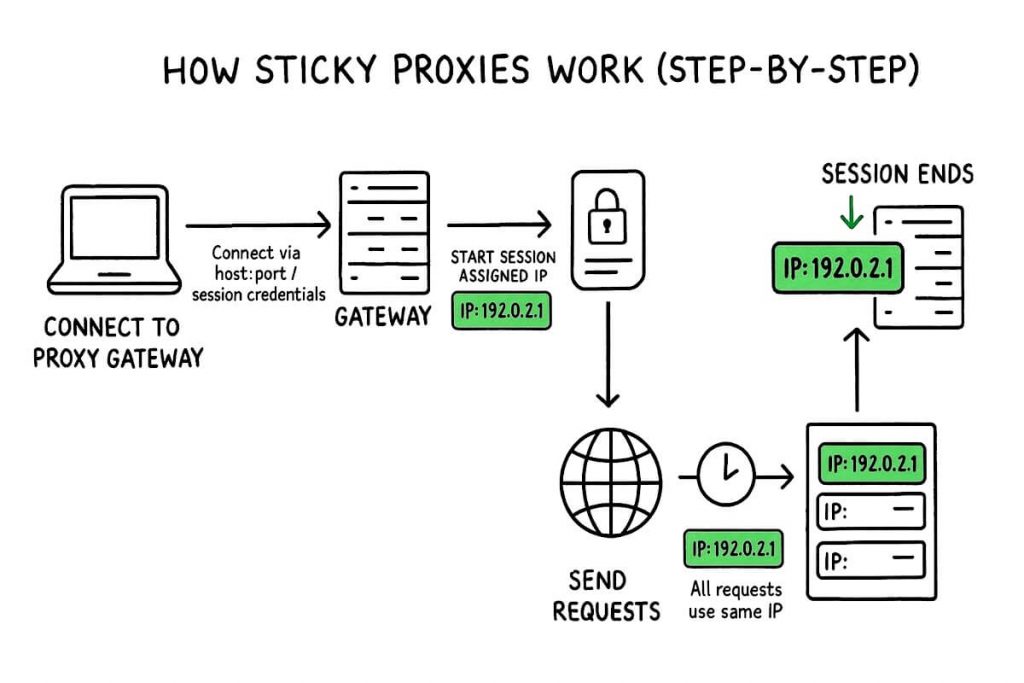
- Connect to Proxy Gateway: You begin by connecting your device to the proxy gateway using host:port or session credentials. This establishes the entry point to the proxy network.
- Start Session – Assigned IP: Once connected, the gateway assigns you a specific IP address. This IP is now tied to your session ID or port, and it becomes your digital identity for the duration of the session.
- Send Requests Through Same IP: All of your outgoing traffic (every request you make) is routed through this assigned IP. The diagram shows the globe with a clock, highlighting that your requests consistently use the same IP.
- IP Persists for the Session Duration: The assigned IP doesn’t change mid-session. It remains “sticky,” sticking with you for the exact time window you set (e.g., 10 minutes, 1 hour, 24 hours).
- Session Ends – IP Returns to the Pool: When the session expires, your IP is released back into the pool. The next time you connect, you’ll be issued a new, fresh IP, ensuring both continuity for tasks and ongoing anonymity.
Tech Details (For the Curious)
- Session IDs: Add _session123 to your username to keep one IP
- Port-based: One port = one IP. Change ports to change IPs
- Session tables: Like a live scoreboard, mapping sessions to IPs and expiration times
You can run multiple sticky sessions at once, each with its own IP. Once a session ends, the IP resets automatically.
3. Sticky vs. Rotating vs. Static Proxies
Proxies aren’t one-size-fits-all. Sticky, Rotating, and Static each behave differently—one prioritizes session continuity, another anonymity, and the last stability.
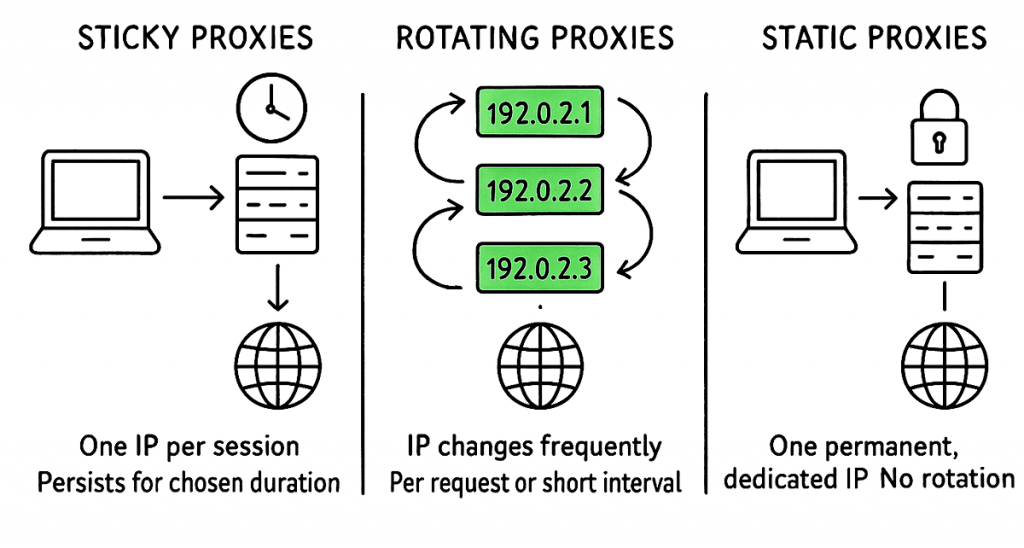
The chart below highlights their key pros, cons, and best uses so you can pick the right fit.
| Type | Behavior | Pros | Cons | Best For |
| Sticky Session Proxy | Same IP for a set time, then rotates | Maintains continuity, supports multi‑step flows, reduces connection overhead | Risk of bans if overused, IP may drop mid‑session | Login flows, checkout, account dashboards |
| Rotating Proxy | New IP every request or at short intervals | Maximum anonymity, great for high‑volume scraping | Breaks session continuity, extra cookie management | Crawling large public sites, mass data collection |
| Static (Dedicated) Proxy | IP never changes until manually switched | Absolute consistency, good for whitelisting | Most detectable if abused, little flexibility | API integrations, long‑term monitoring, reputation building |
Quick decision rule:
- Need session continuity? Go sticky.
- Need maximum IP spread? Go rotating.
- Need permanent IP? Go static.
Time-Sensitive Flows Need This ⏳
Time-sensitive flows like sneaker drops or ticket sales demand sticky session proxies—no second chances.
Get stability4. Use Cases Where Sticky Proxies Are The Best
Sticky proxies aren’t a one‑size‑fits‑all tool. They’re perfect when you need to act like a real, logged‑in user. The following are the most common use cases for sticky proxies.
- 🛒 E-commerce checkout: Sneaker drops, ticket sales, PS5 console launches, anything high-demand needing an uninterrupted checkout. These sessions can run for minutes or half an hour while the site checks your cart and payment. If your IP shifts, the system thinks you quit. A sticky proxy locks your identity in place and guides you from cart to confirmation.
- 🔐 Logins & dashboards: SaaS portals and vendor dashboards tie login tokens to both cookies and IP. If you rotate the IP, those tokens will break. This forces fresh logins and broken scripts. Sticky sessions keep the same IP so workflows stay smooth.
- 📱 Social media management: LinkedIn, TikTok, Facebook, Instagram—these platforms sniff out weird login patterns fast. If your IP changes mid-post, you’ll trip captchas or even bans. Sticky proxies let each account keep a stable IP, so agencies can post and engage without looking fake. Learn more in social media proxies.
- 🌍 Ad verification & geo-testing: Testing an ad isn’t just loading a banner, but it’s tracing the whole journey: impression, click, landing page, maybe even conversion. Every step has to come from the same IP to look real. Sticky proxies hold steady for the 30–60 minutes these tests demand.
- 🧪 QA & user journeys: QA teams follow the same steps a real user would (> log in, > build a profile, > shop, > checkout, > confirm. If the IP rotates, the flow breaks and looks like a bug. Sticky proxies keep the sequence intact so testers can trust their results.
| Interesting: In our internal tests at RapidSeedbox, sticky proxies improved session success rates by over 40% compared to rotating proxies in multi-step checkout flows. |
5. Technical & Engineering Considerations
Sticky proxies only work well if you set them up with care. The wrong timing or cookie handling can flag your traffic ‘as suspicious’ and kill your sessions. However, if you do this right, sticky proxies cut latency and give you far more reliable workflows.
Checklist
- Detection & Fingerprinting: Rotate user-agents and keep fingerprints steady.
- Session Duration: Test different windows (5–60 minutes) to balance stability with stealth.
- Cookie & Token Handling: Persist cookies and headers or risk broken identity.
- Connection Reuse: Enable keep-alive/HTTP2 for lower latency.
- Pool Health: Use providers with clean IPs.
- API Controls: Look for tools to start/stop sessions, rotate on demand, and set sticky length.
- Geo & ISP Coverage: Broader locations and ISP proxies mean higher realism and success.
A sticky proxy session can fall apart if you don’t manage fingerprints and duration. Holding the same IP too long raises suspicion, but switching too quickly breaks workflows. The trick is to balance both: rotate user-agents, keep fingerprints consistent, and experiment with 5, 15, 30, or even 60-minute windows to find the sweet spot. Pair that with solid cookie and token handling so your digital identity doesn’t collapse midstream.
Performance matters too. Sticky proxies typically shave 30–40% off latency because they avoid repeat handshakes, especially with keep-alive or HTTP/2 enabled. But you’ll only get that stability if your provider has clean IP pools and good failover. API controls help you fine-tune sessions—manually rotate, set sticky duration, query IP health—and wide geo/ISP coverage makes your traffic look natural. Done together, these steps keep sticky proxies both fast and believable.
6. The Best Sticky Session Proxy Provider
a. RapidSeedbox – Balanced performance at scale

Well known in the seedbox space, RapidSeedbox (with Datacenter IPv4/IPv6, Residential, and Mobile) now offers a robust sticky proxy solution. Their infrastructure covers both IPv4 and IPv6, with session durations ranging from seconds to 30 minutes. Pricing is competitive in the mid-range, and the service is supported by clean IP pools and responsive customer support.
Learn more about RapidSeedbox in: Datacenter | Residential | Mobile
b. Oxylabs – Enterprise powerhouse

Oxylabs maintains one of the largest IP pools in the market, with over 175M IPs and a 99.9% success rate. Sticky sessions run up to 30 minutes, with strong enterprise-grade support and SLAs. Pricing is at the higher end ($7.75–$8/GB), which suits compliance-driven organizations and large-scale corporate deployments.
Learn more in: Oxylabs Review (+Alternatives)
c. Smartproxy / Decodo – Value leader

Smartproxy (and its partner Decodo) has built a reputation for affordability and speed. Pricing starts at $1.50/GB at scale, with sticky sessions customizable between 1 second and minutes. Average response times are fast at 0.63s, and the inclusion of an anti-detect browser makes it especially appealing for agencies and mid-sized businesses.
Learn more in: Smartproxy: Our Thoughts (+Alternatives)
d. SOAX – Mobile and residential depth

SOAX is recognized for its strong mobile and residential proxy networks. Sticky sessions last up to 60 minutes, and pricing begins at $2.20/GB, dropping as low as $0.32/GB at enterprise scale. The unified subscription model and reliable mobile coverage make SOAX a good fit for ad verification, app testing, and location-sensitive use cases.
Learn more in: Live proxies review and alternatives (SOAX)
e. Bright Data – Compliance-first ecosystem

Bright Data offers a broad suite of data collection tools alongside its sticky proxies. The service guarantees 99.99% uptime under strict SLAs and provides sessions with strong reliability. Pricing starts from $5.88/GB, with mandatory KYC processes in place, which makes Bright Data a natural choice for enterprise users who require compliance and auditing features.
Learn more in: Bright Data Proxy Alternative: 7 Best Options To Try
f. IPRoyal – Ultra-long sessions

IPRoyal distinguishes itself with sticky sessions lasting up to seven days, one of the longest on the market. Pricing is $2.45/GB, and the model allows traffic to never expire. This makes it especially useful for long-term testing or account management scenarios, though its feature set is less broad compared to larger providers.
Learn more in: IPRoyal Review: Is it Worth a Shot?
| Our Methodology for Choosing the Best Sticky Session Proxy ProviderWe compared providers using seven core factors: uptime (99%+ reliability), flexible session control (seconds to 24h), global coverage with realistic IP diversity, and strong API support for session management. We also weighed transparent pricing ($1.50–$8/GB typical), clean IP pools with low abuse rates, and fast performance with sub-second latency. Together, these criteria give a clear picture of which services deliver the best balance of stability, control, and value in 2026. |
7. FAQs About Sticky Proxies
A sticky proxy keeps the same IP for a set time; a rotating proxy changes IP on every request or short interval.
A sticky IP lasts minutes or hours before rotating; a static IP stays the same indefinitely until you manually change it.
It depends on your workflow. Checkout flows: 5–30 min. Social media: 10–60 min. Monitoring: up to 24 h. Test different durations to find your sweet spot.
Yes—by mimicking real user behavior. But you still need realistic headers, cookies, and timing.
For high‑volume scraping where each request is independent, rotating proxies are cheaper and stealthier.
8. Conclusions
Today, sticky session proxies have shifted from niche tool to core infrastructure. They provide the session persistence needed for multi‑step workflows (login > checkout > ad verification) while balancing rotation to avoid bans.
If your automation needs a consistent identity to work properly, sticky proxies are mandatory.
What do we recommend? Start small: test a provider like RapidSeedbox with a 10–30‑minute session. Measure success rates and latency. You can also track the cost per successful request. Then scale.
Used correctly, sticky session proxies deliver stable sessions—all at a fraction of the price compared to just a few years ago.
Don’t Break Your Sessions ⚠️
Don’t risk broken checkouts or expired sessions when a sticky session proxy can keep your flow intact.
Stay connected
0Comments