 By
By
When ticketing systems melt under pressure, it’s rarely because the code failed. It’s the traffic. And ticket-bot proxies help engineers simulate that traffic before it breaks.
Table of Contents
- What Exactly Are Ticket-Bot Proxies?
- Why Ticketing Sites Fight Them So Hard
- Why People Use Ticket-Bot Proxies (Legit and Illegit)
- The Types of Proxies Used in Ticketing (plus real-world tips)
- Inside the Modern Anti-Bot Defense System
- Building a Legitimate Ticket-Testing Stack
- How RapidSeedbox Helps
- Emerging Ticket-Bot Defense on the Horizon
- FAQ: Ticket-Bot Proxy
Disclaimer: This article is for educational and ethical testing purposes only. RapidSeedbox does not condone or support the misuse of proxies, automation, or bots to gain unfair advantages in ticketing systems or any platform. Users are solely responsible for ensuring compliance with all applicable laws and terms of service.
1. What Exactly Are Ticket-Bot Proxies?
At their core, ticket-bot proxies are regular proxies with a very specific job: helping automated bots buy or test tickets at massive scale without getting blocked. When a ticketing website sees too many requests from one IP, it will instantly throttle or ban that address. A proxy solves this by acting as a middleman. The bot (or automated software program) connects to a pool of proxies, and each of these proxies has a different IP and location, so the ticket website sees thousands of unique “users.”
You can think of it like this: One bot pretending to be a thousand buyers standing in line; each with a different face and address.
How They Work Under the Hood
Ticket bots are coordinated systems built for speed, disguise, and scale. They are in fact more than just scripts. Here’s the quick flow that shows how they work under the hood (refer to the diagram below):
- Bot Controller / Scheduler: The operator defines targets (URLs, events, timing). The controller queues and dispatches hundreds of sessions.
- Bot Worker (Headless Browser): Each worker acts as a virtual shopper, loading pages, filling forms, and checking out automatically.
- Proxy Rotator / Rules: Assigns a new IP per request or holds one for a few minutes (sticky) to mimic human browsing.
- ISP, Residential & Mobile Proxies:
- Residential: real household IPs, per-request rotation.
- ISP (Static): sticky IPs for steady sessions.
- Mobile: carrier IPs, highly trusted but slower.
- Ticketing Site: The site sees distributed, human-like traffic — not a single bot.
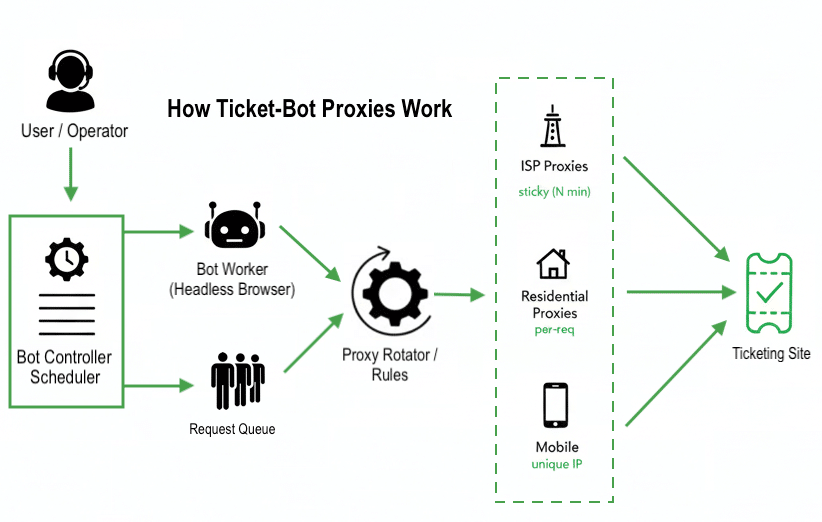
| 💡 Takeaway: The real trick isn’t the bot, it’s how proxies scatter its identity across real ISP networks to stay invisible. |
2. ⚡ Why Ticketing Sites Fight Them So Hard
Ticketing platforms operate under pressure. Artists and venues expect fair access for real fans — and when bots powered by proxies swarm a release, fairness collapses.
The ripple effect:
- Fans are pushed to resale markets at inflated prices.
- Artists lose goodwill and face PR backlash.
- Platforms spend millions upgrading anti-bot infrastructure.
Yet, for developers building load-testing systems, the same proxy methods are essential to ensure reliability under real-world demand. That’s the gray zone — where purpose separates fair testing from exploitation.
| 🎯 Interesting Fact! According to research, bots (bad-bots) make up about 39.9% of all traffic on ticketing websites — significantly higher than the average across industries. Source: softprom.com |
3. Why People Use Ticket-Bot Proxies (Legit and Illegit)
Not every buyer of “ticket proxies” is a scalper. Some are QA testers or data analysts who need to simulate real-world conditions (hundreds of users from multiple places using different devices). Theis group might only want to ensure a ticketing system performs under pressure. But, others… they are not so innocent.
Below is how motivations typically split across legitimate and abusive use cases
| Purpose | Example Use Case | Proxy Type |
| Legitimate Testing | Load-testing queues or replicating global traffic for QA | Residential / Datacenter |
| Market Analytics | Monitoring resale pricing, regional demand, or dynamic pricing algorithms | Rotating Residential |
| Scalping / Resale | Auto-buying tickets in bulk for resale profit, often using hundreds of parallel sessions | Residential / Mobile |
| Fraudulent Automation | Exploiting CAPTCHAs, bypassing queue limits, or faking identities with compromised IPs | Mobile / Compromised IPs |
The thin line between testing and exploitation
There’s a fine line between using proxies for testing and turning them into tools for unfair advantage. On the one hand, legitimate testers rely on proxies to check system performance across different locations and networks (especially during traffic spikes that hit tens of thousands of requests per second). Proxies help simulate such real-world conditions. But scalpers use those same tools differently. By tuning rotation rules and running checkout bots, they chase tiny speed gains to outpace real users. It’s not really testing, but gaming the system.
Then there’s the gray zone. Some groups use automation in ways that follow the rules but still overwhelm fair-use limits. Think reseller dashboards or fan-club scripts. They’re not breaking terms, but they’re pushing the line.
Ethical use vs exploitation
The line between ethical and exploitative use lies in intent and consent.
| Ethical | Unethical |
| Testing your own ticket platform under load | Circumventing queue limits on live events |
| Monitoring prices for analytics | Mass-buying tickets for resale |
| QA for localization or performance | Using leaked or compromised IPs |
Platforms like Ticketmaster and AXS now collaborate with governments and cybersecurity firms to identify large proxy networks used in resale schemes. Meanwhile, legitimate enterprises use the same methods for testing. This is proof that technology itself isn’t the villain.
🧩 Simulate Real Users, Not Bots
Get human-like behavior with residential IPs—perfect for testing ticket-bot proxies ethically.
Try Rotating Residential4. The Types of Proxies Used in Ticketing (plus real-world tips)
Each proxy type has clear pros and trade-offs. Knowing them helps you choose the right mix and understand why ticketing platforms flag certain ranges.
| Proxy Type | Pros | Cons |
| 🏠 Residential | Real-user trust, geo access | Slower, costly |
| 📱 Mobile | Highest trust, bypass locks | Expensive, limited speed |
| 🖥️ Datacenter | Fast, cheap | Easily flagged |
| 🔄 Rotating | New IP each request | No session persistence |
| 🧷 Sticky | Keeps session stable | May get flagged |
a. Residential Proxies
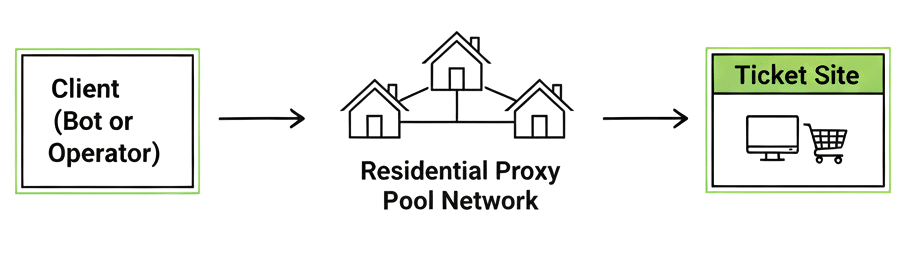
Residential proxies are IPs assigned by ISPs to real homes. They are considered the gold standard for trust and realism.
- ✅ Pros: High mimicry of real users. They give you better success on live checkouts and geo-restricted flows.
- ⚠️ Cons: Higher cost and variable speeds. These also give you occasional churn (IP may change unexpectedly).
- 🔧 Tips: Use residential pools for final-stage checkout sessions and small bursts; warm up new IPs slowly to avoid instant reputation hits. Learn more about how to use residential proxies
b. Mobile Proxies
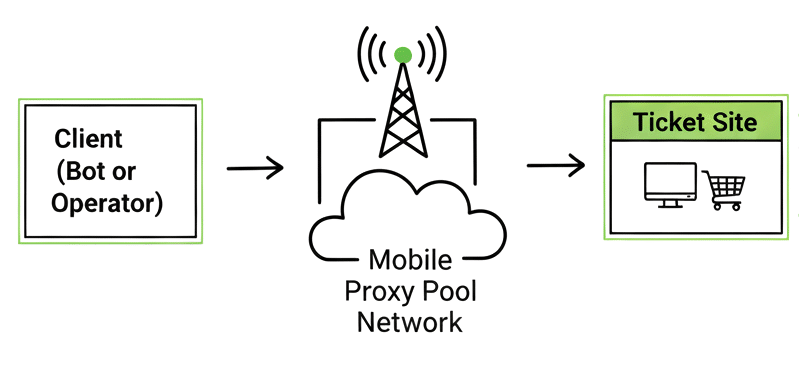
Mobile proxies are carrier-sourced IPs from 3G/4G/5G networks. These proxies are extremely trusted by some anti-fraud systems.
- ✅ Pros: Very high trust signal (carrier NAT masks many users), great for bypassing region checks.
- ⚠️ Cons: Higher latency and usually more expensive. They are also limited in throughput per IP.
- 🔧 Tips: Reserve mobile proxies for the most critical flows (payment verification, region-lock tests). Pair with sticky sessions to avoid reauthentication.
c. Datacenter Proxies
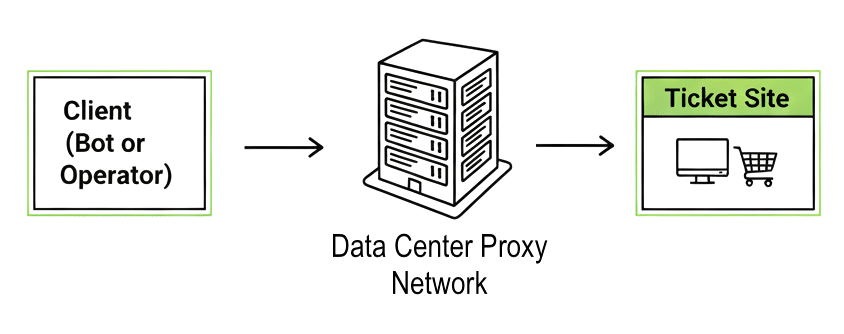
Datacenter proxies are server-hosted IPs. These are fast and cheap but easier to detect.
- ✅ Pros: Lowest cost, high throughput, great for load testing or non-sensitive scraping.
- ⚠️ Cons: High block rates on ticketing sites and platforms using reputation feeds.
- 🔧 Tips: Use datacenter proxies for stress tests and crawling public pages. But never use them for live transactional checkouts unless behind an approved testing environment.
d. Rotating vs Sticky (Session Strategy)
- Rotating: new IP per request. Best for discovery, testing, scraping, or entering queues where many different “users” must be simulated quickly.
- Sticky: same IP for N minutes. Best for maintaining authenticated sessions through checkout and payment.
- ⚙️ Rule of thumb: Rotate during discovery; switch to sticky once the bot enters checkout. Learn more about rotating vs sticky vs static proxies.
| Bottom line: Mix proxy types to match each stage of your flow. For example: discovery (rotating datacenter/residential), validation (rotating residential), and checkout (sticky residential or ISP/static/mobile). That staged approach will help you keep costs manageable while maximizing success rates. |
5. Inside the Modern Anti-Bot Defense System
Modern ticketing systems don’t just block IPs — they analyze behavior. They build adaptive fingerprints across millions of sessions, learning how real people browse… and how scripts don’t.
⚙️ The Four Layers of Detection
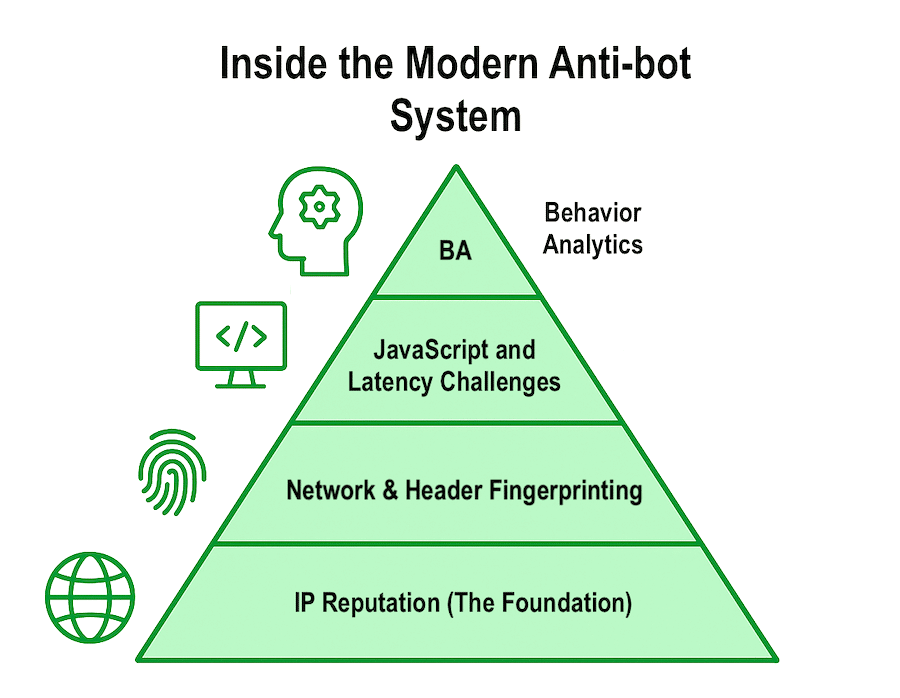
Think of modern bot defense like a security pyramid, where each layer adds another filter.
- IP Reputation (Foundation): Reputation feeds and ASN databases flag overused or automated subnets.
- Network & Header Fingerprinting: Header order, TLS patterns, or cookie gaps expose bots.
- JavaScript & Latency Challenges: Invisible puzzles measure timing and randomness.
- Behavioral Analytics (Human Layer): Mouse wobbles, scrolls, and pauses define “human rhythm.”
a. IP Reputation (The Foundation)
Anti-bot systems cross-check incoming requests against global reputation feeds and ASN databases (Learn about ASN-Targeting proxies). If your proxy subnet has a record of high-volume automation, but for sure, it will be flagged before the first page even loads.
- Shared blacklists from services like Akamai or Cloudflare detect reused or compromised IPs.
- Once a proxy pool is overused, its “trust score” collapses across multiple ticketing platforms.
b. Network & Header Fingerprinting
Even when an IP looks clean, the browser headers can betray automation.
- Header order and TLS signatures will differ between real browsers and bots.
- Cookie absence or mismatch between User-Agent and TLS handshake is another instant giveaway.
c. JavaScript & Latency Challenges
Ticketing websites inject silent JavaScript puzzles to detect human delay and randomness.
- These challenges include invisible CAPTCHAs, canvas fingerprints, and precise timing checks.
- A bot that reacts too perfectly or too fast is flagged as artificial.
d. Behavioral Analytics (The Human Layer)
The hardest to fake.
- Mouse wobbles, scroll depth, click intervals, and mouse hovers, all give the “human rhythm and vibe”
- Real users hesitate and make micro-errors; bots don’t.
| 💡 Insight: Real users hesitate; but bots repeat. That’s how behavioral AI catches even perfect proxy setups. |
6. Building a Legitimate Ticket-Testing Stack
If your goal is to test ticketing performance or simulate user demand (not cheat the system) then your proxy setup needs to be designed for control and transparency. Done right, this proxy setup will help you prevent outages and improve the overall fairness rather than undermine it.
a. Plan & scope
Define targets (URL, event, test window, etc) and success criteria (latency and checkout success). Also, record permissions and add test domains to a whitelist so your traffic is expected.
b. Pick ethical proxies & tools
Choose clean residential/ISP/mobile pools from a reputable provider (no compromised devices). Also, use a headless browser framework (Playwright/Puppeteer) or real-browser workers. And last but not least, don’t forget to keep concurrency limits conservative (start low, increase gradually).
Sometimes proxies might not be enough: Even the best proxies lose trust when overused. Once an IP range hits shared blocklists, your traffic can get throttled (even if you’re playing by the rules.) That’s why proxy hygiene matters just as much as which proxies you choose.
- Swap out overused IPs every 30–45 days.
- Mix residential, ISP, and mobile sources to stay flexible.
- And don’t blast requests—spread them out to stay under the radar.
- The goal? Keep your testing low-key, your footprint believable, and your IPs clean.
c. Emulate real users
- Add human-like randomness: variable delays, random mouse/scroll actions, device/browser diversity.
- Use sticky sessions for checkout flows; rotate IPs during discovery.
- Run a small warm-up before full tests to “season” IPs and avoid sudden bursts.
d. Test your proxy setup
Before launching any large test or automation cycle, make sure your proxies actually work as expected. Verify Your IP (Quick Test). Before you start scraping or testing, double-check that your proxy is active and geolocated correctly. A quick verification helps you catch misconfigurations early and ensures your traffic appears from the right region.
- Browser: visit whatismyip.com or ipinfo.io; confirm proxy IP and location.
- CLI: curl -x IP:PORT -U USER:PASS https://ipinfo.io
Best Practices for Responsible Testing
- Use clean residential proxies from ethical providers (never from compromised IP pools).
- Limit concurrency: simulate natural user volumes, not traffic floods.
- Add randomized delays between actions to reproduce human pacing.
- Whitelist test domains so your own monitoring traffic doesn’t get misclassified as malicious.
- Document your testing scope in your compliance or QA policy.
| 🧭 Final Thoughts: Modern anti-bot systems are not static firewalls — they’re adaptive algorithms that evolve with every release. To operate responsibly within them, your strongest defenses aren’t brute force or stealth, but transparency and precision. Those qualities keep your proxies unblocked; and make your automation credible. |
7. How RapidSeedbox Helps
RapidSeedbox gives you clean residential and mobile proxy pools built for traffic simulation and checkout testing. Because everything runs on ISP-sourced IPs across 100+ regions, your tests look like real traffic instead of bot noise.
This gives engineering room to work. You manage rotation and concurrency, while RapidSeedbox keeps IPs fresh and stable so sessions last longer.
Rotating Residential Proxies (Global & Reliable)
A solid choice for simulating wide, human-like traffic.
- 6.9M+ IPs in 100+ countries
- 99.9% success, 99% uptime
- 100+ Mbps speeds
- Unlimited threads
- Sticky or rotating sessions
- Ethical IPs + SSL
- REST API
- Pricing: 10GB/$30 → 500GB/$1000
- Strong regions: Brazil, India, US
Great for queue tests, region checks, and large discovery phases.
Mobile Proxies (Highest Trust)
Ideal for strict platforms and checkout flows.
- Real 3G/4G/5G carrier IPs
- 99.95% success, 99.9% uptime
- ~0.5s response
- Unlimited threads
- Sticky or rotating
- HTTP/SOCKS5
- Ethical sourcing
- Pricing: 5GB/$45 → 500GB/$2500
Perfect for device-binding tests, mobile-first flows, and anything that flags desktop automation too fast.
8. Emerging Ticket-Bot Defense on the Horizon
Here is a quick read into the modern anti-bot defenses that we see on the horizon:
- Beyond CAPTCHAs: Ticketing now verifies who you are, not just your IP.
- Device Binding: Tickets link to verified phones or wallets, limiting mass resales.
- Smart Queues: Dynamic waitlists adjust to identity and behavior.
- Behavioral AI: Systems track scrolls, clicks, and timing to spot bots.
- Blockchain Tickets: NFT-linked passes ensure traceable, non-transferable ownership.
Modern anti-bot defenses have moved far beyond CAPTCHAs and rate limits. Today’s ticketing systems care more about who you are than just where you’re connecting from.
One major shift is device binding. Tickets are now often tied to verified devices, like your phone, a digital wallet, or the event’s app. This ‘device binding’ is making transfers harder and limiting mass reselling.
Static queues are also being replaced with smart/personalized waitlists. The system adjusts based on your identity and behavior. Two people can load the same event page and face totally different wait times. This of course, would depend on how trustworthy they appear.
At the same time, machine learning is tracking user behavior, for example how long you hover, scroll, or switch tabs. Bots on the other hand, move with robotic precision. Real people don’t. That contrast helps systems flag automation more accurately.
Some organizers are even testing blockchain-based tickets, non-transferable and often linked to NFTs or digital wallets. These leave a traceable ownership path and cut down on scalping. More on this: Imperva: How Bots Impact Ticketing Systems (PDF)
9. Ticket-Bot Proxy FAQ
Use managed proxy services like RapidSeedbox’s rotating residential proxies — millions of real ISP IPs across 100+ locations that mimic human traffic and reduce CAPTCHAs. Plus, these are also great for supporting multi-session testing.
No provider can promise zero blocks. Still, rotating residential or ISP proxies from trusted, ethical providers (like RapidSeedbox or Bright Data) tend to perform best. The real key is good setup — balanced pacing, realistic browser fingerprints, and clean IP rotation. Learn more about Ticketmaster proxies
Yes, but separate your workloads. Run scrapers and bots on different proxy pools to prevent cross-contamination and keep both stable. Here is a pro tip: Use API automation to manage pool rotation and health checks.
Most providers offer dozens of global locations. Closer IPs mean lower latency and better trust. Local ISPs near event venues often improve queue success.
Yes. Rotating residential proxies let you scrape resale or marketplace sites for pricing and demand data without triggering blocks — essential for fair-market monitoring.
Usually no. Ticket queues tie your session to a single IP and device fingerprint. Rotating mid-queue can reset your spot. Use sticky or static proxies until checkout is done, then rotate afterward.
🛡️ Carrier-Grade Anonymity for Testing
Mobile proxies mask automation behind real-world mobile networks—perfect for QA engineers.
Get Mobile Access
0Comments