 By
By
Scraping the web shouldn’t mean solving puzzles. This guide to CAPTCHA-free scraping shows how to bypass detection using residential proxies, smart browser fingerprints, and fallback solvers only when necessary. Learn which tools, tips, tactics, and code setups yield 90%+ success rates while keeping costs under control.
TL;DR + What You’ll Learn
- What is a CAPTCHA and why sites use them: CAPTCHAs exist to stop bots—yours included.
- Avoid triggering CAPTCHAs vs solve them when triggered: Smart scrapers lean hard into avoidance. Solving is the fallback, not the plan.
- Avoiding CAPTCHAs — practical checklist & tactics: With the right setup, you can look human enough to skip most challenges entirely.
- When you must solve CAPTCHAs (solver services & fallback patterns): Some CAPTCHAs are just unavoidable. When that happens, use solvers wisely to minimize cost and delay.
- Hands-on tutorial A: Playwright + Python: minimize captcha triggers: Using Playwright with anti-detection patches makes headless browsers look and feel like real humans.
- Hands-on tutorial B: Proxy rotation + solver fallback: Combine IP management with solver logic to handle high-volume or persistent protection.
- Tools & Services for CAPTCHA-Free Scraping: Tools like Playwright, curl_cffi, and rotating proxies are cost-effective, but need setup and care.
- Ethical & legal considerations: Ignoring Terms of Service or data privacy laws can backfire. Learn the basics and tread carefully.
Content Disclaimer: This article provides technical guidance on CAPTCHA avoidance and solving in the context of ethical web scraping. It is not legal advice. Users are responsible for complying with relevant laws, terms of service, and privacy regulations in their jurisdiction. Always consult legal counsel for use-case-specific compliance.
1. What is a CAPTCHA and why sites use them
A CAPTCHA (Completely Automated Public Turing test to tell Computers and Humans Apart) is a challenge-response test websites use to verify whether you’re human.
You’ve seen them: clicking fire hydrants in grainy images, typing distorted text, simply clicking “I’m not a robot.”, or simply any sort of challenge aimed to stop bots.

Modern CAPTCHAs evolved from simple text puzzles to sophisticated systems. Google’s reCAPTCHA v2 presents image challenges, while v3 runs invisibly and scores your behavior from 0.0 (bot) to 1.0 (human). Cloudflare Turnstile replaced their previous challenges with minimal-friction checks. hCaptcha monetizes the process by using your clicks to train AI models.
Types of CAPTCHAs (click to expand)
- reCAPTCHA v2: Image selection challenges (“Select all traffic lights”)
- reCAPTCHA v3: Invisible scoring based on behavior analysis
- hCaptcha: Similar to reCAPTCHA but privacy-focused
- Cloudflare Turnstile: Minimal interaction, browser verification
- FunCaptcha: Rotating images to correct orientation
- GeeTest: Sliding puzzles popular in Asia
Here’s the distinction: detection happens before you even know it—sites analyze your TLS fingerprint and browser properties. Challenges appear when detection flags you as suspicious. Smart scraping should then focus on avoiding detection entirely rather than constantly solving challenges.
Sites deploy CAPTCHAs to protect against automated abuse: preventing DDoS attacks and blocking spam bots. And yes, stopping web scrapers from overwhelming their servers. CAPTCHA is not specifically put out there to target legitimate data collection. It’s primarily about resource protection but also about maintaining service quality for human users.
| 🧠 Fun Fact: Guatemalan genius Luis von Ahn not only invented CAPTCHA (that little test proving you’re human) but also turned it into reCAPTCHA, using your clicks to help digitize old books! |
2. Two core strategies: avoid triggering CAPTCHAs vs solve them when triggered
The fundamental choice in CAPTCHA-free scraping comes down to prevention (versus cure.) Each approach has different trade-offs that determine when to use which strategy.
a. Avoiding CAPTCHAs
Prevention focuses on never triggering challenges in the first place. This means appearing so human-like in the first place, that anti-bot systems just never suspect you’re automated.
Avoiding CAPTCHA altogether comes with a few clear advantages. First, it’s much more cost-effective in the long run, typically costing just $0.10 to $0.50 per 1,000 requests. On top of that, scraping speeds improve significantly since you’re not stuck waiting 15 to 30 seconds for each CAPTCHA to be solved. When your system’s set up well, you’ll also see higher success rates. And perhaps most importantly (especially at scale) this approach would be able to handle millions of requests with far greater efficiency.
Core avoidance tactics:
- Rotate residential IPs: Use IP addresses from real ISPs rather than datacenter servers
- Match browser fingerprints: Spoof TLS signatures and browser properties correctly
- Simulate human behavior: Add realistic mouse movements and scroll patterns
- Manage sessions properly: Maintain cookies and authentication like real users
b. Solving CAPTCHAs
Sometimes challenges are unavoidable. Even you (the human reading this article 😛) would face CAPTCHAS, now and then. These are called false positives. This is especially true for heavily protected sites or when scaling rapidly. Solver services provide the safety net.
There are times when solving CAPTCHAs makes sense. For example, if you’re building a quick proof of concept, it’s often the fastest way forward. It’s also useful when you hit occasional challenges on sites that are mostly accessible. If avoidance strategies fail, having a solver as a backup keeps things running. And when data is time-sensitive, even a short delay is better than getting nothing at all.
Solver integration approaches:
- API integration: Services like CapSolver or 2Captcha solve challenges programmatically. Learn more here: API vs scraping: for data collection.
- Hybrid strategy: Try avoidance first, fall back to solving when detected
- Queue-based solving: Batch challenges for efficiency
- Human-assisted solving: For complex puzzles AI can’t handle
The optimal approach? Start with avoidance tactics to minimize costs and latency. Add solver integration as a fallback for the 5-20% of requests that still trigger challenges. This hybrid strategy balances cost, speed, and reliability.
3. Avoiding CAPTCHAs — practical checklist & tactics
Successful CAPTCHA avoidance requires multiple defensive layers. Here’s how to build an undetectable scraper from the ground up.
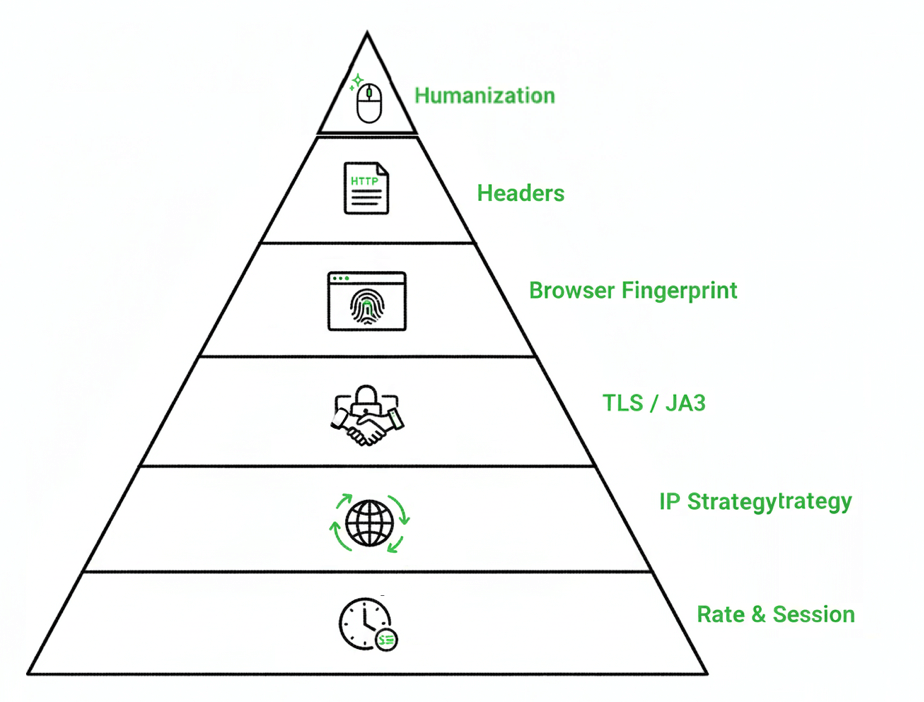
CAPTCHA-Shield Pyramid — Summary
The pyramid shows six layers that together make scraping look human and avoid CAPTCHAs.
- Rate & Session: Pace requests and keep sessions steady to mimic normal browsing.
- IP Strategy: Rotate residential or mobile proxies to appear as real users.
- TLS / JA3: Match Chrome’s encryption pattern for authentic TLS handshakes.
- Browser Fingerprint: Randomize device and rendering properties to evade detection.
- Headers: Use realistic browser headers and align with proxy locations.
- Humanization: Simulate natural movement. Scrolling and timing for a human feel.
a. IP strategy (and rate/sessions)
Your IP address is the first thing sites check. Datacenter IPs scream “bot” to anti-fraud systems, while residential IPs build trust immediately. CAPTCHA-free scraping relies heavily on residential rotating proxies and mobile proxies to avoid detection. These proxies mimic real user behavior and provide higher trust scores. So they are perfect at reducing CAPTCHA frequency.
IP rotation configuration:
| Proxy Type | Trust Score | Cost/GB | Rotation Strategy | Best For |
| Datacenter | Low | $0.50-2 | Every request | Simple APIs, public data |
| Residential | High | $3-8 | Every 10-50 requests | E-commerce, protected sites |
| Mobile 4G | Very High | $4-10 | Sticky sessions | Social media, tough anti-bots |
| ISP | High | $2-5 | Session-based | Balance of speed and trust |
Configure rotation based on your target. For example, sites like Amazon might need new IPs every 20 requests, while news sites accept hundreds from the same residential IP (Learn more: Amazon and ebay scraping). But still, we would always recommend starting conservatively, then gradually increasing requests per IP while monitoring block rates. Learn more about rotation in Residential Proxy Rotation Explained.
Also, when scraping behind login or maintaining cart state, use session-based proxies. These ones can maintain the same IP for 10-30 minutes. Random IP changes mid-session are an instant red flag.
b. Browser & fingerprint strategy
Modern anti-bot systems can analyze dozens of browser properties. TLS fingerprinting for example, can identify Python’s requests library before your first HTTP request even completes.
Here’s what you need to spoof:
TLS/JA3 fingerprinting: Your TLS handshake creates a unique signature. Python’s requests library has a distinctive JA3 hash that screams “bot.” So, what can you do? Use curl_cffi to perfectly mimic Chrome’s TLS fingerprint. You can also deploy real browsers via Playwright or Puppeteer. And, finally, we would also recommend avoiding basic HTTP libraries for protected sites.
Browser properties to randomize:
- Canvas fingerprint (add noise to canvas operations)
- WebGL parameters (vary renderer strings)
- Audio context (inject subtle timing variations)
- Font enumeration (randomize available fonts list)
Tools like Playwright-stealth handle most of this automatically. The key principle would be: to match a real browser’s fingerprint completely rather than partially spoofing properties.
c. Headers & requests
HTTP headers tell a story. So, the idea is to make yours compelling and consistent. Below is an example on how to do this with Python:
|
1 2 3 4 5 6 7 8 9 10 11 12 13 14 |
headers = { 'User-Agent': 'Mozilla/5.0 (Windows NT 10.0; Win64; x64) AppleWebKit/537.36', 'Accept': 'text/html,application/xhtml+xml,application/xml;q=0.9,*/*;q=0.8', 'Accept-Language': 'en-US,en;q=0.9', 'Accept-Encoding': 'gzip, deflate, br', 'DNT': '1', 'Connection': 'keep-alive', 'Upgrade-Insecure-Requests': '1', 'Sec-Fetch-Dest': 'document', 'Sec-Fetch-Mode': 'navigate', 'Sec-Fetch-Site': 'none', 'Cache-Control': 'max-age=0' } |
| ⚠️ Critical details: Use proper Sec-Fetch headers for Chrome and align Accept-Language with your proxy’s location. And yes—keep header order intact; some anti-bot systems flag mismatches. |
Two additional tips for headers & requests.
- Cookie persistence: Consider what real user behavior is. In this case, real users don’t start fresh every request. Save cookies after authentication and restore them in new sessions. This dramatically reduces CAPTCHA rates for logged-in scraping.
- Request pacing: Also remember humans don’t click at superhuman speed. Add delays:
- Between requests: 1-3 seconds minimum
- After errors: exponential backoff (2, 4, 8, 16 seconds)
- Random jitter: ±20% on all timings
d. Humanization & behavior
Bots move in straight lines, but humans… they wander, they take their time. Add these human touches:
- Mouse movements: Use Bézier curves, not linear paths. Overshoot targets occasionally. Add micro-movements while “reading.”
- Scrolling patterns: Smooth acceleration and deceleration. Pause at interesting content. Occasionally scroll up to re-read.
- Viewport interaction: Start with realistic window sizes (1920×1080, not 1024×768). Randomly adjust zoom levels. Load all resources (images, CSS, fonts.)
- Resource loading: Humans trigger lazy-loaded content and wait for images. Your scraper should too. This means scrolling to trigger infinite scroll and waiting for dynamic content.
| 👉 Heads up: These tactics reduce CAPTCHA triggers by 70–90% when properly implemented. But some challenges are still unavoidable—which brings us to solving strategies. |
Hardest Sites? Use Mobile IPs 💪
Cloudflare Turnstile, reCAPTCHA v3? Mobile proxies still get through.
Scrape the Tough Ones →4. When you must solve CAPTCHAs (solver services & fallback patterns)
Despite your best avoidance efforts, some CAPTCHAs are still unavoidable. The causes can be anything from heavy traffic periods, IP reputation issues, or simply tough anti-bot systems which mean you need a solving strategy. Here’s how to integrate solvers effectively while minimizing costs.
a. Solver types
The solver ecosystem offers two approaches with different trade-offs:
| Solver Type | Speed | Cost/1K | Accuracy | Best For |
| AI/Automated | 1-3 seconds | $0.40-3 | 85-95% | High volume, speed critical |
| Human-assisted | 15-30 seconds | $1-3 | 95-99% | Complex puzzles, accuracy critical |
- CapSolver leads in AI solving with 1-3 second response times at $0.40-0.90 per thousand for most types. Perfect when you need scale and can tolerate occasional failures.
- 2Captcha combines AI with human workers for maximum accuracy. At 15-30 seconds per solve and $1-3 per thousand, it’s ideal for complex challenges where accuracy matters more than speed.
b. Integration patterns
Smart integration minimizes both cost and latency impact:
Hybrid approach (recommended):
|
1 2 3 4 5 6 7 8 9 10 11 |
python def scrape_with_fallback(url): # Try stealth first response = stealth_request(url) if has_captcha(response): # Only solve when necessary solution = solve_captcha(response) response = retry_with_solution(url, solution) return response |
This pattern attempts avoidance first, solving only when challenged. Result: 80-95% of requests cost $0.10, while 5-20% cost an additional $1-3 per thousand. But there is a progressive degradation. So we would recommend starting with your fastest, cheapest method. Escalate only when needed:
- Fast datacenter proxy (1 second, $0.01)
- Residential proxy with stealth (2 seconds, $0.50)
- AI solver integration (4 seconds, $1.50)
- Human solver fallback (20 seconds, $3)
Queue-based solving: For non-urgent scraping, batch challenges for bulk solving. This improves efficiency and can reduce costs through volume discounts.
c. Latency & reliability
Solver integration impacts performance. Plan accordingly:
- Timeout strategies: Set aggressive timeouts (30 seconds for 2Captcha, 5 seconds for CapSolver) with retry logic. Don’t let one slow solve block your entire pipeline.
- Parallel solving: When hitting multiple CAPTCHAs, solve them concurrently rather than sequentially. This transforms five 20-second solves from 100 seconds to just 20.
- Success rate monitoring: Track solve rates by CAPTCHA type. If reCAPTCHA v2 success drops below 85%, investigate whether Google has updated their challenges.
- Cost optimization: Log which URLs trigger CAPTCHAs most frequently. Sometimes switching to a vendor’s API or finding alternative data sources is cheaper than constant solving.
| ⚠️ Reminder: Solver services are a safety net, not a primary strategy. If you’re solving more than 20% of requests, it’s time to revisit your avoidance tactics. |
5. Hands-on tutorial A: Playwright + Python: minimize captcha triggers
Let’s build a production-ready scraper that avoids most CAPTCHA challenges through smart browser automation. This example uses Playwright with stealth patches to create an undetectable scraping session. Learn more in: Playwright documentation.
|
1 2 3 4 5 6 7 8 9 10 11 12 13 14 15 16 17 18 19 20 21 22 23 24 25 26 27 28 29 30 31 32 33 34 35 36 37 38 39 40 41 42 43 44 45 46 47 48 49 50 51 52 53 54 55 56 57 58 59 60 61 62 63 64 65 66 67 68 69 70 71 72 |
from playwright.async_api import async_playwright from playwright_stealth import stealth_async import asyncio import random async def create_stealth_browser(): """Initialize an undetectable browser instance""" playwright = await async_playwright().start() # Launch with anti-detection arguments browser = await playwright.chromium.launch( headless=False, # Headless mode is easily detected args=[ '--disable-blink-features=AutomationControlled', '--disable-dev-shm-usage', '--no-sandbox', '--disable-web-security', ] ) # Create context with realistic settings context = await browser.new_context( viewport={'width': 1920, 'height': 1080}, user_agent='Mozilla/5.0 (Windows NT 10.0; Win64; x64) AppleWebKit/537.36 (KHTML, like Gecko) Chrome/120.0.0.0 Safari/537.36', locale='en-US', timezone_id='America/New_York', # Proxy configuration (residential recommended) # proxy={ # 'server': 'http://proxy.example.com:8000', # 'username': 'user', # 'password': 'pass' # } ) page = await context.new_page() # Apply stealth patches await stealth_async(page) # Add mouse movement simulation await page.mouse.move(random.randint(0, 100), random.randint(0, 100)) return page, browser, playwright async def human_like_scrape(url): """Scrape with human-like behavior""" page, browser, playwright = await create_stealth_browser() try: # Navigate with random timing await page.goto(url, wait_until='networkidle') await asyncio.sleep(random.uniform(2, 4)) # Simulate reading behavior for _ in range(random.randint(2, 4)): await page.mouse.wheel(0, random.randint(100, 300)) await asyncio.sleep(random.uniform(0.5, 2)) # Extract data content = await page.content() return content finally: await browser.close() await playwright.stop() # Run the scraper if __name__ == "__main__": content = asyncio.run(human_like_scrape("https://example.com")) print(f"Scraped {len(content)} bytes successfully") |
Key implementation notes:
- Headless=False: Headless mode sets detectable flags. Use virtual displays (Xvfb) in production
- Stealth patches: Removes navigator.webdriver and other automation signatures
- Random delays: Vary timing between 0.5-4 seconds to appear human
- Mouse movements: Small, random movements prevent behavior analysis detection
- Viewport: Use common resolutions (1920×1080, 1366×768) not weird dimensions
| Proxy integration tip: Residential proxies with sticky sessions work best. Configure 10-minute sessions to maintain consistent IPs during multi-page scraping. Check the full code repository. |
This approach successfully avoids CAPTCHAs on 85-95% of medium-protection sites. For the remaining 5-15%, we need a solver fallback.
6. Hands-on tutorial B: Proxy rotation + solver fallback
Here’s a production pattern that combines IP rotation with automatic CAPTCHA solving when needed. This pseudo-code demonstrates the architecture, followed by a Python implementation snippet.
Architecture pattern (language-agnostic):
|
1 2 3 4 5 6 7 8 9 10 11 12 13 14 15 16 17 18 19 20 21 22 23 24 25 26 |
FUNCTION scrape_with_smart_fallback(url): proxy_pool = initialize_proxies() solver = initialize_captcha_solver() FOR attempt IN 1 to 3: proxy = proxy_pool.get_next() response = fetch(url, proxy) IF response.has_captcha(): IF proxy.failure_count > 2: proxy_pool.mark_bad(proxy) CONTINUE solution = solver.solve(response.captcha_params) response = fetch(url, proxy, captcha_solution=solution) IF response.success: proxy.reset_failures() ELSE: proxy.increment_failures() IF response.success: RETURN response THROW "Max retries exceeded" |
Python implementation:
|
1 2 3 4 5 6 7 8 9 10 11 12 13 14 15 16 17 18 19 20 21 22 23 24 25 26 27 28 29 30 31 32 33 34 35 36 37 38 39 40 41 42 43 44 45 46 47 48 49 50 51 52 53 |
import requests from itertools import cycle import time class SmartProxyRotator: def __init__(self, proxy_list): self.proxies = {p: {'failures': 0} for p in proxy_list} self.pool = cycle(self.proxies.keys()) def get_next(self): """Get next healthy proxy""" for _ in range(len(self.proxies)): proxy = next(self.pool) if self.proxies[proxy]['failures'] < 3: return proxy raise Exception("All proxies exhausted") def mark_failure(self, proxy): """Track proxy health""" self.proxies[proxy]['failures'] += 1 if self.proxies[proxy]['failures'] >= 3: print(f"Retiring proxy: {proxy}") # Usage example proxies = [ 'http://user:[email protected]:8000' ] rotator = SmartProxyRotator(proxies) def scrape_with_fallback(url): for attempt in range(3): proxy = rotator.get_next() try: resp = requests.get(url, proxies={'http': proxy, 'https': proxy}) if 'recaptcha' in resp.text: # Log metrics print(f"CAPTCHA triggered on attempt {attempt + 1}") # Implement solver integration here rotator.mark_failure(proxy) continue return resp.text except Exception as e: rotator.mark_failure(proxy) time.sleep(2 ** attempt) # Exponential backoff return None |
Metrics to track:
- Challenge rate per 1,000 requests (target: <5%)
- Average solve latency (affects overall performance)
- Proxy health scores (retire problematic IPs)
- Cost per successful request (optimize rotation strategy)
7. Tools & Services for CAPTCHA-Free Scraping
When choosing your stack for CAPTCHA-free scraping, you have two broad options: DIY setups using libraries like Playwright + rotating proxies, or managed APIs that bundle avoidance and solving into a single service. Learn more in: Best Proxy Setup for Web Scraping at Scale
Here’s a simplified comparison to help you decide.
Simplified Comparison Table
| Tool/Service | Use Case | Price | Pros | Cons |
| Playwright + Proxies | Avoid (DIY) | $50–200/mo | Customizable, low per-request cost | Requires dev time & tuning |
| ZenRows | Avoid + Solve | $69–2,999/mo | All-in-one API, high claim rate | Expensive, verify claims |
| ScrapingBee | Avoid | $49–599/mo | AI extraction, solid support | Credits expire, no solver |
| CapSolver | Solve only | $0.40–$3/1K | Fast AI solver, pay-per-use | No built-in scraping |
| 2Captcha | Solve only | $0.50–$2.99/1K | Human solver, very accurate | Slower (15–30s) |
Tools Mentioned (+ additional and more detail)
- Playwright + Proxies: Best for developers. Combine browser control with rotating residential or mobile proxies. Full control, but requires maintenance and tuning. Learn about: Proxy setup for Playwright automation.
- ZenRows: An API that combines stealth scraping with CAPTCHA solving. Great for fast POCs or handling complex sites, though it’s pricey at higher volumes.
- ScrapingBee: Developer-friendly scraper API with great docs, AI-powered extraction, and support. Good for mid-scale needs, but lacks a built-in solver.
- Crawlbase: Affordable API that includes scraping, CAPTCHA solving, and storage. Slightly rougher edges but great for testing at low cost.
- Octoparse: A no-code scraping tool with a visual UI and templates. Ideal for non-devs; CAPTCHA solving is optional and costs extra.
- CapSolver: A high-speed, AI-based CAPTCHA solver. Cheap and fast for solving, but you’ll need to build your own scraper around it.
- 2Captcha: Human-based CAPTCHA solving. Slower but extremely accurate. Useful for hard challenges that AI solvers miss.
- Bright Data: Premium proxy + scraping infrastructure. Expensive but powerful — mostly for enterprise-scale scraping.
- curl_cffi: Lightweight TLS spoofing for Python users. Excellent for bypassing fingerprint detection in API-style scraping.
Learn more about these and other tools in: The Best Web Scraping Tools
8. Ethical & legal considerations
Web scraping exists in a complex legal landscape that varies by jurisdiction and website. While this guide covers technical implementation, remember you’re responsible for ensuring your scraping activities comply with applicable laws.
a. Key legal checkpoints:
Check robots.txt files. While not legally binding everywhere, ignoring them shows bad faith. Also, always review the Terms of Service carefully; violating them could trigger Computer Fraud and Abuse Act (CFAA) claims in the US. In the EU, GDPR applies when scraping personal data, even if publicly visible. The hiQ Labs v. LinkedIn ruling is a good example. It suggests scraping public data may be permissible, but this applies narrowly and jurisdiction-specific laws vary. Recent cases have gone both ways, making legal consultation essential for commercial projects.
b. Ethical scraping practices:
Respect rate limits to avoid impacting site performance. Also, cache responses to minimize repeat requests and identify your bot in user agents when possible. Consider reaching out to site owners for partnership opportunities or API access; sometimes the official route is actually cheaper and more reliable than scraping.
This is technical guidance only. Consult qualified legal counsel for advice specific to your use case and jurisdiction. We also encourage you to check this related guide: Is Web Scraping Legal?
9. CAPTCHA-Free Scraping: FAQs
No legitimate free CAPTCHA solving service exists at scale. Free options include DIY with Playwright-stealth or curl_cffi, but you’ll still need proxies ($50+ monthly).
The solvers themselves are legal services. However, using them to violate websites’ Terms of Service may have legal implications. Always review ToS and consult counsel.
No. ChatGPT can’t interact with web interfaces or solve visual CAPTCHAs. This is a common misconception—you need specialized solving services.
2Captcha charges $0.50-2.99 per 1,000 solves depending on CAPTCHA type. ReCAPTCHA v2 costs about $2.99/1K.
Use residential proxies, real browser engines (not headless), maintain sessions with cookies, and implement realistic timing delays between requests. Learn more about bypassing Cloudflare protection with Flaresolverr.
Browser fingerprinting likely reveals you. Check TLS fingerprint matching, ensure headers are complete, disable headless mode, and verify JavaScript execution.
Visit bot.sannysoft.com, CreepJS, and browserscan.net. Green results don’t guarantee success everywhere, but red flags indicate immediate detection issues.
Build if: budget under $500/month, scraping simple sites, have development time. Buy if: scraping protected sites, need 99%+ success rates, value time-to-market.
Final Words.
After extensive testing and cost analysis, we came up with the following optimal stack for most projects: start with Playwright + playwright-stealth for browser automation, add residential proxies for trust, integrate curl_cffi for API endpoints, and keep CapSolver as your fallback for unavoidable CAPTCHAs.
Quick implementation checklist:
- ✓ Test your fingerprint at bot.sannysoft.com
- ✓ Set up residential proxy rotation
- ✓ Implement realistic delays (1-3 seconds)
- ✓ Add solver fallback for >5% CAPTCHA rate
- ✓ Monitor metrics and iterate
| 💡 Remember! Avoiding CAPTCHAs through smart tactics costs 10x less than constantly solving them. Invest time in avoidance, and use solvers sparingly. |
Don’t Trigger, Blend In 🕵️♂️
Residential rotation makes your scraper look like any other shopper.
Hide in Plain Sight →
0Comments