 By
By
When working with HTTP requests through proxies, it is essential to handle redirects properly to ensure successful data retrieval and prevent frustrating connection failures. The curl command’s redirect-following capabilities are absolutely critical when routing traffic through proxy servers for privacy, scraping, or accessing geo-restricted content.
This comprehensive guide will teach you everything about using curl to follow redirects. It focuses on proxy configurations, common pitfalls, and advanced techniques that work reliably with different proxy types.
Table of Contents
- What Are HTTP Redirects and Why They Matter for Proxy Users
- The Curl -L Flag: Your Redirect-Following Foundation
- Curl Follow Redirect Options: Complete Reference
- Advanced Curl Redirect Techniques for Proxy Users
- Curl Follow Redirect with Different Proxy Types
- Troubleshooting Curl Redirect Issues with Proxies
- Best Practices for Curl Redirects with Proxies
- Advanced Use Cases: Curl Redirects in Proxy Workflows
- Integration with Other Tools
- Performance Optimization
- Monitoring and Logging
- Common Curl Follow Redirect Scenarios in Real-World Applications
- Advanced Curl Redirect Configuration for Enterprise Environments
- Security Considerations for Curl Redirects with Proxies
- Performance Benchmarking and Optimization
- Industry-Specific Curl Redirect Applications
- Future-Proofing Your Curl Redirect Configurations
- Automated Curl Redirect Monitoring and Alerting
- Curl Redirect Best Practices for Different Proxy Providers
- Troubleshooting Advanced Curl Redirect Scenarios
- Advanced Curl Redirect Debugging and Diagnostics
Disclaimer: This material is for educational purposes only and does not endorse any illegal activities. You are solely responsible for complying with applicable laws and website terms of service when using curl and proxy configurations. We accept no liability for any damages arising from use of this information.
1. What Are HTTP Redirects and Why They Matter for Proxy Users
HTTP redirects are server responses that instruct your client to make a new request to a different URL. When using proxies for web scraping, data collection, or accessing content through different IP addresses, it’s essential to understand how redirects work. This is crucial for maintaining session continuity and avoiding detection.
Common redirect scenarios with proxies:
- Websites that redirect HTTP to HTTPS versions
- Geographic redirects based on your proxy’s location
- Authentication redirects during login processes
- Load balancer redirects in high-traffic scenarios
Without proper redirect handling, your proxy-routed requests might fail, expose your real IP address, or break automated workflows.
2. The Curl -L Flag: Your Redirect-Following Foundation
The -L (or --location) flag tells curl to follow redirects automatically. This simple flag becomes powerful when combined with proxy configurations:
a. Basic Redirect Following
|
1 2 |
curl -L http://example.com |
b. Following Redirects Through a Proxy
|
1 2 |
curl -L --proxy socks5://proxy.example.com:1080 http://example.com |
When curl encounters a redirect response (status codes 301, 302, 307, 308), it automatically makes a new request to the Location header URL, maintaining your proxy connection throughout the redirect chain.
3. Curl Follow Redirect Options: Complete Reference
1. –max-redirs: Controlling Redirect Limits
Prevent infinite redirect loops by setting a maximum number of redirects:
|
1 2 |
curl -L --max-redirs 5 --proxy http://proxy.example.com:8080 http://example.com |
Best practices for proxy users:
- Set
--max-redirsto 3-10 for most applications - Use lower limits (1-3) for scraping to avoid detection
- Higher limits (5-10) for legitimate browsing through proxies
2. –location-trusted: Sending Credentials Through Redirects
When using authenticated proxies, you might need credentials to follow redirects:
|
1 2 |
curl -L --location-trusted -u username:password --proxy http://proxy.example.com:8080 http://example.com |
Security considerations:
- Only use
--location-trustedwith HTTPS proxy connections - Avoid this option when redirecting across different domains
- Essential for maintaining proxy authentication through redirects
3. Protocol-Specific Redirect Handling
Different redirect types behave differently with proxies:
HTTP to HTTPS redirects:
|
1 2 |
curl -L --proxy socks5://proxy.example.com:1080 http://secure-site.com |
HTTPS through HTTP proxy (CONNECT method):
|
1 2 |
curl -L --proxy http://proxy.example.com:8080 https://secure-site.com |
4. Advanced Curl Redirect Techniques for Proxy Users
1. Custom Headers Through Redirects
Maintain custom headers across redirect chains, crucial for scraping with proxies:
|
1 2 3 4 |
curl -L -H "User-Agent: MyBot/1.0" -H "Accept-Language: en-US,en;q=0.5" \ --proxy socks5://residential-proxy.example.com:1080 \ http://target-site.com |
2. Cookie Handling with Redirects
Preserve cookies across redirects when using proxies for session-based scraping:
|
1 2 3 4 |
curl -L -c cookies.txt -b cookies.txt \ --proxy http://datacenter-proxy.example.com:8080 \ http://login-required-site.com |
3. Verbose Redirect Debugging
Track redirect behavior when troubleshooting proxy configurations:
|
1 2 |
curl -L -v --proxy socks5://proxy.example.com:1080 http://example.com |
This shows you:
- Each redirect response code
- New Location headers
- Proxy connection establishment
- SSL handshakes through proxies
4. Timeout Configuration for Proxy Redirects
Set appropriate timeouts for proxy connections with potential redirects:
|
1 2 3 4 |
curl -L --connect-timeout 10 --max-time 60 \ --proxy http://slow-proxy.example.com:8080 \ http://example.com |
Recommended timeout values:
- Connect timeout: 10-30 seconds for reliable proxies
- Max time: 60-120 seconds for redirect chains
- Retry with
--retry 3for unstable proxy connections
5. Curl Follow Redirect with Different Proxy Types
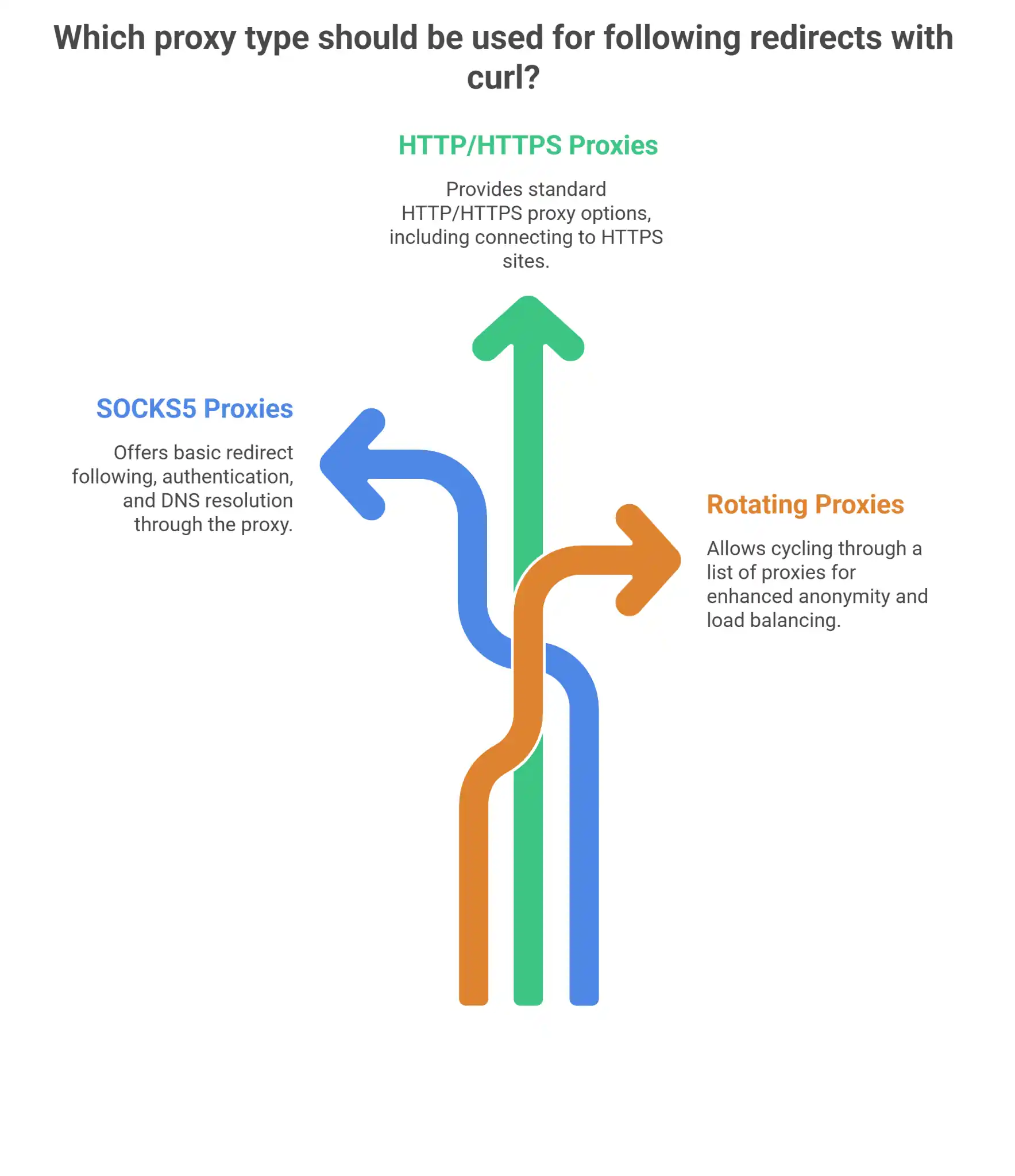
SOCKS5 Proxies
|
1 2 3 4 5 6 7 8 9 |
# Basic SOCKS5 redirect following curl -L --proxy socks5://proxy.example.com:1080 http://example.com # SOCKS5 with authentication # SOCKS5 with DNS resolution through proxy curl -L --proxy socks5h://proxy.example.com:1080 http://example.com |
HTTP/HTTPS Proxies
|
1 2 3 4 5 6 7 8 9 |
# HTTP proxy with redirect following curl -L --proxy http://proxy.example.com:8080 http://example.com # HTTPS proxy (less common) curl -L --proxy https://secure-proxy.example.com:8080 http://example.com # HTTP proxy for HTTPS sites (uses CONNECT) curl -L --proxy http://proxy.example.com:8080 https://secure-site.com |
Rotating Proxies
|
1 2 3 4 5 6 7 8 |
# Script for rotating through proxy list with redirects #!/bin/bash PROXIES=("proxy1.example.com:8080" "proxy2.example.com:8080" "proxy3.example.com:8080") for proxy in "${PROXIES[@]}"; do curl -L --proxy http://$proxy --connect-timeout 5 http://example.com sleep 1 done |
6. Troubleshooting Curl Redirect Issues with Proxies
a. Common Problems and Solutions
1. Redirect Loops
|
1 2 3 4 |
# Symptoms: Curl hangs or reaches max redirects # Solution: Limit redirects and investigate curl -L --max-redirs 3 -v --proxy socks5://proxy.example.com:1080 http://problematic-site.com |
2. Protocol Mismatches
|
1 2 3 4 |
# Problem: HTTP proxy can't handle HTTPS redirects properly # Solution: Use SOCKS5 or configure CONNECT method curl -L --proxy socks5://proxy.example.com:1080 http://site-that-redirects-to-https.com |
3. Authentication Loss on Redirects
|
1 2 3 4 5 |
# Problem: Credentials not passed through redirects # Solution: Use --location-trusted carefully curl -L --location-trusted --proxy-user username:password \ --proxy http://proxy.example.com:8080 http://auth-redirect-site.com |
4. Proxy Connection Drops
|
1 2 3 4 5 |
# Problem: Long redirect chains cause proxy timeouts # Solution: Adjust timeouts and add retries curl -L --retry 3 --retry-delay 2 --connect-timeout 30 \ --proxy socks5://proxy.example.com:1080 http://slow-redirecting-site.com |
b. Debugging Redirect Chains
Use these curl options to diagnose redirect issues:
|
1 2 3 4 5 6 7 8 |
# Full verbose output with redirect tracking curl -L -v -w " URL: %{url_effective} Response Code: %{http_code} Redirect Count: %{num_redirects} Total Time: %{time_total} " --proxy socks5://proxy.example.com:1080 http://example.com |
7. Best Practices for Curl Redirects with Proxies
a. Choose the Right Proxy Type
- SOCKS5: Best for complex redirect scenarios and DNS resolution
- HTTP: Suitable for simple HTTP redirects
- Residential: Ideal for avoiding geo-based redirects
2. Set Appropriate Limits
|
1 2 3 4 5 6 |
# Recommended configuration for most proxy scenarios curl -L --max-redirs 5 --connect-timeout 15 --max-time 60 \ --retry 2 --retry-delay 1 \ --proxy socks5://proxy.example.com:1080 \ http://target-site.com |
3. Handle Different Content Types
|
1 2 3 4 5 6 7 8 9 10 |
# For APIs that might redirect curl -L -H "Accept: application/json" \ --proxy http://datacenter-proxy.example.com:8080 \ http://api.example.com/endpoint # For web scraping with proper headers curl -L -H "User-Agent: Mozilla/5.0 (Windows NT 10.0; Win64; x64) AppleWebKit/537.36" \ --proxy socks5://residential-proxy.example.com:1080 \ http://website.example.com |
4. Security Considerations
- Never use
--location-trustedwith untrusted redirects - Validate redirect destinations in automated scripts
- Monitor for suspicious redirect patterns that might indicate compromise
Need to follow redirects easily while scraping or testing APIs?
Handling redirects with curl -L is simple, but managing complex traffic flows requires a smarter solution. Enhance your workflow with our reliable Datacenter Proxies, perfect for high-speed requests and seamless redirect handling without blocks or bans.
8. Advanced Use Cases: Curl Redirects in Proxy Workflows
1. Web Scraping with Redirect Handling
|
1 2 3 4 5 6 7 8 9 10 11 12 13 14 15 16 17 |
#!/bin/bash # Scraping script with proxy rotation and redirect support PROXY_LIST=("socks5://proxy1.example.com:1080" "socks5://proxy2.example.com:1080") TARGETS=("http://site1.com" "http://site2.com" "http://site3.com") for target in "${TARGETS[@]}"; do for proxy in "${PROXY_LIST[@]}"; do response=$(curl -L -s --connect-timeout 10 --max-time 30 \ --proxy "$proxy" "$target") if [ $? -eq 0 ]; then echo "Successfully scraped $target via $proxy" echo "$response" > "$(basename $target).html" break fi done done |
2. API Testing with Geographic Redirects
|
1 2 3 4 5 6 7 8 9 |
# Test API behavior across different geographic proxy locations REGIONS=("us-proxy.example.com:1080" "eu-proxy.example.com:1080" "asia-proxy.example.com:1080") API_ENDPOINT="http://geo-api.example.com/location" for region in "${REGIONS[@]}"; do echo "Testing from region: $region" curl -L -s --proxy socks5://$region "$API_ENDPOINT" | jq '.' done |
3. Load Testing with Redirect Following
|
1 2 3 4 5 6 7 8 |
# Concurrent requests through proxies with redirect support for i in {1..10}; do curl -L --connect-timeout 5 --max-time 20 \ --proxy socks5://load-test-proxy.example.com:1080 \ http://target-site.com & done wait |
9. Integration with Other Tools
a. Combining with wget
|
1 2 3 4 |
# wget with proxy and redirect following wget --proxy=on --http-proxy=proxy.example.com:8080 \ --max-redirect=5 http://example.com |
b. Using with Python requests
|
1 2 3 4 5 6 7 8 9 10 11 12 |
import requests proxies = { 'http': 'socks5://proxy.example.com:1080', 'https': 'socks5://proxy.example.com:1080' } response = requests.get('http://example.com', proxies=proxies, allow_redirects=True, max_redirects=5) |
c. Integration with FlareSolverr
Based on your existing FlareSolverr setup, you can combine curl redirects with CloudFlare bypass:
|
1 2 3 4 5 6 7 8 9 |
# Use curl with FlareSolverr proxy for redirect handling curl -L -X POST 'http://localhost:8191/v1' \ -H 'Content-Type: application/json' \ --data-raw '{ "cmd": "request.get", "url": "http://cloudflare-protected-site.com", "maxTimeout": 60000 }' |
10. Performance Optimization
a. Connection Reuse
|
1 2 3 4 5 |
# Reuse connections for multiple redirected requests curl -L --keepalive-time 30 \ --proxy socks5://proxy.example.com:1080 \ http://example.com |
b. Parallel Processing
|
1 2 3 4 |
# Handle multiple URLs with redirects in parallel echo "http://site1.com http://site2.com http://site3.com" | \ xargs -n1 -P3 curl -L --proxy socks5://proxy.example.com:1080 |
c. Bandwidth Optimization
|
1 2 3 4 5 |
# Limit bandwidth for proxy connections with redirects curl -L --limit-rate 1M \ --proxy http://bandwidth-limited-proxy.example.com:8080 \ http://large-file-site.com |
11. Monitoring and Logging

a. Comprehensive Logging
|
1 2 3 4 5 |
# Log all redirect activity curl -L -w "@curl-format.txt" \ --proxy socks5://proxy.example.com:1080 \ http://example.com >> redirect-log.txt |
Create curl-format.txt:
|
1 2 3 4 5 6 7 8 9 10 11 12 |
time_namelookup: %{time_namelookup}\n time_connect: %{time_connect}\n time_appconnect: %{time_appconnect}\n time_pretransfer: %{time_pretransfer}\n time_redirect: %{time_redirect}\n time_starttransfer: %{time_starttransfer}\n ----------\n time_total: %{time_total}\n num_redirects: %{num_redirects}\n url_effective: %{url_effective}\n http_code: %{http_code}\n |
b. Error Handling
|
1 2 3 4 5 6 7 8 9 10 11 12 13 14 15 16 17 18 19 20 21 22 23 24 25 26 |
#!/bin/bash # Robust redirect handling with error recovery handle_redirects() { local url="$1" local proxy="$2" local max_attempts=3 local attempt=1 while [ $attempt -le $max_attempts ]; do if curl -L --fail --connect-timeout 10 \ --proxy "$proxy" "$url"; then return 0 else echo "Attempt $attempt failed, retrying..." >&2 ((attempt++)) sleep 2 fi done echo "All attempts failed for $url" >&2 return 1 } # Usage handle_redirects "http://example.com" "socks5://proxy.example.com:1080" |
12. Common Curl Follow Redirect Scenarios in Real-World Applications
Understand how curl follow redirect functionality works in practical scenarios to implement better proxy-based solutions. We’ll explore specific use cases where redirect handling is critical for success.
a. E-commerce Price Monitoring Through Proxies
E-commerce sites use redirects for product pages, regional pricing, and inventory management. Proper redirect handling is essential for accurate data capture when monitoring prices through proxies.
|
1 2 3 4 5 6 7 8 9 10 11 12 13 14 15 16 17 18 19 20 21 22 |
# Price monitoring script with geographic proxy rotation #!/bin/bash PRODUCTS=("product-1" "product-2" "product-3") PROXY_REGIONS=("us-east:proxy1.example.com:1080" "eu-west:proxy2.example.com:1080" "asia:proxy3.example.com:1080") for product in "${PRODUCTS[@]}"; do for region_proxy in "${PROXY_REGIONS[@]}"; do region=$(echo $region_proxy | cut -d: -f1) proxy=$(echo $region_proxy | cut -d: -f2-) echo "Checking $product pricing in $region" curl -L --max-redirs 10 --connect-timeout 15 \ --proxy socks5://$proxy \ -H "User-Agent: PriceBot/1.0" \ -H "Accept: text/html,application/xhtml+xml" \ "https://ecommerce-site.com/products/$product" \ -o "${product}_${region}.html" sleep 2 # Rate limiting done done |
This approach handles common e-commerce redirect patterns including:
- Regional pricing redirects based on proxy location
- HTTPS upgrade redirects for secure checkout processes
- Product availability redirects when items are out of stock
- Mobile vs desktop version redirects based on user agent
b. Social Media Content Aggregation
Social media platforms use a lot of redirect mechanisms for link tracking, privacy protection, and content delivery optimization. When collecting social media content through proxies, redirect following is essential.
|
1 2 3 4 5 6 7 8 9 10 11 12 13 14 15 16 17 18 19 20 21 22 23 24 25 26 27 28 29 30 31 32 33 34 |
# Social media link expansion with proxy rotation expand_social_links() { local social_urls=("$@") local proxy_pool=("proxy1.example.com:1080" "proxy2.example.com:1080" "proxy3.example.com:1080") local proxy_index=0 for url in "${social_urls[@]}"; do proxy=${proxy_pool[$proxy_index]} echo "Expanding: $url via $proxy" final_url=$(curl -L -w '%{url_effective}' -o /dev/null -s \ --max-redirs 8 --connect-timeout 10 \ --proxy socks5://$proxy \ -H "User-Agent: Mozilla/5.0 (compatible; SocialBot/1.0)" \ "$url") echo "Final destination: $final_url" # Rotate to next proxy proxy_index=$(((proxy_index + 1) % ${#proxy_pool[@]})) sleep 1 done } # Usage with common social media shortened URLs social_urls=( "https://t.co/shortened-link" "https://bit.ly/social-post" "https://fb.me/page-link" "https://ln.is/business-post" ) expand_social_links "${social_urls[@]}" |
c. API Endpoint Discovery and Documentation
Many APIs use redirects for versioning, load balancing, and regional distribution. When documenting or testing APIs through proxies, understanding how redirects work helps keep everything in order:
|
1 2 3 4 5 6 7 8 9 10 11 12 13 14 15 16 17 18 19 20 21 22 23 24 25 26 27 28 29 |
# API endpoint discovery with redirect mapping #!/bin/bash API_BASE="https://api.example.com" ENDPOINTS=("v1/users" "v1/posts" "v1/comments" "v2/analytics") PROXY_SERVERS=("datacenter-proxy.example.com:8080" "residential-proxy.example.com:1080") for endpoint in "${ENDPOINTS[@]}"; do echo "Testing endpoint: $API_BASE/$endpoint" for proxy in "${PROXY_SERVERS[@]}"; do echo " Via proxy: $proxy" # Capture redirect chain information curl -L -v --max-redirs 5 \ --proxy http://$proxy \ -H "Accept: application/json" \ -H "User-Agent: APITester/1.0" \ -w " HTTP Code: %{http_code} Redirects: %{num_redirects} Final URL: %{url_effective} Total Time: %{time_total}s " \ "$API_BASE/$endpoint" 2>&1 | grep -E "(HTTP|Redirects|Final URL|Total Time|Location:)" echo "---" done done |
13. Advanced Curl Redirect Configuration for Enterprise Environments
Enterprise proxy environments require advanced redirect management. This is important for keeping security rules while also making sure the system works well.
a. Corporate Firewall and Proxy Integration
When working within corporate networks, curl redirect behavior must align with existing security infrastructure:
|
1 2 3 4 5 6 7 8 9 10 11 12 13 14 15 16 17 18 19 20 21 22 23 24 25 26 27 28 29 30 31 32 33 34 35 36 37 38 39 40 41 42 43 44 45 |
# Enterprise-grade curl configuration with audit logging CORPORATE_PROXY="corporate-proxy.company.com:8080" AUDIT_LOG="/var/log/curl-redirects.log" enterprise_curl() { local target_url="$1" local max_redirects="${2:-5}" # Pre-request logging echo "[$(date)] Starting request to $target_url" >> "$AUDIT_LOG" # Execute curl with comprehensive tracking curl -L --max-redirs "$max_redirects" \ --proxy http://$CORPORATE_PROXY \ --proxy-negotiate --proxy-user : \ --connect-timeout 30 --max-time 300 \ -H "X-Forwarded-For: $(hostname -I | awk '{print $1}')" \ -H "User-Agent: Enterprise-Tool/1.0 ($(uname -s))" \ --trace-ascii /tmp/curl-trace-$.log \ -w " Request completed: URL: %{url_effective} Response Code: %{http_code} Redirects: %{num_redirects} Connect Time: %{time_connect}s Total Time: %{time_total}s Size: %{size_download} bytes " \ "$target_url" || { echo "[$(date)] ERROR: Request failed for $target_url" >> "$AUDIT_LOG" return 1 } # Post-request logging with redirect chain analysis redirect_count=$(grep -c "Location:" /tmp/curl-trace-$.log 2>/dev/null || echo "0") echo "[$(date)] Completed with $redirect_count redirects" >> "$AUDIT_LOG" # Cleanup rm -f /tmp/curl-trace-$.log } # Usage examples enterprise_curl "https://partner-api.example.com/data" enterprise_curl "https://vendor-portal.example.com/login" 10 |
b. Multi-Tenant Proxy Management
For organizations managing multiple proxy configurations, systematic redirect handling ensures consistent behavior across different tenant environments:
|
1 2 3 4 5 6 7 8 9 10 11 12 13 14 15 16 17 18 19 20 21 22 23 24 25 26 27 28 29 30 31 32 33 34 35 36 37 38 39 40 41 42 43 44 45 46 47 48 49 50 51 52 53 54 55 56 |
# Multi-tenant proxy configuration manager #!/bin/bash declare -A TENANT_PROXIES=( ["development"]="dev-proxy.company.com:3128" ["staging"]="stage-proxy.company.com:3128" ["production"]="prod-proxy.company.com:3128" ["testing"]="test-proxy.company.com:3128" ) declare -A TENANT_REDIRECTS=( ["development"]="10" ["staging"]="8" ["production"]="5" ["testing"]="15" ) tenant_request() { local tenant="$1" local url="$2" local additional_headers="$3" if [[ ! ${TENANT_PROXIES[$tenant]+_} ]]; then echo "Error: Unknown tenant '$tenant'" return 1 fi local proxy="${TENANT_PROXIES[$tenant]}" local max_redirects="${TENANT_REDIRECTS[$tenant]}" echo "Making request for tenant: $tenant" echo "Proxy: $proxy" echo "Max redirects: $max_redirects" curl -L --max-redirs "$max_redirects" \ --proxy http://$proxy \ --connect-timeout 20 --max-time 120 \ -H "X-Tenant: $tenant" \ -H "User-Agent: TenantClient/$tenant" \ ${additional_headers:+-H "$additional_headers"} \ --fail-with-body \ -w " Tenant: $tenant Final URL: %{url_effective} Status: %{http_code} Redirects: %{num_redirects} Response Time: %{time_total}s " \ "$url" } # Usage examples for different environments tenant_request "development" "https://dev-api.example.com/health" tenant_request "production" "https://api.example.com/status" "Accept: application/json" tenant_request "testing" "https://test-endpoint.example.com/metrics" |
14. Security Considerations for Curl Redirects with Proxies

Security becomes paramount when following redirects through proxy servers, especially in automated systems handling sensitive data.
a. Redirect Validation and Filtering
Implementing proper validation prevents malicious redirects from compromising your proxy-based applications:
|
1 2 3 4 5 6 7 8 9 10 11 12 13 14 15 16 17 18 19 20 21 22 23 24 25 26 27 28 29 30 31 32 33 34 35 36 37 38 39 40 41 42 43 44 45 46 47 48 49 50 51 52 53 54 55 56 57 |
# Security-focused redirect handler with domain validation ALLOWED_DOMAINS=("api.trusted-site.com" "cdn.trusted-site.com" "assets.trusted-site.com") BLOCKED_DOMAINS=("malicious-site.com" "phishing-domain.net") secure_curl_with_redirects() { local initial_url="$1" local proxy="$2" local temp_file="/tmp/curl_headers_$.txt" # First, get headers without following redirects curl -I --proxy "$proxy" --connect-timeout 10 "$initial_url" > "$temp_file" 2>/dev/null # Extract and validate redirect destination local redirect_url=$(grep -i "^location:" "$temp_file" | cut -d' ' -f2- | tr -d '\r\n') if [[ -n "$redirect_url" ]]; then local redirect_domain=$(echo "$redirect_url" | sed -E 's|^https?://([^/]+).*|\1|') # Check against blocked domains for blocked in "${BLOCKED_DOMAINS[@]}"; do if [[ "$redirect_domain" == "$blocked" ]]; then echo "SECURITY ALERT: Redirect to blocked domain $blocked" rm -f "$temp_file" return 1 fi done # Check against allowed domains (if whitelist is used) local domain_allowed=false for allowed in "${ALLOWED_DOMAINS[@]}"; do if [[ "$redirect_domain" == "$allowed" ]]; then domain_allowed=true break fi done if [[ "$domain_allowed" == false && ${#ALLOWED_DOMAINS[@]} -gt 0 ]]; then echo "SECURITY ALERT: Redirect to non-whitelisted domain $redirect_domain" rm -f "$temp_file" return 1 fi echo "Redirect validation passed: $redirect_domain" fi # If validation passes, proceed with redirect following curl -L --max-redirs 3 --proxy "$proxy" \ --connect-timeout 15 --max-time 60 \ -H "X-Security-Check: Passed" \ "$initial_url" rm -f "$temp_file" } # Usage with security validation secure_curl_with_redirects "https://trusted-api.com/endpoint" "socks5://secure-proxy.example.com:1080" |
b. Credential Protection During Redirects
Protecting authentication credentials during redirect chains prevents credential leakage:
|
1 2 3 4 5 6 7 8 9 10 11 12 13 14 15 16 17 18 19 20 21 22 23 24 25 26 27 28 29 30 31 32 33 34 35 36 37 38 39 |
# Credential-safe redirect handling safe_authenticated_request() { local url="$1" local username="$2" local password="$3" local proxy="$4" # Extract the initial domain local initial_domain=$(echo "$url" | sed -E 's|^https?://([^/]+).*|\1|') # First request without credentials to check redirect destination local redirect_info=$(curl -I -s --proxy "$proxy" --max-redirs 0 "$url" | grep -i "^location:") if [[ -n "$redirect_info" ]]; then local redirect_url=$(echo "$redirect_info" | cut -d' ' -f2- | tr -d '\r\n') local redirect_domain=$(echo "$redirect_url" | sed -E 's|^https?://([^/]+).*|\1|') if [[ "$initial_domain" != "$redirect_domain" ]]; then echo "WARNING: Cross-domain redirect detected" echo "Initial: $initial_domain" echo "Redirect: $redirect_domain" echo "Credentials will NOT be sent to redirect destination" # Follow redirect without credentials curl -L --max-redirs 5 --proxy "$proxy" "$url" return fi fi # Safe to send credentials - same domain or no redirect curl -L --max-redirs 5 --proxy "$proxy" \ -u "$username:$password" \ --location-trusted \ "$url" } # Safe usage safe_authenticated_request "https://api.example.com/secure" "user123" "pass456" "socks5://proxy.example.com:1080" |
15. Performance Benchmarking and Optimization
Optimizing curl redirect performance through proxies requires systematic measurement and tuning.
a. Redirect Performance Metrics Collection
Comprehensive performance monitoring helps identify bottlenecks in proxy redirect chains:
|
1 2 3 4 5 6 7 8 9 10 11 12 13 14 15 16 17 18 19 20 21 22 23 24 25 26 27 28 29 30 31 32 33 34 35 36 37 38 39 40 41 42 43 44 45 46 47 48 49 50 51 52 53 54 55 56 57 58 59 60 61 62 63 64 65 66 67 68 69 70 71 72 73 74 75 76 77 78 79 80 81 |
# Performance benchmarking suite for curl redirects #!/bin/bash BENCHMARK_URLS=( "http://redirect-test.com/single" "http://redirect-test.com/chain-3" "http://redirect-test.com/chain-5" "http://redirect-test.com/https-upgrade" ) PROXY_CONFIGS=( "direct::" "http:datacenter-proxy.example.com:8080" "socks5:residential-proxy.example.com:1080" "socks5:mobile-proxy.example.com:1080" ) benchmark_redirects() { local results_file="redirect_benchmark_$(date +%Y%m%d_%H%M%S).csv" echo "URL,Proxy_Type,Proxy_Server,Redirects,Total_Time,Connect_Time,Redirect_Time,HTTP_Code,Final_URL" > "$results_file" for url in "${BENCHMARK_URLS[@]}"; do for proxy_config in "${PROXY_CONFIGS[@]}"; do IFS=':' read -r proxy_type proxy_server proxy_port <<< "$proxy_config" echo "Testing: $url via $proxy_type ($proxy_server)" if [[ "$proxy_type" == "direct" ]]; then proxy_param="" proxy_display="direct" else proxy_param="--proxy $proxy_type://$proxy_server:$proxy_port" proxy_display="$proxy_server" fi # Run benchmark with detailed timing local timing_output=$(curl -L -w "TIMING:%{num_redirects},%{time_total},%{time_connect},%{time_redirect},%{http_code},%{url_effective}" \ -o /dev/null -s --max-redirs 10 \ --connect-timeout 30 --max-time 120 \ $proxy_param \ "$url" 2>/dev/null) if [[ $? -eq 0 && "$timing_output" =~ TIMING:(.+) ]]; then local metrics="${BASH_REMATCH[1]}" echo "$url,$proxy_type,$proxy_display,$metrics" >> "$results_file" else echo "$url,$proxy_type,$proxy_display,ERROR,ERROR,ERROR,ERROR,ERROR,ERROR" >> "$results_file" fi sleep 1 # Rate limiting between tests done done echo "Benchmark completed. Results saved to: $results_file" # Generate summary statistics echo " === PERFORMANCE SUMMARY === " awk -F',' ' NR>1 && $4!="ERROR" { proxy_type[$2]++ total_time[$2] += $5 redirect_time[$2] += $7 redirect_count[$2] += $4 } END { for (proxy in proxy_type) { avg_total = total_time[proxy] / proxy_type[proxy] avg_redirect = redirect_time[proxy] / proxy_type[proxy] avg_redirects = redirect_count[proxy] / proxy_type[proxy] printf "%-12s: Avg Total Time: %.3fs, Avg Redirect Time: %.3fs, Avg Redirects: %.1f\n", proxy, avg_total, avg_redirect, avg_redirects } }' "$results_file" } # Run comprehensive benchmark benchmark_redirects |
b. Connection Pooling and Keep-Alive Optimization
Optimizing connection reuse across redirect chains improves performance significantly:
|
1 2 3 4 5 6 7 8 9 10 11 12 13 14 15 16 17 18 19 20 21 22 23 24 25 26 27 28 29 30 31 32 33 34 35 36 37 38 39 40 41 42 43 44 45 46 47 48 49 50 51 52 53 54 |
# Connection pooling optimization for redirect scenarios optimize_redirect_connections() { local target_urls=("$@") local proxy="socks5://optimized-proxy.example.com:1080" # Create a named pipe for connection reuse local cookie_jar="/tmp/curl_cookies_$.jar" local connection_cache="/tmp/curl_connections_$.cache" # Optimized curl configuration for connection reuse local curl_opts=( -L # Follow redirects --max-redirs 8 # Reasonable redirect limit --keepalive-time 60 # Keep connections alive for 60 seconds --max-time 300 # Overall timeout --connect-timeout 10 # Connection establishment timeout --speed-time 30 # Speed check interval --speed-limit 1024 # Minimum speed (1KB/s) --proxy "$proxy" # Proxy configuration -c "$cookie_jar" # Cookie jar for session persistence -b "$cookie_jar" # Use cookies from jar --compressed # Enable compression -H "Connection: keep-alive" # Explicit keep-alive -H "Keep-Alive: timeout=60, max=100" # Keep-alive parameters ) echo "Optimizing redirect requests with connection reuse..." for url in "${target_urls[@]}"; do echo "Processing: $url" # Use optimized configuration curl "${curl_opts[@]}" \ -w "URL: %{url_effective}\nTime: %{time_total}s\nRedirects: %{num_redirects}\nCode: %{http_code}\n---\n" \ "$url" # Small delay to demonstrate connection reuse sleep 0.5 done # Cleanup rm -f "$cookie_jar" "$connection_cache" } # Test URLs with various redirect patterns test_urls=( "http://example.com/redirect-test-1" "http://example.com/redirect-test-2" "http://example.com/redirect-test-3" "https://secure.example.com/test" ) optimize_redirect_connections "${test_urls[@]}" |
16. Industry-Specific Curl Redirect Applications
Different industries have unique requirements for handling redirects through proxies. Let’s explore specialized applications.
a. Financial Services and Compliance
Financial institutions require strict audit trails and compliance monitoring when following redirects through proxies:
|
1 2 3 4 5 6 7 8 9 10 11 12 13 14 15 16 17 18 19 20 21 22 23 24 25 26 27 28 29 30 31 32 33 34 35 36 37 38 39 40 41 42 43 44 45 46 47 48 49 50 51 52 53 54 55 56 57 58 59 60 61 62 |
# Financial services compliant redirect handling COMPLIANCE_LOG="/var/log/financial-curl-audit.log" REGULATORY_PROXY="compliance-proxy.bank.com:8080" financial_curl_request() { local transaction_id="$1" local target_url="$2" local business_justification="$3" # Pre-request compliance logging cat >> "$COMPLIANCE_LOG" << EOF [$(date -u '+%Y-%m-%dT%H:%M:%SZ')] TRANSACTION_START Transaction ID: $transaction_id Target URL: $target_url Business Justification: $business_justification User: $(whoami) System: $(hostname) IP: $(hostname -I | awk '{print $1}') EOF # Execute request with full audit trail curl -L --max-redirs 3 \ --proxy http://$REGULATORY_PROXY \ --connect-timeout 15 --max-time 60 \ -H "X-Transaction-ID: $transaction_id" \ -H "X-Business-Unit: $(whoami)" \ -H "User-Agent: FinancialSystem/1.0 Compliance" \ --trace-ascii "/tmp/curl_trace_${transaction_id}.log" \ -w " COMPLIANCE_METRICS: Transaction ID: $transaction_id Final URL: %{url_effective} HTTP Status: %{http_code} Redirect Count: %{num_redirects} Total Time: %{time_total}s Data Size: %{size_download} bytes " \ "$target_url" 2>&1 | tee -a "$COMPLIANCE_LOG" local exit_code=${PIPESTATUS[0]} # Post-request compliance logging cat >> "$COMPLIANCE_LOG" << EOF [$(date -u '+%Y-%m-%dT%H:%M:%SZ')] TRANSACTION_END Transaction ID: $transaction_id Exit Code: $exit_code Status: $([[ $exit_code -eq 0 ]] && echo "SUCCESS" || echo "FAILURE") --- EOF # Archive trace for compliance if [[ -f "/tmp/curl_trace_${transaction_id}.log" ]]; then mv "/tmp/curl_trace_${transaction_id}.log" "/var/log/compliance/curl_traces/" fi return $exit_code } # Usage examples financial_curl_request "TXN20250825001" "https://fed-reserve-api.gov/rates" "Daily interest rate retrieval for compliance reporting" financial_curl_request "TXN20250825002" "https://swift.com/api/sanctions" "Sanctions list update for KYC compliance" |
b. Healthcare Data Integration
Healthcare applications require HIPAA-compliant handling of redirects when integrating with medical APIs:
|
1 2 3 4 5 6 7 8 9 10 11 12 13 14 15 16 17 18 19 20 21 22 23 24 25 26 27 28 29 30 31 32 33 34 35 36 37 38 39 40 41 42 43 44 45 46 47 48 49 50 51 52 53 54 55 56 57 58 59 60 61 62 63 64 65 66 67 68 69 70 71 72 73 74 75 76 77 |
# HIPAA-compliant curl redirect handling HIPAA_AUDIT_LOG="/var/log/hipaa/curl-redirects.log" HEALTHCARE_PROXY="hipaa-proxy.healthcare.com:8080" hipaa_secure_request() { local patient_context="$1" # Anonymized patient identifier local endpoint_url="$2" # Healthcare API endpoint local data_classification="$3" # PHI, PII, or Public # Validate data classification if [[ ! "$data_classification" =~ ^(PHI|PII|Public)$ ]]; then echo "ERROR: Invalid data classification. Must be PHI, PII, or Public" return 1 fi # Enhanced security for PHI data if [[ "$data_classification" == "PHI" ]]; then local additional_headers="-H 'X-HIPAA-Compliant: true' -H 'X-Encryption-Required: AES256'" local max_redirects=1 # Minimal redirects for PHI local timeout=30 # Shorter timeout for sensitive data else local additional_headers="" local max_redirects=5 local timeout=60 fi # Generate secure session ID local session_id="HIPAA_$(date +%Y%m%d_%H%M%S)_$(openssl rand -hex 4)" # HIPAA audit logging cat >> "$HIPAA_AUDIT_LOG" << EOF [$(date -u '+%Y-%m-%dT%H:%M:%SZ')] HIPAA_ACCESS_START Session ID: $session_id Patient Context: $patient_context Data Classification: $data_classification Target URL: $(echo "$endpoint_url" | sed 's/\(.*\/\/[^\/]*\).*/\1\/[REDACTED]/') User: $(whoami) System: $(hostname) EOF # Execute HIPAA-compliant request curl -L --max-redirs "$max_redirects" \ --proxy http://$HEALTHCARE_PROXY \ --connect-timeout 10 --max-time "$timeout" \ --cert /etc/ssl/certs/healthcare-client.crt \ --key /etc/ssl/private/healthcare-client.key \ --cacert /etc/ssl/certs/healthcare-ca.crt \ -H "X-HIPAA-Session: $session_id" \ -H "X-Data-Classification: $data_classification" \ -H "User-Agent: HealthcareSystem/1.0 HIPAA-Compliant" \ $additional_headers \ --fail \ -w " HIPAA_METRICS: Session: $session_id Classification: $data_classification Final URL: [REDACTED] Status: %{http_code} Redirects: %{num_redirects} Time: %{time_total}s " \ "$endpoint_url" 2>/dev/null || { # Error logging for HIPAA compliance echo "[$(date -u '+%Y-%m-%dT%H:%M:%SZ')] HIPAA_ACCESS_FAILED: Session $session_id" >> "$HIPAA_AUDIT_LOG" return 1 } # Success logging echo "[$(date -u '+%Y-%m-%dT%H:%M:%SZ')] HIPAA_ACCESS_SUCCESS: Session $session_id" >> "$HIPAA_AUDIT_LOG" } # Usage examples for different data classifications hipaa_secure_request "ANON_PATIENT_001" "https://hl7-api.hospital.com/fhir/Patient" "PHI" hipaa_secure_request "PROVIDER_DATA" "https://npi-registry.cms.gov/api/providers" "PII" hipaa_secure_request "PUBLIC_LOOKUP" "https://public-health-api.cdc.gov/guidelines" "Public" |
Frustrated by blocked or broken redirects during curl requests?
Whether you’re automating scripts or scraping websites, following redirects with curl -L can hit roadblocks fast. Our high-performance Datacenter Proxies help you bypass restrictions, maintain anonymity, and keep your curl sessions smooth and uninterrupted.
17. Future-Proofing Your Curl Redirect Configurations
As web standards change and proxy technologies improve, it becomes more important to have smart ways of dealing with redirects.
a. HTTP/3 and QUIC Protocol Support
Preparing for next-generation protocols while maintaining backward compatibility:
|
1 2 3 4 5 6 7 8 9 10 11 12 13 14 15 16 17 18 19 20 21 22 23 24 25 26 27 28 29 30 31 32 33 34 35 36 37 38 39 40 41 42 43 44 |
# Future-ready curl configuration with HTTP/3 support future_ready_curl() { local target_url="$1" local proxy_config="$2" local fallback_protocols=("http3" "http2" "http1.1") for protocol in "${fallback_protocols[@]}"; do echo "Attempting connection with $protocol..." case $protocol in "http3") # HTTP/3 over QUIC (when available) curl_cmd="curl -L --http3-only --max-redirs 5" ;; "http2") # HTTP/2 with fallback curl_cmd="curl -L --http2 --max-redirs 6" ;; "http1.1") # Traditional HTTP/1.1 curl_cmd="curl -L --http1.1 --max-redirs 8" ;; esac # Execute with protocol-specific configuration if $curl_cmd --proxy "$proxy_config" \ --connect-timeout 15 --max-time 120 \ -H "User-Agent: FutureClient/1.0 ($protocol)" \ --fail-with-body \ "$target_url"; then echo "Success with $protocol" return 0 else echo "Failed with $protocol, trying next..." fi done echo "All protocols failed for $target_url" return 1 } # Protocol-aware proxy testing future_ready_curl "https://http3-test-site.com" "socks5://next-gen-proxy.example.com:1080" |
b. Machine Learning Enhanced Redirect Prediction
Implementing intelligent redirect prediction to optimize proxy routing decisions:
|
1 2 3 4 5 6 7 8 9 10 11 12 13 14 15 16 17 18 19 20 21 22 23 24 25 26 27 28 29 30 31 32 33 34 35 36 37 38 39 40 41 42 43 44 45 46 47 48 49 50 51 52 53 54 55 56 57 58 59 60 61 62 63 64 65 66 67 68 69 70 71 72 73 74 75 76 77 78 79 80 81 82 83 84 85 86 87 88 89 90 91 92 93 94 95 96 97 98 99 100 101 102 103 104 105 106 |
# ML-enhanced redirect prediction and optimization #!/bin/bash # Redirect pattern learning database REDIRECT_PATTERNS_DB="/var/lib/curl/redirect_patterns.json" LEARNING_LOG="/var/log/curl/ml_redirect_learning.log" learn_redirect_patterns() { local source_url="$1" local final_url="$2" local redirect_count="$3" local proxy_used="$4" local response_time="$5" # Extract patterns for machine learning local source_domain=$(echo "$source_url" | sed -E 's|^https?://([^/]+).*|\1|') local final_domain=$(echo "$final_url" | sed -E 's|^https?://([^/]+).*|\1|') local hour_of_day=$(date +%H) local day_of_week=$(date +%u) # Log pattern data for ML training cat >> "$LEARNING_LOG" << EOF { "timestamp": "$(date -u '+%Y-%m-%dT%H:%M:%SZ')", "source_domain": "$source_domain", "final_domain": "$final_domain", "redirect_count": $redirect_count, "proxy_type": "$proxy_used", "response_time": $response_time, "hour_of_day": $hour_of_day, "day_of_week": $day_of_week, "path_pattern": "$(echo "$source_url" | sed -E 's|^https?://[^/]+(.*)|\1|')" }, EOF } intelligent_curl_with_prediction() { local target_url="$1" local available_proxies=("$2" "$3" "$4") # Multiple proxy options # Simple pattern matching (in production, this would use actual ML) local source_domain=$(echo "$target_url" | sed -E 's|^https?://([^/]+).*|\1|') local predicted_redirects=3 # Default prediction local optimal_proxy="${available_proxies[0]}" # Default proxy # Pattern-based optimization (simplified ML simulation) case "$source_domain" in *"cdn."*|*"static."*) predicted_redirects=1 optimal_proxy="${available_proxies[2]}" # Use fastest proxy for CDN ;; *"api."*|*"service."*) predicted_redirects=2 optimal_proxy="${available_proxies[1]}" # Use reliable proxy for APIs ;; *"social"*|*"facebook"*|*"twitter"*) predicted_redirects=5 optimal_proxy="${available_proxies[0]}" # Use residential proxy for social ;; esac echo "ML Prediction: $predicted_redirects redirects expected, using $optimal_proxy" # Execute optimized request local start_time=$(date +%s.%N) curl -L --max-redirs "$predicted_redirects" \ --proxy "$optimal_proxy" \ --connect-timeout 10 --max-time 60 \ -H "X-ML-Predicted-Redirects: $predicted_redirects" \ -w "STATS:%{num_redirects},%{time_total},%{http_code},%{url_effective}" \ -o /dev/null -s \ "$target_url" local end_time=$(date +%s.%N) local actual_time=$(echo "$end_time - $start_time" | bc -l) # Extract results for learning local curl_output=$(curl -L --max-redirs "$predicted_redirects" \ --proxy "$optimal_proxy" \ -w "STATS:%{num_redirects},%{time_total},%{http_code},%{url_effective}" \ -o /dev/null -s \ "$target_url" 2>&1) if [[ "$curl_output" =~ STATS:([0-9]+),([0-9.]+),([0-9]+),(.+) ]]; then local actual_redirects="${BASH_REMATCH[1]}" local response_time="${BASH_REMATCH[2]}" local http_code="${BASH_REMATCH[3]}" local final_url="${BASH_REMATCH[4]}" # Feed back to learning system learn_redirect_patterns "$target_url" "$final_url" "$actual_redirects" "$optimal_proxy" "$response_time" echo "Results: Predicted=$predicted_redirects, Actual=$actual_redirects, Time=${response_time}s" fi } # Usage with ML-enhanced predictions available_proxies=( "socks5://residential-proxy.example.com:1080" "http://datacenter-proxy.example.com:8080" "socks5://high-speed-proxy.example.com:1080" ) intelligent_curl_with_prediction "https://api.social-platform.com/posts" "${available_proxies[@]}" |
18. Automated Curl Redirect Monitoring and Alerting

Implementing comprehensive monitoring systems for production environments where curl redirect behavior is critical for business operations.
c. Real-Time Redirect Health Monitoring
|
1 2 3 4 5 6 7 8 9 10 11 12 13 14 15 16 17 18 19 20 21 22 23 24 25 26 27 28 29 30 31 32 33 34 35 36 37 38 39 40 41 42 43 44 45 46 47 48 49 50 51 52 53 54 55 56 57 58 59 60 61 62 63 64 65 66 67 68 69 70 71 72 73 74 75 76 77 78 79 80 81 82 83 84 85 86 87 88 89 90 91 92 93 94 95 96 97 98 99 100 101 102 103 104 105 106 107 108 109 110 111 112 113 114 115 116 117 118 119 120 121 122 123 124 125 126 127 128 129 130 131 132 133 134 135 136 137 138 139 140 141 142 143 144 145 146 147 148 149 150 151 152 153 154 155 156 157 158 159 160 161 162 163 164 165 166 167 |
#!/bin/bash # Production-grade redirect monitoring system MONITOR_CONFIG="/etc/curl-monitor/config.json" ALERT_WEBHOOK="https://alerts.company.com/webhook" METRICS_DB="/var/lib/curl-monitor/metrics.db" # Critical endpoints to monitor declare -A CRITICAL_ENDPOINTS=( ["payment-gateway"]="https://payments.company.com/api/process" ["user-auth"]="https://auth.company.com/oauth/authorize" ["cdn-assets"]="https://cdn.company.com/assets/critical.js" ["api-health"]="https://api.company.com/health" ["partner-integration"]="https://partner-api.external.com/sync" ) # Proxy configurations for different endpoint types declare -A ENDPOINT_PROXIES=( ["payment-gateway"]="socks5://secure-proxy.company.com:1080" ["user-auth"]="socks5://auth-proxy.company.com:1080" ["cdn-assets"]="http://cdn-proxy.company.com:8080" ["api-health"]="socks5://monitoring-proxy.company.com:1080" ["partner-integration"]="socks5://external-proxy.company.com:1080" ) # Expected redirect thresholds declare -A REDIRECT_THRESHOLDS=( ["payment-gateway"]="2" # Payment flows should have minimal redirects ["user-auth"]="5" # Auth flows may have multiple redirects ["cdn-assets"]="1" # CDN should redirect once at most ["api-health"]="0" # Health checks should not redirect ["partner-integration"]="3" # Partner APIs may have some redirects ) monitor_endpoint_redirects() { local endpoint_name="$1" local endpoint_url="${CRITICAL_ENDPOINTS[$endpoint_name]}" local proxy="${ENDPOINT_PROXIES[$endpoint_name]}" local max_expected="${REDIRECT_THRESHOLDS[$endpoint_name]}" local timestamp=$(date -u '+%Y-%m-%dT%H:%M:%SZ') local monitor_id="CURL_MONITOR_${endpoint_name}_$(date +%s)" echo "[$timestamp] Monitoring $endpoint_name..." # Execute monitored curl request local curl_output=$(curl -L --max-redirs 10 \ --proxy "$proxy" \ --connect-timeout 15 --max-time 60 \ --retry 2 --retry-delay 1 \ -H "X-Monitor-ID: $monitor_id" \ -H "User-Agent: CurlMonitor/1.0" \ -w "METRICS:%{http_code},%{num_redirects},%{time_total},%{time_connect},%{url_effective}" \ -o /dev/null -s \ "$endpoint_url" 2>&1) local curl_exit_code=$? # Parse results if [[ "$curl_output" =~ METRICS:([0-9]+),([0-9]+),([0-9.]+),([0-9.]+),(.+) ]]; then local http_code="${BASH_REMATCH[1]}" local redirect_count="${BASH_REMATCH[2]}" local total_time="${BASH_REMATCH[3]}" local connect_time="${BASH_REMATCH[4]}" local final_url="${BASH_REMATCH[5]}" # Store metrics echo "$timestamp,$endpoint_name,$http_code,$redirect_count,$total_time,$connect_time,$final_url,$curl_exit_code" >> "$METRICS_DB" # Check for anomalies local alert_triggered=false local alert_message="" # Check HTTP status if [[ "$http_code" -lt 200 || "$http_code" -ge 400 ]]; then alert_triggered=true alert_message+="HTTP Status Alert: $endpoint_name returned $http_code. " fi # Check redirect count if [[ "$redirect_count" -gt "$max_expected" ]]; then alert_triggered=true alert_message+="Redirect Alert: $endpoint_name had $redirect_count redirects (expected ≤$max_expected). " fi # Check response time local time_threshold=5.0 if (( $(echo "$total_time > $time_threshold" | bc -l) )); then alert_triggered=true alert_message+="Performance Alert: $endpoint_name took ${total_time}s (threshold: ${time_threshold}s). " fi # Check curl execution if [[ "$curl_exit_code" -ne 0 ]]; then alert_triggered=true alert_message+="Connection Alert: $endpoint_name curl failed with exit code $curl_exit_code. " fi # Send alerts if triggered if [[ "$alert_triggered" == true ]]; then send_alert "$endpoint_name" "$alert_message" "$monitor_id" fi echo "[$timestamp] $endpoint_name: Status=$http_code, Redirects=$redirect_count, Time=${total_time}s" else # Monitoring failure echo "[$timestamp] MONITOR_FAILURE: $endpoint_name - Could not parse curl output" send_alert "$endpoint_name" "Monitor execution failed for $endpoint_name" "$monitor_id" fi } send_alert() { local endpoint="$1" local message="$2" local monitor_id="$3" local severity="WARNING" # Determine severity based on endpoint criticality case "$endpoint" in "payment-gateway"|"user-auth") severity="CRITICAL" ;; "api-health"|"partner-integration") severity="HIGH" ;; *) severity="WARNING" ;; esac # Send webhook alert curl -X POST "$ALERT_WEBHOOK" \ -H "Content-Type: application/json" \ --connect-timeout 5 --max-time 10 \ -d "{ \"timestamp\": \"$(date -u '+%Y-%m-%dT%H:%M:%SZ')\", \"severity\": \"$severity\", \"service\": \"curl-redirect-monitor\", \"endpoint\": \"$endpoint\", \"message\": \"$message\", \"monitor_id\": \"$monitor_id\", \"runbook\": \"https://docs.company.com/runbooks/curl-redirect-issues\" }" 2>/dev/null || echo "Failed to send alert for $endpoint" } # Main monitoring loop run_monitoring_cycle() { echo "Starting curl redirect monitoring cycle..." for endpoint_name in "${!CRITICAL_ENDPOINTS[@]}"; do monitor_endpoint_redirects "$endpoint_name" sleep 2 # Brief pause between endpoint checks done echo "Monitoring cycle completed" } # Continuous monitoring with configurable interval MONITOR_INTERVAL=${CURL_MONITOR_INTERVAL:-300} # Default 5 minutes echo "Starting continuous curl redirect monitoring (interval: ${MONITOR_INTERVAL}s)" while true; do run_monitoring_cycle sleep "$MONITOR_INTERVAL" done |
d. Redirect Anomaly Detection
|
1 2 3 4 5 6 7 8 9 10 11 12 13 14 15 16 17 18 19 20 21 22 23 24 25 26 27 28 29 30 31 32 33 34 35 36 37 38 39 40 41 42 43 44 45 46 47 48 49 50 51 52 53 54 55 56 57 58 59 60 61 62 63 64 65 66 67 68 69 70 71 72 73 74 75 76 77 78 79 80 81 82 83 84 |
#!/bin/bash # Advanced anomaly detection for curl redirect patterns BASELINE_DATA="/var/lib/curl-monitor/baselines.json" ANOMALY_THRESHOLD=2.5 # Standard deviations from baseline analyze_redirect_patterns() { local endpoint="$1" local current_redirects="$2" local current_time="$3" # Calculate baseline statistics from historical data local historical_data=$(tail -n 100 "$METRICS_DB" | grep ",$endpoint," | cut -d',' -f4,5) if [[ -z "$historical_data" ]]; then echo "No baseline data available for $endpoint" return 0 fi # Calculate mean and standard deviation for redirects and response time local stats=$(echo "$historical_data" | awk -F',' ' { redirect_sum += $1 time_sum += $2 redirect_sq_sum += $1 * $1 time_sq_sum += $2 * $2 count++ } END { redirect_mean = redirect_sum / count time_mean = time_sum / count redirect_variance = (redirect_sq_sum / count) - (redirect_mean * redirect_mean) time_variance = (time_sq_sum / count) - (time_mean * time_mean) redirect_stddev = sqrt(redirect_variance) time_stddev = sqrt(time_variance) printf "%.2f,%.2f,%.2f,%.2f", redirect_mean, redirect_stddev, time_mean, time_stddev }') IFS=',' read -r redirect_mean redirect_stddev time_mean time_stddev <<< "$stats" # Calculate z-scores local redirect_zscore=$(echo "scale=2; ($current_redirects - $redirect_mean) / $redirect_stddev" | bc -l) local time_zscore=$(echo "scale=2; ($current_time - $time_mean) / $time_stddev" | bc -l) # Check for anomalies local redirect_anomaly=$(echo "$redirect_zscore > $ANOMALY_THRESHOLD || $redirect_zscore < -$ANOMALY_THRESHOLD" | bc -l) local time_anomaly=$(echo "$time_zscore > $ANOMALY_THRESHOLD || $time_zscore < -$ANOMALY_THRESHOLD" | bc -l) if [[ "$redirect_anomaly" -eq 1 ]]; then echo "ANOMALY DETECTED: $endpoint redirect count anomaly (z-score: $redirect_zscore)" send_anomaly_alert "$endpoint" "redirect" "$current_redirects" "$redirect_mean" "$redirect_zscore" fi if [[ "$time_anomaly" -eq 1 ]]; then echo "ANOMALY DETECTED: $endpoint response time anomaly (z-score: $time_zscore)" send_anomaly_alert "$endpoint" "response_time" "$current_time" "$time_mean" "$time_zscore" fi } send_anomaly_alert() { local endpoint="$1" local metric_type="$2" local current_value="$3" local baseline_mean="$4" local z_score="$5" curl -X POST "$ALERT_WEBHOOK" \ -H "Content-Type: application/json" \ --connect-timeout 5 --max-time 10 \ -d "{ \"timestamp\": \"$(date -u '+%Y-%m-%dT%H:%M:%SZ')\", \"severity\": \"HIGH\", \"alert_type\": \"anomaly_detection\", \"service\": \"curl-redirect-monitor\", \"endpoint\": \"$endpoint\", \"metric\": \"$metric_type\", \"current_value\": \"$current_value\", \"baseline_mean\": \"$baseline_mean\", \"z_score\": \"$z_score\", \"message\": \"Anomalous $metric_type behavior detected for $endpoint (z-score: $z_score)\" }" 2>/dev/null } |
19. Curl Redirect Best Practices for Different Proxy Providers
Each proxy provider has its own way of handling redirects. Let’s look at ways to improve the performance of specific providers.
a. Residential Proxy Optimization
Residential proxies require special consideration due to their dynamic nature and higher latency:
|
1 2 3 4 5 6 7 8 9 10 11 12 13 14 15 16 17 18 19 20 21 22 23 24 25 26 27 28 29 30 31 32 33 34 35 36 37 38 39 40 41 42 43 44 45 46 47 48 49 50 51 52 53 54 55 56 57 58 59 60 61 |
# Residential proxy optimized curl redirect configuration residential_proxy_curl() { local target_url="$1" local residential_proxy="$2" # Residential proxies often have higher latency and more variable performance local optimized_settings=( -L # Follow redirects --max-redirs 8 # Allow more redirects (residential IPs may trigger more) --connect-timeout 25 # Longer connection timeout for residential --max-time 120 # Extended total timeout --retry 3 # More retries for residential instability --retry-delay 3 # Longer delay between retries --keepalive-time 300 # Longer keepalive for expensive connections --proxy "$residential_proxy" # Residential proxy configuration -H "User-Agent: Mozilla/5.0 (Windows NT 10.0; Win64; x64) AppleWebKit/537.36 (KHTML, like Gecko) Chrome/120.0.0.0 Safari/537.36" -H "Accept: text/html,application/xhtml+xml,application/xml;q=0.9,image/webp,*/*;q=0.8" -H "Accept-Language: en-US,en;q=0.5" -H "Accept-Encoding: gzip, deflate, br" -H "Connection: keep-alive" -H "Upgrade-Insecure-Requests: 1" --compressed # Handle compression --location-trusted # Trust redirects for residential authenticity ) echo "Using residential proxy optimized settings..." curl "${optimized_settings[@]}" "$target_url" } # Residential proxy pool management with redirect awareness manage_residential_pool() { local target_urls=("$@") local residential_proxies=( "socks5://user:[email protected]:1080" "socks5://user:[email protected]:1080" ) local proxy_index=0 local requests_per_proxy=5 # Rotate after N requests to avoid rate limiting local current_requests=0 for url in "${target_urls[@]}"; do if [[ $current_requests -ge $requests_per_proxy ]]; then proxy_index=$(((proxy_index + 1) % ${#residential_proxies[@]})) current_requests=0 echo "Rotating to proxy $proxy_index" sleep 10 # Cool-down period between proxy switches fi local current_proxy="${residential_proxies[$proxy_index]}" echo "Processing $url with residential proxy $proxy_index" residential_proxy_curl "$url" "$current_proxy" ((current_requests++)) # Longer delays for residential proxies to avoid detection sleep $((RANDOM % 5 + 3)) # Random delay between 3-7 seconds done } |
b. Datacenter Proxy Optimization
Datacenter proxies offer speed and reliability but may face more blocking:
|
1 2 3 4 5 6 7 8 9 10 11 12 13 14 15 16 17 18 19 20 21 22 23 24 25 26 27 28 29 30 31 32 33 34 35 36 37 38 39 40 41 42 43 44 45 46 47 48 49 50 51 52 53 54 55 56 57 58 59 60 61 62 63 64 65 66 67 68 69 70 71 72 73 74 75 76 77 78 79 80 81 82 83 84 85 86 87 88 89 90 91 92 |
# Datacenter proxy optimized configuration datacenter_proxy_curl() { local target_url="$1" local datacenter_proxy="$2" local user_agent_rotation="$3" # Datacenter proxies can handle faster, more aggressive configurations local datacenter_settings=( -L # Follow redirects --max-redirs 5 # Fewer redirects expected --connect-timeout 8 # Faster connection timeout --max-time 45 # Shorter total timeout --retry 2 # Fewer retries needed --retry-delay 1 # Shorter retry delay --speed-time 10 # Speed check after 10s --speed-limit 10240 # Minimum 10KB/s speed --proxy "$datacenter_proxy" # Datacenter proxy -H "User-Agent: $user_agent_rotation" --compressed # Compression support --tcp-nodelay # Optimize for speed ) curl "${datacenter_settings[@]}" "$target_url" } # High-performance datacenter proxy pool with failover datacenter_high_performance() { local target_url="$1" local datacenter_proxies=( "http://dc-proxy-1.provider.com:8080" "http://dc-proxy-2.provider.com:8080" "http://dc-proxy-3.provider.com:8080" "http://dc-proxy-4.provider.com:8080" ) local user_agents=( "Mozilla/5.0 (X11; Linux x86_64) AppleWebKit/537.36" "Mozilla/5.0 (Macintosh; Intel Mac OS X 10_15_7) AppleWebKit/537.36" "Mozilla/5.0 (Windows NT 10.0; Win64; x64; rv:109.0) Gecko/20100101" ) # Parallel execution with fastest response wins local temp_dir="/tmp/datacenter_curl_$" mkdir -p "$temp_dir" echo "Starting parallel datacenter proxy requests..." for i in "${!datacenter_proxies[@]}"; do { local proxy="${datacenter_proxies[$i]}" local ua="${user_agents[$((i % ${#user_agents[@]}))]}" local output_file="$temp_dir/result_$i.txt" if datacenter_proxy_curl "$target_url" "$proxy" "$ua" > "$output_file" 2>/dev/null; then echo "SUCCESS_$i" > "$temp_dir/status_$i" else echo "FAILED_$i" > "$temp_dir/status_$i" fi } & done # Wait for first success or all failures local success_found=false local max_wait=30 local wait_count=0 while [[ $wait_count -lt $max_wait && $success_found == false ]]; do for i in "${!datacenter_proxies[@]}"; do if [[ -f "$temp_dir/status_$i" ]]; then local status=$(cat "$temp_dir/status_$i") if [[ "$status" == "SUCCESS_$i" ]]; then echo "Datacenter proxy $i succeeded first!" cat "$temp_dir/result_$i.txt" success_found=true break fi fi done sleep 1 ((wait_count++)) done # Kill remaining background jobs and cleanup jobs -p | xargs -r kill 2>/dev/null rm -rf "$temp_dir" if [[ $success_found == false ]]; then echo "All datacenter proxies failed" return 1 fi } |
c. Mobile Proxy Considerations
Mobile proxies simulate mobile device connections and require specific handling:
|
1 2 3 4 5 6 7 8 9 10 11 12 13 14 15 16 17 18 19 20 21 22 23 24 25 26 27 28 29 30 31 32 33 34 35 36 37 38 39 40 41 42 43 44 45 46 47 48 49 50 51 52 53 54 55 56 57 58 59 60 61 62 63 64 65 |
# Mobile proxy optimized curl configuration mobile_proxy_curl() { local target_url="$1" local mobile_proxy="$2" local device_type="${3:-smartphone}" # Mobile device simulation headers case "$device_type" in "smartphone") local user_agent="Mozilla/5.0 (iPhone; CPU iPhone OS 17_0 like Mac OS X) AppleWebKit/605.1.15 (KHTML, like Gecko) Version/17.0 Mobile/15E148 Safari/604.1" local viewport="width=device-width, initial-scale=1" ;; "tablet") local user_agent="Mozilla/5.0 (iPad; CPU OS 17_0 like Mac OS X) AppleWebKit/605.1.15 (KHTML, like Gecko) Version/17.0 Mobile/15E148 Safari/604.1" local viewport="width=768, initial-scale=1" ;; "android") local user_agent="Mozilla/5.0 (Linux; Android 14; SM-G998B) AppleWebKit/537.36 (KHTML, like Gecko) Chrome/120.0.0.0 Mobile Safari/537.36" local viewport="width=device-width, initial-scale=1" ;; esac # Mobile-optimized curl settings curl -L --max-redirs 6 \ --connect-timeout 20 --max-time 90 \ --proxy "$mobile_proxy" \ -H "User-Agent: $user_agent" \ -H "Accept: text/html,application/xhtml+xml,application/xml;q=0.9,image/webp,image/apng,*/*;q=0.8" \ -H "Accept-Language: en-US,en;q=0.9" \ -H "Accept-Encoding: gzip, deflate, br" \ -H "X-Requested-With: XMLHttpRequest" \ -H "Viewport: $viewport" \ -H "Connection: keep-alive" \ --compressed \ "$target_url" } # Mobile proxy rotation with device simulation simulate_mobile_traffic() { local target_urls=("$@") local mobile_proxies=( "socks5://mobile-us-1.provider.com:1080" "socks5://mobile-us-2.provider.com:1080" "socks5://mobile-eu-1.provider.com:1080" ) local device_types=("smartphone" "tablet" "android") local session_duration=$((RANDOM % 60 + 30)) # 30-90 second sessions for url in "${target_urls[@]}"; do local proxy_index=$((RANDOM % ${#mobile_proxies[@]})) local device_index=$((RANDOM % ${#device_types[@]})) local selected_proxy="${mobile_proxies[$proxy_index]}" local selected_device="${device_types[$device_index]}" echo "Simulating $selected_device traffic to $url via proxy $proxy_index" mobile_proxy_curl "$url" "$selected_proxy" "$selected_device" # Realistic mobile browsing delay sleep $((RANDOM % 15 + 5)) done } |
20. Troubleshooting Advanced Curl Redirect Scenarios
Complex redirect scenarios require systematic troubleshooting approaches, especially when combined with proxy configurations.
a. JavaScript-Triggered Redirects
Many modern websites use JavaScript redirects that curl cannot follow directly:
|
1 2 3 4 5 6 7 8 9 10 11 12 13 14 15 16 17 18 19 20 21 22 23 24 25 26 27 28 29 30 31 32 33 34 35 36 37 38 39 40 41 42 43 44 45 46 47 48 49 50 51 52 53 54 55 |
# Handling JavaScript redirects with headless browser integration handle_js_redirects() { local target_url="$1" local proxy="$2" echo "Checking for JavaScript redirects..." # First, try standard curl local curl_result=$(curl -L --max-redirs 5 --proxy "$proxy" \ -w "%{url_effective}|%{num_redirects}" \ -o /dev/null -s "$target_url") IFS='|' read -r final_url redirect_count <<< "$curl_result" # Get page content to check for JS redirects local page_content=$(curl -L --proxy "$proxy" -s "$target_url") # Check for common JavaScript redirect patterns local js_redirect_patterns=( 'window\.location\.href\s*=\s*["\'"'"']([^"'"'"']+)["\'"'"']' 'location\.replace\s*\(\s*["\'"'"']([^"'"'"']+)["\'"'"']\s*\)' 'window\.location\s*=\s*["\'"'"']([^"'"'"']+)["\'"'"']' 'document\.location\s*=\s*["\'"'"']([^"'"'"']+)["\'"'"']' ) local js_redirect_found="" for pattern in "${js_redirect_patterns[@]}"; do js_redirect_found=$(echo "$page_content" | grep -oP "$pattern" | head -1) if [[ -n "$js_redirect_found" ]]; then echo "JavaScript redirect detected: $js_redirect_found" break fi done # If JS redirect found, attempt to follow it if [[ -n "$js_redirect_found" ]]; then local js_target=$(echo "$js_redirect_found" | sed -E 's/.*["\'"'"']([^"'"'"']+)["\'"'"'].*/\1/') # Make target URL absolute if needed if [[ "$js_target" =~ ^/ ]]; then local base_url=$(echo "$target_url" | sed -E 's|(https?://[^/]+).*|\1|') js_target="$base_url$js_target" elif [[ ! "$js_target" =~ ^https?:// ]]; then local base_dir=$(dirname "$target_url") js_target="$base_dir/$js_target" fi echo "Following JavaScript redirect to: $js_target" curl -L --max-redirs 5 --proxy "$proxy" "$js_target" else echo "No JavaScript redirects detected" echo "$page_content" fi } |
b. Meta Refresh Redirects
HTML meta refresh redirects are another form of client-side redirect that curl doesn’t handle automatically:
|
1 2 3 4 5 6 7 8 9 10 11 12 13 14 15 16 17 18 19 20 21 22 23 24 25 26 27 28 29 30 31 32 33 34 35 36 37 38 39 40 41 42 43 44 45 46 47 48 49 50 51 52 53 54 55 56 57 58 59 |
# Handle HTML meta refresh redirects handle_meta_refresh() { local target_url="$1" local proxy="$2" local max_meta_redirects="${3:-3}" local current_redirects=0 local current_url="$target_url" while [[ $current_redirects -lt $max_meta_redirects ]]; do echo "Checking for meta refresh at: $current_url" # Get page content local page_content=$(curl -L --proxy "$proxy" -s "$current_url") local curl_exit=$? if [[ $curl_exit -ne 0 ]]; then echo "Failed to retrieve page content" return $curl_exit fi # Check for meta refresh redirect local meta_refresh=$(echo "$page_content" | grep -i '<meta[^>]*http-equiv=.refresh' | head -1) if [[ -n "$meta_refresh" ]]; then # Extract URL and delay from meta refresh local refresh_content=$(echo "$meta_refresh" | sed -E 's/.*content=.([^"'"'"']+).*/\1/') local refresh_delay=$(echo "$refresh_content" | sed -E 's/([0-9]+).*/\1/') local refresh_url=$(echo "$refresh_content" | sed -E 's/.*url=([^;"\'"'"']+).*/\1/') echo "Meta refresh found: delay=${refresh_delay}s, url=${refresh_url}" # Make URL absolute if needed if [[ "$refresh_url" =~ ^/ ]]; then local base_url=$(echo "$current_url" | sed -E 's|(https?://[^/]+).*|\1|') refresh_url="$base_url$refresh_url" elif [[ ! "$refresh_url" =~ ^https?:// ]]; then local base_dir=$(dirname "$current_url") refresh_url="$base_dir/$refresh_url" fi # Honor the refresh delay (with a reasonable maximum) local actual_delay=$((refresh_delay > 10 ? 10 : refresh_delay)) echo "Waiting ${actual_delay}s before following meta refresh..." sleep "$actual_delay" current_url="$refresh_url" ((current_redirects++)) else echo "No meta refresh found, returning final content" echo "$page_content" return 0 fi done echo "Maximum meta refresh redirects reached ($max_meta_redirects)" curl -L --proxy "$proxy" -s "$current_url" } |
c. Complex Authentication Redirect Chains
Many applications use complex authentication flows with multiple redirects:
|
1 2 3 4 5 6 7 8 9 10 11 12 13 14 15 16 17 18 19 20 21 22 23 24 25 26 27 28 29 30 31 32 33 34 35 36 37 38 39 40 41 42 43 44 45 46 47 48 49 50 51 52 53 54 55 56 57 58 59 60 61 62 63 64 65 66 67 68 69 70 71 72 73 74 75 76 77 78 |
# Handle complex OAuth/SAML authentication redirect chains handle_auth_redirects() { local auth_start_url="$1" local proxy="$2" local username="$3" local password="$4" local cookie_jar="/tmp/auth_cookies_$.jar" echo "Starting authentication redirect chain..." # Step 1: Initial authentication request echo "Step 1: Initiating authentication" curl -L --max-redirs 5 \ --proxy "$proxy" \ -c "$cookie_jar" -b "$cookie_jar" \ -H "User-Agent: AuthClient/1.0" \ -w "Auth Init: %{url_effective} (Status: %{http_code})\n" \ -o "/tmp/auth_step1_$.html" \ "$auth_start_url" # Step 2: Extract authentication form details echo "Step 2: Analyzing authentication form" local form_action=$(grep -i '<form' "/tmp/auth_step1_$.html" | \ sed -E 's/.*action=["\'"'"']([^"'"'"']+)["\'"'"'].*/\1/' | head -1) local csrf_token=$(grep -i 'csrf\|_token\|authenticity_token' "/tmp/auth_step1_$.html" | \ sed -E 's/.*value=["\'"'"']([^"'"'"']+)["\'"'"'].*/\1/' | head -1) if [[ -n "$form_action" && -n "$csrf_token" ]]; then # Make form action absolute if needed if [[ "$form_action" =~ ^/ ]]; then local base_url=$(echo "$auth_start_url" | sed -E 's|(https?://[^/]+).*|\1|') form_action="$base_url$form_action" fi echo "Form action: $form_action" echo "CSRF token: ${csrf_token:0:20}..." # Step 3: Submit authentication credentials echo "Step 3: Submitting credentials" curl -L --max-redirs 8 \ --proxy "$proxy" \ -c "$cookie_jar" -b "$cookie_jar" \ -X POST \ -H "Content-Type: application/x-www-form-urlencoded" \ -H "Referer: $auth_start_url" \ -d "username=$(echo "$username" | sed 's/+/%2B/g')&password=$(echo "$password" | sed 's/+/%2B/g')&_token=$csrf_token" \ -w "Auth Submit: %{url_effective} (Status: %{http_code}, Redirects: %{num_redirects})\n" \ -o "/tmp/auth_step3_$.html" \ "$form_action" # Step 4: Handle potential MFA or additional verification if grep -qi "mfa\|two.*factor\|verification" "/tmp/auth_step3_$.html"; then echo "Step 4: Multi-factor authentication detected" echo "MFA handling would require additional implementation" fi # Step 5: Final redirect to protected resource local protected_resource=$(grep -i 'href.*continue\|href.*proceed' "/tmp/auth_step3_$.html" | \ sed -E 's/.*href=["\'"'"']([^"'"'"']+)["\'"'"'].*/\1/' | head -1) if [[ -n "$protected_resource" ]]; then echo "Step 5: Accessing protected resource" curl -L --max-redirs 3 \ --proxy "$proxy" \ -c "$cookie_jar" -b "$cookie_jar" \ -w "Final Access: %{url_effective} (Status: %{http_code})\n" \ "$protected_resource" fi else echo "Could not extract form details for authentication" return 1 fi # Cleanup rm -f "/tmp/auth_step"*"_$.html" "$cookie_jar" } |
21. Advanced Curl Redirect Debugging and Diagnostics
When redirect issues occur in production, having comprehensive debugging tools is essential.
a. Comprehensive Redirect Chain Analysis
|
1 2 3 4 5 6 7 8 9 10 11 12 13 14 15 16 17 18 19 20 21 22 23 24 25 26 27 28 29 30 31 32 33 34 35 36 37 38 39 40 41 42 43 44 45 46 47 48 49 50 51 52 53 54 55 56 57 58 59 60 61 62 63 64 65 66 67 68 69 70 71 72 73 74 75 76 77 78 79 80 81 82 83 84 85 86 87 88 89 90 91 92 93 94 95 96 97 98 99 100 101 102 103 104 105 106 107 108 109 110 111 112 113 114 115 116 117 118 119 120 121 122 123 124 125 126 127 128 129 130 131 132 133 134 135 136 137 138 139 140 141 142 143 144 145 146 147 148 149 150 151 152 153 154 155 156 157 158 159 160 161 162 163 164 165 166 167 168 169 170 171 172 173 174 175 176 177 178 179 180 181 182 183 184 185 186 187 188 189 190 191 |
#!/bin/bash # Advanced redirect chain analyzer with proxy support analyze_redirect_chain() { local target_url="$1" local proxy="$2" local analysis_id="REDIRECT_ANALYSIS_$(date +%s)_$(openssl rand -hex 4)" echo "=== REDIRECT CHAIN ANALYSIS ===" echo "Analysis ID: $analysis_id" echo "Target URL: $target_url" echo "Proxy: $proxy" echo "Timestamp: $(date -u '+%Y-%m-%dT%H:%M:%SZ')" echo "" # Create temporary files for analysis local trace_file="/tmp/curl_trace_${analysis_id}.log" local headers_file="/tmp/curl_headers_${analysis_id}.log" local timing_file="/tmp/curl_timing_${analysis_id}.log" # Execute curl with comprehensive tracing echo "Executing traced curl request..." curl -L --max-redirs 20 \ --proxy "$proxy" \ --trace-ascii "$trace_file" \ --dump-header "$headers_file" \ --connect-timeout 30 --max-time 180 \ -H "User-Agent: RedirectAnalyzer/1.0 ($analysis_id)" \ -w "FINAL_STATS: URL_EFFECTIVE: %{url_effective} HTTP_CODE: %{http_code} NUM_REDIRECTS: %{num_redirects} TIME_NAMELOOKUP: %{time_namelookup} TIME_CONNECT: %{time_connect} TIME_APPCONNECT: %{time_appconnect} TIME_PRETRANSFER: %{time_pretransfer} TIME_REDIRECT: %{time_redirect} TIME_STARTTRANSFER: %{time_starttransfer} TIME_TOTAL: %{time_total} SIZE_DOWNLOAD: %{size_download} SPEED_DOWNLOAD: %{speed_download} " \ "$target_url" > "/tmp/curl_output_${analysis_id}.log" 2>&1 local curl_exit_code=$? echo "" echo "=== REDIRECT CHAIN BREAKDOWN ===" # Parse redirect chain from headers local redirect_count=0 local current_location="" while IFS= read -r line; do if [[ "$line" =~ ^HTTP/ ]]; then local status_code=$(echo "$line" | awk '{print $2}') if [[ "$status_code" =~ ^3[0-9][0-9]$ ]]; then ((redirect_count++)) echo "Redirect #$redirect_count: Status $status_code" elif [[ "$status_code" =~ ^[45][0-9][0-9]$ ]]; then echo "ERROR: HTTP $status_code encountered" fi elif [[ "$line" =~ ^[Ll]ocation: ]]; then current_location=$(echo "$line" | sed 's/^[Ll]ocation: *//' | tr -d '\r\n') echo " → Location: $current_location" elif [[ "$line" =~ ^[Ss]erver: ]]; then local server=$(echo "$line" | sed 's/^[Ss]erver: *//' | tr -d '\r\n') echo " → Server: $server" elif [[ "$line" =~ ^[Cc]ache-[Cc]ontrol: ]]; then local cache_control=$(echo "$line" | sed 's/^[Cc]ache-[Cc]ontrol: *//' | tr -d '\r\n') echo " → Cache-Control: $cache_control" fi done < "$headers_file" echo "" echo "=== TIMING ANALYSIS ===" # Extract timing information local timing_info=$(grep "FINAL_STATS:" -A 20 "/tmp/curl_output_${analysis_id}.log") echo "$timing_info" | while IFS=': ' read -r key value; do case "$key" in "URL_EFFECTIVE") echo "Final URL: $value" ;; "HTTP_CODE") echo "Final HTTP Code: $value" ;; "NUM_REDIRECTS") echo "Total Redirects: $value" ;; "TIME_REDIRECT") echo "Time Spent on Redirects: ${value}s" ;; "TIME_TOTAL") echo "Total Request Time: ${value}s" ;; "SPEED_DOWNLOAD") echo "Average Download Speed: ${value} bytes/sec" ;; esac done echo "" echo "=== PROXY ANALYSIS ===" # Analyze proxy-specific behavior from trace if grep -q "Proxy-Connection" "$trace_file"; then echo "Proxy connection headers detected" grep "Proxy-" "$trace_file" | head -5 fi if grep -q "CONNECT " "$trace_file"; then echo "HTTPS tunneling through proxy detected" grep "CONNECT " "$trace_file" | head -3 fi # Check for proxy authentication if grep -q "407 Proxy Authentication Required" "$trace_file"; then echo "WARNING: Proxy authentication required" fi echo "" echo "=== REDIRECT PATTERN ANALYSIS ===" # Analyze common redirect patterns local domains_in_chain=$(grep -i "location:" "$headers_file" | \ sed -E 's/.*:\/\/([^\/]+).*/\1/' | \ sort | uniq -c | sort -nr) if [[ -n "$domains_in_chain" ]]; then echo "Domains in redirect chain:" echo "$domains_in_chain" fi # Check for redirect loops local potential_loops=$(echo "$domains_in_chain" | awk '$1 > 2 {print $2}') if [[ -n "$potential_loops" ]]; then echo "" echo "WARNING: Potential redirect loops detected:" echo "$potential_loops" fi # Check for insecure redirects if grep -qi "http://" "$headers_file" && grep -qi "https://" "$headers_file"; then echo "" echo "WARNING: Mixed HTTP/HTTPS redirects detected" fi echo "" echo "=== RECOMMENDATIONS ===" # Provide recommendations based on analysis local redirect_time=$(grep "TIME_REDIRECT:" "/tmp/curl_output_${analysis_id}.log" | cut -d':' -f2 | tr -d ' ') if (( $(echo "$redirect_time > 2.0" | bc -l) )); then echo "• Consider reducing max-redirs or optimizing redirect chain" fi if [[ $redirect_count -gt 5 ]]; then echo "• High redirect count ($redirect_count) - investigate if all redirects are necessary" fi if [[ $curl_exit_code -ne 0 ]]; then echo "• Request failed with exit code $curl_exit_code - check network connectivity and proxy configuration" fi # Security recommendations if grep -qi "http://" "$headers_file"; then echo "• Security: Some redirects use unencrypted HTTP - consider enforcing HTTPS" fi echo "" echo "=== ANALYSIS COMPLETE ===" echo "Analysis ID: $analysis_id" echo "Trace file: $trace_file" echo "Headers file: $headers_file" echo "Exit code: $curl_exit_code" # Cleanup option read -p "Delete temporary files? (y/N): " -n 1 -r echo if [[ $REPLY =~ ^[Yy]$ ]]; then rm -f "/tmp/curl_"*"_${analysis_id}.log" echo "Temporary files deleted" else echo "Temporary files preserved for further analysis" fi } # Usage analyze_redirect_chain "https://example.com/complex-redirect" "socks5://proxy.example.com:1080" |
b. Real-Time Redirect Monitoring Dashboard
|
1 2 3 4 5 6 7 8 9 10 11 12 13 14 15 16 17 18 19 20 21 22 23 24 25 26 27 28 29 30 31 32 33 34 35 36 37 38 39 40 41 42 43 44 45 46 47 48 49 50 51 52 53 54 55 56 57 58 59 60 61 62 63 64 65 66 67 68 69 70 71 72 73 74 75 76 77 78 79 80 81 82 83 84 85 86 87 88 89 90 91 92 93 94 95 96 97 98 99 100 101 102 103 104 105 106 107 108 109 110 111 112 113 114 115 116 117 118 119 120 121 122 123 124 125 126 127 128 129 130 131 132 133 134 135 136 137 138 139 140 141 142 143 144 145 146 147 148 149 150 151 152 153 154 155 156 157 158 159 160 161 162 163 164 165 166 167 168 169 170 171 172 173 174 175 176 177 178 179 180 181 182 183 184 185 186 187 188 189 190 191 192 193 194 195 196 197 198 199 200 201 202 203 204 205 206 207 208 209 210 211 212 213 214 215 216 217 218 219 220 221 222 223 224 225 226 227 228 229 230 231 232 233 234 235 236 |
#!/bin/bash # Real-time redirect monitoring dashboard DASHBOARD_PORT=8080 METRICS_FILE="/tmp/redirect_metrics.json" WEB_ROOT="/tmp/redirect_dashboard" setup_dashboard() { mkdir -p "$WEB_ROOT" # Create simple HTML dashboard cat > "$WEB_ROOT/index.html" << 'EOF' <!DOCTYPE html> <html> <head> <title>Curl Redirect Monitor</title> <meta http-equiv="refresh" content="5"> <style> body { font-family: Arial, sans-serif; margin: 20px; } .metrics { display: flex; flex-wrap: wrap; gap: 20px; } .metric-card { border: 1px solid #ddd; padding: 15px; border-radius: 5px; min-width: 200px; } .success { background-color: #d4edda; } .warning { background-color: #fff3cd; } .error { background-color: #f8d7da; } .chart { height: 200px; background: #f8f9fa; margin: 10px 0; padding: 10px; } </style> </head> <body> <h1>Curl Redirect Monitoring Dashboard</h1> <div id="last-update">Last Update: <span id="timestamp"></span></div> <div class="metrics"> <div class="metric-card success"> <h3>Successful Requests</h3> <div id="success-count">0</div> </div> <div class="metric-card warning"> <h3>High Redirect Count</h3> <div id="high-redirect-count">0</div> </div> <div class="metric-card error"> <h3>Failed Requests</h3> <div id="error-count">0</div> </div> <div class="metric-card"> <h3>Average Response Time</h3> <div id="avg-response-time">0s</div> </div> </div> <div class="chart"> <h3>Recent Redirect Patterns</h3> <div id="redirect-chart">Loading chart data...</div> </div> <h2>Recent Requests</h2> <div id="recent-requests">Loading...</div> <script> function updateDashboard() { fetch('/metrics.json') .then(response => response.json()) .then(data => { document.getElementById('timestamp').textContent = new Date().toLocaleString(); document.getElementById('success-count').textContent = data.success_count || 0; document.getElementById('high-redirect-count').textContent = data.high_redirect_count || 0; document.getElementById('error-count').textContent = data.error_count || 0; document.getElementById('avg-response-time').textContent = (data.avg_response_time || 0) + 's'; // Update recent requests const recentDiv = document.getElementById('recent-requests'); recentDiv.innerHTML = ''; (data.recent_requests || []).forEach(req => { const div = document.createElement('div'); div.className = 'metric-card ' + (req.status === 'success' ? 'success' : 'error'); div.innerHTML = ` <strong>${req.url}</strong><br> Status: ${req.status}<br> Redirects: ${req.redirects}<br> Time: ${req.time}s<br> Proxy: ${req.proxy} `; recentDiv.appendChild(div); }); }) .catch(err => console.error('Failed to update dashboard:', err)); } // Update every 5 seconds setInterval(updateDashboard, 5000); updateDashboard(); // Initial load </script> </body> </html> EOF echo "Dashboard setup complete at $WEB_ROOT" } update_metrics() { local url="$1" local proxy="$2" local status="$3" local redirects="$4" local response_time="$5" # Update metrics JSON local timestamp=$(date -u '+%Y-%m-%dT%H:%M:%SZ') local new_entry="{ \"timestamp\": \"$timestamp\", \"url\": \"$url\", \"proxy\": \"$proxy\", \"status\": \"$status\", \"redirects\": $redirects, \"time\": $response_time }" # Append to metrics file if [[ ! -f "$METRICS_FILE" ]]; then echo "{\"recent_requests\": []}" > "$METRICS_FILE" fi # Update the JSON (simplified approach) python3 << EOF import json import sys try: with open('$METRICS_FILE', 'r') as f: data = json.load(f) except: data = {'recent_requests': []} # Add new entry new_entry = $new_entry data['recent_requests'].insert(0, new_entry) # Keep only last 50 entries data['recent_requests'] = data['recent_requests'][:50] # Calculate summary statistics success_count = sum(1 for req in data['recent_requests'] if req['status'] == 'success') error_count = len(data['recent_requests']) - success_count high_redirect_count = sum(1 for req in data['recent_requests'] if req['redirects'] > 5) if data['recent_requests']: avg_response_time = sum(req['time'] for req in data['recent_requests']) / len(data['recent_requests']) else: avg_response_time = 0 data['success_count'] = success_count data['error_count'] = error_count data['high_redirect_count'] = high_redirect_count data['avg_response_time'] = round(avg_response_time, 2) with open('$METRICS_FILE', 'w') as f: json.dump(data, f, indent=2) # Copy to web root with open('$WEB_ROOT/metrics.json', 'w') as f: json.dump(data, f, indent=2) EOF } monitor_with_dashboard() { local urls=("$@") local proxies=( "socks5://proxy1.example.com:1080" "socks5://proxy2.example.com:1080" "http://proxy3.example.com:8080" ) setup_dashboard echo "Starting dashboard web server on port $DASHBOARD_PORT..." (cd "$WEB_ROOT" && python3 -m http.server $DASHBOARD_PORT) & local server_pid=$! echo "Dashboard available at: http://localhost:$DASHBOARD_PORT" echo "Starting monitoring loop..." # Monitoring loop while true; do for url in "${urls[@]}"; do for proxy in "${proxies[@]}"; do echo "Testing $url via $proxy" local start_time=$(date +%s.%N) local curl_result=$(curl -L --max-redirs 10 \ --proxy "$proxy" \ --connect-timeout 15 --max-time 60 \ -w "%{http_code}|%{num_redirects}" \ -o /dev/null -s \ "$url" 2>&1) local end_time=$(date +%s.%N) local response_time=$(echo "$end_time - $start_time" | bc -l) if [[ "$curl_result" =~ ([0-9]+)\|([0-9]+) ]]; then local http_code="${BASH_REMATCH[1]}" local redirect_count="${BASH_REMATCH[2]}" local status="success" if [[ "$http_code" -ge 400 ]]; then status="error" fi update_metrics "$url" "$proxy" "$status" "$redirect_count" "$response_time" else update_metrics "$url" "$proxy" "error" "0" "$response_time" fi sleep 2 done done echo "Monitoring cycle completed, waiting 30 seconds..." sleep 30 done # Cleanup kill $server_pid 2>/dev/null rm -rf "$WEB_ROOT" "$METRICS_FILE" } # Example usage monitor_urls=( "https://httpbin.org/redirect/3" "https://httpbin.org/redirect-to?url=https://example.com" "https://httpbin.org/absolute-redirect/2" ) monitor_with_dashboard "${monitor_urls[@]}" |
Final Words
Mastering curl’s redirect-following capabilities with proxy configurations opens up some pretty powerful possibilities for web scraping, API testing, and secure browsing. The key is understanding how different proxy types handle redirects and configuring appropriate timeouts, limits, and authentication methods.
No matter what you’re working on. Whether it’s building automated scraping systems, testing geographic content delivery, implementing enterprise monitoring solutions, or just browsing securely through proxies – the techniques covered in this comprehensive guide will help you handle redirects reliably and efficiently.
The scenarios we’ve gone over are pretty advanced. We’ve talked about JavaScript redirects, how to deal with meta refreshes, complex authentication flows, mobile proxy optimization, and real-time monitoring. All of these are the latest and greatest in proxy-based redirect management. If you put these strategies into practice, you’ll be all set for whatever redirect challenge comes your way.
Remember to always respect websites’ robots.txt files and terms of service when using these techniques for data collection. Also, think about the legal implications of using your proxy in your jurisdiction. Also, to make sure your curl redirects work well, you need to follow these steps: keep up with security practices, set up monitoring, and follow the rules for optimization.
Using curl -L but still facing redirect issues?
Redirects can be tricky, especially when IP reputation or geo-restrictions come into play. With our premium Datacenter Proxies, you can follow redirects effortlessly, avoid IP bans, and ensure your automation tasks stay efficient and reliable.
0Comments