 By
By
Are you looking to elevate your torrenting experience with powerful automation, extensive customization, and a user-friendly interface? A ruTorrent seedbox combines the high-speed capabilities of a remote server with the advanced features of ruTorrent, a popular web-based client.
This guide will look at how ruTorrent seedboxes help users manage their torrents efficiently, keep their upload ratios high, and automate their digital content workflows.
Table of Contents
- What is ruTorrent?
- ruTorrent Seedbox: Key Facts
- ruTorrent vs. rTorrent: What’s the Difference?
- Why Use ruTorrent on a Seedbox?
- ruTorrent vs. Other Popular Seedbox Clients
- Top Seedbox Providers for ruTorrent Integration
- How to Use ruTorrent on Your Seedbox
- Who Should Use a ruTorrent Seedbox?
- How ruTorrent Actually Works
- Common Mistakes with ruTorrent Seedbox Setups
- Conclusion: Master Your Torrents
What is ruTorrent?
ruTorrent is a simple, web-based interface for the rTorrent BitTorrent client. It’s designed to make managing torrents on a remote server easy. It’s usually used on seedboxes to give you a graphical way to interact with the powerful, console-based rTorrent client, emulating the look and feel of popular desktop torrent clients like uTorrent.
ruTorrent Seedbox: Key Facts
- What it is: A seedbox (remote server) running ruTorrent as its primary torrent management interface.
- How it works: ruTorrent communicates with the rTorrent client via XML-RPC, allowing web-based control of torrent operations.
- Main components: A seedbox, rTorrent client, ruTorrent web interface, and various plugins.
- Key benefits: Advanced automation, extensive customization via plugins, high performance (due to rTorrent), remote access, and improved privacy.
- Difficulty level: Intermediate (requires some understanding of seedbox environments and ruTorrent features).
- Best for: Experienced torrent users, ratio maintainers, and those seeking highly automated and customizable torrent management.
- Alternatives: qBittorrent, Deluge, Transmission (all with web UIs).
- Last updated: May 2026
ruTorrent vs. rTorrent: What’s the Difference?
To really get a handle on a ruTorrent seedbox, it’s key to understand the difference between ruTorrent and rTorrent. They’re not the same, but rather a powerful client-server duo. rTorrent is the actual BitTorrent client, a command-line interface (CLI) application written in C++. It’s known for being efficient, using few resources, and performing well, which makes it great for server environments like seedboxes.
ruTorrent is a web-based graphical user interface (GUI) for rTorrent. It’s developed in PHP and provides a rich, intuitive interface that mimics the look and feel of popular desktop torrent clients. ruTorrent communicates with the running rTorrent instance using the XML-RPC protocol, translating your clicks and commands into actions for rTorrent.
This makes rTorrent handle all the torrent processing, and then you can use ruTorrent to manage your torrents from any web browser. For example, you can add torrents, monitor progress, set upload/download limits, and manage files all through the web interface, without ever having to touch the command line.
Why Use ruTorrent on a Seedbox?
Combining ruTorrent with a seedbox is a great idea. It makes torrenting way more efficient and easier. It goes from being a manual process to being automated and high-performance. A seedbox provides the strong infrastructure (high bandwidth, dedicated resources, and 24/7 uptime) while ruTorrent delivers the advanced control and automation.
This combo is great for users who want to keep good upload ratios on private trackers, handle a lot of torrents, or automate their media acquisition workflows.
When should you use it?
If you need to have a lot of control over your torrents, want to automate as much as possible with plugins (like auto-labeling, RSS feed integration, or ratio groups), and want to access your torrent client from anywhere with an internet connection, a ruTorrent seedbox is the perfect solution.
When not to use it?
If you’re just starting out and don’t torrent that often, a simpler client might be all you need. ruTorrent’s advanced features might be more than you need.
ruTorrent vs. Other Popular Seedbox Clients
While ruTorrent is a solid choice for seedbox management, there are other options out there. Other popular clients like qBittorrent and Deluge also offer web interfaces and robust features. Knowing the differences between them can help you choose the best client for your needs.
| Feature | ruTorrent (with rTorrent) | qBittorrent | Deluge |
| Core Client | rTorrent (CLI, C++) | qBittorrent (GUI, C++) | libtorrent (daemon, C++) |
| Interface | Web-based (PHP) | Web-based (built-in) / Desktop | Web-based (thin client) / Desktop |
| Resource Usage | Very low (rTorrent) | Moderate | Moderate to High |
| Plugin System | Extensive | Moderate | Extensive |
| Automation | Highly customizable via plugins (e.g., AutoTools, Ratio Groups) | Good (RSS downloader, scheduling) | Good (plugins) |
| Ease of Use | Intermediate (can be complex with plugins) | High | Moderate |
| Look & Feel | uTorrent-like | Modern, intuitive | Customizable |
| Best for | Advanced users, ratio masters, automation enthusiasts | General users, ease of use, integrated search | Users wanting a modular, extensible client |
- Choose ruTorrent when you prioritize ultimate control, extensive automation capabilities through a rich plugin ecosystem, and the raw performance of the rTorrent backend. It’s the go-to for users who want to fine-tune every aspect of their torrenting and maintain high ratios on private trackers.
- Choose qBittorrent when you prefer a more integrated and user-friendly experience with a modern interface and good built-in automation features. It’s often recommended for beginners due to its simplicity.
- Choose Deluge when you value a modular client that allows you to add features as needed through plugins, offering a balance between ease of use and customization.
Top Seedbox Providers for ruTorrent Integration
If you want the best experience with a ruTorrent seedbox, it’s important to choose a reliable provider that makes it easy to install and has strong performance. The best providers make sure that ruTorrent and its underlying rTorrent client are well-integrated and perform efficiently.
1. RapidSeedbox

RapidSeedbox is the best seedbox provider for ruTorrent. They offer a great balance of speed, reliability, and user-friendliness. Their platform comes with pre-installed ruTorrent, so it’s super easy to get going.
RapidSeedbox plans are known for their unlimited bandwidth capacity, which ensures super-fast downloads and uploads. These are crucial for maintaining high ratios.
They’ve got a ton of features on top of ruTorrent, like 24/7 customer support, a 14-day money-back guarantee, and Plex Media Server support. It’s a solid solution for anyone into media, whether you’re a casual user or a power user. Their strong infrastructure makes rTorrent run smoothly, giving you a reliable and high-performance setup for all your torrenting needs.
Want faster torrents with ruTorrent and zero ISP throttling?
Boost your ruTorrent experience with a premium seedbox built for speed and reliability. Stream, download, and manage torrents remotely with blazing-fast bandwidth, enhanced privacy, and zero local resource usage. Ideal for users who demand performance without compromise.
2. Ultra.cc

Ultra.cc is a solid choice for ruTorrent seedboxes, known for its high-performance servers and wide-ranging application support.
They’ve got all the info you need to install and set up ruTorrent/rTorrent, which is great if you like step-by-step instructions. Ultra.cc’s strong hardware and wide range of apps make it a great choice for users who need a solid setup for advanced torrent management and automation.
3. Whatbox

Whatbox provides a simple and reliable seedbox experience with solid support for ruTorrent. Some configurations might need a little bit of manual setup, but their wiki is clear and the community is active, so users can figure things out. Whatbox is known for its reliable performance and easy-to-use approach, making it a good choice for people who like simplicity and consistent service.
4. Seedboxes.cc

Seedboxes.cc has a feature-rich seedbox platform that works with ruTorrent. They’ve got this cool custom management tool, “Seedbucket,” that makes running a lot of seedboxes a breeze. Their platform is designed to support various applications, and their support resources can guide users through the ruTorrent integration process. Seedboxes.cc is a solid choice for users looking for a comprehensive platform with a wide array of features and good support.
5. GigaRapid

GigaRapid is another well-respected seedbox provider that supports ruTorrent, often integrated with their GigaDrive storage solutions. They’re known for their fast speeds and reliable service, which are key for managing torrents effectively. GigaRapid provides documentation to help users set up ruTorrent, making it a solid choice for those looking for a high-performance seedbox with good ruTorrent support.
How to Use ruTorrent on Your Seedbox
Using ruTorrent on your seedbox makes managing your torrents a breeze. You can add, monitor, and control your downloads and uploads from any web browser.
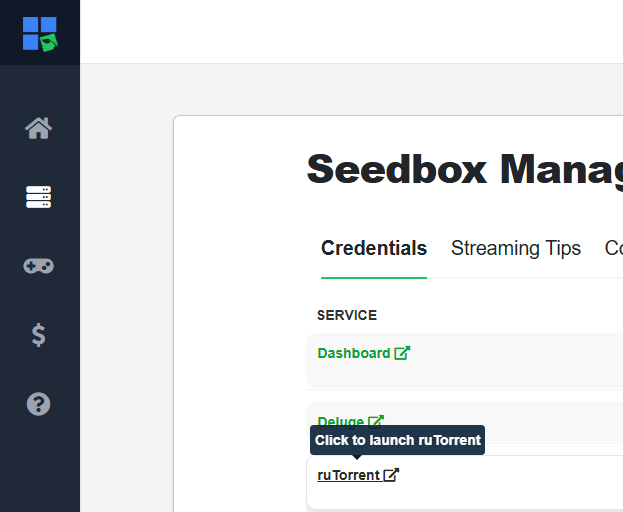
1. Access Your ruTorrent Web Interface
Once your seedbox is set up, you’ll usually get your login info and a link to your ruTorrent web interface. Just open the URL in your web browser and log in with the username and password that are provided. The interface should look like a regular desktop torrent client, with sections for active torrents, files, logs, and various settings.
2. Add New Torrents
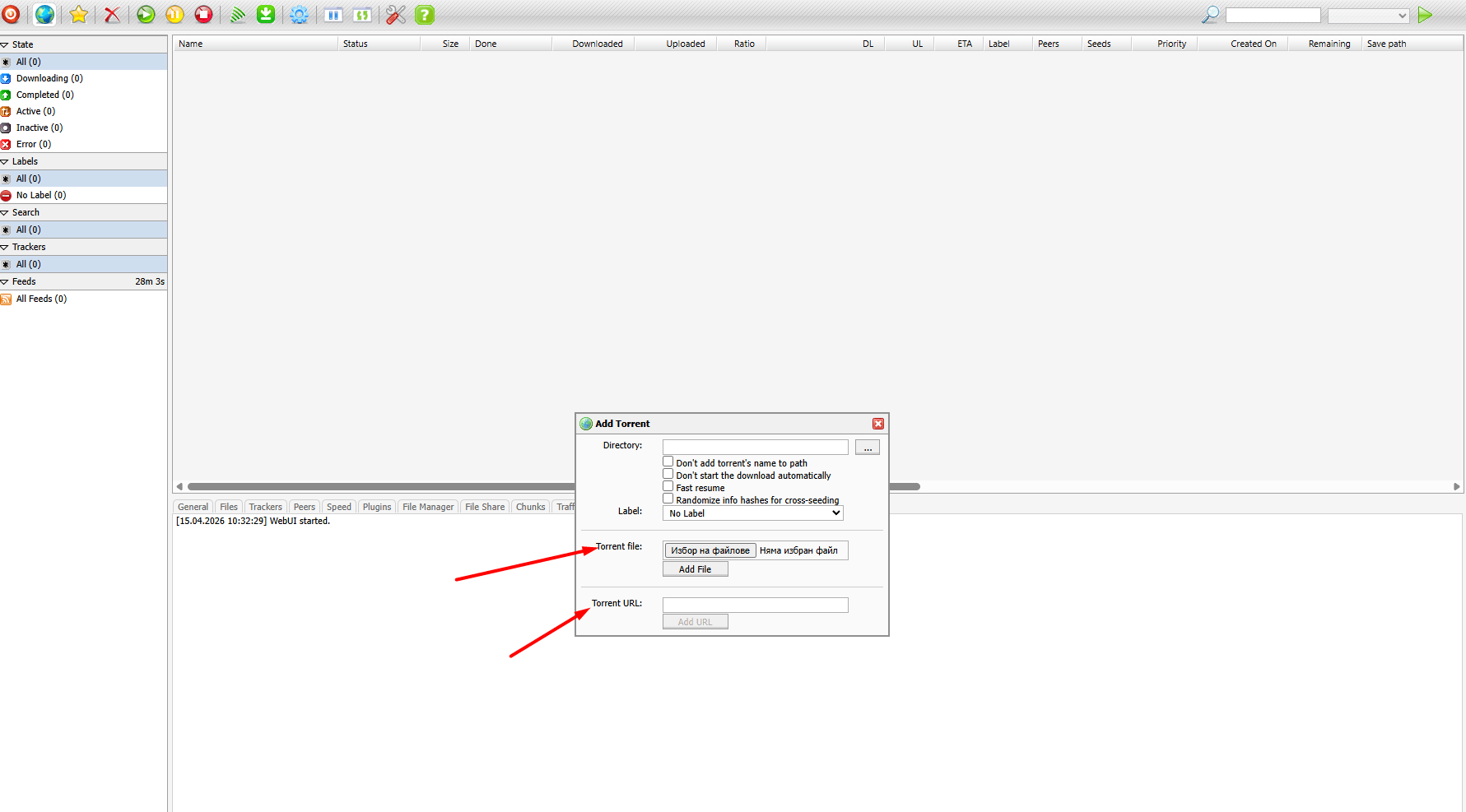
There are several ways to add torrents to ruTorrent:
- Upload .torrent file: Click the “Add Torrent” icon (usually a plus sign or a folder with an arrow) and browse for a .torrent file on your local computer. Select the desired download directory on your seedbox.
- Add from URL: Paste the URL of a .torrent file or a magnet link directly into the “Add Torrent” dialog box. This is convenient for adding torrents found online without downloading the .torrent file first.
- RSS Downloader (Plugin): If you have the RSS plugin enabled, you can configure ruTorrent to automatically download torrents from specified RSS feeds based on filters you define. This is a powerful automation feature.
3. Monitor and Manage Torrents
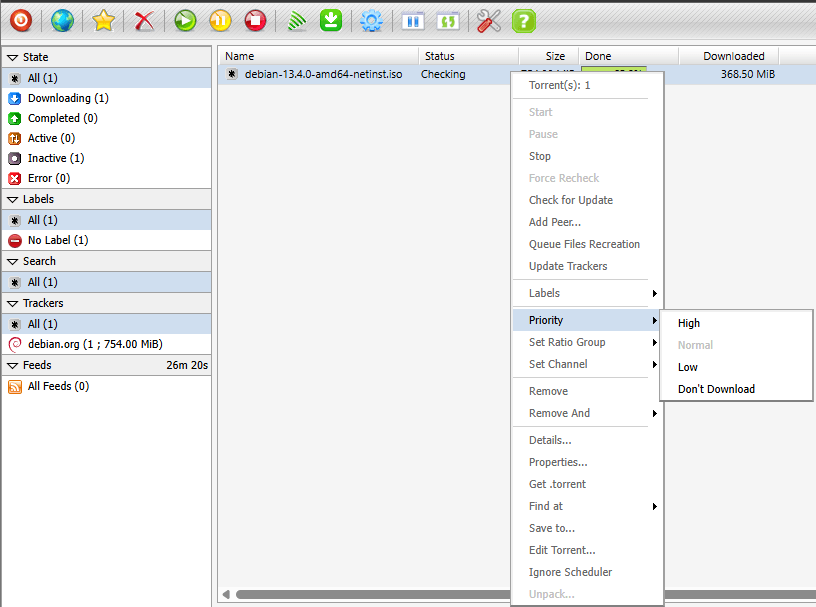
Once you add them, your torrents will show up in the main window. You can keep an eye on their status (downloading, seeding, paused), progress, speed, and estimated time remaining. ruTorrent gives you different options for managing individual torrents:
- Pause/Start: Temporarily stop or resume a torrent.
- Stop/Remove: Stop a torrent and optionally remove it from the list, with or without deleting the associated data.
- Set Priority: Adjust the download or upload priority for specific files within a torrent.
- Labeling: Assign labels to torrents for better organization, especially useful with automation plugins.
4. Configure Plugins and Automation
One of ruTorrent’s greatest strengths is its extensive plugin system. Access the settings (a gear icon) to manage installed plugins. Common and highly recommended plugins include:
- Ratio Group: Automatically stop or move torrents once a specified upload ratio is reached.
- AutoTools: Automate tasks like moving completed downloads to specific folders, renaming files, and creating hard links.
- Scheduler: Schedule specific actions (e.g., pause all torrents) at certain times.
Make sure to check your seedbox provider’s documentation or knowledge base for specific instructions on installing and configuring plugins, since these can differ slightly between providers.
Who Should Use a ruTorrent Seedbox?
A seedbox with ruTorrent is a pretty versatile tool. It’s great for different types of users, depending on their torrenting habits and technical skills. If you can understand these personas, you can figure out if this advanced setup is right for you.
For The Ratio Chaser
Profile: Users deeply involved in private trackers who need to maintain high upload ratios to avoid being banned and to gain access to exclusive content. They often have large bandwidth allocations and seed 24/7.
Why it works: The rTorrent client that’s running in the background is really efficient for seeding, and the Ratio Group and Scheduler plugins for ruTorrent let you control seeding behavior with precision. This makes sure torrents are seeded to meet tracker requirements without constant manual oversight.
Getting started: When you’re setting up your ratio groups, make sure your seedbox has enough storage and bandwidth to handle the continuous seeding you plan on doing.
For The Automator
Profile: People who want to cut down on manual intervention when acquiring media. They often combine their seedbox with other tools like Sonarr, Radarr, or Plex to create a fully automated media server.
Why it works: ruTorrent’s RSS Downloader and AutoTools plugins are total game-changers for automation. You can set up RSS feeds to automatically download new episodes of TV shows or movies, and then use AutoTools to move them to specific directories, rename them, and even trigger other applications to process them.
Optimization tips: Check out the advanced scripting capabilities and API integrations to connect ruTorrent with external media management software for a hands-off experience.
For The Power User and Customization Enthusiast
Profile: Tech-savvy users who like to tweak their software, explore advanced settings, and use a bunch of plugins to get their torrent client just how they like it.
Advanced features: ruTorrent’s design is pretty modular, and it’s got a ton of plugins you can use to customize it however you like. From detailed stats to custom themes and advanced file management, power users can configure ruTorrent to meet virtually any specific need.
Common workflow: Play around with different plugins, dive into the configuration files, and check out the community-developed scripts to see what they can really do. The ability to manage everything via a web interface provides flexibility and control.
How ruTorrent Actually Works
ruTorrent is a fancy web-based control panel for the rTorrent BitTorrent client. This architecture provides a solid and efficient system for managing torrents on a seedbox. The main way the user’s web browser, ruTorrent, and rTorrent talk to each other is through the XML-RPC protocol.
XML-RPC Communication
XML-RPC, or XML Remote Procedure Call, is a simple protocol that allows a client (like ruTorrent) to call procedures or functions on a remote server (like rTorrent) using HTTP as the transport mechanism and XML for encoding calls and responses.
When you interact with the ruTorrent web interface (like by adding a torrent or pausing a download), ruTorrent translates these actions into XML-RPC requests.
Then, these requests are sent to the rTorrent client, which executes the corresponding commands and returns the results to ruTorrent.
Finally, ruTorrent updates the web interface.
This efficient communication method lets ruTorrent provide real-time feedback and control without adding a lot of overhead.
Plugin Architecture
One of the best things about ruTorrent is its plugin architecture. The interface itself is pretty basic, but you can expand its functionality a lot with a bunch of different plugins. These plugins are usually written in PHP and work really well with the ruTorrent core, often using rTorrent’s features via XML-RPC. Here are some examples:
- autotools: Automates tasks like moving completed downloads, creating hard links, and renaming files based on predefined rules.
- ratio: Allows users to set specific upload ratio goals for torrents and automatically stop or remove them once the goal is met.
- RSS: Integrates with RSS feeds to automatically detect and download new torrents based on user-defined filters.
- scheduler: Enables scheduling of various actions, such as pausing all torrents during specific hours to conserve bandwidth.
This plugin system makes ruTorrent highly extensible and adaptable to individual user needs, transforming it from a simple web interface into a comprehensive torrent management platform.
Additional Tips
- Optimize rtorrent.rc: For advanced users, directly editing the rtorrent.rc configuration file can unlock deeper optimizations for performance, memory usage, and network settings. Consult your seedbox provider’s documentation before making changes.
- Hard Links vs. Copies: If your seedbox supports it, use hard links with plugins like autotools to save disk space. Hard links let you put files in multiple places without using extra storage, which is great for organizing media while keeping seeding.
- Security best practices: Always access your ruTorrent interface over HTTPS to encrypt your connection and protect your login credentials and torrenting activity from eavesdropping.
Common Mistakes with ruTorrent Seedbox Setups
While a ruTorrent seedbox is great because it gives you a lot of control and automation, there are some common mistakes that can mess up its effectiveness. If you can avoid these mistakes, you’ll have a better experience.
1. Neglecting Plugin Configuration
Why it happens:
A lot of users install ruTorrent but don’t fully explore or configure its powerful plugins, missing out on significant automation and management benefits.
How to avoid:
Take some time to learn about and set up the key plugins, like autotools, ratio, and RSS. These plugins are what make it so useful for hands-off torrent management.
2. Ignoring rTorrent’s Resource Usage
Why it happens:
rTorrent is lightweight, but if it’s not configured properly or there are too many active torrents, it can still use a lot of CPU or memory. This can affect the performance of your seedbox.
How to avoid:
Keep an eye on how your seedbox is using its resources. Go ahead and adjust rTorrent’s settings (like max_memory_usage and max_peers) in the rtorrent.rc file to match what your seedbox needs. If you’ve got inactive torrents, you can pause or remove them to free up resources.
3. Insecure Access to the Web Interface
Why it happens:
If you access ruTorrent over an unencrypted HTTP connection, your login credentials and torrenting activity could be exposed to potential interception, which would compromise your privacy.
How to avoid:
Just make sure your seedbox provider has HTTPS configured for your ruTorrent interface. If not, you might want to think about using a VPN or SSH tunnel to keep your connection safe when you’re using ruTorrent.
Conclusion: Master Your Torrents
The ruTorrent seedbox combo is the ultimate solution for managing your torrents. It’s powerful, customizable, and automated – perfect for any digital content fanatic.
The rTorrent client is great, and the ruTorrent web interface is easy to use and can be extended.
This gives users total control over their torrenting activities. From keeping upload ratios top-notch on private trackers to setting up fully automated media acquisition systems, a ruTorrent seedbox, especially when hosted by a top-tier provider like RapidSeedbox, can help you get the most out of your digital life.
Disclaimer: This article is intended for informational purposes only. The use of seedboxes and torrenting technologies carries legal and ethical responsibilities. Users are solely responsible for ensuring their activities comply with all applicable laws, regulations, and terms of service in their jurisdiction and with their seedbox provider. We do not endorse or condone the use of these technologies for illegal activities, including copyright infringement. Always ensure you have the legal right to download and share content.
Looking for a powerful ruTorrent seedbox setup without the hassle?
Take your torrenting to the next level with a high-performance seedbox fully optimized for ruTorrent. Enjoy lightning-fast downloads, secure remote access, and seamless file management – all while keeping your identity protected. Perfect for users who want speed, privacy, and full control in one place.
0Comments