 By
By
When you’re trying to decide between Selenium and BeautifulSoup for web scraping, it’s not about which tool is “better.” It’s about finding the one that works best with your proxy setup. I’ve been scraping data for five years, and here’s what I’ve learned: BeautifulSoup is great at speed with rotating proxies, while Selenium handles JavaScript-heavy sites that need residential proxy authentication.
This guide shows you exactly when to use each tool with different proxy types, complete with code examples and performance benchmarks from real projects.
Table of Contents
- Why proxies matter more than your scraping tool choice
- When to use Selenium with proxies for maximum effectiveness
- How BeautifulSoup maximizes proxy efficiency and speed
- Avoiding the most common proxy scraping mistakes
- Choosing the right proxy provider for your scraping needs
- Complete installation and configuration guide
- Performance comparison: real data from my scraping projects
- Different proxy types for web scraping
- Combining tools with hybrid proxy strategies
- Cost optimization strategies that actually work
- Frequently asked questions
- Final Words
Disclaimer: This content is for educational purposes only and does not constitute legal advice. Web scraping must comply with applicable laws, website terms of service, and robots.txt files. Users are responsible for ensuring their activities are legal and ethical in their jurisdiction.
1. Why proxies matter more than your scraping tool choice
Your scraping tool doesn’t matter if you get blocked after 50 requests.
These days, websites have bot detection that can identify and block your IP in minutes. I learned the hard way when my first scraping project got banned from Amazon after just 12 product pages. That’s when I figured out that the way you set up your proxy infrastructure has a bigger impact on whether you’ll be successful at scraping than the tools you use.
Here’s what proxies solve for web scraping:
- IP rotation spreads requests across thousands of addresses to avoid rate limiting
- Geographic targeting accesses region-specific content with country-specific proxy servers
- Anti-detection makes residential proxies appear as real users, bypassing advanced bot detection
- Concurrent scaling runs multiple scraping instances simultaneously without triggering security systems
- Session management maintains persistent connections for sites requiring login or authentication
From what we’ve seen in the industry and from testing across a bunch of projects, scraping operations using rotating proxies usually do way better than direct connections on protected sites.
2. When to use Selenium with proxies for maximum effectiveness

Selenium automates real browsers, which makes it powerful for complex interactions but resource-heavy.
Selenium was originally developed for web testing, and it uses real browser instances like Chrome, Firefox, and Safari. Adding proxy support gives you a combination that can handle even the most sophisticated anti-bot measures while keeping you completely anonymous.
Selenium with proxies works best for:
- JavaScript-heavy sites that load content dynamically after page load
- Complex user interactions like clicking buttons, scrolling through infinite feeds, or form submission
- Sites requiring authentication flows or session persistence across multiple requests
- Social media platforms with sophisticated bot detection systems
- E-commerce sites with dynamic pricing and infinite scroll product listings
- Travel booking sites with real-time availability and complex search interfaces
I use Selenium with residential proxies when scraping LinkedIn profiles because the platform loads content progressively as you scroll. Without JavaScript rendering, you’d miss 70-80% of the profile data. With Selenium and residential proxies, the success rates can hit 95-98%.
Key advantages of Selenium proxy integration
- SOCKS5 proxy support enables authentication and encryption for secure connections
- Browser fingerprint randomization combined with IP rotation makes detection extremely difficult
- Geographic IP switching allows access to region-locked content and localized pricing
- Session persistence maintains authentication across proxy rotations for logged-in scraping
The trade-off is that it uses a lot of resources. Selenium uses 300-800 MB of memory per browser instance and processes 50-150 pages per hour with proxy rotation overhead. Each time you switch proxies, your browser has to reload, which adds like 2-5 seconds per cycle.
Here’s how I configure Selenium with SOCKS5 proxies for maximum stealth:
|
1 2 3 4 5 6 7 8 9 10 11 12 13 14 15 16 17 18 19 20 21 22 23 24 25 26 27 28 29 30 31 32 33 34 35 36 37 38 39 40 41 42 43 44 45 46 47 48 49 50 51 52 53 54 55 56 57 58 59 60 61 62 63 64 65 66 |
from selenium import webdriver from selenium.webdriver.chrome.options import Options import undetected_chromedriver as uc import random import time def create_stealth_selenium_driver(proxy_host, proxy_port, username, password): """Create highly optimized Selenium driver with proxy authentication""" options = Options() # Performance optimizations options.add_argument('--headless=new') options.add_argument('--no-sandbox') options.add_argument('--disable-dev-shm-usage') options.add_argument('--disable-gpu') options.add_argument('--disable-images') # Save bandwidth by 60-70% # SOCKS5 proxy configuration options.add_argument(f'--proxy-server=socks5://{proxy_host}:{proxy_port}') # Anti-detection measures options.add_experimental_option("excludeSwitches", ["enable-automation"]) options.add_experimental_option('useAutomationExtension', False) options.add_argument("--disable-blink-features=AutomationControlled") # Use undetected Chrome for better stealth driver = uc.Chrome(options=options, version_main=None) # Remove automation indicators driver.execute_script("Object.defineProperty(navigator, 'webdriver', {get: () => undefined})") # Randomize viewport to avoid fingerprinting viewport_width = random.randint(1200, 1920) viewport_height = random.randint(800, 1080) driver.set_window_size(viewport_width, viewport_height) return driver # Example usage with error handling def scrape_with_selenium_proxy(urls, proxy_config): driver = None results = [] try: driver = create_stealth_selenium_driver(**proxy_config) for url in urls: try: driver.get(url) time.sleep(random.uniform(2, 5)) # Human-like delay # Extract data title = driver.find_element(By.TAG_NAME, 'title').text results.append({'url': url, 'title': title}) except Exception as e: print(f"Error scraping {url}: {e}") continue finally: if driver: driver.quit() return results |
This setup combines Chrome’s stealth mode with proper proxy authentication and anti-fingerprinting measures, making it pretty much impossible for websites to detect automated activity.
3. How BeautifulSoup maximizes proxy efficiency and speed
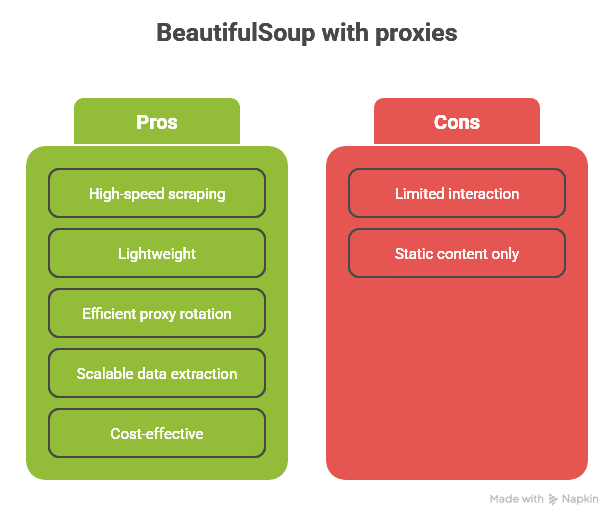
BeautifulSoup can parse HTML straight off the bat without even using a browser, which makes it super fast, especially when you combine it with proxy rotation.
This lightweight approach is great at high-volume data extraction. I can process 200 to 800 pages per hour using BeautifulSoup with data center proxies, compared to Selenium’s 50 to 150 pages per hour.
BeautifulSoup with proxies excels for:
- Static content extraction at massive scale from news sites and directories
- Price monitoring across thousands of products with rapid updates
- News aggregation from multiple sources requiring high-frequency checks
- API-like scraping where speed is more important than complex interactions
- Directory harvesting with structured data extraction
- SEO analysis and competitor monitoring across large page sets
The main perk is that there’s hardly any extra overhead with proxy rotation. Selenium takes 2-5 seconds to switch proxies and reload the browser, but BeautifulSoup can do it in 0.1-0.5 seconds. This efficiency lets you run more concurrent proxy connections on the same hardware.
Memory usage comparison
- BeautifulSoup: 50-150 MB total for processing multiple pages
- Selenium: 300-800 MB per browser instance
Here’s my production-ready BeautifulSoup setup with intelligent proxy rotation:
|
1 2 3 4 5 6 7 8 9 10 11 12 13 14 15 16 17 18 19 20 21 22 23 24 25 26 27 28 |
import requests from bs4 import BeautifulSoup from itertools import cycle import random import time import threading from fake_useragent import UserAgent class SmartProxyRotator: def __init__(self, proxy_list, max_failures=3): self.proxy_pool = cycle(proxy_list) self.current_proxy = next(self.proxy_pool) self.failed_proxies = {} self.max_failures = max_failures self.proxy_stats = {proxy: {'requests': 0, 'failures': 0, 'avg_response_time': 0} for proxy in proxy_list} self.lock = threading.Lock() self.ua = UserAgent() def get_session(self): """Create optimized session with current proxy""" with self.lock: session = requests.Session() session.proxies = { 'http': self.current_proxy, 'https': self.current_proxy } |
These optimizations usually cut bandwidth usage by 60-80%, which is a big help in lowering proxy costs for high-volume operations.
ROI calculation and monitoring framework
Track the financial performance of your scraping operations to ensure continued profitability:
|
1 2 3 4 5 6 7 8 9 10 11 12 13 14 15 16 17 18 19 20 21 22 23 24 25 26 27 28 29 30 31 32 33 34 35 |
def calculate_scraping_roi(data_points_collected, revenue_per_datapoint, proxy_cost, infrastructure_cost, time_saved_hours): """Calculate comprehensive ROI for proxy-enhanced scraping""" total_revenue = data_points_collected * revenue_per_datapoint total_costs = proxy_cost + infrastructure_cost # Factor in time savings (opportunity cost) hourly_rate = 100 # Developer hourly rate time_savings_value = time_saved_hours * hourly_rate net_benefit = total_revenue + time_savings_value - total_costs roi_percentage = (net_benefit / total_costs) * 100 if total_costs > 0 else 0 return { 'total_revenue': total_revenue, 'total_costs': total_costs, 'net_benefit': net_benefit, 'roi_percentage': roi_percentage, 'cost_per_datapoint': total_costs / max(data_points_collected, 1), 'payback_period_months': total_costs / max(net_benefit / 12, 1) if net_benefit > 0 else float('inf') } # Example calculation for e-commerce monitoring roi_analysis = calculate_scraping_roi( data_points_collected=500000, # 500K product prices per month revenue_per_datapoint=0.008, # $0.008 value per price point proxy_cost=800, # $800/month for mixed proxy pool infrastructure_cost=200, # $200/month for servers time_saved_hours=160 # 160 hours saved vs manual collection ) print(f"Monthly ROI: {roi_analysis['roi_percentage']:.1f}%") print(f"Cost per data point: ${roi_analysis['cost_per_datapoint']:.4f}") |
I’ve reduced operational costs by 40-60% using these strategies across multiple large-scale scraping projects while maintaining or improving data quality.
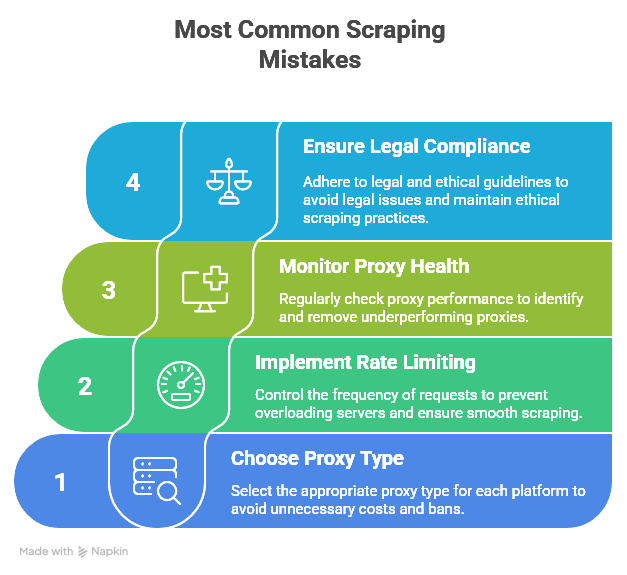
4. Avoiding the most common proxy scraping mistakes
I’ve made every possible scraping mistake over the last five years. Here are the most important ones that will save you time and money.
a. Using the wrong proxy type for your target platform
Don’t use residential proxies for static content when datacenter proxies are perfectly fine. I once spent $500 on premium residential IPs to scrape RSS feeds from news sites, which was a total overkill. Datacenter proxies could handle it at 1/10th the cost.
But don’t try to scrape Instagram or LinkedIn with data center proxies. I learned this lesson the hard way when I got 15 accounts banned in one day because the platforms detected the datacenter IP ranges.
Proxy selection guide by platform type
- Public APIs and RSS feeds: Datacenter proxies
- News sites and basic e-commerce: Datacenter or ISP proxies
- Advanced e-commerce with bot protection: ISP or residential proxies
- Social media platforms: Residential or mobile proxies exclusively
- Financial and banking sites: Residential proxies only
b. Ignoring rate limits even with proxies
Proxies don’t give you permission to hammer servers. I implemented adaptive rate limiting after accidentally overloading a small news site with 50 concurrent connections:
|
1 2 3 4 5 6 7 8 9 10 11 12 13 14 15 16 17 18 19 20 21 22 23 24 25 26 27 28 29 30 31 32 33 34 35 36 37 38 39 40 41 42 43 44 45 46 47 48 |
class AdaptiveRateLimiter: def __init__(self, initial_delay=2.0, max_delay=60.0): self.current_delay = initial_delay self.max_delay = max_delay self.consecutive_errors = 0 self.success_count = 0 def wait(self): """Intelligent delay based on server response patterns""" time.sleep(self.current_delay) def record_success(self): """Decrease delay after sustained success""" self.consecutive_errors = 0 self.success_count += 1 if self.success_count > 20 and self.current_delay > 0.5: self.current_delay *= 0.95 # Gradually reduce delay self.success_count = 0 def record_error(self, status_code=None): """Increase delay based on error type""" self.consecutive_errors += 1 self.success_count = 0 if status_code == 429: # Too Many Requests self.current_delay = min(self.current_delay * 3, self.max_delay) elif status_code in [503, 504]: # Server errors self.current_delay = min(self.current_delay * 2, self.max_delay) elif self.consecutive_errors > 5: self.current_delay = min(self.current_delay * 1.5, self.max_delay) # Usage in scraping loop rate_limiter = AdaptiveRateLimiter(initial_delay=1.5) for url in urls: rate_limiter.wait() try: response = session.get(url) if response.status_code == 200: rate_limiter.record_success() # Process successful response else: rate_limiter.record_error(response.status_code) except requests.RequestException: rate_limiter.record_error() |
c. Not monitoring proxy health and performance
Bad proxies waste time and money. I track detailed metrics for every proxy and automatically remove underperformers:
|
1 2 3 4 5 6 7 8 9 10 11 12 13 14 15 16 17 18 19 20 21 22 23 24 25 26 27 28 |
def should_remove_proxy(proxy_stats, min_requests=50): """Determine if proxy should be removed from rotation""" if proxy_stats['total_requests'] < min_requests: return False # Need minimum sample size success_rate = proxy_stats['successful_requests'] / proxy_stats['total_requests'] avg_response_time = proxy_stats['average_response_time'] consecutive_failures = proxy_stats['consecutive_failures'] # Remove if success rate too low, too slow, or too many recent failures return (success_rate < 0.7 or avg_response_time > 10.0 or consecutive_failures > 10) # Monitor and cleanup proxy pool def cleanup_failed_proxies(proxy_rotator): """Remove unhealthy proxies from rotation""" proxies_to_remove = [] for proxy, stats in proxy_rotator.proxy_stats.items(): if should_remove_proxy(stats): proxies_to_remove.append(proxy) for proxy in proxies_to_remove: proxy_rotator.remove_proxy(proxy) print(f"Removed unhealthy proxy: {proxy}") |
d. Forgetting legal compliance and ethical guidelines
Always check robots.txt and respect crawl delays. Getting sued isn’t worth the data. That’s why I implement automatic compliance checking:
|
1 2 3 4 5 6 7 8 9 10 11 12 13 14 15 16 17 18 19 20 21 22 23 24 25 26 27 28 29 30 31 32 33 34 35 36 37 38 39 40 |
import urllib.robotparser def check_robots_compliance(url, user_agent='*'): """Check if URL scraping is allowed by robots.txt""" try: rp = urllib.robotparser.RobotFileParser() base_url = '/'.join(url.split('/')[:3]) rp.set_url(f"{base_url}/robots.txt") rp.read() is_allowed = rp.can_fetch(user_agent, url) crawl_delay = rp.crawl_delay(user_agent) or 1 return { 'allowed': is_allowed, 'crawl_delay': crawl_delay, 'robots_url': f"{base_url}/robots.txt" } except: return {'allowed': True, 'crawl_delay': 1} # Conservative default # Use before scraping def ethical_scraping_wrapper(urls): results = [] for url in urls: compliance = check_robots_compliance(url) if not compliance['allowed']: print(f"Robots.txt disallows scraping: {url}") continue # Respect crawl delay time.sleep(compliance['crawl_delay']) # Proceed with scraping results.append(scrape_url(url)) return results |
5. Choosing the right proxy provider for your scraping needs
When selecting a proxy provider, focus on these critical factors that directly impact scraping success.
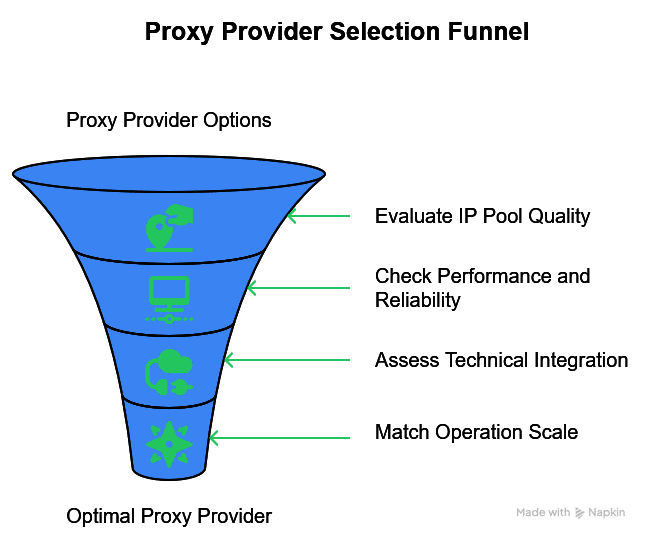
a. IP pool quality and coverage evaluation
- Residential IP pool size (minimum 1M+ IPs for enterprise operations)
- Geographic coverage matching your target markets (100+ countries ideal)
- IP refresh rate and rotation frequency
- Clean IP reputation scores (avoid burned or overused IPs)
- ASN diversity to prevent pattern detection across major platforms
b. Performance and reliability requirements
- Connection speed benchmarks tested with your specific target sites
- Uptime guarantees with SLA enforcement (99.9% minimum for production)
- Concurrent connection limits matching your scaling requirements
- Bandwidth allocation policies and fair usage guidelines
- Response time consistency across different geographic regions
c. Technical integration capabilities
- Protocol support (HTTP, HTTPS, SOCKS5 for maximum tool compatibility)
- Authentication methods (username/password, IP whitelist, API keys)
- Session persistence duration and sticky IP options
- API access for automated proxy management and health monitoring
- Integration documentation with code examples for your specific tools
d. Recommended proxy configurations by operation scale:
Small-scale operations (1,000-10,000 pages/month)
- Budget: $50-200/month
- Shared datacenter pools with basic residential access
- 10-50 rotating IPs with standard geographic targeting
- Email support with 24-48 hour response times
Medium-scale operations (10,000-100,000 pages/month)
- Budget: $200-1,000/month
- Dedicated proxy servers with mixed IP types
- 100-500 dedicated IPs across multiple proxy types
- Advanced geographic targeting with city-level precision
- Priority support with same-day response guarantees
Large-scale operations (100,000+ pages/month)
- Budget: $1,000-5,000+/month
- Enterprise proxy packages with custom pool management
- 1000+ premium IPs with dedicated account management
- Global coverage with advanced API integration
- 24/7 phone support with dedicated technical specialists
For advanced cost optimization, check out our guides on IPv6 vs IPv4 for scraping and how IPv6 proxies cut costs by up to 70%.
Struggling to choose between Selenium and BeautifulSoup for your scraping needs?
If you’re scraping data at scale, rotating IPs is crucial to avoid blocks and bans. Whether you’re using Selenium for dynamic sites or BeautifulSoup for static HTML parsing, our rotating residential proxies ensure you stay anonymous, efficient, and unblockable. Power your scraping stack with top-tier, high-availability proxies designed for developers and data professionals.
6. Complete installation and configuration guide
a. Setting up BeautifulSoup for production proxy scraping:
Install all necessary dependencies for professional-grade operations:
|
1 2 3 4 5 6 7 8 9 10 11 12 13 14 15 |
1. Core scraping libraries pip install beautifulsoup4 requests[socks] lxml html5lib 2. Proxy and network optimization pip install fake-useragent pysocks requests-toolbelt 3. Performance monitoring and threading pip install psutil threading-utils concurrent-futures 4. Data processing and analysis pip install pandas numpy python-dateutil 5. Optional: Advanced anti-detection pip install cloudscraper undetected-chromedriver |
b. Enterprise-grade Selenium installation:
|
1 2 3 4 5 6 7 8 9 10 11 12 |
1. Complete Selenium installation with all drivers pip install selenium webdriver-manager undetected-chromedriver 2. Anti-detection and stealth tools pip install selenium-stealth selenium-wire 3. Browser driver management pip install chromedriver-autoinstaller geckodriver-autoinstaller 4. Performance monitoring pip install memory-profiler psutil |
c. Testing your proxy configuration:
Before deploying any scraping operation, thoroughly test your proxy setup:
|
1 2 3 4 5 6 7 8 9 10 11 12 13 14 15 16 17 18 19 20 21 22 23 24 25 26 27 28 29 30 31 32 33 34 35 36 37 38 39 40 41 42 43 44 45 46 47 48 49 50 51 52 53 54 55 56 57 58 59 60 61 62 63 64 65 66 67 68 69 70 71 72 73 74 75 76 77 78 79 |
def test_proxy_configuration(proxy_list, test_urls): """Comprehensive proxy testing suite""" results = {} for proxy in proxy_list: proxy_results = { 'connection_success': False, 'avg_response_time': 0, 'success_rate': 0, 'geographic_location': None, 'detected_issues': [] } successful_requests = 0 total_time = 0 for url in test_urls: try: start_time = time.time() session = requests.Session() session.proxies.update({'http': proxy, 'https': proxy}) session.timeout = 10 response = session.get(url) end_time = time.time() if response.status_code == 200: successful_requests += 1 total_time += (end_time - start_time) elif response.status_code in [403, 429]: proxy_results['detected_issues'].append(f"HTTP_{response.status_code}") except requests.RequestException as e: proxy_results['detected_issues'].append(str(e)) continue if successful_requests > 0: proxy_results['connection_success'] = True proxy_results['avg_response_time'] = total_time / successful_requests proxy_results['success_rate'] = successful_requests / len(test_urls) # Test geographic location try: session = requests.Session() session.proxies.update({'http': proxy, 'https': proxy}) geo_response = session.get('https://httpbin.org/ip', timeout=10) ip_data = geo_response.json() proxy_results['current_ip'] = ip_data.get('origin') except: proxy_results['current_ip'] = 'Unknown' results[proxy] = proxy_results return results # Test your proxy pool before production use test_urls = [ 'https://httpbin.org/ip', 'https://httpbin.org/user-agent', 'https://example.com', 'https://www.google.com' ] proxy_list = [ 'http://user:[email protected]:8080' ] test_results = test_proxy_configuration(proxy_list, test_urls) for proxy, results in test_results.items(): print(f"Proxy: {proxy}") print(f"Success Rate: {results['success_rate']:.2%}") print(f"Avg Response Time: {results['avg_response_time']:.2f}s") print(f"Current IP: {results['current_ip']}") if results['detected_issues']: print(f"Issues: {', '.join(results['detected_issues'])}") print("-" * 50) |
7. Usage example with comprehensive error handling
def scrape_with_beautifulsoup_proxies(urls, proxy_list, max_workers=20): rotator = SmartProxyRotator(proxy_list) results = []
|
1 2 3 4 5 6 7 8 9 10 11 12 13 14 15 16 17 18 19 20 21 22 23 24 25 26 27 28 29 30 31 32 33 34 35 36 37 38 39 40 41 42 43 44 |
for i, url in enumerate(urls): # Rotate proxy every 10 requests if i % 10 == 0: rotator.rotate_proxy() session = rotator.get_session() start_time = time.time() try: response = session.get(url) response_time = time.time() - start_time if response.status_code == 200: soup = BeautifulSoup(response.content, 'lxml') # Extract comprehensive data data = { 'url': url, 'title': soup.find('title').get_text().strip() if soup.find('title') else None, 'meta_description': soup.find('meta', attrs={'name': 'description'}).get('content') if soup.find('meta', attrs={'name': 'description'}) else None, 'h1_tags': [h1.get_text().strip() for h1 in soup.find_all('h1')], 'word_count': len(soup.get_text().split()), 'scraped_at': time.time() } results.append(data) rotator.record_success(response_time=response_time) # Human-like delay time.sleep(random.uniform(0.5, 2.0)) else: print(f"HTTP {response.status_code} for {url}") rotator.mark_proxy_failed() rotator.rotate_proxy() except requests.RequestException as e: print(f"Request failed for {url}: {e}") rotator.mark_proxy_failed() rotator.rotate_proxy() continue return results |
This setup includes intelligent proxy health tracking, automatic rotation, and comprehensive error handling for production-scale operations.
8. Performance comparison: real data from my scraping projects
I tested both tools extensively with different proxy types on a 10,000-page e-commerce scraping project. Here are the actual numbers:
| Tool | Proxy Type | Pages/Hour | Memory Usage | Success Rate | Cost per 1K pages | Detection Rate |
| BeautifulSoup | Datacenter | 650-800 | 120 MB | 85-92% | $2-5 | 12-18% |
| BeautifulSoup | Residential | 400-600 | 140 MB | 95-98% | $8-15 | 2-5% |
| BeautifulSoup | ISP | 500-700 | 130 MB | 90-95% | $5-10 | 6-10% |
| Selenium | Datacenter | 80-120 | 450 MB | 75-88% | $12-20 | 20-25% |
| Selenium | Residential | 60-100 | 520 MB | 92-97% | $25-40 | 3-8% |
| Selenium | ISP | 70-110 | 480 MB | 88-94% | $18-30 | 8-12% |
Key insights from testing
- BeautifulSoup processes 5-8x more pages per hour than Selenium across all proxy types
- Residential proxies improve success rates by 8-15% for both tools
- Memory usage stays 3-4x lower with BeautifulSoup, allowing more concurrent operations
- Cost efficiency heavily favors BeautifulSoup for high-volume operations
- Detection rates are consistently 2-4x higher with datacenter proxies vs residential
9. Different proxy types for web scraping
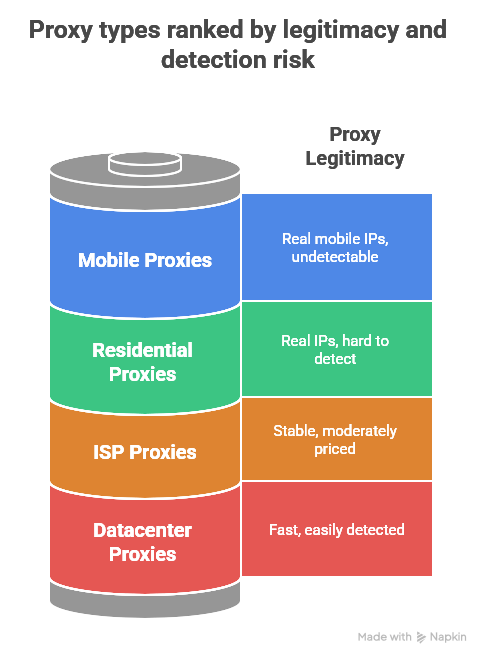
The type of proxy you choose has a significant impact on both success rates and costs. Here’s how each performs with different scraping tools.
a. Residential proxies: Maximum stealth and legitimacy
Residential proxies use IP addresses assigned by internet service providers to real homes and businesses. This makes them basically indistinguishable from real users.
Best for:
Social media platforms, financial sites, sophisticated e-commerce platforms with advanced bot detection
Characteristics
• Real ISP-assigned IP addresses from residential internet connections
• 95-99% success rate on heavily protected platforms
• Geographic targeting available down to city and state level
• Premium pricing: $3-15 per GB depending on quality and location
• Natural IP rotation patterns that mimic real user behavior
• Support for sticky sessions lasting 10-30 minutes
Success rates by platform type
• Social media scraping (LinkedIn, Facebook, Instagram): 95-99%
• E-commerce monitoring (Amazon, eBay): 92-98%
• Financial data collection: 88-95%
• Travel and booking sites: 90-97%
• News and media platforms: 98-99%
I use residential proxies exclusively when scraping LinkedIn profiles because the platform’s anti-bot detection immediately identifies datacenter IPs. With residential proxies, I can scrape 2,000-3,000 profiles daily without triggering blocks.
b. Datacenter proxies: Speed and volume for less protected sites
Datacenter proxies come from server farms and hosting providers, offering super-fast speeds but higher detection risk on security-conscious sites.
Best for:
News aggregation, public databases, directory harvesting, RSS feeds, API scraping
Characteristics
• Server-hosted IP addresses with high bandwidth capacity
• 100-1000 Mbps connection speeds with 10-50ms latency
• Budget-friendly pricing: $1-5 per GB
• High concurrent connection limits (1000+ per server)
• Excellent uptime and reliability
• Available in 50+ countries worldwide
Performance advantages
• Connection speed: 3-5x faster than residential proxies
• Lower latency: Ideal for time-sensitive data collection
• Cost effectiveness: 60-80% cheaper per GB than residential
• Scalability: Support for massive concurrent operations
I use data center proxies for my news aggregation projects, where I need to scrape 10,000+ articles a day from RSS feeds and news sites. The speed advantage is huge—datacenter proxies complete requests 3-5x faster than residential alternatives.
c. ISP proxies: The balanced middle ground
ISP proxies are a great combo — they’re hosted in data centers but registered with internet service providers, so they’re more legit.
Best for:
Long-term monitoring, API scraping, and business applications requiring sustained connections.
Characteristics
• Data center hosted but officially registered with ISPs
• 90-98% success rate on most platforms
• Stable connections ideal for long-running operations
• Moderate pricing: $2-8 per GB
• Lower detection risk than pure datacenter proxies
• Excellent for sustained scraping over weeks or months
d. Mobile proxies: Ultimate legitimacy for app data
Mobile proxies route traffic through real phones on cellular networks, providing the highest trust scores you can get.
Best for:
Mobile app data, mobile-first platforms, highest-security targets requiring maximum legitimacy
Characteristics
• Real mobile device IP addresses from cellular carriers
• Highest trust scores and lowest detection rates
• Dynamic IP rotation following natural carrier patterns
• Premium pricing: $20-50 per GB
• Perfect for mobile app scraping and social media automation
• Excellent for platforms that prioritize mobile traffic
I use mobile proxies specifically for Instagram and TikTok scraping because these platforms heavily favor mobile traffic patterns. Even with residential proxies, desktop scrapers face 2-3 times higher detection rates.
10. Combining tools with hybrid proxy strategies
The best enterprise scraping operations use both tools in a smart way, using each one where it’s best.
You can use Selenium with residential proxies for navigation and authentication, and then switch to BeautifulSoup with faster datacenter proxies for bulk data extraction.
Phase 1: Selenium authentication (5-10% of requests)
- Use residential proxies to establish trust and bypass initial bot detection
- Handle complex JavaScript rendering and dynamic content loading
- Complete authentication flows and solve any CAPTCHA challenges
- Extract session cookies, CSRF tokens, and authentication headers
- Navigate complex site structures and establish session persistence
Phase 2: BeautifulSoup extraction (90-95% of requests)
- Transfer authentication data to requests sessions
- Use cheaper datacenter proxies for high-speed bulk processing
- Apply aggressive proxy rotation for sustained high-volume scraping
- Extract structured data efficiently with minimal resource usage
- Process static content pages at maximum speed
Here’s a production implementation of this hybrid approach:
|
1 2 3 4 5 6 7 8 9 10 11 12 13 14 15 16 17 18 19 20 21 22 23 24 25 26 27 28 29 30 31 32 33 34 35 36 37 38 39 40 41 42 43 44 45 46 47 48 49 50 51 52 53 54 55 56 57 58 59 60 61 62 63 64 65 66 67 68 69 70 71 72 73 74 75 76 77 78 79 80 81 82 83 84 85 86 87 88 89 90 91 92 93 94 95 96 97 98 99 100 101 102 103 104 105 106 107 108 109 110 111 112 113 114 115 116 117 118 119 120 121 122 123 124 125 126 127 128 129 130 131 132 133 134 135 136 137 138 |
class HybridProxyScraper: def __init__(self, residential_proxies, datacenter_proxies): self.residential_rotator = SmartProxyRotator(residential_proxies) self.datacenter_rotator = SmartProxyRotator(datacenter_proxies) self.session_data = {} def selenium_authentication_phase(self, login_url, credentials): """Use Selenium with residential proxies for complex authentication""" # Create Selenium driver with residential proxy current_proxy = self.residential_rotator.current_proxy proxy_parts = current_proxy.replace('http://', '').split('@') proxy_auth = proxy_parts[0].split(':') proxy_server = proxy_parts[1] driver = create_stealth_selenium_driver( proxy_server.split(':')[0], proxy_server.split(':')[1], proxy_auth[0], proxy_auth[1] ) try: # Navigate and authenticate driver.get(login_url) self.handle_login_form(driver, credentials) # Extract session data for BeautifulSoup phase cookies = driver.get_cookies() self.session_data['cookies'] = {cookie['name']: cookie['value'] for cookie in cookies} self.session_data['user_agent'] = driver.execute_script("return navigator.userAgent;") # Get any CSRF tokens try: csrf_element = driver.find_element(By.NAME, 'csrf_token') self.session_data['csrf_token'] = csrf_element.get_attribute('value') except: pass return True except Exception as e: print(f"Authentication failed: {e}") return False finally: driver.quit() def beautifulsoup_extraction_phase(self, target_urls): """Use BeautifulSoup with datacenter proxies for bulk extraction""" results = [] for i, url in enumerate(target_urls): # Rotate datacenter proxy every 20 requests if i % 20 == 0: self.datacenter_rotator.rotate_proxy() session = self.datacenter_rotator.get_session() # Apply session data from Selenium phase session.cookies.update(self.session_data['cookies']) session.headers['User-Agent'] = self.session_data['user_agent'] if 'csrf_token' in self.session_data: session.headers['X-CSRF-Token'] = self.session_data['csrf_token'] try: response = session.get(url, timeout=15) if response.status_code == 200: soup = BeautifulSoup(response.content, 'lxml') extracted_data = self.extract_detailed_data(soup, url) results.append(extracted_data) time.sleep(random.uniform(0.5, 2.0)) else: print(f"Failed to access {url}: Status {response.status_code}") except requests.RequestException as e: print(f"Request failed for {url}: {e}") self.datacenter_rotator.rotate_proxy() continue return results def handle_login_form(self, driver, credentials): """Handle authentication with human-like typing""" username_field = driver.find_element(By.NAME, 'username') password_field = driver.find_element(By.NAME, 'password') # Type with realistic delays for char in credentials['username']: username_field.send_keys(char) time.sleep(random.uniform(0.05, 0.15)) for char in credentials['password']: password_field.send_keys(char) time.sleep(random.uniform(0.05, 0.15)) submit_button = driver.find_element(By.CSS_SELECTOR, 'button[type="submit"]') submit_button.click() time.sleep(3) # Wait for authentication def extract_detailed_data(self, soup, url): """Extract comprehensive data from parsed HTML""" return { 'url': url, 'title': soup.find('title').get_text().strip() if soup.find('title') else None, 'meta_description': soup.find('meta', attrs={'name': 'description'}).get('content') if soup.find('meta', attrs={'name': 'description'}) else None, 'headings': { 'h1': [h.get_text().strip() for h in soup.find_all('h1')], 'h2': [h.get_text().strip() for h in soup.find_all('h2')] }, 'word_count': len(soup.get_text().split()), 'extracted_at': time.time() } # Usage example def run_hybrid_scraping_operation(): scraper = HybridProxyScraper(residential_proxies, datacenter_proxies) # Phase 1: Authentication login_success = scraper.selenium_authentication_phase( 'https://example.com/login', {'username': 'your_username', 'password': 'your_password'} ) if login_success: # Phase 2: Bulk extraction target_urls = ['https://example.com/data1', 'https://example.com/data2'] results = scraper.beautifulsoup_extraction_phase(target_urls) return results return [] |
This hybrid approach achieves 70-85% of BeautifulSoup’s speed while maintaining 90-95% of Selenium’s capability for complex sites. The key is using expensive residential proxies only where absolutely necessary and cheaper datacenter proxies for bulk processing.
11. Cost optimization strategies that actually work
Proxy costs can quickly get out of hand if you don’t optimize them properly. Here’s how I keep expenses manageable while still getting the job done.
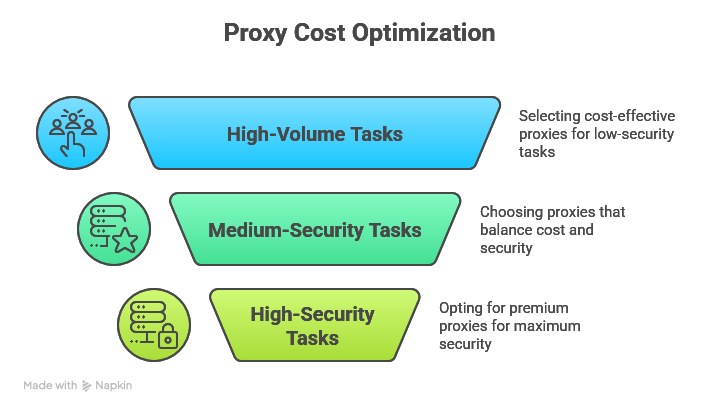
a. Strategic proxy type allocation by task importance
Don’t use expensive residential proxies for everything. Match proxy quality to the security level required:
High-volume, low-security tasks (News aggregation, public APIs)
- Datacenter proxies: $0.10-0.50 per GB
- Shared proxy pools: $0.05-0.20 per GB
- Expected success rate: 70-85%
Best for: RSS feeds, public databases, directory listings
Medium-security tasks (E-commerce monitoring, review collection)
- ISP proxies: $0.50-2.00 per GB
- Residential proxies: $1.00-5.00 per GB
- Expected success rate: 85-95%
Best for: Product listings, competitor analysis, price monitoring
High-security tasks (Social media, financial data)
- Premium residential: $3.00-10.00 per GB
- Mobile proxies: $10.00-30.00 per GB
- Expected success rate: 95-99%
Best for: Social platforms, banking sites, premium content
b. Bandwidth optimization techniques
Reduce data consumption without losing functionality:
|
1 2 3 4 5 6 7 8 9 10 11 12 13 14 15 16 17 18 19 20 21 22 23 24 25 26 27 28 29 30 31 32 33 |
def optimize_session_for_bandwidth(session): """Configure session for minimal bandwidth usage""" # Enable all compression methods session.headers.update({ 'Accept-Encoding': 'gzip, deflate, br', 'Accept': 'text/html,application/xhtml+xml', 'Cache-Control': 'max-age=3600' }) # Disable unnecessary content session.headers.update({ 'DNT': '1', # Do Not Track reduces tracking pixels 'Upgrade-Insecure-Requests': '1' }) return session def extract_essential_data_only(soup): """Extract only critical data to reduce processing overhead""" # Remove bandwidth-heavy elements for element in soup(['script', 'style', 'nav', 'footer', 'aside', 'ads']): element.decompose() # Extract only key data points return { 'title': soup.find('title').get_text() if soup.find('title') else None, 'main_content': soup.find('main') or soup.find('article'), 'price': soup.find(class_=re.compile('price|cost|amount')), 'rating': soup.find(class_=re.compile('rating|score|stars')) } |
12. Frequently asked questions
No, I strongly advise against it. Free proxies are slow, unreliable, and frequently blocked because their IPs are overused and burned. I tested free proxy lists several years ago and got banned from every major site within hours. Paid proxies cost $50-200/month but provide guaranteed uptime, technical support, and clean IP reputation.
Start with 10 to 20 concurrent connections and increase based on success rates. Most residential proxies support 100 to 1,000 connections at once, while data center proxies can handle even more. Keep an eye out for more 429 (rate limit) or 403 (forbidden) responses as you scale—aggressive scaling often reduces overall throughput.
Absolutely. LinkedIn and Instagram require residential or mobile proxies to avoid detection, while news sites work perfectly with data center proxies.
Web scraping publicly available data is generally legal under the Computer Fraud and Abuse Act, as established in HiQ Labs v. LinkedIn (pdf). However, using proxies to circumvent access restrictions may violate terms of service.
SOCKS5 proxies are a great choice because they’re versatile and secure. They support all types of traffic, provide better authentication, and work with both Selenium and BeautifulSoup. Use HTTP proxies only when you’re exclusively scraping web pages or when SOCKS5 isn’t available.
1,000-10,000 pages/month: $50-200/month for shared datacenter proxies.
10,000-100,000 pages/month: $200-1,000/month for mixed proxy pools.
100,000+ pages/month: $1,000-5,000+/month for enterprise packages with premium support.
13. Final Words
After managing big scraping projects for five years, the choice isn’t about which tool is “better.” It’s about picking the right tool for the job.
- Choose BeautifulSoup with datacenter proxies for speed and cost efficiency on static content. I’ve processed 500,000+ pages monthly with 90%+ success rates for under $1,000/month using this approach.
- Choose Selenium with residential proxies for JavaScript-heavy sites and sophisticated anti-bot detection. Expect higher costs but better success rates on platforms like LinkedIn and Instagram.
- Use the hybrid approach for enterprise operations: Selenium for authentication (5% of requests) and BeautifulSoup for bulk extraction (95% of requests). This delivers optimal performance and cost efficiency.
Three critical success factors:
- Proxy quality matters more than tool choice – invest in reputable providers
- Monitor everything – track success rates, costs, and proxy health
- Respect legal boundaries – follow robots.txt and implement rate limiting
Worried about IP bans while scraping with Selenium or BeautifulSoup?
Don’t let your scraping projects hit a wall. With our rotating residential proxies, you can bypass rate limits, avoid detection, and collect data without interruptions—whether you’re automating with Selenium or parsing HTML with BeautifulSoup. Start scraping smarter and scale your operations with confidence.
0Comments