 By
By
Are you tired of managing multiple Usenet indexers? I know how frustrating it can be, as a long-time Usenet user myself.
That said, let me introduce you to NZBHydra2—your very own multi-headed librarian. Like the librarian Hydra shown below, it calmly juggles dozens of indexers so you don’t have to.

This guide will walk you through the key features, setup process, common troubleshooting steps, and tips to enhance your experience with a seedbox, VPN, or proxy. No matter if you’re new to Usenet or an advanced user, I’ve got you covered with some practical tips to make your Usenet searches faster and more efficient.
⚠️ Disclaimer: This guide is provided for educational and informational purposes only. NZBHydra2 is a tool that aggregates search results from indexers and does not host or distribute copyrighted content. You are solely responsible for how you use this software. Ensure your usage complies with local laws and the terms of service of any Usenet or indexing provider you access. RapidSeedbox does not endorse or encourage illegal downloading, and we strongly advise using a VPN or Seedbox to protect your privacy when accessing third-party services.
Table of Contents
- What is NZBHydra2?
- NZBHydra2 Key Features
- How to Set Up NZBHydra2
- System Requirements
- How to Set Up and Configure
- API Key Setup Table
- How do I install NZBHydra2 using Docker?
- How to use NZBHydra2
- NZBHydra2 Benefits
- NZBHydra2 Cons
- NZBHydra2 vs Jackett vs Prowlarr
- How to Improve Your NZBHydra2 Experience
- How to Troubleshoot Common Issues
- NZBHydra2 FAQ.
- Final Words
1. What is NZBHydra2?
NZBHydra2 is a fantastic meta search tool designed with Usenet users in mind. It gathers search results from various Usenet indexers and Torznab trackers into one easy-to-use interface.
This makes it easier than ever to find and download content from Usenet by combining multiple sources. NZBHydra2 works with popular Usenet clients like SABnzbd and NZBGet, and it offers some great features like customizable search filters, automated searches, and detailed logging.
With this tool, you can manage your Usenet searches more efficiently and effectively, saving you time and effort.
| Did you know? NZBHydra2 is the successor to the original NZBHydra and NZBmegasearcH. |
2. NZBHydra2 Key Features
a. Unified Search
Let’s start with Unified Search! This game-changer for Usenet users aggregates results from multiple Usenet indexers and torznab trackers in one easy-to-use interface. No more searching each indexer individually — this feature saves you tons of time! Compared to other services like NZBKing or Binsearch, NZBHydra2 offers a more efficient search process, which reduces the time spent looking for content.
b. Easy Integration
Integration with Usenet clients is seamless in NZBHydra2. It supports popular clients such as SABnzbd and NZBGet.
The setup is simple: you just enter your client’s API key and URL in the settings. This direct integration ensures that once you find the NZB file you want, you can download it with a single click. In contrast, tools like NZBIndex often require manual downloads and additional steps to start downloading content.
c. Customizable Interface
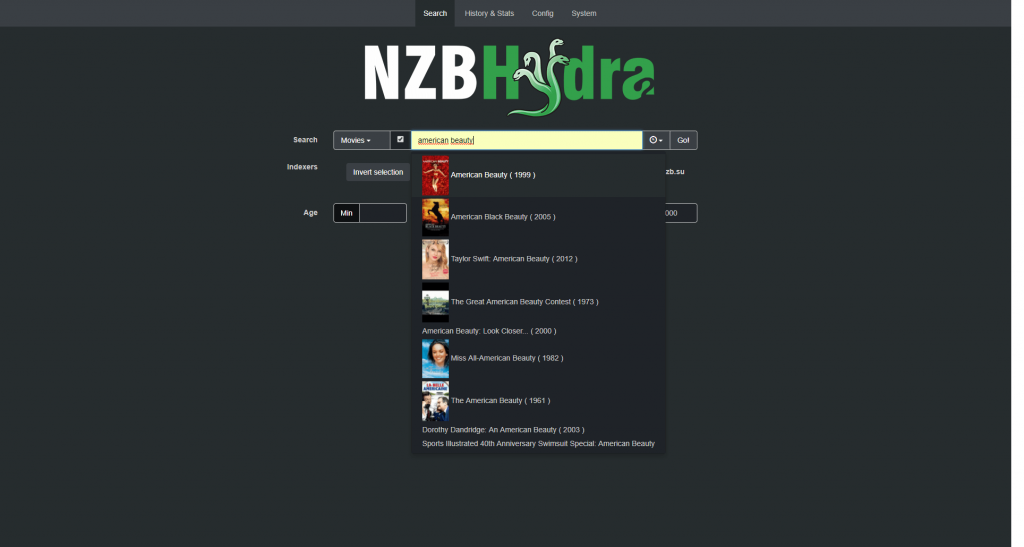
The customizable interface lets you tailor the search and results display to your preferences. You can filter results by age, size, and indexer, and even set default sorting options. This level of customization is a big advantage over services like DogNZB, which offer fewer personalization options. NZBHydra2 is more user-friendly and adaptable to different needs because it provides more customization options.
d. Advanced Filtering
Advanced Filtering in NZBHydra2 lets you refine your search results in an efficient way. You can exclude specific words, set minimum or maximum file sizes, and filter by age or specific indexers. Compared to other Usenet search tools like Newzleech, NZBHydra2’s filtering options are more sophisticated, which guarantees better search results.

e. Automation Features
The automation features include scheduled searches and notifications.
You can set up automatic searches for specific content and get alerts when new results are found. This automation is great for staying up to date with new releases without having to check every day. While other tools like SimpleNZB offer basic search functionalities, NZBHydra2’s automation capabilities make it easier and more efficient.
f. Detailed Logging and Statistics
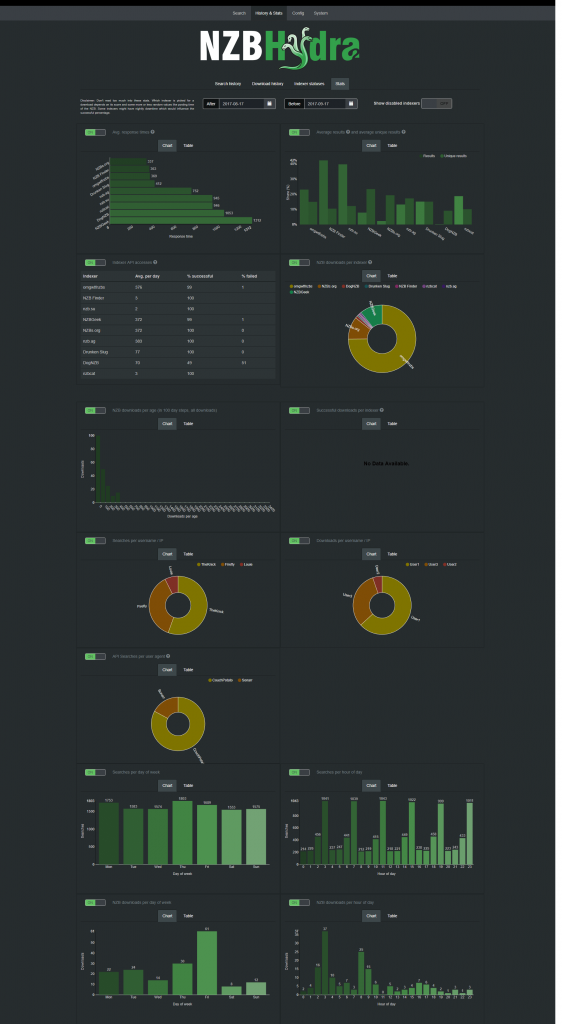
The detailed logging and statistics give you insights into your search and download activities. You can track which indexers provide the most results, monitor search performance, and identify any issues quickly. This feature sets NZBHydra2 apart from competitors like Usenet-Crawler, which doesn’t offer such detailed analytics, giving you better control and understanding of your Usenet usage.
All in all, this tool offers a lot of features that make it easier to find and download Usenet content, saving you time and making the whole process more enjoyable. With its powerful features and user-friendly interface, it’s a must-have tool for any Usenet enthusiast.
👉 Don’t Just Use NZBHydra2—Master It.
You’ve got the tools. Now unlock the performance. Our seedboxes are ready to be configured with NZBHydra2 + Docker. Everything you need for privacy, speed, and automation.
Get started instantly3. How to Set Up NZBHydra2
a. System Requirements
| Component | Minimum Requirement | Recommended for Best Performance |
|---|---|---|
| CPU | 1 GHz dual-core | 2 GHz+ (ARMv8 or x86_64) |
| RAM | 1 GB | 2 GB or more |
| Storage | 100 MB (app + logs) | 500 MB+ (with full logs/cache) |
| OS | Windows, Linux, macOS | Docker on Linux or NAS |
| Network | Localhost or LAN access | Reverse proxy with HTTPS |
b. How to Set Up and Configure
- Download and Install:
- Visit the GitHub page.
- Download the latest version for your operating system. Follow the installation instructions.
- Advanced user? We recommend NZBHydra2 on Docker
- Configure Indexers:
- Open NZBHydra2 and go to the settings.
- Add your preferred Usenet indexers and trackers.
- Configure the API keys and other necessary details.
- Integrate with Usenet Clients:
c. API Key Setup Table
| Step | SABnzbd Setup | NZBGet Setup |
|---|---|---|
| 1 | Open SABnzbd > Config > General | Open NZBGet > Settings > Security |
| 2 | Copy your API Key | Set a ControlPassword |
| 3 | In NZBHydra2: Settings > Usenet Clients > Add SABnzbd | In NZBHydra2: Settings > Usenet Clients > Add NZBGet |
| 4 | Enter host, port (8080), and API key | Enter host, port (6789), username, and password |
| 5 | Click Test, then Save | Click Test, then Save |
- For more information on these two powerful Usenet clients, refer to their respective guides: SABnzbd and NZBGet.
d. How do I install NZBHydra2 using Docker?
Use the official NZBHydra2 LinuxServer.io Docker image. Here’s a quick example with Docker Compose:
|
1 2 3 4 5 6 7 8 9 10 |
services: nzbhydra2: image: lscr.io/linuxserver/nzbhydra2 container_name: nzbhydra2 ports: - 8989:8989 volumes: - ./config:/config - ./downloads:/downloads restart: unless-stopped |
Using Docker? This is really the easiest and most reliable way to deploy NZBHydra2 in 2026.
e. How to use NZBHydra2
- Add Torznab Trackers to NZBHydra2
- Perform a Search:
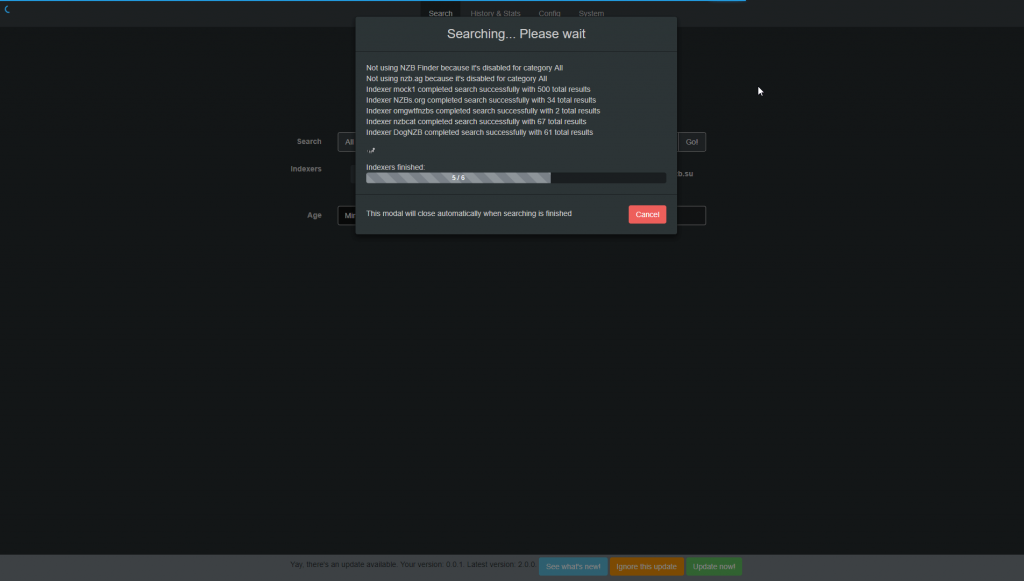
- Use the search bar to enter your query.
- Browse through the consolidated results.
- Send the desired NZB files directly to your Usenet client.
4. NZBHydra2 Benefits
NZBHydra2 makes it easier to find and download Usenet content. It saves you time by putting all the search results in one place and offers lots of other useful features, so it’s a great tool for anyone who loves Usenet.
5. NZBHydra2 Cons
While NZBHydra2 has a lot going for it, there are a few things to think about before you get started.
First, setting it up can be a bit tricky, especially if you’re new to configuring multiple indexers and API keys.
Second, performance can vary depending on how many indexers you use. Too many can slow down searches.
Third, this tool requires ongoing maintenance, like updating indexer URLs and handling potential downtime. This requires more user involvement and technical know-how than single-source search tools.
6. NZBHydra2 vs Jackett vs Prowlarr
NZBHydra2, Jackett, or Prowlarr: Which one should you use?
This is a hot question across Reddit and the Usenet community. All three tools serve a similar goal—indexer aggregation for Sonarr, Radarr, and Plex setups. But they do differ in strengths and best use cases.
Comparison Table
| Feature / Tool | NZBHydra2 | Prowlarr | Jackett |
| Search Interface | Manual + API Usenet searches | No manual search, syncs with *Arrs | Basic web UI, no unified search |
| Indexer Management | Moderate (Usenet only) | Advanced (Torrent + Usenet) | Advanced (Torrent only) |
| Speed | Fast for Usenet | Slower for manual searches via proxy | Fast, but less polished |
| Integration | Manual API setup in Sonarr/Radarr | Auto-syncs indexers across all *Arrs | Manual per-app config |
| Stability | Very stable, active dev | Actively developed by the *Arr team | Less active, known for quirks |
| Interface UX | Web UI with useful stats and graphs | Matches Sonarr/Radarr UI | Minimalist UI |
| Torrent Support | Needs Jackett for torrent support | Native support | Native support |
Recommended Setup
- For Indexer Management: Use Prowlar. It syncs indexers across all *Arr apps and simplifies long-term maintenance. Learn more about Prowlarr.
- For Unified Manual Search: Use NZBHydra2. It provides a powerful, unified Usenet search interface you can use across multiple apps.
Avoid Jackett unless needed for niche tracker support: It’s functional but outdated and less actively maintained. Learn more about Jackett.
💡 Bottom Line: Use Prowlarr for managing indexers across all apps and NZBHydra2 for power search and historical queries.
7. How to Improve Your NZBHydra2 Experience
Upgrading your NZBHydra2 experience can make Usenet searching more efficient and enjoyable. Here are several ways to optimize your setup:
a. Use a Seedbox
A seedbox, like the one offered by RapidSeedbox, can significantly speed up your download times and manage your Usenet traffic efficiently. Seedboxes provide high-speed servers with ample storage, which guarantees that your downloads are fast and uninterrupted.
b. Use a VPN
A VPN service is a great way to keep your privacy and security up while searching and downloading from Usenet. With RapidSeedbox’s VPN service, you can mask your IP address, preventing your ISP from throttling your speeds and keeping your online activities private.

c. Proxy Integration
You can also integrate a proxy to manage and route your searches through different IPs, which further improves your privacy and reduces the risk of indexer bans. This can be quite handy if you frequently access multiple Usenet indexers.
d. Regular Updates and Maintenance
It’s important to keep NZBHydra2 and your indexers up to date regularly. This ensures you have the latest features, performance improvements, and security patches.
8. How to Troubleshoot Common Issues
Even with NZBHydra2’s great features, you might run into a few common problems. Here’s how to handle them:
a. Connection Problems
Issue: Can’t connect to your indexers or Usenet clients.
Solution:
- Check if the API keys and URLs for your indexers and Usenet clients are correctly entered in NZBHydra2’s settings.
- Verify that your firewall or antivirus isn’t blocking NZBHydra2. You might need to add exceptions.
b. Slow Searches
Issue: Searches take longer than expected.
Solution:
- Go to the settings and increase the timeout values for indexer queries.
- Reduce the number of indexers used simultaneously to prevent overload.
c. Integration Issues
Issue: NZBHydra2 isn’t integrating well with Usenet clients like SABnzbd or NZBGet.
Solution:
- Double-check the API key and URL settings in both NZBHydra2 and your Usenet client.
- Check whether NZBHydra2 and your Usenet client are updated to their latest versions. If they are not, update them.
d. Missing Results
Issue: Some expected search results are missing.
Solution:
- Check if the indexers are online and functional. You can verify this in NZBHydra2’s status dashboard.
- Include additional, reputable indexers to broaden your search results.
e. Frequent Timeouts
Issue: NZBHydra2 frequently times out when searching.
Solution:
- Reduce the server load by spacing out your search queries.
- Check if your internet connection is stable. Using a proxy or VPN can also help stabilize your connection.
I hope this practical troubleshooting guide will help you get a smoother experience with NZBHydra2.
Frequently Asked Questions: NZBHydra2
Simply put, NZBHydra2 is the upgraded version of the original NZBHydra. It’s actively maintained, faster, and built with modern setups in mind. You get Docker support, improved search performance, integration with Jackett and Prowlarr, and a cleaner interface. If you’re new to Usenet or upgrading an older setup, NZBHydra2 is the clear choice.
Yes, and it’s a popular option for DIY users. NZBHydra2 runs best on a Raspberry Pi 4 or newer. The older Pi 3 or Zero models don’t have enough memory for smooth performance, especially if you use multiple indexers. For optimal results, use Docker and keep your setup lightweight.
That depends on your setup. Jackett is perfect if you only need torrent indexers. It converts them into Torznab feeds and works well with Sonarr and Radarr. But if you want something broader, NZBHydra2 is the better choice. NZBHydra2 supports both Usenet and Torznab feeds. It aggregates search results across all sources and gives you built-in stats, history, and filtering. Many users combine them—Jackett feeds into NZBHydra2, which handles the unified search.
By default, NZBHydra2 runs on port 8989. You can change this in the config file or your Docker environment. If you’re planning to access it remotely, make sure this port is open on your firewall or routed properly via your reverse proxy.
You’ll find everything you need on the official GitHub page: 👉 https://github.com/theotherp/nzbhydra2 – There, you can download the latest release, explore the source code, open issues, or follow along with community updates and Docker setup instructions.
Yes, exactly. NZBHydra2 works as a powerful Torznab aggregator. It pulls results from Jackett, Prowlarr, and any Torznab-compatible indexer. Instead of searching each site separately, you search once—Hydra2 queries everything and presents results in one clean interface.
Absolutely. NZBHydra2 plays a key role in automated Usenet workflows. It pairs well with apps like Sonarr, Radarr, Lidarr, NZBGet, and SABnzbd. Hydra2 handles search. Your download client grabs the file. Your media manager organizes it. Together, it’s a hands-off system for managing content.
If you want remote access, there are two main approaches. The simplest is to forward port 8989 from your router to the machine running NZBHydra2. A better option is to set up a reverse proxy using NGINX or Caddy and secure it with HTTPS. To stay safe, always add a VPN or password protection so no one can stumble into your interface.
Start by using fewer, high-quality indexers—too many can slow it down. In the settings, increase query timeouts so searches have room to finish. It also helps to schedule searches during off-peak hours. For the best experience, run NZBHydra2 in its own Docker container or virtual machine to avoid resource conflicts.
9. Final Words
Enhancing your Usenet experience with NZBHydra2 is simple and really pays off.
By using its one-stop search, seamless client integration, and customizable interface, you can make your searches and downloads much easier.
Solving common issues with practical solutions ensures a smooth experience. Plus, using a seedbox or VPN can further optimize your setup by providing faster speeds and enhanced privacy.
Finally, keep NZBHydra2 up to date and configured properly, and you’ll find managing Usenet content more efficient and enjoyable than ever.
Run NZBHydra2 on the Right Stack
Why troubleshoot ports, proxies, and Docker alone? Get a plug-and-play seedbox built for NZBHydra2, Jackett, and Prowlarr.
👉 Deploy your stack in minutes
0Comments