 By
By
A SOCKS5 configurator is a tool that simplifies proxy setup by managing connections, applying rules, and improving speed and privacy. Instead of manual configuration, you can install a SOCKS5 configurator, download the needed files, and follow step-by-step instructions to set up secure, fast proxy access.
I’ve tested dozens of tools over the years, and I can tell you: the right setup makes a huge difference. That is why we created this guide. To break down the best options—and show you how to use them without the usual hassle.

🧰 Want to auto-generate your SOCKS5 proxy rules instead of typing them by hand?
Unlock the Free PAC File GeneratorTable of Contents
- What is a SOCKS5 Configurator?
- Why Use SOCKS5 Configurators?
- Best SOCKS5 Configurator Tools
- Step-by-Step Configuration Guide
- SOCKS5 Configurator FAQ
- Final Thoughts
1. What is a SOCKS5 Configurator?
A SOCKS5 configurator is software that helps remove the guesswork from proxy setup. Instead of typing in server details by hand, it generates the right settings and applies them system-wide—or just where you need them.
These tools manage the “usual” challenges like port settings, authentication, and routing rules. Some of these socks5 configurators offer a clean GUI for beginners; others give you command-line power if you know what you’re doing.
| ⚠️ Pro Tip: Stability Over Speed! Here’s what I’ve learned after using some of these tools: the best ones don’t just work—they protect you from misconfigurations that can break your connection or open security holes. When looking for the right tool, I strongly recommend you looking for features like auto failover, live connection testing, and simple ways to switch proxies on the fly. |
So how does it work?
A SOCKS5 configurator allows you to assign specific proxy rules for different applications. In the image below, apps like Chrome, uTorrent, and SSH are routed individually: Chrome uses Proxy A, uTorrent uses Proxy B, and SSH bypasses proxies entirely.

This setup gives you fine-grained control over which app uses which SOCKS5 proxy, optimizing speed, privacy, and connection rules — all managed through a central configurator that redirects traffic based on your preferences.
2. Why Use SOCKS5 Configurators?
Manually having to set up SOCKS5 proxies means entering server addresses, ports, authentication, login details, and whatnot… into every app you use. It’s a tedious process—and let’s be honest, it’s easy to mess something up. A good configurator removes that challenge. Plus, it brings a few extra perks to the table.
a. Automated Setup and Management
Configurators handle all the setup for you. They generate clean, accurate settings that reduce the chance of errors that could expose your traffic or break your connection. Things like port assignments and authentication protocols are all taken care of. So, yes, you do not need deep tech skills.
b. Bulk Configuration Made Simple
If you have to manage multiple proxy servers and, on top of that, also manage several applications, applying settings one by one is definitely a time sink. I’ve seen how much faster bulk setup can be with the right tool. A solid socks5 configurator updates everything at once. That is right! It can save you time and keep your setup consistent across the board.
c. Real-Time Monitoring and Failover
The best “premium” tools don’t just configure—they stay alert. This is a special helpful feature to use with your sensitive apps. The real-time monitoring helps detect failed connections and automatically switch to a backup server. You won’t even notice when this switch happens. This obviously means less downtime and fewer headaches.
d. Easy Profile Switching
Most configurators also support profiles. That means you can create separate setups for different needs (or people)—like one for secure browsing at work, another for streaming, and a third for data scraping. Switching between them takes one click, not fifteen steps.
🧪 Built to Be Tested
Want to actually see if your config works? Our residential proxies let your SOCKS5 Configurator show its full potential.
Run a Real Test3. Best SOCKS5 Configurator Tools
Choosing the right configurator depends on your technical level and specific requirements. Here are the most effective tools for different use cases.
a. Proxifier: Professional-Grade Configuration
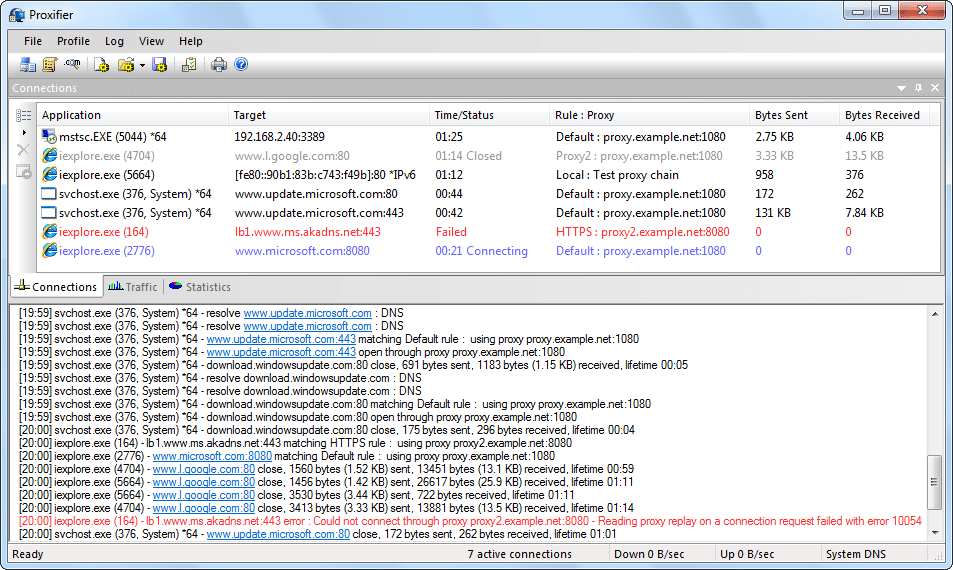
Proxifier is one of the best at system-wide SOCKS5 configuration. It can route any application through your proxy servers, even if they don’t natively support proxies. It comes with an amazing rule-based system. This system allows granular control over which applications use which proxy servers.
The tool costs around $40 but provides enterprise-level features, including detailed logging and automated failover. But fortunately, Proxifier offers a 31-day Free trial.
Learn more about this tool in: Our Review of Proxifier + Alternatives
b. ProxyCap: Windows-Focused Solution

ProxyCap is quite similar to Proxifier. The main difference is that ProxyCap focuses specifically on Windows environments. It provides an intuitive interface for creating proxy rules and supports both SOCKS5 and HTTP proxies. The tool works great with applications that have complex networking requirements.
Learn more about this tool in: Proxycap: Setup and Troubleshooting Guide
c. FoxyProxy: Browser-Specific Configuration

If you are primarily configuring browser traffic, then I would strongly recommend FoxyProxy. This tool provides sophisticated SOCKS5 management directly within Firefox or Chrome. It also supports pattern-based switching, which allows automatic proxy selection based on the websites you visit. And that is not all, the tool also includes built-in proxy testing and performance monitoring.
Learn more about this tool from our Top Proxy Management Tools article
d. Shadowsocks Clients: Cross-Platform Efficiency

These are clients especially designed for the Shadowsocks protocol. Examples of these clients are: ShadowsocksX-NG, which provides excellent SOCKS5 support across multiple platforms, or platform-focused tools like Shadowrocket. These lightweight tools offer features like automatic server selection and built-in speed testing to optimize your connection quality.
e. Command-Line Configurators

If you are an advanced “power” user, then I would recommend using tools like proxychains (Linux) or custom PowerShell scripts (Windows), especially if you want automated SOCKS5 configuration. The benefits of using these tools? To integrate well with deployment scripts and manage large-scale proxy implementations.
4. Step-by-Step Guide: Setting Up a SOCKS5 Proxy Configurator
Setting up a SOCKS5 proxy doesn’t have to be difficult. Just follow these clear steps, and you’ll be routing traffic like a pro.
Step 1: Collect Your Proxy Details
Before you touch any settings, make sure you’ve got all the required info on hand.
What you’ll need:
- Proxy server address (you’ll get this from your provider)
- Port number (usually 1080 for SOCKS5)
- Username and password
- Protocol type (you want SOCKS5, not HTTP)
| 📌 Pro tip: Stick with reputable providers. RapidSeedbox is a solid choice with both data center and rotating residential proxies, depending on your needs. If you are already using RapidSeedbox, just log in to your dashboard. They make it super easy to copy these details in one go. |
Step 2: Install Your Configurator
Now, download your chosen SOCKS5 configurator. There are several options out there—some free, some paid. Pick one that fits your platform and use case. (If you are still unsure, check out the previous section.)
During installation:
- Grant administrator access if and when prompted
- Decide between system-wide proxy routing or app-specific routing
- Follow on-screen steps and avoid rushing—you want things clean and stable
Step 3: Set Up Your First Proxy Profile
Once installed, open the tool and create your first profile.
Here’s what to enter:
- Server address + port number
- Your login credentials
- Protocol: Make sure to choose SOCKS5, not HTTP or HTTPS
Then hit “Test Connection.” Most tools will tell you right away if something’s off—fix errors before moving on.
| 💡Tip! Save multiple profiles if you switch between locations or tools often. |
Step 4: Create Rules for Specific Apps
Not every app needs to go through your proxy. You can fine-tune that.
You can usually:
- Choose specific apps by their .exe or file path
- Set up rules to auto-route by pattern (like domains or ports)
| 💡 Tip! I would recommend you start simple—maybe your browser or torrent client—then layer in more apps as needed. Also, dont forget to restart your apps after changing settings—some don’t detect new proxies right away. |
Step 5: Test and Verify Everything
As always, do not forget to double-check that things are working ok.
To verify:
- Open your browser and go to a site like whatismyip.com
- Compare your IP address with the one RapidSeedbox assigned to you
- Use your configurator’s built-in tools if available
If your IP shows the proxy location (not your home country), you’re all set!
Advanced Configuration Features
You might also consider advanced configuration features, especially if you are a power user. Professional SOCKS5 configurators offer tools that improve speed and security.
- Failover & Load Balancing: Auto-switch to backup proxies or spread traffic across servers for better reliability.
- Traffic Routing Rules: Send streaming through datacenter proxies; route browsing via residential proxies for more privacy.
- Authentication Tools: Use rotating logins, tokens, or connect with identity systems—great for teams and strict access control.
- Performance Monitoring: Track bandwidth, connection success, and server response to fine-tune your setup.
- DNS Leak Protection: Route DNS through the proxy to keep your activity private.
⚡ Stop configuring proxies manually. Get the shortcut the pros use.
Get Instant Access to the Proxy Rule Generator5. FAQ: SOCKS5 Proxy Authenticator
SOCKS5 configurators handle any type of traffic. HTTP proxy configurators, on the other hand, only work with web browsing. SOCKS5 also provides better performance for non-web applications like email clients, torrent software, gaming applications, and more.
VPN configurators route all traffic through encrypted tunnels. They provide comprehensive security but with potentially slower speeds. SOCKS5 configurators offer more flexibility. They allow you to route only specific applications through proxies while maintaining direct connections for others.
Use SOCKS5 configurators when you need application-specific routing and faster connection speeds. Also, go for these tools when you are looking for compatibility with software that doesn’t support VPN connections. They’re ideal for data collection, streaming, or managing multiple online accounts.
Yes. SOCKS5 proxies can help bypass geo-blocks by routing traffic through servers located in specific countries. However, unlike VPNs, they don’t encrypt your data—so they’re best used when speed matters more than security (e.g., streaming or gaming).
Yes. Many SOCKS5 configurators support username/password authentication. This is essential when using paid proxy services that require login credentials. Just make sure the app or tool you’re configuring supports it—some clients may need manual input or config file editing.
6. Final Thoughts
Gone are the days of copy-pasting proxy details into every app—and hoping you didn’t break something in the process. A good SOCKS5 configurator does more than just simplify setup; it gives you full control over how your traffic flows, when and where it routes, and what happens if a server goes down.
Don’t waste time on manual setup. Start using a SOCKS5 configurator today and unlock the smarter, faster way to proxy.
🎯 Route What Matters
Not every app needs a proxy. Fine-tune traffic with a SOCKS5 Configurator + precise proxy control.
Test Config Options English
  Français
  Español
  Tiếng Việt
  简体中文
简体中文  Русский
  Türkçe
  Bahasa Indonesia
  日本語
日本語  العربية
  Português
  Українська
0Comments