 By
By
I’ve tested dozens of proxy tools over the years, and trust me, your manager can make or break the whole setup.
In the end, it all comes down to whether you’re scraping sites, managing accounts, improving your privacy or just keeping your team’s data safe, the right tool will always make a big difference.
In this guide, I’ll cover the 12 best proxy managers—from simple browser extensions to heavy-duty, enterprise-ready options.

Disclaimer: This material has been developed strictly for informational purposes. It does not constitute endorsement of any activities (including illegal activities), products or services. You are solely responsible for complying with the applicable laws, including intellectual property laws, when using our services or relying on any information herein. We do not accept any liability for damage arising from the use of our services or information contained herein in any manner whatsoever, except where explicitly required by law.
Top Proxy Management Tools: In-Depth Reviews & Comparisons
- Proxifier – Routes any app’s traffic through proxies with custom rules and system-wide control.
- Multilogin – Manages multiple identities with anti-detect tech and rotating proxies for large-scale use.
- Nginx Proxy Manager – Web GUI for managing Nginx reverse proxies, SSL, and access rules.
- Proxy SwitchyOmega – Browser extension for rule-based proxy switching in Chrome/Firefox.
- FoxyProxy Basic – Simple cross-browser proxy switcher for everyday users.
- WinGate – Full-featured Windows proxy server with VPN, bandwidth control, and access management.
- ProxyCap – Tunnels desktop apps through proxies, even without native support.
- Charles Proxy –A Debugging tool for inspecting and modifying HTTP/HTTPS traffic with SSL support.
- Proxychains – CLI tool for chaining proxies in Linux, ideal for stealthy terminal use.
- Squid Proxy – Caching proxy server for enterprises to optimize bandwidth and control access.
- HAProxy – Load balancer and reverse proxy for handling high-traffic web services.
- Proxy Manager (ElectronJS) – A Lightweight app for easy proxy switching on any OS.
1. Proxifier – Advanced Desktop Proxy Client

Proxifier has always been my go-to recommendation for Windows and macOS users who need a full proxy management tool that comes without browser limitations. This powerful desktop application routes any application’s traffic through proxy servers. So it is perfect if you need system-wide proxy control.
Learn more from our full review: Is Proxifier Safe? [+ Proxifier Alternatives]
Key Features:
- System-wide proxy support for any application
- Advanced rule-based traffic routing
- Real-time connection monitoring and logging
- Support for SOCKS4, SOCKS5, and HTTP proxies
Ideal User / Use Case:
Proxifier is perfect for developers and system administrators who need to route specific applications through different proxy servers. It is also ideal for those users running multiple applications that require different proxy configurations simultaneously.
Why do I recommend it?
I recommend Proxifier because it is one of the best at providing granular control over which applications use which proxies. Plus, it comes with excellent logging capabilities that help troubleshoot connection issues. The rule-based system is intuitive once you understand it. And that is not all, the real-time monitoring gives you complete visibility into your traffic. However, the interface can feel overwhelming for beginners who just need basic proxy switching.
Pricing: 31-day free trial, then $39.95 for a single license
2. Multilogin – Anti-Detect Browser with Advanced Proxy Session Handling
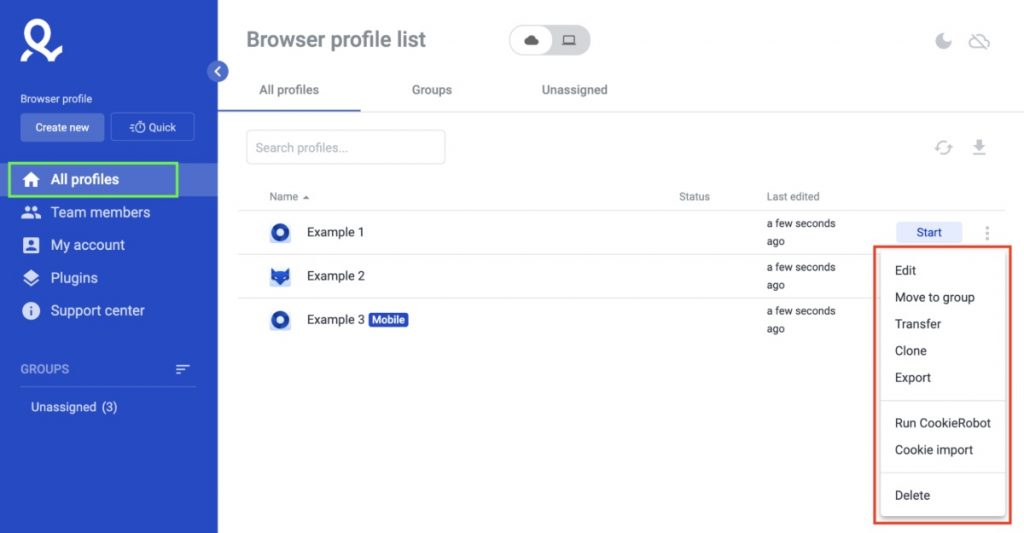
Multilogin is a cutting-edge proxy management tool that comes with browser fingerprint protection. I’ve watched this tool evolve from a niche solution to a must-have platform for anyone managing multiple online identities or conducting large-scale web operations. Multilogin is one of the best alternatives to GoLogin.
Key Features:
- Advanced browser fingerprint masking and management
- Team collaboration with shared proxy configurations
- Automated proxy rotation and session management
- Integration with major proxy providers, including residential networks
Ideal User / Use Case:
This tool is recommended for users like digital marketing agencies or e-commerce professionals. Those who need to ‘anonymously’ manage multiple accounts across platforms. Consider Multilogin if you are looking to perform competitive intelligence and market research operations.
Why do I recommend it?
I love Multilogin because it combines anti-detection technology with sophisticated proxy management. This combination results in an unmatched solution for various advanced use cases. The team features are amazing. Also, the automation capabilities can save you hours of manual work. The only downside you need to be aware of is the learning curve and higher cost, which may be prohibitive for individual users.
Pricing: Free trial available, plans start at $99/month for team features
3. Nginx Proxy Manager – Web-Based GUI for Nginx Configuration

Having configured countless Nginx servers manually, I can’t overstate how much value Nginx Proxy Manager brings to the table. This web-based interface transforms the traditionally command-line-heavy Nginx configuration into an intuitive GUI experience. Learn more in: Nginx Proxy Manager: How to Set Up and Use.
Key Features:
- Visual SSL certificate management with Let’s Encrypt integration
- Stream support for TCP/UDP proxying
- Access control lists and user authentication
- Real-time statistics and monitoring dashboard
Ideal User / Use Case:
This tool is perfect for system admins and developers who need to manage reverse proxies, load balancers, or SSL termination for web applications. It is also a great tool for those running self-hosted services or managing multiple websites.
Why do I recommend it?
Nginx Proxy Manager makes the Nginx configuration a lot easier, all while maintaining the powerful features that make Nginx great. The SSL management alone saves hours of work. Additionally, the intuitive interface means less experienced users can get the same professional results. The main limitation is that you still need basic server administration knowledge to deploy it effectively.
Pricing: Completely free and open-source
4. Proxy SwitchyOmega – Browser Extension for Chrome/Firefox
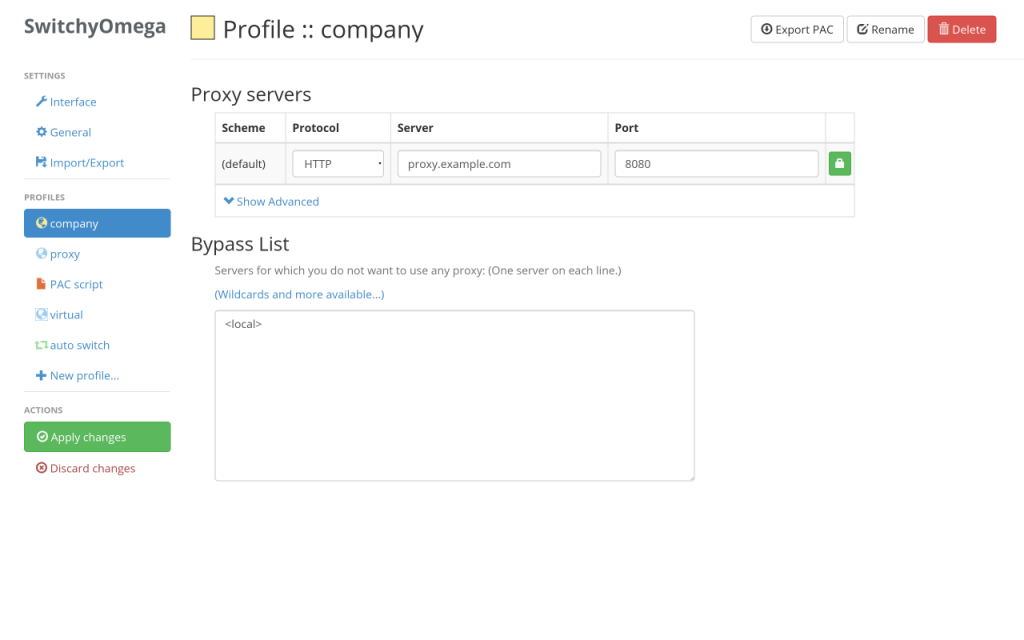
After years of implementing browser-based proxy solutions, SwitchyOmega (formerly SwitchySharp) has always been on my top recommendation for those people who need flexible, rule-based proxy switching directly in their browser. It is basically an extension to manage and switch between multiple proxies. The software has evolved significantly since its early days and now offers enterprise-level features. Learn more in our guide: Proxy SwitchyOmega: Step-by-Step Tutorial
Key Features:
- Automatic proxy switching based on URL patterns
- PAC script support for advanced routing logic
- Profile-based configuration management
- Import/export functionality for team deployments
Ideal User / Use Case:
Ideal for researchers, marketers, developers, or anyone who needs access to geo-restricted content. It is also perfect for those looking to test applications from different locations. I would also recommend SwitchyOmega for teams looking to standardize their proxy configurations across multiple browsers.
Why do I recommend it?
I recommend SwitchyOmega because it strikes the perfect balance between simplicity and advanced functionality. The rule-based switching eliminates the need for having to manually change your proxy config constantly. Also, the profile system makes it easy to organize different configurations for various projects. The only drawback is that it’s limited to browser traffic, so it won’t work for desktop applications.
Pricing: Completely free
5. FoxyProxy Basic – Cross-Browser Proxy Extension

FoxyProxy Basic has earned its place in our top proxy management tools post as a reliable cross-browser solution that works consistently across Chrome, Firefox, and other browsers. I love FoxyProxy’s focus on simplicity while still providing (and powerful) essential proxy management features.
Key Features:
- Cross-browser compatibility (Chrome, Firefox, Edge)
- Quick proxy switching with toolbar integration
- Basic pattern matching for automatic switching
- Proxy authentication support
Ideal User / Use Case:
This tool is perfect for users who work across multiple browsers and still need consistent proxy functionality. Also, I consider FoxyProxy an ideal tool for casual users who need reliable proxy switching without the usual advanced configuration options that some premium/power solutions come with.
Why do I recommend it?
FoxyProxy Basic delivers exactly on its promises – basic but reliable proxy functionality that works across browsers. The best part is that the interface is clean and intuitive, so it is accessible to users of all technical levels. There is a limitation, of course. And this is that FoxyProxy doesn’t offer the advanced automation and rule systems that power users might need.
Pricing: Free basic version, premium features available
6. WinGate – Full-Featured Proxy Server Suite

WinGate is one of the most comprehensive proxy solutions for Windows. Having deployed it before as a hands-on trial in an enterprise setting, I can confirm its robust feature set and reliable performance. This is especially true for organizations that need complete network control.
The Ultimate Guide to Wingate [+ Configuration]
Key Features:
- Comprehensive proxy server with multiple protocol support
- User authentication and access control systems
- Bandwidth monitoring and traffic shaping
- VPN integration and secure tunneling
Ideal User / Use Case:
This proxy solution was designed explicitly for those IT admins who need to monitor network access for multiple users. I would also recommend this solution for businesses implementing advanced and complete internet access policies.
Why do I recommend it?
WinGate packs powerful proxy features, including detailed reports and solid user controls. It’s great for managing network performance at scale. But it’s complex to set up—and only runs on Windows—so it’s not ideal for small teams or mixed-OS setups.
Pricing: Free version with limitations, professional licenses start at $89
7. ProxyCap – Desktop Proxy Client for Tunneling

ProxyCap is one of the best tools for making applications proxy-aware, even when they don’t natively support proxy connections. I’ve used it extensively for tunneling applications through proxy servers. I am happy to say that it always maintains excellent performance and stability. Learn more in our review: Proxycap: Setup and Troubleshooting Guide
Key Features:
- Application-specific proxy routing rules
- Support for SOCKS4, SOCKS5, and HTTP proxies
- Real-time connection monitoring
- IPv6 proxy support
Ideal User / Use Case:
There are a lot of use cases for this tool. ProxyCap basically routes specific desktop applications through proxy servers while leaving others on direct connections. This means ProxyCap can be useful for gaming, specialized software, or legacy applications that lack built-in proxy support.
Why do I recommend it?
ProxyCap shines when you need to route apps that don’t support proxies on their own. It’s flexible and fast. Plus, it also handles complex rules pretty well. The only catch? The interface feels outdated, and getting advanced setups right takes some learning.
Pricing: Free trial period, then $34 for a single license
8. Charles Proxy – Web Debugging Proxy Application

Charles Proxy is a web debugging proxy app for Windows, macOS, and Linux. It stands out as one of the best tools for developers who need detailed insight into HTTP/HTTPS traffic. It is, after all, considered an all-in-one: HTTP proxy, HTTP monitor, and Reverse Proxy. I love this tool especially for its unmatched for debug web applications and APIs. Learn more about it in: Charles Proxy: A Reliable Web Debugger?
Key Features:
- SSL certificate installation and HTTPS decryption
- Request/response modification and throttling
- Advanced filtering and search capabilities
- Mobile device debugging support
Ideal User / Use Case:
Charles Proxy is perfect for web developers who need to analyze, modify, or debug HTTP traffic. I also recommend it if you are looking to understand how applications communicate with servers.
Why do I recommend it?
After actively hands-on testing Charles Proxy, I was impressed by the unparalleled visibility it provides into web traffic, thanks to its professional-grade debugging features. Also, the SSL proxying capabilities are excellent. Plus, the filtering system is a nice addition if you are looking to manage complex traffic scenarios. However, remember that for now, Charles Proxy is primarily a development tool rather than a general-purpose proxy manager. Also, keep in mind that the interface can feel overwhelming for non-developers.
Pricing: 30-day free trial, then $50 for a single license
🔄 Tired of Switching Proxies Manually?
Automate your proxy management tool workflow with residential IPs that blend in like real users.
→ Explore Smart Rotation9. Proxychains – CLI Tool for Linux Proxy Chaining

Proxychains lets you force any app’s TCP traffic through a proxy, like Tor or any SOCKS4, SOCKS5, or HTTP(S) proxy. It supports user/pass for SOCKS and basic auth for HTTP. Handy for tools that don’t support proxies out of the box. This tool remains the gold standard for command-line proxy management on Linux systems.
Key Features:
- Dynamic and strict proxy chaining modes
- SOCKS4, SOCKS5, and HTTP proxy support
- DNS resolution through proxy servers
- Easy configuration file management
Ideal User / Use Case:
I always recommend Proxychains for Linux system administrators and developers who need to route command-line applications through proxy chains. The penetration testers will also find this tool very useful. If you are looking to improve your scripting and automation scenarios, then Proxychains is a must-have proxy tool.
Why do I recommend it?
I highly recommend Proxychains because it does exactly what it promises—forces any app to use a proxy (no tweaks needed). It’s lightweight and fits right into Linux workflows. Just keep it mind it’s command-line only, so you’ll definitely need the Linux know-how.
Pricing: Completely free and open-source
10. Squid Proxy – Open-Source Caching Proxy Server

Squid has been the backbone of many enterprise proxy deployments I’ve worked with over the years. It is a caching proxy that speeds up web access and saves bandwidth by storing frequently-used content. It’s widely used by ISPs and websites to reduce server load and handle traffic spikes with ease. It does take some setup know-how, but Squid delivers serious flexibility and speed for large-scale proxy needs.
Key Features:
- High-performance caching and content filtering
- Extensive access control and authentication options
- Traffic shaping and bandwidth management
- Integration with external authentication systems
Ideal User / Use Case:
I recommend Squid for network administrators dealing with large organizations or ISPs that need comprehensive proxy services. It is also best suited for environments where performance and scalability are critical.
Why do I recommend it?
Squid offers powerful and customizable proxy performance built for enterprise use. It comes with advanced caching that boosts speed and control. However, keep in mind that the setup can be tough without a solid technical background, especially since there’s no GUI.
Pricing: Completely free and open-source
11. HAProxy – High-Performance TCP/HTTP Load Balancer

HAProxy has earned a spot in our top list for proxy management tools for its reputation as one of the most reliable load balancers and proxy servers. It is a fast, open-source load balancer and reverse proxy for TCP and HTTP traffic. It’s built for high-traffic setups, with features like SSL termination, health checks, and support for modern protocols.
Want to learn more about this fantastic load balancer?
Key Features:
- Distributes traffic efficiently across multiple servers.
- Handles SSL, routing, and access control.
- Monitors servers and reroutes on failure.
- Supports HTTP/2, QUIC, SSL, and traffic filtering.
Ideal User / Use Case:
HaProxy is perfect for teams running high-availability services, like e-commerce sites or SaaS platforms. These services where uptime and speed are non-negotiable. I would also recommend it for setups that need smart routing under pressure, like flash sales or global user spikes.
Why do I recommend it?
HAProxy is rock-solid in high-traffic environments. I love this tool because it offers deep control with features like built-in health checks and real-time stats. It does take some skills to configure it properly, but once you set it up, you can run traffic at scale without blinking. Plus, its ability to handle modern protocols like HTTP/3 gives it a really good future-proof edge.
Pricing: Completely free and open-source, commercial support available
12. Proxy Manager (ElectronJS) – Lightweight Cross-Platform GUI

Proxy Manager (ElectronJS) is a lightweight proxy manager that provides a simple GUI interface for basic proxy management tasks across Windows, macOS, and Linux. It lets you quickly add, edit, or switch proxy settings through a clean card-based interface. Proxies are stored locally, and the app updates system settings for tools like Git, npm, pip, and most browsers. While not as feature-rich as other solutions, it offers an accessible entry point for users new to proxy management.
Official homepage: ProxyManager
Key Features:
- Cross-platform GUI – Works on Windows, macOS, and Linux.
- Easy Proxy Switching – Click-to-apply proxy cards.
- Local Proxy Storage – Saves custom proxies in local storage.
- System Proxy Control – Applies proxies to system tools (Git, npm, pip, etc.).
Ideal User / Use Case:
Proxy Manager (ElectronJS) is great for anyone who needs a fast way to manage proxies across different systems. If you are a developer testing region-specific setups or a remote worker who just wants a bit more privacy, this proxy manager is for you. Either way, this tool makes proxy switching easy (no terminal and no deep settings).
Why do I recommend it?
What I like most about Proxy Manager (ElectronJS) is how it keeps things simple without cutting corners. You don’t get overloaded with enterprise features you’ll never touch. Instead, this manager does one job well: applying and switching system proxies fast. It’s light, runs on all major platforms, and doesn’t need any technical setup. You can save multiple proxies, switch with one click, and it even follows your system theme for a cleaner feel. Now, it’s not meant for large-scale proxy management or automation-heavy tasks. But if you just need a reliable, straightforward tool for personal use or testing, it nails the basics—and that’s exactly the point.
Pricing: Completely free and open-source
Quick Feature Comparison Table
| Tool | Rotation | Scraping Support | Browser Ext | OS | API | Cost |
| Proxifier | Manual | Yes | No | Win/Mac | No | $39.95 |
| Multilogin | Auto | Yes | Built-in | Win/Mac/Linux | Yes | $99+/mo |
| Nginx Proxy Manager | Manual | Limited | No | Linux/Docker | No | Free |
| Proxy SwitchyOmega | Auto | Limited | Yes | Cross-browser | No | Free |
| FoxyProxy Basic | Basic | Limited | Yes | Cross-browser | No | Free |
| WinGate | Manual | Yes | No | Windows | Limited | $89+ |
| ProxyCap | Manual | Yes | No | Win/Mac | No | $34 |
| Charles Proxy | Manual | Dev Tools | No | Win/Mac/Linux | Limited | $50 |
| Proxychains | Manual | Yes | No | Linux | No | Free |
| Squid Proxy | Manual | Yes | No | Linux/Unix | No | Free |
| HAProxy | Manual | Limited | No | Linux/Unix | Yes | Free |
| Proxy Manager | Manual | Basic | No | Cross-platform | No | Free |
What to Look for in a Proxy Manager
After years of testing proxy tools, I’ve found a few must-haves you’ll want in any good proxy manager.
Here’s what to keep an eye on:
a. A Centralized Dashboard
Look for a tool that gives you one place to manage everything—regardlss you’re configuring proxies or just monitoring activity, or switching setups. A clean, centralized interface makes a huge difference. Tools like Multilogin and Nginx Proxy Manager do this well. They let you group proxies into profiles, so moving between projects feels seamless instead of chaotic.
b. Smart Rotation Automation
If you’re scraping data or managing accounts you’ll need automatic rotation. The best tools switch proxies in the background—based on time, request volume, or connection failures—without you lifting a finger. Multilogin and advanced setups in Proxifier are great examples of how rotation should work: quietly and reliably.
c. Built-In Authentication Support
Most professional proxy services require some kind of authentication, either usernames and passwords or IP whitelisting. Your proxy manager should handle this for you, storing login details securely and applying them when needed. Proxifier shines here. It makes it easy to juggle different providers without constant reconfiguring.
d. Real-Time Performance Monitoring
When proxies fail, lag, or eat up bandwidth, you want to know right away. A solid proxy manager shows you what’s happening in real time. Look for tools with live stats, error alerts, and traffic logs. Charles Proxy is a top-tier option for deep traffic analysis, while Proxifier gives you a live view of connection health.
e. Integration with Scraping Tools
If automation is part of your workflow, make sure your proxy manager plays nice with tools like Puppeteer, Playwright, or Selenium. Some managers support direct API integration; others work at the system level. Either way, consider how easily it’ll slot into what you’re already using.
FAQs: Proxy Management, Security & Integration
It’s software that helps you switch and monitor proxies easily. It routes your traffic through chosen proxy servers, handling rules, authentication, and rotation automatically—no need to configure each app manually.
Yes. Proxy SwitchyOmega is great for both browsers, with advanced switching features. FoxyProxy Basic is simpler but solid.
Multilogin is top-tier with anti-detection and scraping integration. Proxifier is great for routing desktop scrapers. For command-line tasks, Proxychains rules on Linux. Charles Proxy helps with testing and debugging.
They hide your real IP and location by routing traffic through different proxies. Tools like Multilogin also manage browser fingerprints and rotate identities to avoid tracking—but complete anonymity needs more than just proxies.
Free tools like SwitchyOmega work for basic needs. Paid ones like Multilogin or Proxifier offer better automation, monitoring, team features, and support. For pro use, paid tools are worth it.
Yes. Tools like Multilogin and Proxifier let you manage both types in one place, often with built-in integration and rotation support. Just make sure your tool supports your proxy provider’s setup.
Multilogin runs smoothly on all platforms. Proxifier is great for Windows and macOS. Linux users can use Proxychains or browser extensions like SwitchyOmega. Charles Proxy works across the board for debugging.
SwitchyOmega is a browser-only tool—great for web testing. Proxifier works system-wide and routes any app through proxies. Use Omega for browsing, Proxifier for everything else.
For SEO, SwitchyOmega works fine. But if you are looking for scraping, go with Multilogin or Proxifier. For social media, Multilogin’s anti-detection and session tools are best. Match the tool to your workflow and scale.
📈 Scale Proxy Management Without Stress
Pair your proxy manager with rotating IPs that adapt to traffic spikes and complex tasks—no extra load.
→ View Rotation Options
0Comments