 By
By
Tired of your e-commerce and marketing intelligence data pipelines getting crushed by web scraping rate limiting or 429 errors? RapidSeedbox’s Rotating Residential Proxies restore predictable scale and high-quality data to your operation.
Table of Contents
- What Is Rate Limiting in Web Scraping?
- Common HTTP Status Codes and What They Mean
- How Websites Detect and Block Scrapers
- Polite Scraping: Throttling and Delay Strategies
- Implementing Retry Logic with Exponential Backoff
- Proxy Solutions for Rate Limit Avoidance
- Python Code Example: Simple Backoff with Proxy Rotation
- The Real Value of Scalable Scraping
- Frequently Asked Questions
1. What Is Rate Limiting in Web Scraping?
Rate limiting is the site’s way of saying: slow down. Not forever, but just within a window of time.
You send requests, and the server counts. When the counter tips over its limit, you get a nudge… or a 429 error.
Here’s the quick math that actually matters:
If a site allows 60 requests per minute, your safe pace should be ≤1 request/second. But if you are bursting to 10 in a second, that is ok, as long as you idle long enough for the window to reset. Did you blow past the window? Then, naturally expect blocks, cooldowns, or a tougher challenge.
So, what the server watches isn’t just raw volume. It watches patterns or spikes. Perfect intervals or identical headers. A single IP doing the work of a small city. That’s how bots give themselves away.
Why sites rate limit at all:
- Keep servers upright.
- Keep costs predictable.
- Keep usage fair.
- Keep bots from chewing through everything.
- Keep attacks from turning small problems into outages.
| 🤖 Did you know? Modern defenses (think Cloudflare and friends) go beyond a stopwatch. They look at header order, JavaScript behavior, cookie lifecycles, per-IP velocity, and how a “user” moves across pages. Remember: Real people wobble but bots repeat. |
How rate limiting actually works
The following chart shows how rate limiting controls how many requests you can send within a fixed time window: here in the example, 60 seconds.
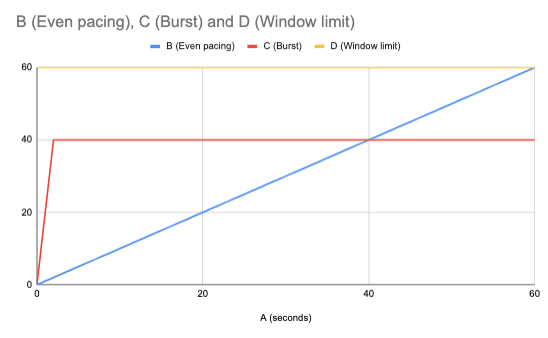
- The yellow line is the limit (60 requests).
- The blue line shows steady pacing (about 1 request per second) staying safely below the limit.
- The red line shows a burst (many requests in a short time) then a flat pause while waiting for the window to reset.
In web scraping, pacing requests evenly prevent blocks, while bursts risk hitting the limit and triggering the dreaded HTTP 429 (Too Many Requests). Learn more in HTTP 429 error: Too many requests.
| ⚙️ Bottom line: Web scraping rate limiting isn’t random punishment. Think of it more like math plus behavior. So take this with you: pace your requests, vary your footprint, and you’ll stay under the radar long enough to get the data. |
2. Common HTTP Status Codes and What They Mean
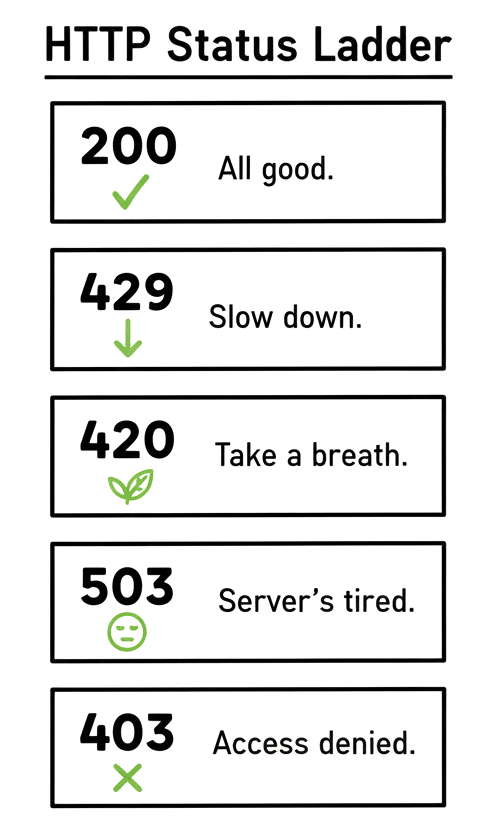
When you scrape long enough, you’ll start to recognize the numbers. They’re not random. Each one is a kind of conversation between you and the server (sometimes polite, sometimes not).
- A 429 means: “You’re too fast.” The most literal signal to slow down. It often comes with a Retry-After header. A digital stopwatch counting the seconds until you’re allowed back in.
- And the weird cousin, 420, which means: Calm Down. Twitter used to throw that one. Same idea as a 429, but with more personality.
- A 503? That’s chaos. It might mean you’ve hit a soft rate limit, or maybe the site is just on fire. Either way, give it space; wait and retry later.
- A 403 is colder. It doesn’t negotiate. It just says, “You’re not welcome.” Usually, your IP has tripped a firewall rule or an anti-bot system has tagged you as suspicious.
So, when you see these codes, don’t just log them. Listen. They tell you how the site feels about your pace and your pattern. Here is ‘humanized’ way on how to remember HTTP status codes.
Key Headers to Watch
These headers are the breadcrumbs servers leave behind. These tell you how close you are to the wall, and when you can climb back over. Below is a simple checklist useful when debugging rate limits.
|
1 2 3 4 5 6 7 |
# Minimal checklist when debugging rate limits important_headers = { 'Retry-After': 'Seconds to wait before retrying', 'X-RateLimit-Limit': 'Max requests allowed in window', 'X-RateLimit-Remaining': 'How many you’ve got left', 'X-RateLimit-Reset': 'When your counter resets (Unix timestamp)' } |
| 🧩 Tip: Log these headers for every 429 or 503. Patterns appear fast when you actually look. |
3. How Websites Detect and Block Scrapers
You’re not invisible. Every request you send leaves a fingerprint, a trace of pattern. And websites do notice those patterns. They don’t need to “see” your code. They just watch how you move.
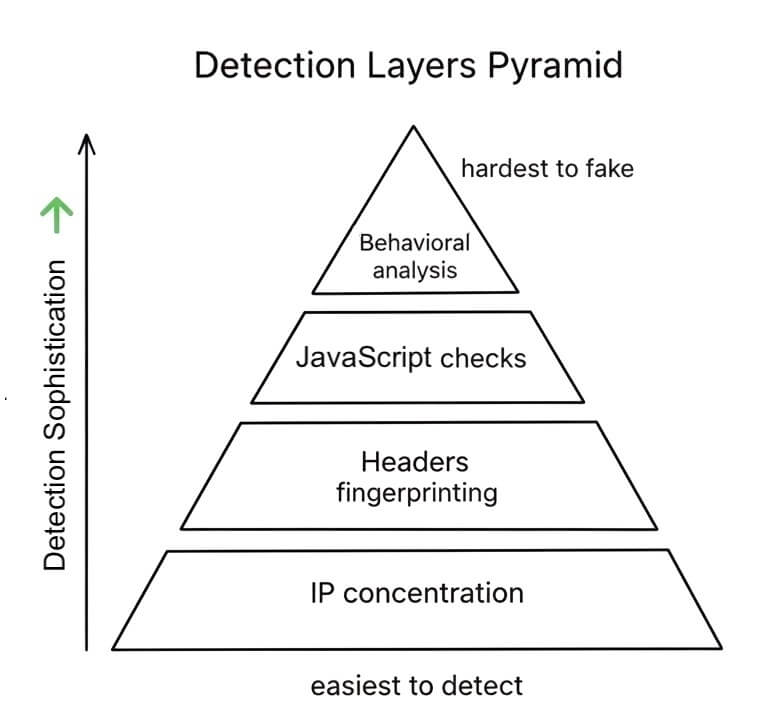
The following pyramid shows how bot detection systems get smarter at each layer. They start with simple checks like IP concentration and headers, then move up to JavaScript challenges and finally behavioral analysis, which is the hardest for bots to fake.
a. IP Concentration
Send a few hundred requests from the same IP in under a minute? You’ve already lost. That single address lights up on their logs like a flare. Firewalls and bot protection systems all keep counters, including those requests per IP and per second. Once the number climbs too high, the gate closes.
Fix: spread the load. Use rotation. Residential proxies give you the illusion of being many people at once. Normal traffic coming from real ISP/home addresses, not a data center block. 👉 Rotating residential proxies are the scalpel for this kind of surgery.
b. Header Fingerprinting
The easiest way to spot a fake user? Look at the headers. Real browsers send a very specific symphony of headers (order, wording, even commas). Scrapers often hum a different tune: too clean and too consistent. Or missing something small.
They check:
- User-Agent: “Python-requests/2.31”? Dead giveaway.
- Accept: Real browsers declare what MIME types they want.
- Header order: Chrome, Safari, Edge — each has a tell.
- Missing headers: CORS, encoding, cookies… the little details bots forget.
Fix: Copy a real browser header set. Rotate it. Randomize order and whitespace. Make it messy — just like humans.
c. JavaScript Challenges
Web application security and traffic management platforms like Cloudflare and Akamai don’t just read your headers; they test your reality. How do they do this? They ask your client to do some things like running JavaScript puzzles and tracking fake mouse movements. If your scraper doesn’t execute JS or doesn’t move, you fail.
They use:
- Browser fingerprinting: Checking for expected JS APIs.
- Canvas fingerprinting: Drawing invisible shapes to see if you render like a real device.
- Mouse tracking: Bots don’t wiggle.
- Math puzzles: Simple for browsers, impossible for headless ghosts.
Fix: Use headless browsers like Playwright or Puppeteer; or a stealth wrapper. Let the script breathe.
d. Behavioral Analysis
Even if your IP and headers look human, your behavior might betray you. For example, perfect intervals and predictable paths. This is not real human behavior. Humans pause, scroll, get distracted, click the wrong thing. Bots never do.
Sites notice patterns like:
- Request intervals: Identical milliseconds between calls = bot.
- Navigation flow: Sequential URLs with no randomness.
- Session duration: Humans vanish mid-scroll. Bots stay linear.
- Resource loading: Real browsers grab images, CSS, and fonts. Scrapers don’t bother.
Fix: Teach your scraper to act imperfectly. Add random delays, mimic referrers, fetch assets occasionally. The art of looking human means unpredictable or even lazy.
4. Polite Scraping: Throttling and Delay Strategies
a. Smart Delays
The idea is to have your scraper act human. So, add a heartbeat between requests. Something imperfect. Here is an example:
|
1 2 3 4 5 6 7 8 9 10 11 |
import random import time def smart_delay(min_delay=1, max_delay=3): delay = random.uniform(min_delay, max_delay) time.sleep(delay) return delay for url in urls: fetch(url) smart_delay(1, 3) |
Tip: Throw in extra pauses every few requests. Humans get distracted. Your scraper should too.
b. Respect robots.txt
That tiny file we often ignore, the robots.tx. That is the rulebook. If it says “don’t scrape this,” don’t. Even bots can have manners.
|
1 2 3 4 5 6 7 |
from urllib.robotparser import RobotFileParser def can_fetch(url, agent='*'): rp = RobotFileParser() rp.set_url(url + "/robots.txt") rp.read() return rp.can_fetch(agent, url) |
Tip: If access is denied, move on. There’s always another source.
c. Time-Based Throttling.
Cap your requests per time window but never go beyond.
|
1 2 3 4 5 6 7 8 9 10 11 12 13 14 15 16 17 18 19 20 21 22 |
from collections import deque import time class RateLimiter: def __init__(self, max_requests=10, window=60): self.max_requests = max_requests self.window = window self.requests = deque() def wait_if_needed(self): now = time.time() # Remove timestamps outside the window while self.requests and self.requests[0] < now - self.window: self.requests.popleft() # If limit reached, wait until window resets if len(self.requests) >= self.max_requests: time.sleep(self.window - (now - self.requests[0])) # Record new request timestamp self.requests.append(now) |
5. Implementing Retry Logic with Exponential Backoff
Servers hate desperation. If you get blocked and start hammering the door again and again, you look desperate (and desperate gets you banned). Smart scrapers don’t beg. They wait and come back later. That’s the logic behind exponential backoff: a fancy term for “wait longer after every failed attempt.” If your first retry waits one second, the next waits two, then four, then eight. A rhythm of patience instead of panic.
a. The Basic Idea: Start Small, Double Each Time
Every time the server says “too many requests” or “service unavailable,” your scraper should quietly back off. Then double its delay and try again — never instantly.
|
1 2 3 4 5 6 7 8 9 10 11 12 13 14 15 16 17 18 19 20 21 22 23 24 25 26 27 |
import time import requests def fetch_with_backoff(url, max_retries=5): for attempt in range(max_retries): try: r = requests.get(url, timeout=10, headers={'User-Agent': 'Mozilla/5.0'}) if r.status_code == 200: return r if r.status_code in [429, 503]: wait = int(r.headers.get('Retry-After', 2 ** attempt)) print(f"Rate limited. Waiting {wait}s...") time.sleep(min(wait, 300)) # cap at 5 minutes continue if 400 <= r.status_code < 500: print(f"Client error {r.status_code}. Stopping.") return None except requests.RequestException as e: print(f"Error: {e}. Retrying in {2 ** attempt}s...") time.sleep(2 ** attempt) print("Max retries exceeded.") return None |
This small loop does one thing right; it never fights back too soon.
b. Add Jitter: Because Everyone Else Is Waiting Too
When hundreds of scrapers hit the same limit, that means they all wake up at the same time. Jitter adds randomness to your backoff. This way your scraper doesn’t move in sync with everyone else.
|
1 2 3 4 5 6 |
import random def backoff_with_jitter(attempt, base=1): delay = base * (2 ** attempt) jitter = random.uniform(0.75, 1.25) return min(delay * jitter, 300) |
Use it instead of fixed waits. You’ll blend into the noise.
c. The Capped Retry: Know When to Quit
Some servers just won’t open up again soon, and that’s fine. You’ve got better things to do.
So, set a maximum total wait time or number of retries (whichever comes first). This helps, stop wasting bandwidth on dead ends.
|
1 2 3 4 5 6 7 8 9 10 11 12 13 14 15 16 17 18 19 20 21 22 23 24 25 |
from datetime import datetime, timedelta import time class CappedRetry: def __init__(self, max_attempts=5, max_total_time=600): self.max_attempts = max_attempts self.max_total_time = max_total_time self.start = None self.attempt = 0 def should_retry(self): if self.attempt >= self.max_attempts: return False if not self.start: self.start = datetime.now() elapsed = (datetime.now() - self.start).total_seconds() return elapsed < self.max_total_time def get_delay(self): delay = min(2 ** self.attempt, 60) self.attempt += 1 return delay |
Retries should be smart, not endless. If the site’s down for maintenance, even a thousand retries won’t help.
6. Proxy Solutions for Rate Limit Avoidance
When a website starts counting your requests, it’s also counting your IP. Change that, and you reset the game. That’s what proxies do. They let you scrape at scale while staying below the radar.
a. Session vs. Rotating Proxies
- Session (Sticky) Proxies stick with one IP for a while — think of them as your “long-game” identity. Learn more about sticky session proxies (guide and providers). These are perfect when:
- You’re logging in or maintaining sessions
- You need consistency across requests
- You’re navigating user accounts or multi-step workflows
- Rotating Proxies, on the other hand, are the shape-shifters. Every request means a new IP. Learn more residential proxy rotation. These are ideal for:
- High-volume scraping
- Avoiding IP-based rate limits
- Staying anonymous and unpredictable
| 💡 Rule of thumb: Sticky for stateful workflows. Rotating for brute-scale crawling. |
b. Residential vs. Datacenter Proxies
Here’s the trade-off most beginners miss: You can’t have stealth, speed, and price — pick two. Here is a comparison table that helps you clarify the differences.
| Feature | Residential Proxies 🏡 | Datacenter Proxies 🖥️ |
| Trust Score | Very High (real user IPs) | Medium (known hosting IPs) |
| Detection Rate | 5–10% blocked | 20–40% blocked |
| Speed | 50–200ms latency | 10–50ms latency |
| Cost | $10–30/GB | $1–5/month per IP |
| Reliability | 95–99% uptime | 99.9% uptime |
| Best For | Social media, e-commerce | SEO, basic scraping |
| Pool Size | Millions of IPs | Thousands |
| Geolocation | Country, region, city, carrier | Limited targeting |
If you’re scraping protected sites (e.g., e-commerce or travel), residential wins every time. If you’re doing SEO, price checks, or open data, consider datacenter proxies. The former are usually faster and cheaper.
Learn more in: Residential vs. Datacenter IPv6 Proxies: Which Works Better..
c. Implementing Proxy Rotation in Python
Smart scraping is automation layered with randomness (rotation, headers, user agents). Here’s a lean example of a rotating proxy manager:
|
1 2 3 4 5 6 7 8 9 10 11 12 13 14 15 16 17 18 19 20 21 22 23 24 25 26 27 28 29 30 31 32 33 34 35 36 37 38 39 40 41 42 43 44 |
from itertools import cycle import requests import random class ProxyRotator: def __init__(self, proxies): self.proxies = proxies self.proxy_pool = cycle(proxies) self.dead = set() def get_proxy(self): proxy = next(self.proxy_pool) while proxy in self.dead: proxy = next(self.proxy_pool) return {'http': proxy, 'https': proxy} def mark_dead(self, proxy): self.dead.add(proxy) def make_request(self, url): for _ in range(3): proxy = self.get_proxy() try: r = requests.get( url, proxies=proxy, timeout=10, headers={'User-Agent': self.random_ua()} ) if r.status_code == 200: return r if r.status_code == 429: continue except requests.RequestException: self.mark_dead(list(proxy.values())[0]) return None @staticmethod def random_ua(): return random.choice([ 'Mozilla/5.0 (Windows NT 10.0; Win64; x64)', 'Mozilla/5.0 (Macintosh; Intel Mac OS X 10_15_7)', 'Mozilla/5.0 (X11; Linux x86_64)' ]) |
Ethical and Legal Considerations
Just because you can scrape doesn’t mean you should. Learn more in Is Web Scraping Legal? A few ground rules for staying on the right side of the line:
- Respect the site’s Terms of Service
- Prefer official APIs if they exist
- Even with proxies, limit your request rates
- Don’t touch personal data — ever
- Stay compliant with GDPR, CCPA, and local laws
Build Without Headaches 🏗️
If you’re building at enterprise scale, skip the DIY pain. Use managed proxy pools that rotate, monitor, and self-heal automatically — like RapidSeedbox’s rotating residential proxies (6.9M+ IPs across 100+ countries).
Explore Managed Proxies7. Python Code Example: Simple Backoff with Proxy Rotation
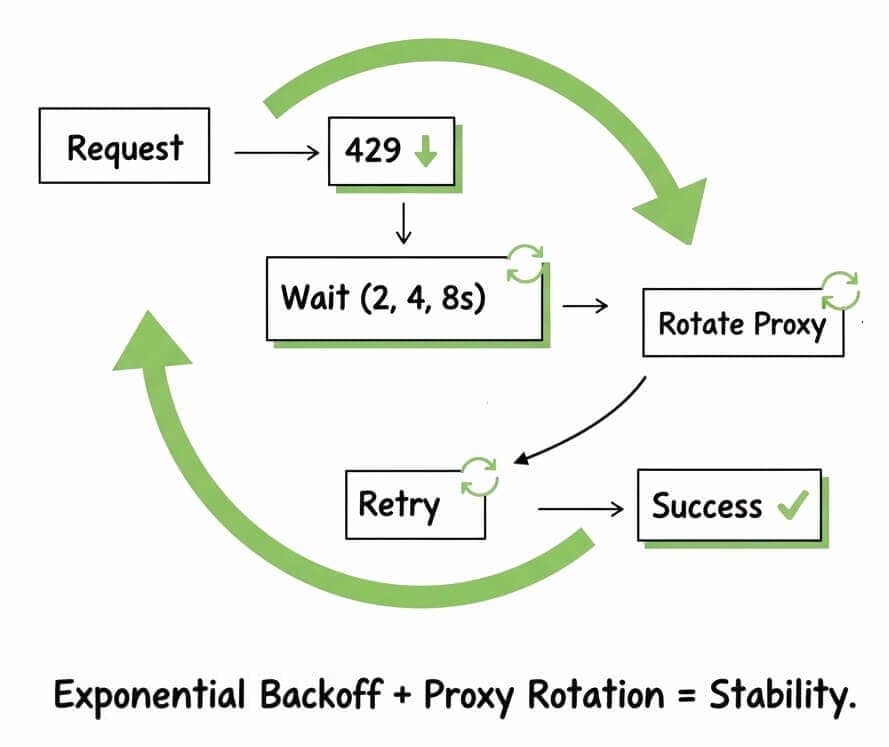
A good scraper adapts. Here’s a compact example that handles rate limits gracefully using exponential backoff and proxy rotation. Clean and production-ready.
|
1 2 3 4 5 6 7 8 9 10 11 12 13 14 15 16 17 18 19 20 21 22 23 24 25 26 27 28 29 30 31 32 33 34 35 36 37 38 39 40 41 42 43 44 45 46 47 48 |
import requests import time import random from itertools import cycle class SmartScraper: def __init__(self, base_url, proxies): self.base = base_url self.proxies = cycle(proxies) def get(self, endpoint, retries=5): url = f"{self.base}{endpoint}" for attempt in range(retries): proxy = next(self.proxies) try: r = requests.get( url, proxies={'http': proxy, 'https': proxy}, headers={'User-Agent': random.choice(self.user_agents())}, timeout=10 ) if r.status_code == 200: return r if r.status_code in [429, 503]: wait = min(2 ** attempt, 60) print(f"Rate limited. Waiting {wait}s…") time.sleep(wait) continue except requests.RequestException: continue print("Max retries reached.") return None @staticmethod def user_agents(): return [ "Mozilla/5.0 (Windows NT 10.0; Win64; x64)", "Mozilla/5.0 (Macintosh; Intel Mac OS X 10_15_7)", "Mozilla/5.0 (X11; Linux x86_64)" ] |
|
1 2 3 4 5 6 7 8 9 10 11 12 13 |
# Example use scraper = SmartScraper( "https://api.example.com", [ "http://proxy1.example.com:8080", "http://proxy2.example.com:8080" ] ) response = scraper.get("/data") if response: print(response.text[:200]) |
This short script covers the essentials — rate limit handling, random headers, proxy cycling, and polite retries — without the bloat.
9. The Real Value of Scalable Scraping
With managed tools like Rotating Residential Proxies, you’re not stuck fixing servers. You’re focused on results. This way, your data team can move from debugging to strategy.
Building a solid scraping system isn’t just about clever code. You also need reliable infrastructure. That’s where RapidSeedbox steps in—connecting your logic to a network built for scale. With 6.9 million residential IPs across 100+ countries, your scraper stays hidden and global-ready. Perfect for price tracking, market research, or targeting worldwide.
This setup changes everything.
You get 99.9% success, 99% uptime, and no more CAPTCHAs. Unlimited threads. 256-bit SSL encryption. Automatic IP rotation. And a REST API that slots right into your pipeline or CI/CD flow.
What does all that mean?
- Fewer blocks. More wins.
- Scale fast without burning IPs.
- Cleaner data, fewer retries.
- Less DevOps stress.
- Higher ROI.
- Smarter forecasting.
Scraping should help your business grow. Not drain your team. We are here to help!
10. Frequently Asked Questions
429 Too Many Requests means you’ve exceeded the rate limit—the server works fine but blocks you for sending too many requests. 503, on the other hand, means the server can’t respond—due to overload, maintenance, or similar issues. For 429, slow down. For 503, wait—it may clear up on its own.
First, check the response headers for clues like CF-RAY, CF-Cache-Status, or Server: cloudflare. Then, if you see a “Checking your browser” page, it confirms Cloudflare’s bot protection is in effect.
Start with a 1–3 second delay between requests, with some randomness. Then, check response headers for rate limit signs and adjust as needed. For higher volume, use Premium proxy to spread requests instead of slowing them down.
CAPTCHAs aim to block bots, so it’s best to avoid them using smart proxy rotation and human-like behavior. If you need to solve them, tools like 2captcha or Anti-Captcha can help—but they add cost and complexity. Even better, see if the site has an API you can use instead. Learn more from our free-CAPTCHA scraping post
Stay Under the Limit ⚡
Balance your request pace with resilient IP rotation. Keep flows steady and your data clean — no 429s, no drama.
Try Rotating IPsContent disclaimer: This article is for informational and educational purposes only. Always respect website Terms of Service, robots.txt directives, and applicable data-protection laws. Use official APIs when available and avoid collecting personal data.
0Comments