 Qua
Qua
With more than 666 million active users, the former Twitter, or newly branded X, is one of the most popular social media platforms and a valuable source of information for businesses, researchers, and individuals. However, extracting and filtering data manually from the vast domain of Twitter data is overwhelming and non-functional.

Twitter scraping involves using software or scripts to collect data from the platform. You can analyze this data to gain invaluable insights into trending topics and hashtags, conversations, interactions happening on the platform, and user behavior.
The collected information can be meticulously analyzed for various purposes, such as sentiment analysis, market research, and social media monitoring. This article will delve into different aspects of scraping Twitter data using existing methods, from scripting to no-code software, associated costs, and legality and ethical terms.
Tuyên bố miễn trừ trách nhiệm: Tài liệu này đã được phát triển nghiêm ngặt cho mục đích thông tin. Nó không cấu thành sự chứng thực cho bất kỳ hoạt động nào (bao gồm cả các hoạt động bất hợp pháp), sản phẩm hoặc dịch vụ. Bạn hoàn toàn chịu trách nhiệm tuân thủ luật hiện hành, bao gồm luật sở hữu trí tuệ, khi sử dụng dịch vụ của chúng tôi hoặc dựa vào bất kỳ thông tin nào ở đây. Chúng tôi không chấp nhận bất kỳ trách nhiệm pháp lý nào đối với thiệt hại phát sinh từ việc sử dụng các dịch vụ hoặc thông tin của chúng tôi ở đây dưới bất kỳ hình thức nào, trừ khi luật pháp yêu cầu rõ ràng.
Mục lục
What Types of Data Can Be Extracted From Twitter?
You can extract different types of Twitter data. Here are three main data types for Twitter scraping:
- Tweets: You can capture specific data from filtered tweets based on profiles, such as their likes, replies, retweets, and specified URLs.
- User Profiles: Anything from a public user profile is collectible, such as the user’s bio, profile description, number of tweets, retweets, number of followers/ followings, and profile image.
- Keywords/Hashtags: You can collect tweets containing particular keywords, hashtags, or their combination. Refining your search by the number of likes or by looking up specific dates and times is also possible.
Legality and Ethical Terms of Use
When diving into the world of data scraping, it is essential to understand the legal and ethical boundaries involved.
According to the Twitter terms and regulations (Developer Agreement and Policy), scraping data without explicit permission is prohibited and declared by Twitter policy: “Scraping the Services without the prior consent of Twitter is expressly prohibited.
Any abuse of the Twitter API for these purposes will be subject to enforcement action, which may include suspension and termination of access.
General Guide for Scraping Twitter
After a brief introduction to Twitter scraping, it’s time to explore the process of scraping through Twitter data. Thus, we’ve compiled a simple and comprehensive guide to Twitter scraping for you. Please follow the steps below:
- First, you need to have the right scraping tools. There are plenty of options to choose from. So, determine which option suits your budget and preferences.
- Download and install the scraping tool on your system.
- Make sure there is plenty of storage space available on your device and that you have a reliable internet connection.
- After installing, log in using your Twitter account details.
- Adjusting parameters for scraping data from Twitter is an important step that allows you to extract data based on keywords, hashtags, dates and times, locations, URLs, etc.
- After executing the scraper tool, a large amount of data will be left behind. You can export the data to different file formats (xlsx, CSV, JSON, etc.).
- In the final step, you should analyze the exported data to gain insights into your topic of interest.
Twitter Scraping Tools and Methods
We have reviewed some available scraping tools across the internet, from the official Twitter scraper to third-party services and even open-source Python libraries, and listed them below.
4.1. API-Based Twitter Scrapers
The first method that we are going to take a look at is API-based Twitter scrapers, which include Twitter API V2, Apify, Brightdata, and Scrapingdog.
4.1.1. Twitter API V2
Twitter API v2 is the latest version of Twitter`s API, the official and one of the most commonly used APIs for developers building apps with social interaction or researchers/individuals who collect data for their specific purpose. The use of new APIs enables the effortless monitoring and analysis of live conversations on social networks.
Recently, Twitter has added some new features, such as endpoints, payload options for tweet posts, conversation identifier sets, and annotations. These changes are quite impressive. However, the new pricing structure has raised serious concerns for developers and third-party apps. With the new pricing structure, access to services has dramatically decreased, and prices have risen drastically.
The Twitter/X API v2 pricing plans have three levels: Free, Basic, and Enterprise.
- In the free tier, developers can post up to 1500 tweets per month, designed for write-only use and testing the Twitter API.
- The basic tier costs $100 per month and allows developers to post up to 3,000 tweets per month at the user level and 50,000 tweets (with a read limit of 10,000) at the app level.
- The Enterprise tire includes more advanced features designed for businesses. However, the enterprise plan will charge developers/businesses an exorbitant price of nearly 42000$ a month.
4.1.2. Apify
Through Apify’s Twitter Scraper, you can extract information from publicly available Twitter data such as hashtags, threads, replies, images, and more. Recent changes to Twitter have put new limits on viewing and scraping tweets on this platform, as users will only extract public information up to 100 tweets per profile. This scraper cannot scrape the latest tweets but can retrieve the most liked ones. Extracted data can be accessible in HTML, JSON, Excel, and CSV formats.
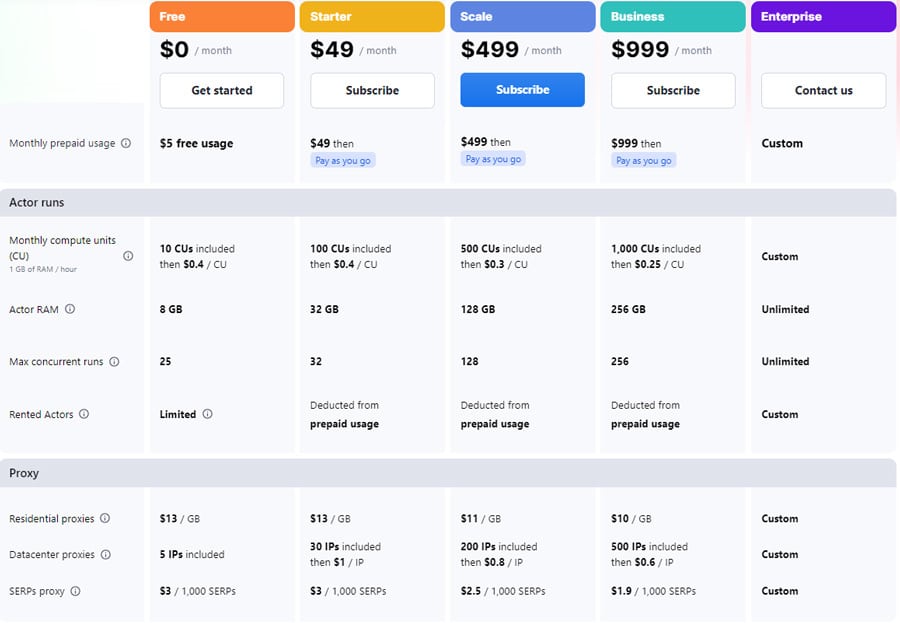
The following figure illustrates the monthly service costs by Apify. It also offers a 10% discount for the annual plan. For more information, visit Apify pricing.
4.1.3. Brightdata
Bright Data is a data collection platform that offers web scraping tools such as proxy servers, APIs, and no-code solutions. Bright Data’s Web Scraper gives users the ability to extract data from public Twitter profiles, including images, videos, tweets, hashtags, and more.
Prices begin with a monthly 500$ for 151000 page loads. Bright Data Twitter scraper data collector is compatible with all web services and outputs its data in Excel format. It also offers a 7-day trial, and you can test the platform before paying 500 bucks.
Ready to take your Twitter scraper to the next level?
4.1.4. Scrapingdog
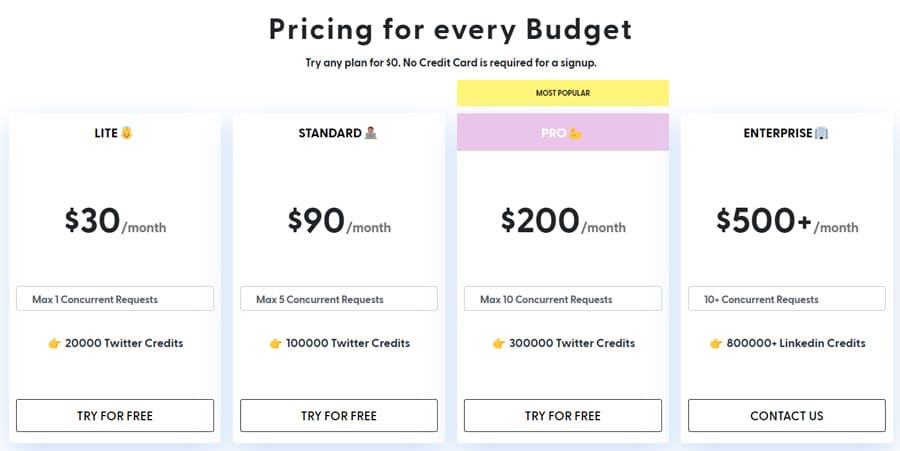
Scrapingdog is a web scraping API that helps you scrape any website, including Twitter. It allows you to scrape tweets using tweet IDs or scrape public pages to extract details such as number of followers, number of followers, and website links.
It costs you 0.0009$ per page to scrape Twitter in the standard plan, which is among the best value over price compared to the other top Twitter scrapers. They have also provided a free trial; you can cancel your subscription anytime and refund your money easily. For more information about how to scrape data using Scrapingdog, you can visit Twitter Scraping API documentation.
4.2. Python Libraries and Packages for Scraping Twitter
Now that you are familiar with the Twitter API and apps like Apify, it is time to take a look at the Python libraries and packages for Twitter scraping.
4.2.1. Tweepy
Tweepy is an open-source Python package that allows developers to access Twitter endpoints smoothly and transparently. However, you should be aware that Twitter has imposed limitations on the number of requests sent to the X/Twitter API, where 900 requests are allowed every 15 minutes. In this section, we aim to take a look at Tweepy’s functionality and give a simple example.
To begin, install the Tweepy package using the “pip install Tweepy” command on your Python IDE and then import Tweepy as well. Registering your client application with Twitter is the next step. Create a new application. Once completed, you will receive a bearer token.
|
1 2 |
pip install tweepy import tweepy |
Next, you must create a “Client” instance to pass the consumer bearer token you have gotten from the Twitter API.
In the query variable, we specified a field, a mention, and a hashtag as demonstrated.
|
1 2 3 |
client = tweepy.Client(bearer_token='bearer_token') query = 'query @mentions #hashtags' |
To search for tweets from the past seven days, you can use the search_recent_tweets feature available in Tweepy. To specify the data you’re looking for, you need to pass a search query.
|
1 2 |
recent_tweets = client.search_recent_tweets(query=query, tweet_fields=['tweet_field_1’, 'tweet_field_2'], max_results=100) |
If you have access to the academic research product track, you can retrieve tweets older than 7 days. From the complete archive of publicly available tweets.
|
1 2 |
tweets = client.search_all_tweets(query=query, tweet_fields=['tweet_field_1’, 'tweet_field_2'], max_results=100) |
You can export the results using the following code.
|
1 2 3 4 5 |
for tweet in tweets.data: print(tweet.text) if len(tweet.context_annotations) > 0: print(tweet.context_annotations) |
There are also plenty of functions in Tweepy capable of performing various tasks in more complex and specific cases.
4.2.2. Snscrape
Another way to get information from Twitter without relying on an API is through Snscrape. It allows you to retrieve basic information like user profiles, tweet content, sources, etc. Unlike Tweepy, there are no limits on the number of tweets you can scrape or the dates of tweets, and you can extract old Twitter data. Since Snscrape is not connected to the Twitter API, it lacks functionality at the level of Tweepy. Check our complete guide to Snscrape.
In this section, we also review a basic example of scraping some data from Twitter using Snscrape in Python.
First, you should install Snscrape. Note that you must have Python 3.8 or higher installed to make it work.
|
1 2 |
pip install snscrape |
In the next step, install the following libraries.
|
1 2 3 |
import snscrape.modules.twitter as sntwitter import pandas as pd |
We send a query (in our case, “query”) using the “TwitterSearchScraper(query).get_items” function and obtain elements from the search just like the results from the Twitter search bar.
|
1 2 3 4 5 6 |
query = "query" for tweet in sntwitter.TwitterSearchScraper(query).get_items(): print(vars(tweet)) break |
There are other methods that can be used for scraping data from Twitter, such as: TwitterSearchScraper, TwitterUserScraper, TwitterProfileScraper, TwitterHashtagScraper, TwitterTweetScraperMode, TwitterTweetScraper, TwitterListPostsScraper, TwitterTrendsScraper.
Advanced Scraping Techniques and Challenges
When basic scraping methods hit their limits with Twitter’s sophisticated defenses, advanced techniques become essential. Twitter’s modern interface relies heavily on JavaScript rendering and implements multiple layers of bot detection, making traditional HTTP requests insufficient for reliable data collection.
Handling Dynamic Content with Headless Browsers
Twitter’s timeline loads dynamically through JavaScript, meaning the content you see isn’t present in the initial HTML response. Headless browsers simulate real user interactions, rendering JavaScript and handling dynamic content loading.
Playwright vs Selenium: Playwright offers better performance and more reliable handling of modern web applications, while Selenium remains the established choice with extensive community support.
Here’s a practical example using Playwright to scrape dynamically loaded tweets:
|
1 2 3 4 5 6 7 8 9 10 11 12 13 14 15 16 17 18 19 20 21 22 23 24 25 26 27 28 29 30 31 32 33 34 35 36 37 38 39 40 41 42 43 44 45 46 47 48 49 50 51 52 53 54 55 |
import asyncio from playwright.async_api import async_playwright import json async def scrape_twitter_profile(username): async with async_playwright() as p: # Launch headless browser browser = await p.chromium.launch(headless=True) context = await browser.new_context( user_agent="Mozilla/5.0 (Windows NT 10.0; Win64; x64) AppleWebKit/537.36" ) page = await context.new_page() try: # Navigate to profile await page.goto(f"https://twitter.com/{username}") # Wait for tweets to load await page.wait_for_selector('[data-testid="tweet"]', timeout=10000) # Scroll to load more tweets for i in range(3): await page.evaluate("window.scrollTo(0, document.body.scrollHeight)") await page.wait_for_timeout(2000) # Extract tweet data tweets = await page.evaluate(""" () => { const tweetElements = document.querySelectorAll('[data-testid="tweet"]'); return Array.from(tweetElements).map(tweet => { const textElement = tweet.querySelector('[data-testid="tweetText"]'); const timeElement = tweet.querySelector('time'); return { text: textElement ? textElement.innerText : '', timestamp: timeElement ? timeElement.getAttribute('datetime') : '', url: window.location.href }; }); } """) return tweets except Exception as e: print(f"Error scraping {username}: {e}") return [] finally: await browser.close() # Usage tweets = asyncio.run(scrape_twitter_profile("elonmusk")) print(json.dumps(tweets[:3], indent=2)) |
Key advantages of headless browsers include handling JavaScript rendering, managing cookies and sessions automatically, and bypassing basic bot detection through realistic browser fingerprints.
Resource considerations: Headless browsers consume significantly more memory and CPU compared to simple HTTP requests. For large-scale operations, consider running multiple browser instances across different servers or using browser pools.
Bypassing Anti-Scraping Measures
Twitter employs sophisticated bot detection that goes beyond simple rate limiting. Understanding these measures helps develop effective countermeasures.
Common Anti-Scraping Techniques
Rate Limiting: Twitter monitors request frequency per IP address, implementing both short-term (requests per minute) and long-term (daily quotas) limits. Learn more in Web Scraping Rate Limiting: The Fix.
IP Blocking: Suspicious IP addresses get temporarily or permanently blocked. Datacenter IPs face more scrutiny than residential addresses.
CAPTCHA Challenges: Automated CAPTCHA presentation when bot-like behavior is detected. Modern CAPTCHAs use behavioral analysis beyond simple image recognition.
Browser Fingerprinting: Analysis of browser characteristics including user agent, screen resolution, installed plugins, and JavaScript execution patterns.
Effective Countermeasures
Proxy Rotation Strategy: Using services like RapidSeedbox provides access to residential IP pools that appear as legitimate user traffic. Residential proxies from their 6.9+ million IP network significantly reduce detection compared to datacenter proxies.
|
1 2 3 4 5 6 7 8 9 10 11 12 13 14 15 16 17 18 19 20 21 22 23 24 25 |
import random import time from itertools import cycle # Proxy rotation setup proxy_list = [ "http://user:[email protected]:8080" ] proxy_cycle = cycle(proxy_list) def get_next_proxy(): return next(proxy_cycle) # Implement in your scraper async def scrape_with_rotation(): for i in range(10): proxy = get_next_proxy() # Configure your browser/session with new proxy # Perform scraping request # Add random delay await asyncio.sleep(random.uniform(5, 15)) |
User Agent Rotation: Vary browser signatures to avoid pattern detection. Use real user agent strings from different browsers and operating systems.
|
1 2 3 4 5 6 7 8 9 |
USER_AGENTS = [ "Mozilla/5.0 (Windows NT 10.0; Win64; x64) AppleWebKit/537.36 (KHTML, like Gecko) Chrome/120.0.0.0 Safari/537.36", "Mozilla/5.0 (Macintosh; Intel Mac OS X 10_15_7) AppleWebKit/537.36 (KHTML, like Gecko) Chrome/120.0.0.0 Safari/537.36", "Mozilla/5.0 (Windows NT 10.0; Win64; x64; rv:121.0) Gecko/20100101 Firefox/121.0" ] def get_random_user_agent(): return random.choice(USER_AGENTS) |
Behavioral Patterns: Mimic human browsing behavior with variable delays, realistic scrolling patterns, and occasional non-scraping activities.
Session Management: Maintain consistent sessions with proper cookie handling and avoid creating too many new sessions from the same IP.
Advanced Detection Avoidance
Request Timing: Implement exponential backoff when encountering rate limits. Start with longer delays and gradually reduce them based on success rates.
Geolocation Consistency: When using proxies, ensure your requests maintain geographic consistency. Don’t jump between countries rapidly.
Browser Fingerprint Management: Use tools like undetected-chromedriver or stealth plugins to reduce browser fingerprinting effectiveness.
|
1 2 3 4 5 6 7 8 9 10 11 12 13 14 15 16 17 18 19 20 21 22 |
from selenium import webdriver from selenium_stealth import stealth def create_stealth_driver(): options = webdriver.ChromeOptions() options.add_argument("--headless") options.add_argument("--no-sandbox") options.add_argument("--disable-dev-shm-usage") driver = webdriver.Chrome(options=options) stealth(driver, languages=["en-US", "en"], vendor="Google Inc.", platform="Win32", webgl_vendor="Intel Inc.", renderer="Intel Iris OpenGL Engine", fix_hairline=True, ) return driver |
Error Handling: Implement graceful error handling that can distinguish between temporary blocks, permanent bans, and technical issues.
The combination of residential proxies from services like RapidSeedbox, proper browser stealth techniques, and realistic behavioral patterns creates a robust foundation for large-scale Twitter data collection while minimizing detection risks.
Remember that Twitter’s anti-bot measures continue evolving, so successful scraping requires ongoing adaptation of these techniques based on current platform behavior.
Câu hỏi thường gặp (FAQ)
Twitter scraping exists in a legal gray area. While Twitter’s Terms of Service prohibit automated data collection, scraping publicly available data isn’t automatically illegal.
Legal risks include:
1. Copyright infringement on user content
2. CFAA violations in some jurisdictions
3. GDPR compliance issues with personal data
Safer approach: Use Twitter’s official API when possible, consult legal counsel for large projects, and focus on publicly available data for legitimate research purposes.
No, but coding provides better results.
No-code options: Browser automation tools and visual workflow builders work for basic scraping but are limited in speed and flexibility.
Coding solutions: Python with Selenium or specialized libraries offers greater control, better anti-bot handling, and higher success rates.
Best approach: Start with no-code tools to test your needs, then learn basic Python scripting for serious data collection.
Twitter’s free API tier has severe restrictions:
1. Rate limits: Very low monthly request quotas
2. Historical data: Limited to recent tweets (typically past week)
3. Tính năng: No advanced analytics or engagement metrics
4. Access: Requires application approval
Most research and business use cases exceed free tier limits, making paid plans or alternative methods necessary.
Historical Twitter data requires specialized tools since regular browsing only shows recent content.
Best tool: Snscrape – Python library accessing tweets from years back with date range filtering.
Other options:
1. TwitterScraper library
2. Academic Research API (institutional access required)
3. Third-party historical data services
Tip: Historical scraping is slower and requires careful rate limiting to avoid blocks.
Essential practices:
1. Giới hạn tốc độ tải: 1-2 seconds between requests minimum
2. Respect robots.txt: Follow platform guidelines
3. Data minimization: Collect only necessary information
4. Proper delays: Use IP rotation and residential proxies
5. Error handling: Stop scraping if blocked or rate-limited
Key principle: Always try official APIs first, then scrape responsibly with respect for Twitter’s infrastructure and user privacy.
Kết luận
Twitter is a worthwhile source of sociological information across the web. By leveraging the information scraped from Twitter, you can tailor your plans to boost your sales and improve your marketing strategies. In this article, we have presented an in-depth overview of different aspects and methods of Twitter scraping for extracting data that can be valuable to businesses or research.
To sum up, according to the new limitations imposed on Twitter API v2, along with high costs, selecting the best scraper would be challenging. You can benefit from more advanced features on the Twitter API or third-party apps and Python libraries (Tweepy) that are directly connected to the Twitter API.
But the number of requests you can make is strictly limited. On the other hand, if you seek to scrape publicly available data and the basic features satisfy your needs, options like the Snscrape Python library can be a great choice.
 English
  Français
  Español
  Tiếng Việt
  简体中文
简体中文  Русский
  Türkçe
  Bahasa Indonesia
  日本語
日本語  العربية
  Português
  Українська
01 bình luận