 By
By
I’ve been using seedboxes for years, and one thing I’ve learned is that unlimited traffic makes a huge difference. A seedbox with unlimited traffic means you can download and upload as much as you want without worrying about hitting a data cap.
We’ll cover what “unlimited traffic” actually means, find the top seedbox providers, and even answer some common questions. By the end, you’ll know exactly which seedboxes offer unlimited upload bandwidth, their features, pricing, and how to avoid slow speeds.
Table of Contents
- What Does Unlimited Traffic Mean for a Seedbox?
- Best Seedboxes with Unlimited Traffic
- Frequently-Asked Questions
- Final Words
1. What Does Unlimited Traffic Mean for a Seedbox?
When a seedbox advertises unlimited traffic, it means the provider isn’t imposing a hard cap on how much data you can transfer (upload or download) each month
In other words, your seedbox can run 24/7, seeding torrents or fetching files, and you won’t be charged extra or throttled just for using too much data. This is also known as unmetered bandwidth. It’s like having an all-you-can-eat data plan for your torrenting.
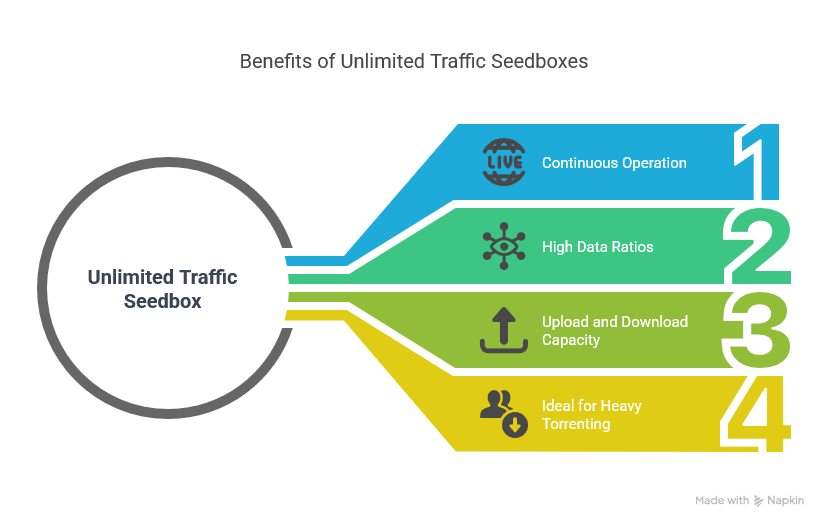
a. Unlimited = No Hidden Caps
With unlimited traffic, you can maintain a high ratio on private trackers by uploading terabytes of data, or download entire media libraries, without the fear of a sudden slow-down or overage fee. For example, some seedboxes might cap you at 5 TB or 10 TB per month, after which they throttle your speed. But an unlimited plan means no fixed quota – a huge relief if you’re a power user. Of course, fair use policies may apply and truly abusive levels could draw provider attention, but typical heavy usage is fine.
b. Upload vs Download
Most unlimited seedboxes apply to both upload and download traffic. So an unlimited traffic seedbox is effectively a seedbox with unlimited upload capacity as well as unlimited downloading. I’ve personally left torrents seeding for weeks on an unlimited seedbox and shared terabytes of data — all with zero issues.
To sum up, a seedbox with unlimited traffic is ideal for heavy torrenting, maintaining high ratios, and even streaming media from your seedbox.
Now, let’s look at the best unlimited traffic seedbox providers today and what each offers.
🚚 Tired of data caps or slowdowns? — Get 4 Months Free with Unlimited Traffic
2. Best Seedboxes with Unlimited Traffic
These are the top seedbox providers that offer unlimited bandwidth in 2026. All of them are active at the time of writing this list.
a. RapidSeedbox – Best Overall Seedbox with Unlimited Traffic
RapidSeedbox is my go-to recommendation and the one I personally use the most. All RapidSeedbox plans come with truly unlimited bandwidth (no monthly caps) on high-speed connections. In fact, RapidSeedbox offers unlimited traffic on every plan, even the basic ones This means whether you choose a starter plan or a high-tier plan, you can upload and download freely.
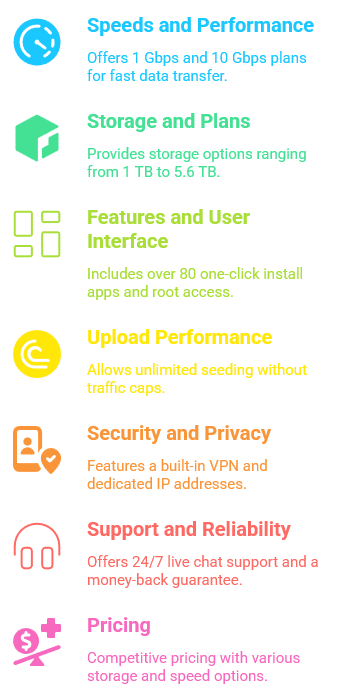
Speeds and Performance
RapidSeedbox offers plans on both 1 Gbps and 10 Gbps networks. The entry-tier plans (affordable shared seedboxes) give you around 1 Gbps, while premium plans boast blazing-fast 10 Gbps speeds for both upload and download.
Even the 1 Gbps “Lean” plans are plenty fast for most needs – I regularly max them out when seeding popular torrents. The 10 Gbps options are insanely quick – you’ll see torrents finish in the blink of an eye if the peers can keep up.
Storage and Plans
Plans range from about 1 TB up to 5.6 TB of storage space on RapidSeedbox, so you can choose based on how much data you need to store. For example, the basic plan (“Lean” series) offers 1 TB storage for around $9/month (monthly) or ~$8/month if you pay annually.
That’s a great price for an unlimited 1 Gbps seedbox. On the higher end, there are premium plans with 5.6 TB storage on a 10 Gbps line for roughly $70 per month.
Features and User Interface
One of the things I love about RapidSeedbox is how user-friendly it is despite offering advanced features. You get a clean web-based dashboard where you can install apps in one click.
Want to run qBittorrent, ruTorrent, Deluge, or Transmission? Just a single click and it’s ready to go. They offer over 80 one-click install apps.
They even give you root access on your seedbox if you’re a power user who wants to customize things via SSH.
Upload Performance
Since RapidSeedbox doesn’t cap your traffic, you can seed torrents 24/7. The unlimited traffic and high bandwidth mean RapidSeedbox is fantastic for maintaining upload ratios on private trackers. Even on a 1 Gbps plan, I’ve been able to seed dozens of torrents simultaneously without slowdown.
Security and Privacy
RapidSeedbox puts a big emphasis on privacy.
All plans come with a free built-in VPN (OpenVPN) you can use to encrypt your connection. This is useful if you want to securely tunnel other traffic or just add an extra layer of anonymity.
The seedboxes themselves are private and secure – you get a dedicated IP address and the traffic is encrypted via HTTPS and SFTP for transfers. They also support Plex and other media servers, with security measures in place so only you can access your media.
Support and Reliability
RapidSeedbox’s support is top-notch. They have 24/7 live chat support where actual humans respond within minutes. When I had a question about setting up Sonarr, the support rep walked me through it at 2 AM!
They also offer a 14-day money-back guarantee, which shows confidence in their service. Over the years, I’ve found RapidSeedbox to be extremely reliable. I rarely notice downtime, and speeds remain consistent.
Pricing
The plans start at around $8-$9 per month for 1 TB storage (shared 1 Gbps), and scale up to higher tiers like 2 TB for ~$15, 5.6 TB for $73 (with 10 Gbps).
The intermediate plans (e.g. ~2.2 TB or 2.8 TB) are in the $30-$40 per month range.
They accept various payment methods (even Bitcoin) and offer month-to-month flexibility or discounts on annual plans. Given the performance and truly unlimited traffic, the pricing is very fair compared to other providers.
Need a reliable way to transfer huge amounts of data without limits?
Experience the freedom of true unlimited traffic with our powerful Seedbox solutions. Whether you’re downloading, uploading, or streaming, our Seedboxes give you lightning-fast performance, robust privacy, and zero bandwidth restrictions. Say goodbye to throttling and hello to seamless data transfer—perfect for power users and serious file sharers!
b. Seedboxes.cc

Seedboxes.cc is a close runner-up for unlimited seedboxing. Seedboxes.cc is a well-established provider that includes unlimited traffic on all plans, so no data caps whatsoever. They are known for 20 Gbps connections on their seedboxes, which is fantastic for heavy users.
Speeds and Network
Seedboxes.cc upgraded all their plans to a 20 Gbps server uplink. This means even on a shared slot, you have plenty of bandwidth headroom.
In practice, actual torrent speeds will depend on swarm health, but you could max out at several gigabits per second on popular torrents. The snappy network also means streaming from your seedbox (via Plex or Emby) is smooth, even for 4K content.
Unlimited Upload
Every Seedboxes.cc plan offers Unlimited Monthly Upload Traffic. This phrasing is reassuring – you can push terabytes of upload without worry. Their site explicitly touts “Unlimited Traffic – FTP, SFTP, HTTP and PLEX streaming always use our premium network”, meaning you’re free to use the bandwidth as needed.
Storage and Plans
They have a range of plans with fun names like Gremlin, Vampire, Zombie, and Red Dragon. Storage ranges from 1.5 TB up to 6 TB on these plans.
For example, the “Gremlin Box” offers 1.5 TB storage and 20 Gbps for around €20.95/month (or ~€18.85/mo if billed annually).
The largest “Red Dragon Box” has 6 TB for €80.95/mo.
These aren’t the cheapest plans per GB, but considering the fast network and unlimited data, many users find them worth it.
Features
Seedboxes.cc comes with some practical features features. They provide a complimentary VPN account with each seedbox, allowing you to use up to 2-5 simultaneous VPN connections (depending on the plan) through their servers. They also support one-click app installs and have a custom “Seedbucket” tool for managing files and integrating with cloud storage (handy if you want to offload files to Google Drive or other service).
User Interface
The interface at Seedboxes.cc is straightforward. While not quite as flashy as RapidSeedbox’s, it’s clean and gets the job done. You have a web-based file manager and easy access to apps like ruTorrent. You can set up Plex easily, and they allow full admin access to your media server apps, which is great for power users who want to tweak Plex or Jellyfin settings.
Security
Because Seedboxes.cc owns their hardware and networkseedboxes.cc, they have tight control over security. All their plans allow Plex, Emby, and Jellyfin, and those are secured behind login. They also isolate user environments well. I haven’t heard of any privacy issues – and with the included VPN and HTTPS access, you can keep your activities quite private.
Support
They offer a one-week money-back guarantee for new users. Support is available via tickets. Unfortunately, they don’t have 24/7 live chat like RapidSeedbox.
Pricing
Starting at about €20.95 per month for 1.5 TB (20 Gbps), going up to ~€80.95 for 6 TB. If you choose yearly billing you can lower the effective monthly cost by 10-15%.
They accept major credit cards and even Bitcoin. While the price per TB is higher than most competitors, remember you’re getting unmetered 20 Gbps – the real selling point for Seedboxes.cc.

c. Feral Hosting

Feral Hosting is a veteran in the seedbox scene. They’ve been around for over a decade, and they offer unlimited bandwidth on all plans as well.
Feral is particularly known for its long history within the seedbox space while still providing high performance.
Speeds and Plans
Feral’s current plans (named after elements) all come with a 20 Gbit/s network port, which, albeit shared, is pretty good.
Their “Capacity based slots” plans include: Helium at £10/mo (1 TB storage), Neon at £15 (1.5 TB), Argon at £20 (2 TB), Krypton £30 (3 TB), Xenon £45 (4.5 TB), and Radon £60 (8 TB).
Unlimited Traffic and Fair Use:
Feral doesn’t throttle or cap your monthly usage. However, they do mention something about “off-peak” usage in some high-end SSD plans, but for the standard capacity plans listed above, you can use full 20 Gbps whenever available.
Feral’s network is robust (servers in the UK and Netherlands, typically), and they peer well so even across the ocean I got great throughput.
User Interface and Features
Feral’s approach is a bit more hands-off. You’ll get a basic web interface and FTP/SSH access. You might need to install or update some apps via their web terminal or knowledge base instructions, which can be a fun learning experience if you’re technically inclined.
They support common apps and have a community wiki. However, there aren’t fancy one-click app installers or a glossy custom dashboard here – it’s old-school.
Still, experienced users won’t have face any troubles using ruTorrent and FTP on Feral. They also allow Plex, so you can stream your content. Just note, with a shared seedbox you will not get the same CPU allocation for transcoding as a dedicated box. Feral does indicate the number of Plex transcodes each plan can handle.
Support
Feral’s support has been historically ticket-based. In my experience, responses came within 24 hours on average. They also have an IRC channel for community support.
Feral may not handhold you through every step, but they do maintain a quite decent wiki/FAQ that covers most common tasks (like how to connect via SFTP, use Rclone, etc.).
Security and Privacy
Feral is quite security-conscious. They don’t allow public torrent trackers on their slots by default (to avoid DMCA issues). This actually helps ensure your slot isn’t taken down for copyright complaints.
All traffic is via secure protocols (SFTP, HTTPS for Deluge Web UI, etc.). They don’t provide a personal VPN service like some others, but you could always run a proxy or OpenVPN on your slot if needed.
Pricing
As mentioned, starts at £10 per month (~$12-13) for a 1 TB slot and goes all the way up to £60 for an 8 TB slot.
These prices are very competitive given the storage and unlimited 20 Gbps pipe. It’s month-to-month (no long commitments required).

d. DediSeedbox

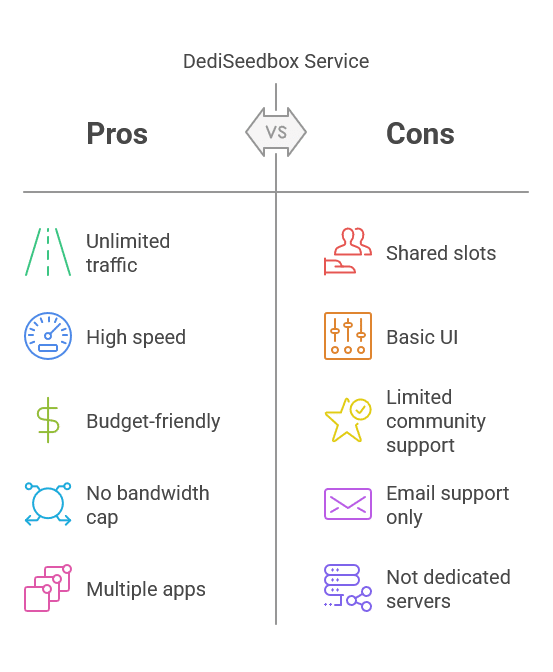
If you’re looking for unlimited traffic on a 10 Gbps port at a budget price, DediSeedbox is hard to beat. DediSeedbox offers shared seedbox plans hosted in the Netherlands with 10 Gbps speeds and unmetered bandwidth on all plans.
Despite the name, these are not dedicated servers – they are shared seedbox slots. Still, the performance and specs are quite good for the cost.
Plans and Pricing
DediSeedbox keeps it simple. They have a few standard plans:
- 750 GB for $10/month
- 1.5 TB for $15/month
- 2 TB for $20/month
- 3 TB for $25/month
All include Unlimited Traffic (10 Gbps), as well as Plex/Emby support and a suite of apps.
Speed and Performance
Each slot is on a 10 Gbps shared line. DediSeedbox seems to use NFOrce data center bandwidth (Netherlands) which is quite reputable. Importantly, there is no bandwidth cap.
Features
DediSeedbox offers a decent number of apps. You’ll get 40+ one-click install apps, including all the usual torrent clients, automation tools like Radarr, Sonarr, and utility apps.
Plex, Emby, and Jellyfin are also included on all plans. They also include a VPN (OpenVPN) on all plans, so you can route your own connection through the seedbox if desired. This is a nice security bonus at no extra cost.
User Interface
DediSeedbox provides a web control panel. It’s not the most modern UI I’ve seen, but it’s functional. You manage your apps, see disk usage, etc., and can open web UIs for things like ruTorrent.
For file management, I primarily use SFTP which is straightforward. Given the low price, I was actually expecting a more barebones setup, but they have a decent interface that even beginners can navigate.
Support
DediSeedbox offers support via email and they also have a small Wiki. The community around DediSeedbox isn’t as large as some providers, you can find existing users on forums.
Frustrated by bandwidth caps and slow speeds?
Break free with a high-performance Seedbox that offers unlimited traffic, fast transfer speeds, and 24/7 availability. Perfect for handling large torrents, automation, and remote access, our Seedboxes empower you to do more—without ever worrying about limits or ISP restrictions.
e. Seedit4.me

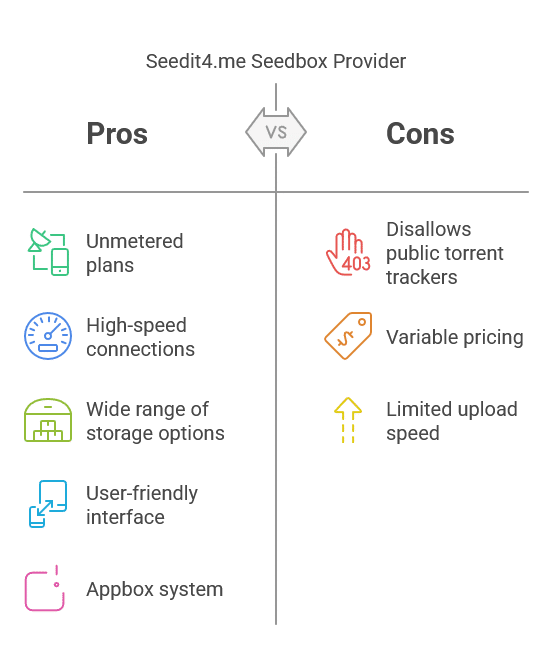
Seedit4.me is another popular seedbox provider that deserves a spot on the list. They offer a wide variety of plans, and importantly many of their plans come with unmetered/unlimited data. You just have to choose the ones labeled “UNMETERED” in their lineup.
Unlimited Plans
Seedit4.me clearly marks which plans have unlimited traffic. For example, their high-tier plan “Avenger NL” offers unmetered bandwidth on a 1 Gbit outgoing line (with 2 Gbit incoming).
All lower-tier plans also include unlimited download at least, and many include unlimited upload as well. The key is that all Seedit4.me plans include unmetered traffic in one form or another – their site even says “all plans include unmetered traffic, meaning you can literally seed with super powers!”.
Speed and Connection
Seedit4.me servers have between 1 Gbps and 10 Gbps connections depending on the plan. Many of their unmetered plans are around 1 Gbps for upload, which is okayish.
They host in various locations like the Netherlands, France, and Canda.
Storage and Pricing
Seedit4.me has a huge range of plans, from small 150 GB slots up to 5 TB slots.
Prices vary massively by plan. You can find ones for around €10-€15 per month for ~500 GB to 1 TB with unlimited traffic, all the way to ~€45 for 5 TB unmetered.
Features and Apps
Seedit4.me has an “Appbox” style system where you can install apps with one click. This includes all torrent clients, plus Sonarr, Radarr, CouchPotato, SABnzbd (for Usenet), file managers, and more.
Practically most automation and media management tools are available. The provider also includes OpenVPN access on many plans, so you can use the seedbox as a personal VPN.
Additionally, certain high-end plans support dedicated Plex or Emby servers with hardware-accelerated transcoding.
User Interface
The Seedit4.me dashboard is modern and mobile-friendly. It has a dark theme and is pretty intuitive. I especially like their resource monitor that shows CPU/RAM usage, because it helps me know if I’m pushing the slot too hard.
They also have a built-in file browser and even an integrated code editor if you’re tinkering with config files. Overall, the user experience feels good.
Limitations
It’s worth noting that Seedit4.me (like some others) disallows public torrent trackers on their seedboxes to avoid copyright issues. That said, if you need to grab something from a public tracker, you might need to use a different method or get a provider that allows it.
Pricing
You can get the following:
- a 500 GB unmetered plan for around €9-€10 monthly
- 1 TB for ~€12-€15
- Larger 2-5 TB plans range from ~€20 up to €45.
The good news is they frequently run promotions (holiday sales etc.). The company accepts payment via card or crypto . They also have a 7-day refund policy if things don’t work out.
f. ByteSized Hosting

ByteSized Hosting is known for its focus on Plex and streaming. They call their seedboxes “Appbox” and have options, including an Unmetered Appbox plan which offers unlimited upload and download traffic.
Unlimited Appbox
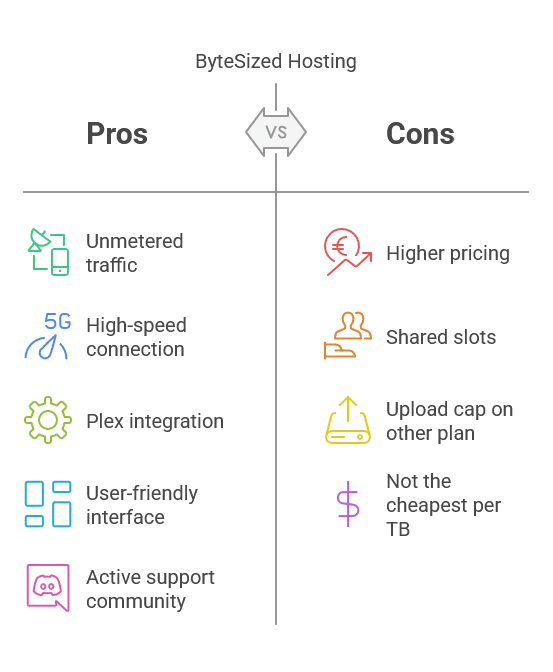
ByteSized’s Unmetered Appbox starts at €14 per month and comes with 1 TB storage, 10 Gbit connection, and unmetered download and upload.
There are higher tiers that will give more storage and you can add storage a la carte as well at a per-GB fee.
Speed and Performance
The Appbox has a 10 Gbit port, so the speed is very good. Just keep in mind that Bytesized’s unmetered plans have no limits on traffic, but they do mention a “6TB upload” cap on their other plan (“New Appbox”).
In practice, my upload on Bytesized is only constrained by the fact that my slot is shared with others – but I’ve never encountered a situation where I was throttled or couldn’t max out the line when needed.
Features and Apps
As the name suggests, Appbox supports tons of applications. You can install everything from torrent clients to cloud backup tools.
One standout feature for Bytesized is their streamlined Plex integration. They allow a certain number of concurrent Plex transcodes on each plan. That way, multiple people can stream from your Plex at once.
The environment is optimized for media streaming, so you won’t find Plex hogging all the CPU unless you exceed the provider’s guidelines.
User Interface
Bytesized offers a very good user interface. It’s clean, modern, and the Appbox dashboard makes managing apps super easy.
It’s very similar to Seedit4.me in that sense, but possibly even more refined since Bytesized has been polishing it for years. They also have a mobile app for monitoring your seedbox. Finding and installing apps feels almost like using a smartphone app store, it’s very user-friendly.
Support and Community
Bytesized has an active Discord and a helpful community. The staff often engage there as well. They’ve been around for over 10 years and have a good reputation.
The other way to reach out to support is via tickets. Usually, you’ll receive an answer within several hours.
Pricing
There are four straightforward Unmetered Appbox plans:
- +Stream 1 – 1000 GB for €14/month
- +Stream 1.5 – 1500 GB for €21/month
- +Stream 2 – 2000 GB for €28/month
- +Stream 3 – 3000 GB for €42/month
It’s not the cheapest per TB, but they offer decent quality. The company accepts payments via credit card and PayPal.
Those are the top seedbox providers I recommend for unlimited traffic usage. Each of these has no monthly bandwidth limits, great performance, and a unique set of features to suit different needs.
📦 Unlimited bandwidth. No limits. Just freedom. — Try It Free for 4 Months
3. Frequently-Asked Questions
a. What is a seedbox and why use one?
A seedbox is a remote server optimized for downloading and uploading torrents (and sometimes Usenet) at high speeds. Since seedboxes are in data centers with fast connections (1 Gbps, 10 Gbps, etc.), they can download and seed torrents much faster than a typical home internet line.
b. What does “unlimited traffic” really mean? Is it truly unlimited?
Unlimited traffic means the provider isn’t imposing a fixed cap on your data transfer. In principle, you can use as much bandwidth as you want. In practice, it’s truly unlimited for normal users. Reputable seedbox providers with unlimited plans do not throttle you as long as you’re using the service within reasonable bounds. Some have a Fair Use Policy (FUP) which is typically in place to prevent abuse.
c. Do seedboxes with unlimited traffic have slower speeds or any downsides?
Generally, no speed throttling is applied just because it’s unlimited. In fact, many unlimited seedboxes are on the fastest networks available (10 or 20 Gbps). An unlimited plan should perform just as well as (or better than) a limited one.
The only “downside” could be that some extremely budget seedboxes that advertise unlimited might have more users per server, which could mean slower speeds at peak times.
d. Is using a seedbox safe and legal?
Seedboxes are safe. They add a layer of privacy between you and the torrents. Since the torrents run on the seedbox’s server (often under a different jurisdiction), your personal IP isn’t exposed to the torrent swarm. Good seedbox providers also secure your access via encryption (SSL, SFTP, etc.).
As for legality: Seedboxes themselves are legal, since they are just servers. What matters is what you do with them. Downloading or sharing copyrighted content without permission is illegal in many countries, whether on a seedbox or your home PC.
e. Do I need a VPN when using an unlimited seedbox?
When you’re torrenting on a seedbox, you typically do not need a VPN on top of it. The seedbox itself acts as the privacy shield and it downloads torrents on your behalf.
Your own IP is not seen by peers, only the server’s IP is. The connection between you and the seedbox (when you download files via HTTPS or SFTP) is encrypted, so outsiders can’t snoop on that either. So for torrent activity, a VPN at home isn’t necessary. However, some people still use a VPN in conjunction with a seedbox for extra privacy or to access geo-restricted content.
f. How to Avoid Slow Upload Speeds on a Seedbox
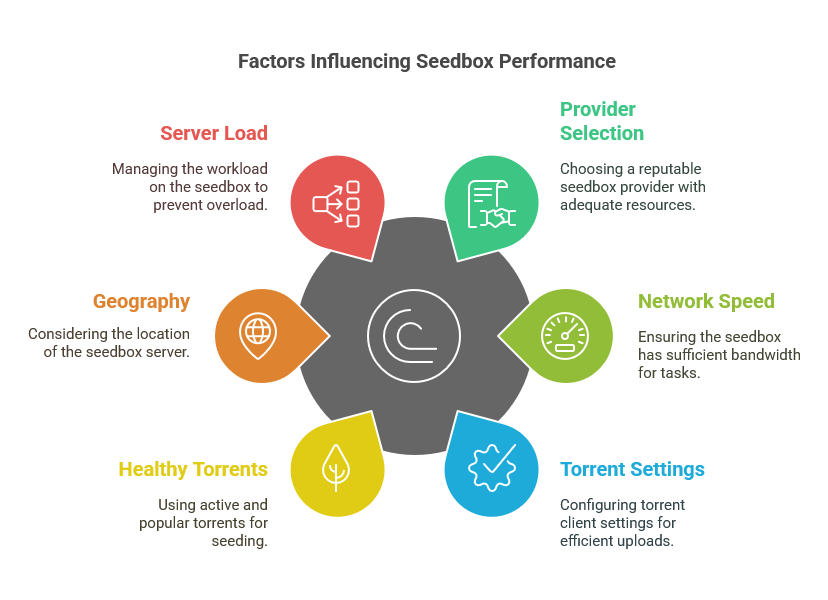
One of the main reasons to get a seedbox is to enjoy fast upload speeds for seeding torrents. If you’re struggling with slow upload speeds on a seedbox, especially one with unlimited traffic, here are some tips from my experience to keep things running smoothly.
g. Choose the Right Provider and Plan
First, make sure you’re with a reputable provider that doesn’t overcrowd servers. All the providers I listed are known for good performance. If you picked a cheap, unknown seedbox that’s slow, the issue might be with the provider.
Also, make sure your plan has enough network speed. If you need to upload a lot of data quickly, a 10 Gbps plan will obviously perform better than a 100 Mbps one. If you feel like your current plan is maxed out, think about upgrading to the next tier.
h. Optimize Your Torrent Settings
Seedboxes usually come pre-configured, but you can still tweak some settings. Just don’t set too many simultaneous uploads. Instead, allow a reasonable number of slots so each torrent can use enough bandwidth.
For example, seeding 20 torrents at once with a 1 Gbps line might give better overall speed per torrent than seeding 100 at once where each gets a trickle. Also, check if your torrent client has any speed limits set by accident (sometimes there’s a global speed limit toggle). We have excellent guides on how the tweak the settings on uTorrent and qBittorrent.
i. Use Healthy Torrents and Trackers
Naturally, your upload speed depends on how many other people are downloading the same torrent pieces as you. If you’re seeding a torrent that nobody’s downloading, your seedbox can’t upload anything (no matter how fast it is). If you’ve tinkered with your network settings, make sure the torrent client’s port is open and not firewalled so peers can connect to you easily.
j. Geography
Sometimes, slow upload could be because of network paths. If most of your peers are in the US and your seedbox is in Europe (or vice versa), there might be a bit of a delay in speeds for certain peers. Usually, the impact is minor, but if you think this might be the case, you could choose a seedbox in a region closer to your main peer base.
k. Don’t Overload the Seedbox
If you’re running a lot on your seedbox (like Plex transcodes, extracting archives, heavy CPU tasks), this can indirectly slow down torrent processes. High CPU or disk usage from other tasks can affect the torrent client’s ability to read/write data quickly, causing slower speeds. To fix it, schedule heavy tasks during off-peak hours or when you’re not actively trying to seed at maximum speed.
l. Use Multi-Connection Transfers
If you’re trying to pull data off the seedbox and it’s slow, try using multiple connections. A lot of seedboxes let you download files to your PC via FTP/HTTP. Using a download manager that opens multiple connections can get you the most throughput possible. This won’t affect your seeding speed, but it’s a good tip to get your files faster.
m. Keep Your Seedbox Clean
Last, but not least, maintain your seedbox. If you hit storage limits (disk almost full), the performance will most likely drop. Delete old files or move them to cloud storage. Also, reboot your seedbox from time to time to improve the performance.
4. Final Words
If you’re looking for a seedbox with unlimited traffic, these providers offer the best combination of speed, unlimited upload capability, reliable performance, and ease of use.
Choosing the right seedbox equals hassle-free torrenting, better ratios on trackers, and no worries about hitting a monthly data cap. Keep your downloads and uploads flying without limits, and don’t forget to optimize your settings to avoid slow speeds.
Hitting data limits while managing your torrents?
Get uninterrupted access to your files with a Seedbox that offers unlimited traffic and blazing-fast speeds. Whether you’re a casual user or a heavy-duty downloader, our Seedboxes provide the perfect balance of speed, storage, and freedom—no caps, no slowdowns, just pure performance.
0Comments