 By
By
CAPTCHAs and 429 errors can cripple automation and data collection. In this guide we’ll explain how to use residential proxies to bypass those barriers safely and efficiently. You’ll learn how ISP-assigned IPs improve reliability, enable precise geo-spoofing, and overall minimize detection risks when scraping or testing. The guide walks you through every step you need to run large-scale and compliant operations with confidence. And yes, all these without burning IPs or breaking terms of service.
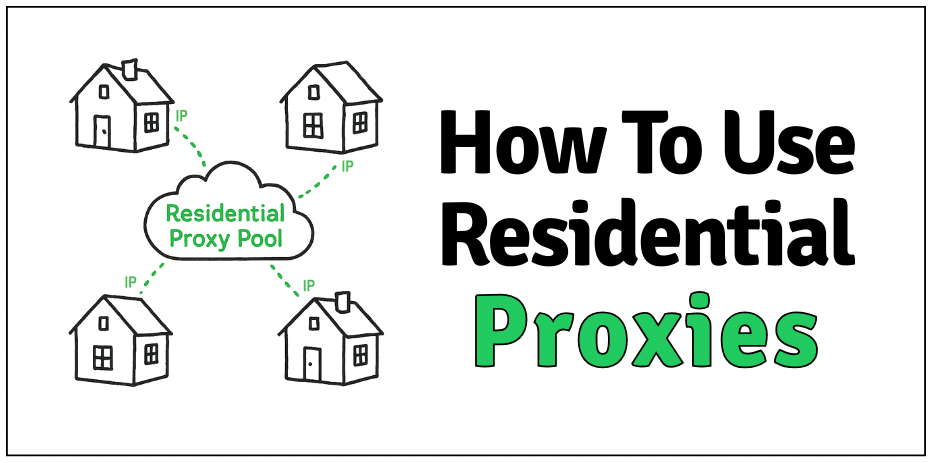
Table of Contents
- What Are Residential Proxies? (Quick Recap)
- Why Use Residential Proxies (Benefits & Use Cases)
- Get Residential Proxies and Activate Your Connection
- Choose the Right Proxy Provider (Before You Start)
- Step-by-Step Setup (OS, Browser, Code)
- Rotation vs Sticky Sessions (When to Use Each)
- Avoid Detection: Headers, Fingerprinting & Pacing
- Legal & Ethical Use (Trust Essentials)
- FAQ: How to Use Residential Proxies
- Final Words
Disclaimer: This guide is for informational and educational purposes only. Using proxies must comply with all applicable laws, website terms of service, and data protection regulations. RapidSeedbox does not condone or encourage misuse of proxy technologies for unlawful or unethical activities.
1. What Are Residential Proxies? (Quick Recap)
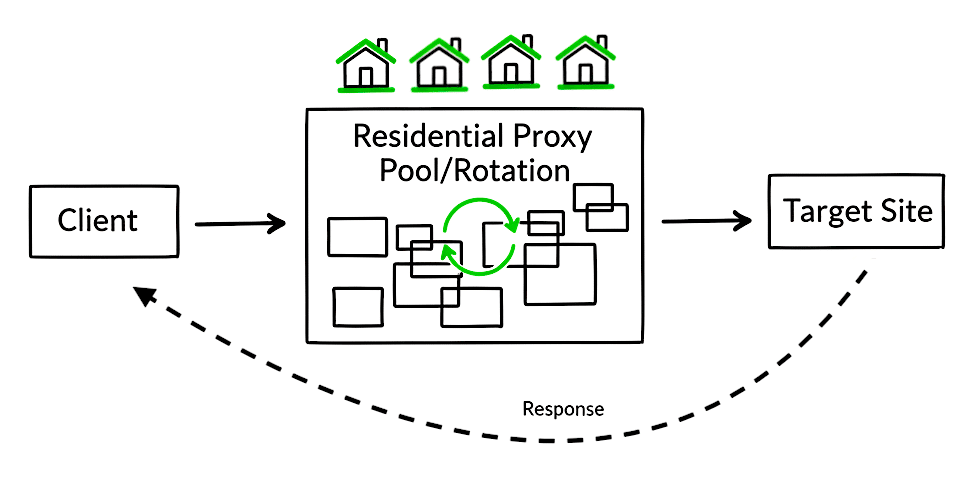
A residential proxy routes your requests through an IP address assigned by an internet service provider ISP to an actual home device. These are real-user IPs and not data center blocks. That alone gives them credibility, so most websites read them as ordinary traffic.
Premium residential proxy services give rotation as a feature. This allows your request to keep taking different IP addresses from the IP proxy pool. It helps you stay under the radar, so target sites or services see incoming traffic/requests from different ‘homes’.
Residential vs. datacenter proxies.
Datacenter proxies are cheaper and faster. But on the downside, they are easier to fingerprint. They come from the same server farms bots love. Residential proxies, on the other hand, hide inside real neighborhoods, mixed with everyday users. That makes them tougher to flag and ideal for geo-targeting or scraping tasks where consistency matters.
2. Why Use Residential Proxies (Benefits & Use Cases)
Before diving into setup, it’s important to know why residential proxies matter in the first place.
Because not all IPs are created equal. And when you’re scraping or testing, the wrong one can stop you cold.
Residential proxies borrow trust from real-world users. Each IP belongs to an actual device connected through an ISP. So websites treat your traffic like normal human behavior. That’s the secret to bypassing noisy filters and staying undetected in large-scale data tasks.
Here’s where they shine:
- Web scraping at scale: Handle millions of requests with fewer blocks or CAPTCHAs. Residential IPs blend into real traffic, so your scraping jobs run cleaner and faster. Learn about proxies for scraping.
- SEO monitoring & ad verification: View search results and creatives as they appear to real users in different cities — not data-center ghosts. Learn more in: SEO proxies.
- Access geo-restricted content: Test region-locked pages, payment flows, or app stores by switching IP geolocation dynamically.
- Managing multiple accounts: Reduce linkage risk across profiles; sticky residential sessions help preserve logins without triggering suspicion. Learn more about social media proxies for multiple accounts.
- Market & price intelligence: Collect accurate competitor data from retail, travel, or streaming sites without tripping IP-based filters. Price intelligence scraping: ebay and Amazon
- App & QA testing: Simulate real-world user traffic from various ISPs to debug content delivery or localization issues.
- High-demand drops (sneakers, tickets): Residential IPs appear human and distributed, cutting down on “bot detected” flags during surges. Learn more in Sneaker Proxies
| 💡 Insight: Think of residential proxies as renting thousands of tiny front doors in real neighborhoods. Because the IPs belong to actual ISPs, sites tend to treat that traffic as coming from real users, not servers. |
3. Choose the Right Proxy Provider (Before You Start)
Before you configure anything, choose your foundation wisely. The right proxy provider determines whether your setup runs smoothly or burns hours troubleshooting. Cheap, mislabeled, or overused IPs won’t just slow down your scraping, they will likely break it.
Here’s what matters most:
- Pool size & diversity: A larger proxy pool means less IP reuse and lower fingerprint risk. Look for thousands (ideally millions) of active residential IPs tied to real ISPs.
- Geo coverage: You don’t need “global.” You need precision. So, pick a provider that gives you (geo-targeted proxies) city- and region-level targeting in countries that actually match your testing or scraping needs. Nearby exits also reduce latency.
- Rotation control: Smart control over rotation intervals and sticky duration keeps sessions stable for logins while still rotating enough to avoid bans. Learn more in: What Is IP Rotation.
- Authentication options: Both username/password and IP whitelisting support make integration painless across servers, APIs, and automation frameworks.
- Protocol support: Ensure SOCKS5 and HTTP/HTTPS proxies are all available; each suits different tools (curl, Playwright, or Selenium).
- Bandwidth & uptime: Look for 99.9% uptime and consistent throughput. Avoid “unlimited” claims; they often throttle under load.
- Ethical sourcing: Trust only transparent, opt-in residential networks. Free or gray-market sources can leak credentials or cause legal trouble.
- Support & documentation: Real-time chat, API examples, working dashboards and more support and doc sources. A solid provider should save hours when debugging rate limits or credential mismatches.
RapidSeedbox’s Residential Proxies check every one of these boxes — with clean, ethically sourced IPs, adjustable rotation rules, and separate networks for rotating residential, mobile, and datacenter proxies. Choose based on your use case, not hype.
We’ll skip the theory from here and move straight into how to actually use them.
No More CAPTCHA Headaches 🤖
Learn how to use residential proxies to avoid constant challenges and retries.
Use Clean IPs4. Get Residential Proxies and Activate Your Connection
Before configuring devices or apps, you’ll first need to acquire and activate your residential proxies through your provider’s dashboard. Here’s the quick process to go from signup to connection.
a. Choose Your Plan
Pick between a subscription model (monthly data reset) or pay-as-you-go (top up anytime). With Rapidseedbox’s Residential Proxies you get country-level targeting, sticky or rotating sessions, and standard HTTP access.
- Sticky sessions keep the same IP for about 30 minutes; This is ideal for steady logins or carts.
- Rotating sessions refresh with every request; This is perfect for scraping, testing, or ad checks.
b. Configure Your Proxy
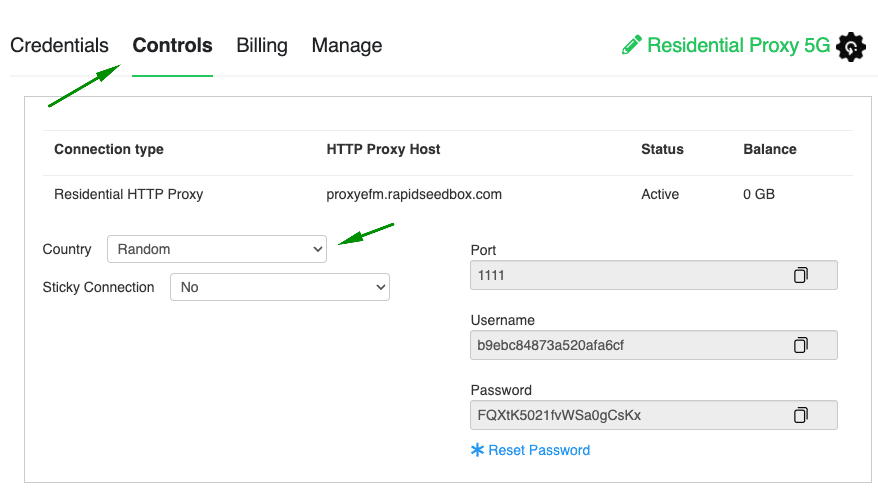
Inside your Client Area → Controls tab, select your country and session type. The dashboard automatically updates your proxy credentials according to your settings, so there’s no manual script editing needed.
c. Manage or Reset Credentials
If you ever need a fresh start, go to Proxy Controls → Reset Password. Replace the credentials in your apps or scripts to continue browsing securely with a clean slate.
For screenshots and a full setup demo, see RapidSeedbox’s guide 👉 Getting Started with Residential Proxies
5. Step-by-Step Setup (Provider, OS, Browser, Code)
Here’s how to configure residential proxies on your system, browser, or code. Follow these quick steps to route traffic through proxy IPs and verify everything works—whether you’re browsing or scraping.
a. Windows / macOS (System Proxy)
Windows 10/11
- Open Settings → Network & Internet → Proxy. Under Manual proxy setup, toggle On.
- Enter proxy IP and Port for HTTP/HTTPS.
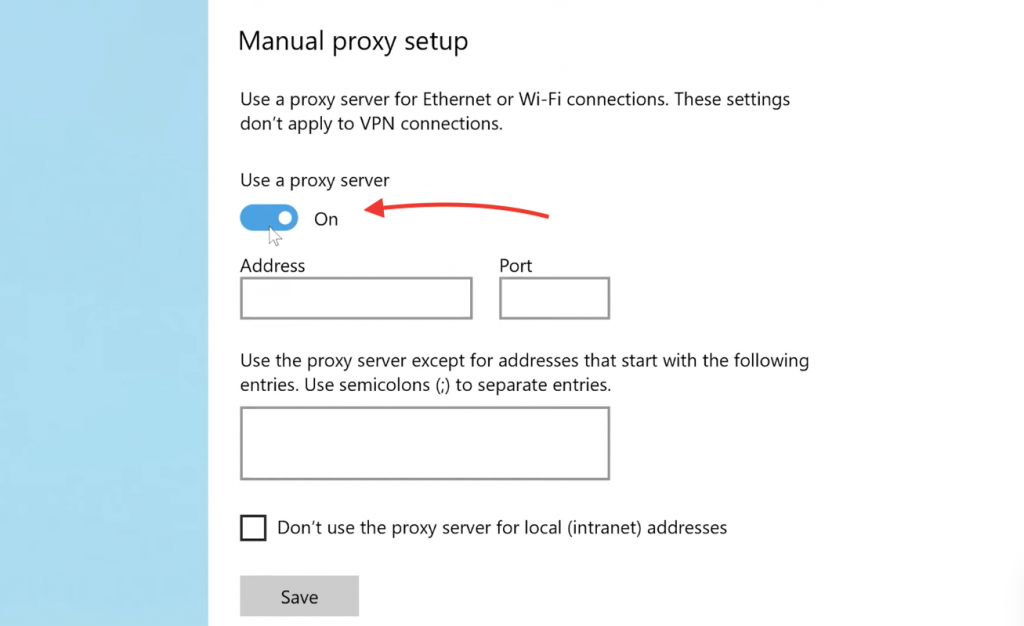
- Save; the system or browser prompts for proxy authentication (username/password).
- Test a site; then disable when done if you don’t want all traffic proxied.
macOS (Ventura/ Sonoma)
- System Settings → Network → select your adapter (Wi-Fi/Ethernet) → Details/Advanced.
- Or search for ‘Proxies’ in the upper-right search bar for the System Preferences. → Network
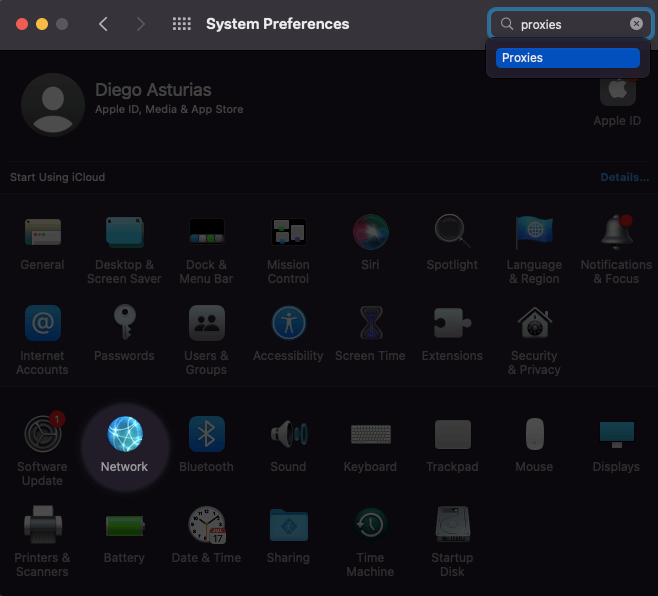
- Open Proxies. Enable Web/HTTPS proxy (or SOCKS5 proxy).
- Enter IP, Port, and credentials (if necessary).
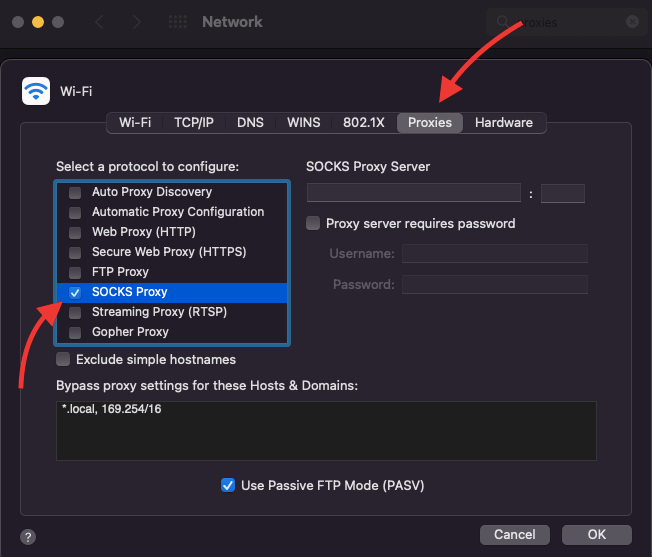
- Apply and test; disable later if you only need per-app routing.
| Tip: System proxies affect all apps. If you only need one browser or script proxied, prefer per-app config. |
b. Browser Setup (Firefox/Chrome + Extension)
Firefox
- Settings → General → Network Settings → select Manual proxy configuration.
- Add HTTP/HTTPS proxy and port; enable “Use this proxy for all protocols.”
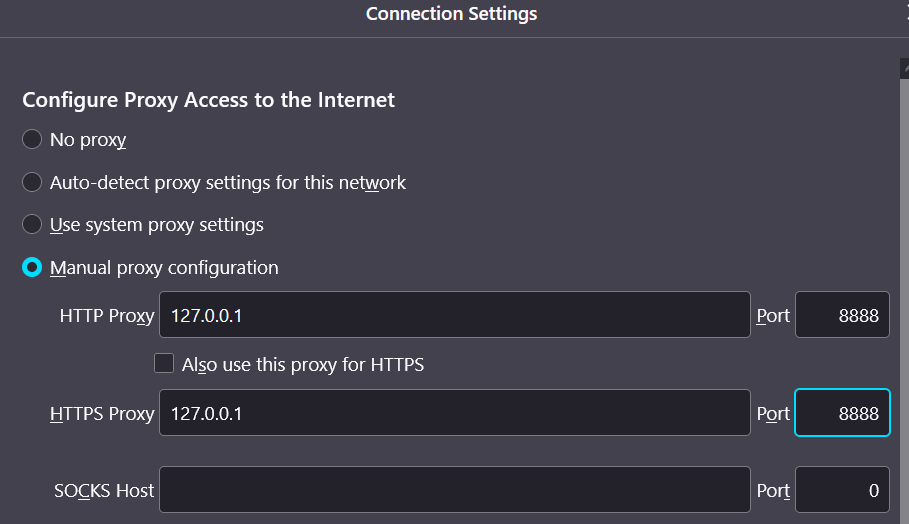
- Save and visit an IP check.
Chrome
Chrome inherits OS settings. For profiles and quick switching, use FoxyProxy (or similar) to store multiple endpoints and rules.
Note: For accurate geo tests, mitigate WebRTC leaks (Firefox about:config flag; extensions on Chromium).
c. Code – Python (requests) Mini-Snippet
If you automate scraping or testing APIs, you’ll often need to route requests through your residential proxies. Below is a simple ‘requests’ example showing how to authenticate, send a test call, and confirm your proxy IP before scaling up.
|
1 2 3 4 5 6 7 |
import requests proxies = { "http": "http://USER:PASS@IP:PORT", "https": "http://USER:PASS@IP:PORT" } resp = requests.get("https://httpbin.org/ip", proxies=proxies, timeout=20) print(resp.status_code, resp.text) |
Tip: Add retry/backoff for reliability; see our Rate Limiting guide for pacing patterns.
d. Verify Your IP (Quick Test)
Before you start scraping or testing, always double-check that your proxy is actually working. It needs to show the right location. A quick verification helps you catch misconfigurations early on. It will also help you ensure your requests appear from the intended region.
- Browser: visit whatismyip.com or ipinfo.io; confirm the proxy IP and expected geolocation.
- CLI: curl -x IP:PORT -U USER:PASS https://ipinfo.io
6. Rotation vs Sticky Sessions (When to Use Each)
How your IPs behave defines how human your scraper looks. Here’s the quick version before we go deeper:
| Mode | IP Behavior | Best For | Risk Level |
| Rotating | New IP per request or interval | Large-scale scraping, anonymity | Very low |
| Sticky | Same IP for a few minutes or requests | Logins, carts, dashboards | Moderate |
| Static | Long-term fixed IP | Account management, QA testing | Higher |
In plain terms:
- Rotating residential proxies issue a new IP per request or at a fixed interval via a backconnect gateway. Use rotation for crawling/scraping at scale, broad sampling, or when you need stronger anonymity and lower per-IP velocity. Rotation lowers correlation but can break multi-step flows if the site ties state to IP. Learn more about rotating residential proxies.
- Sticky sessions keep the same IP for X minutes/requests, useful for logins, carts, paginated flows, or dashboards that bind sessions to an IP. Pair sticky with gentle pacing to reduce friction; once a task ends, rotate again to refresh reputation. Sticky Session Proxies: Guide and Top Providers
- Static proxies (long-lived residential/ISP IPs) are a subset of sticky. These are better for account stewardship but not for bursty scraping. In code, reuse a session (HTTP keep-alive or shared client) to maintain the same exit; reconnect or change the session token to rotate. Static vs. Rotating Proxies: Which One Should You Choose?
💡 Pro tip: Start rotating when gathering or scanning data, then switch to sticky once you log in or need persistence. That hybrid flow mirrors real-world traffic — fast when anonymous, stable when authenticated.
RapidSeedbox lets you fine-tune both rotation frequency and sticky duration on one endpoint — so you can adapt your IP behavior to each task.
7. Avoid Detection: Headers, Fingerprinting & Pacing
Rotate realistic User-Agent strings. But do not sling random jargon. Include Accept, Accept-Language, Connection, Referer when it makes sense. But also remember to keep header order and spacing messy (browsers are inconsistent). In code: build headers in insertion order (don’t rely on alphabetic dictionaries). And, then randomize the UA from a short, curated list that matches the target’s typical clients.
| ⚙️ Quick Reference– Rotate IP → Proxy layer- Randomize headers → Client layer- Execute JS → Browser automation- Add jitter → Request pacing |
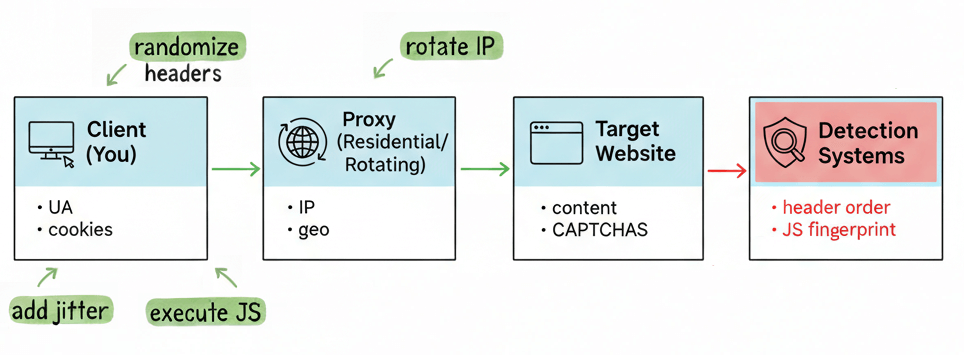
Anti-detection strategy in one glance
Look at the diagram below: Client → Proxy → Target → Detection.
- Client: Make requests look human; randomize headers (UA, Referer), add small random delays (jitter), and run JS when needed.
- Proxy: Use rotating residential IPs for scale; use sticky sessions when you need consistent identity (logins, carts).
- Detection systems: They watch for things like: header order, JS fingerprint, and timing. Your job: mix headers, rotate IPs, execute JS, and add jitter so traffic looks ordinary — not mechanical.
Mini example (conceptual — preserve order):
|
1 2 3 4 5 6 7 8 9 10 11 |
# build headers in realistic order headers = [ ("User-Agent", ua), ("Accept", "text/html,application/xhtml+xml,application/xml;q=0.9,*/*;q=0.8"), ("Accept-Language", "en-US,en;q=0.5"), ("Referer", "https://example.com/previous-page"), ("Connection", "keep-alive"), ] # send as ordered structure in your HTTP client |
a. Fingerprinting (reduce non-IP signals).
Use separate browser profiles per identity. Also, disable WebRTC or block leaks. Clear or isolate cookies. Don’t jump straight to heavy anti-detect stacks; they work, but they also look engineered. Try simple hygiene first: separate profiles, consistent fonts, normal screen sizes, and conservative timezone/locale settings. Learn more from: IPv6 Pool Hygiene Best Practices for Proxy Services
b. Pacing & concurrency (slow is stealthy).
Add jittered delays, not fixed beats. Keep low thread counts per domain. Also, fetch a few page assets (CSS, fonts, a tiny image) occasionally so your requests resemble a full page load. If you must scale, distribute work across many IPs (IP rotation) rather than piling concurrent hits from the same address. Learn more about Web Scraping: Rate Limiting.
c. CAPTCHA signals (treat them as feedback, not a challenge to beat).
If you see CAPTCHAs: pause, rotate IP, re-evaluate headers and session state. Move to a headful browser (Playwright/Puppeteer) only if the site requires JS execution or true browser behavior. Even then, prefer stealth techniques that mimic real navigation (mouse moves, realistic timing) over brute-force solver services. And last, but not least, accept that some flows will need human intervention. Learn more about this in: CAPTCHA-free scraping.
8. Legal & Ethical Use (Trust Essentials)
Residential proxies are powerful, so you must treat them with responsibility. The proxy tools themselves are legal but how you use them determines everything.
Always respect a target site’s terms of service and robots.txt rules. This is especially true when automating access or collecting data. Always avoid scraping personal or sensitive information; regulations like GDPR and CCPA define clear boundaries on data use. Ethical scraping in this case, also means choosing the right provider. So, stick with ethically sourced residential networks (where IPs are obtained with consent). Always avoid free or unknown proxies. These free proxies often leak data or originate from compromised devices.
| ⚠️ Remember! proxies enhance privacy, but they don’t make you invisible. Maintain secure endpoints and log activity to stay compliant and transparent. Responsible proxy use builds trust; both with your users and with the broader web ecosystem. |
Learn more about the legality aspect of proxies in: Are proxies illegal?
9. FAQ: How to use residential proxies
Rotate for scale and lower correlation across many requests. Use sticky sessions for logins, carts, or multi-step flows where the site ties state to IP. Learn more in: Static vs. Rotating Proxies: Which One Should You Choose?
HTTP/HTTPS proxies cover most web use. SOCKS5 is protocol-agnostic and useful when tools or traffic types benefit from it. Choose what your stack supports reliably.
Start 1–2 per IP and scale with rotation and jitter. Monitor 429/403 rates and back off dynamically.
Use an IP check (whatismyip/ipinfo) and verify DNS/WebRTC aren’t leaking your local IP in browsers.
Yes, but your actions must comply with laws and ToS. Avoid scraping behind logins or collecting personal data without consent.
10. Final Words.
You’ve made it to the end. By now, you’ve got a clear picture of how residential proxies work; also about what they are, how to set them up, rotate IPs, dodge detection, and stay within the rules.
The real value of residential proxies? Flexibility. You can scale your scraping, and automate tasks without tripping alarms.
And so, if you’re rotating IPs for bulk data pulls or locking in sticky sessions for smoother logins, it all comes down to balance. Stay fast, but not sloppy. Stay hidden, but not shady.
If there’s one thing to remember, it’s this: using proxies well isn’t about disappearing, but more about staying in control. Control over how you’re seen, what you can reach, and how your data flows.
Outsmart IP Bans ⚡
Using residential proxies strategically keeps your sessions alive longer.
Try Rotating Proxies
0Comments