 By
By
You want fast, private downloads – but you’re stuck choosing between a seedbox vs Usenet. Both solve the same problem in completely different ways, and picking the wrong one costs you money, speed, or privacy.
A seedbox is basically a remote server that’s all about torrenting. It downloads, seeds, and stores files for you in a data center. Usenet is a decentralized file-sharing network built on binary newsgroups. Files are distributed across news servers rather than between peers. It’s important to understand how each one works so you can make the right choice for your setup.
Table of contents
- What Is a Seedbox?
- What Is Usenet?
- Seedbox vs Usenet: Key Facts
- Seedbox vs Usenet: Full Comparison
- How a Seedbox Works
- How Usenet Works (Technical Details)
- Who Should Use a Seedbox?
- Who Should Use Usenet?
- Can You Use a Seedbox and Usenet Together?
- Common Mistakes When Choosing Between Seedbox and Usenet
- Seedbox vs Usenet: Cost Breakdown
- Seedbox vs Usenet Summary
- Frequently Asked Questions About Seedbox vs Usenet
- Which One Should You Actually Get?
What Is a Seedbox?
A seedbox is a high-speed dedicated or virtual server hosted in a data center that handles BitTorrent downloads remotely – independently of your home internet connection. It works by connecting to torrent swarms on your behalf, downloading files at data-center speeds (often 1Gbps–10Gbps), and storing them server-side so you can get them at any time.
Seedboxes are usually used by torrent users who want faster download speeds, better upload ratios on private trackers, and privacy from their ISPs. All torrent traffic originates from the seedbox’s IP address, not yours, so your home connection stays clean.
What Is Usenet?
Usenet is a network of news servers that hosts binary files (movies, software, archives) as encoded text posts across thousands of newsgroups. It uses an NNTP (Network News Transfer Protocol) client-server model, where a Usenet provider replicates binary files across its server infrastructure and subscribers download them directly via an NZB file.
Usenet is usually used for high-speed, private downloading without peer-to-peer exposure. Unlike torrents, Usenet isn’t a swarm-based system – there are no peers or seeds. You download straight from the server. Files are kept on Usenet servers for a set amount of time (usually around 3,000+ days on premium providers) before they’re deleted.
Seedbox vs Usenet: Key Facts
Seedbox
- What it is: Remote BitTorrent server hosted in a data center
- How it works: Downloads torrents on your behalf, stores files server-side
- Protocol: BitTorrent (peer-to-peer within swarms)
- Main components: VPS/dedicated server + torrent client (ruTorrent, qBittorrent, Deluge)
- Key benefits: Ratio building, private tracker support, ISP privacy, high-speed seeding
- Difficulty level: Beginner–Intermediate
- Best for: Private tracker users, ratio-conscious seeders, torrent enthusiasts
- Alternatives: Usenet, direct download services (Debrid), public trackers with VPN
- Last updated: May 2026
Usenet
- What it is: Binary file distribution network via news servers
- How it works: Downloads files from centralized NNTP servers using NZB files
- Protocol: NNTP (Network News Transfer Protocol)
- Main components: Usenet provider + NZB indexer + Usenet client (SABnzbd, NZBGet)
- Key benefits: No peer exposure, fast server-direct downloads, no ratio requirements
- Difficulty level: Intermediate
- Best for: Privacy-focused users, speed-first downloaders, non-torrent workflows
- Alternatives: Seedbox, Real-Debrid, direct download hosters
Seedbox vs Usenet: Full Comparison
| Feature | Seedbox | Usenet |
|---|---|---|
| Download protocol | BitTorrent (P2P) | NNTP (server-direct) |
| Privacy from ISP | High (your IP hidden from swarm) | Very High (no P2P exposure at all) |
| Download speed | Up to 10Gbps server-side | Up to 1Gbps (provider-dependent) |
| File availability | Depends on seeders | Depends on retention & completion |
| Ratio building | Yes – core feature | No – not applicable |
| Private tracker support | Yes | No |
| Content discovery | Via tracker indexers, RSS | Via NZB indexers (NZBGeek, DrunkenSlug) |
| Cost | $5-$30/month (seedbox plan) | $10-$20/month (provider + indexer) |
| Setup complexity | Low-Medium | Medium |
| File retention | As long as you keep them | 3,000+ days on premium providers |
| Incomplete files | Possible (low seeders) | Possible (incomplete binary posts) |
| SSL encryption | Depends on provider | Included with premium providers |
| Best for | Private tracker users | Privacy-first, fast downloading |
Use a seedbox when: You use private torrent trackers, need to maintain upload ratios, or want full BitTorrent ecosystem access with privacy from your ISP.
Choose Usenet when: You want server-direct downloads with zero peer exposure, you don’t care about private trackers, and you prefer a simpler download workflow without ratio management.
How a Seedbox Works
A seedbox runs a torrent client – usually ruTorrent, qBittorrent, or Deluge – inside a Linux-based VPS or dedicated server in a data center. When you add a torrent or magnet link, the seedbox connects to the swarm and downloads the file at its own data center speed, completely separate from your home network.
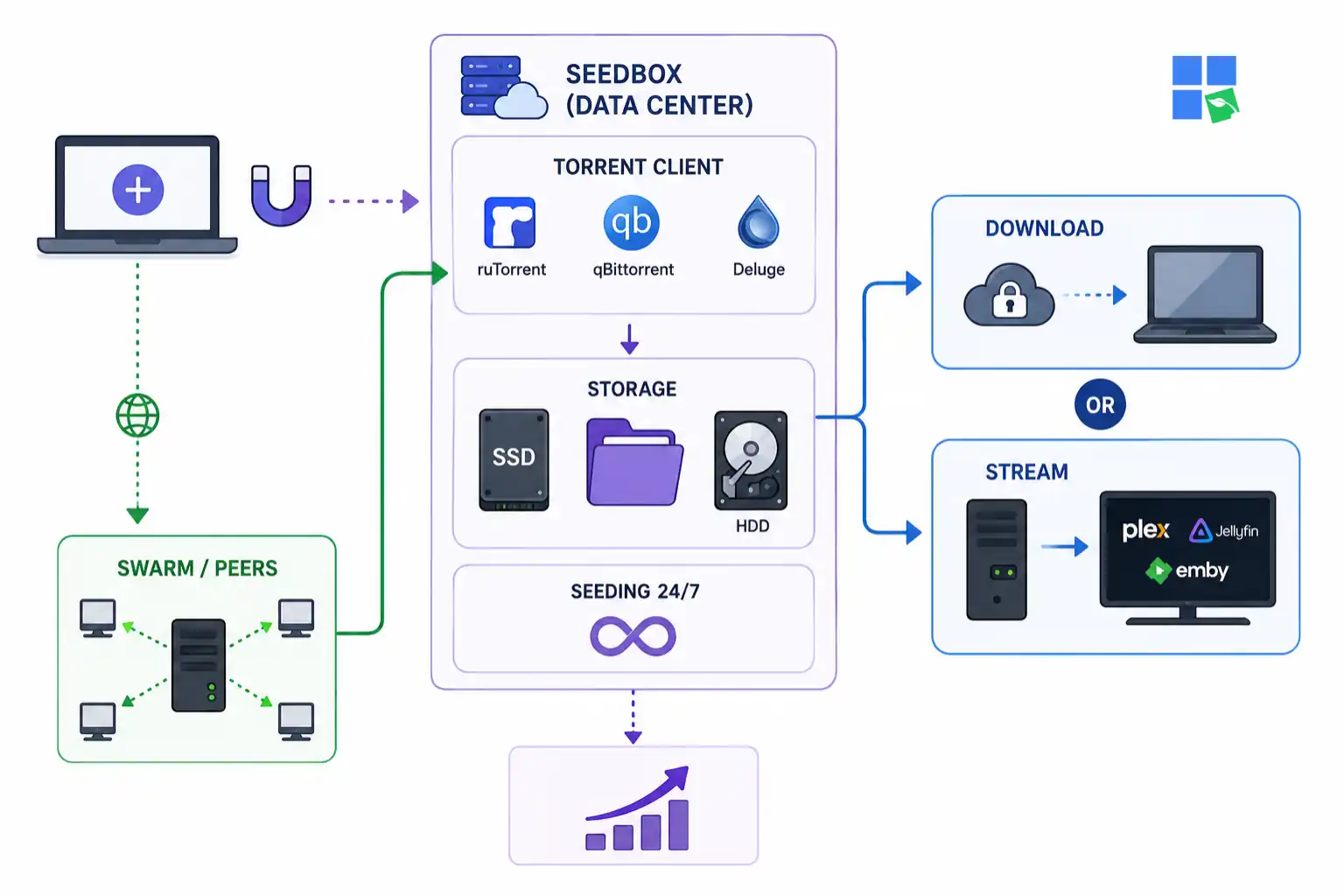
Once the download is done, the file sits on the server’s storage (usually an SSD or HDD, depending on the plan). You can get it in two ways: via SFTP/FTP (direct download to your computer) or by streaming directly through a media player like Plex, Jellyfin, or Emby if your provider offers media server integration. The torrent client is always seeding the file from the server, which automatically builds your upload ratio on private trackers while you sleep.
Seedbox Infrastructure
Most commercial seedboxes run on shared or dedicated hardware in European data centers (like the Netherlands, France, and Switzerland) that are chosen for their relaxed copyright enforcement and high-bandwidth peering. Providers like RapidSeedbox offer plans from shared 1Gbps slots up to unmetered 10Gbps dedicated servers, depending on your speed and storage needs. Compare RapidSeedbox plans to match your actual usage.
How Usenet Works (Technical Details)
Usenet uses NNTP (Network News Transfer Protocol), a server-based protocol originally designed for text-based newsgroups. When it comes to file sharing, binary files are converted into text (typically using yEnc encoding), split into multiple parts, and sent out to thousands of Usenet servers all over the world.
If you’re looking to download from Usenet, you’ll need three things: a Usenet provider (like Newshosting, Eweka, or UsenetServer), an NZB indexer (a search engine for Usenet posts, like NZBGeek or DrunkenSlug), and a Usenet client like SABnzbd or NZBGet. The NZB file is like a torrent file – it’s a small XML file with pointers to all the binary parts on the Usenet server. Your client feeds the NZB to the provider, which reassembles and downloads the file.
Usenet Retention and Completion
Premium Usenet providers offer 3,000+ days of binary retention, meaning files posted years ago remain downloadable. But completion rates can vary. If binary posts are incomplete (missing parts), they can result in corrupted files, unless PAR2 repair files are included. This is Usenet’s main weakness compared to a seedbox. If a file wasn’t posted properly or parts were deleted, it’s simply gone. You can’t re-request from a swarm.
Who Should Use a Seedbox?
Private Tracker Members
- Profile: Registered users of invite-only torrent sites like BTN, PTP, or RED.
- Why it works: Private trackers enforce upload/download ratios. A seedbox seeds files at data center speeds, building ratios automatically without using up your home bandwidth.
- Getting started: Choose a seedbox with a torrent client pre-installed and connect it directly to your private tracker account.
High-Volume Downloaders
- Profile: Users moving 1TB+ per month who’ve hit ISP throttling or data cap limits.
- Why it works: The seedbox does all the heavy lifting on its own dedicated bandwidth. You fetch completed files at home whenever you want, spreading the transfer across time.
- Pro tip: Use SFTP or Rclone to automate syncing completed downloads to local storage.
Media Server Users
- Profile: Plex, Jellyfin, or Emby users who want remote streaming without self-hosting everything.
- Why it works: A lot of seedbox providers offer Plex or Jellyfin integration. Your downloads stream straight from the seedbox, so there’s no need for local storage. RapidSeedbox’s Plex-on-seedbox setup is really clean for this workflow.
VPN-Free Torrent Users
- Profile: Anyone tired of VPN speed hits, connection drops, or blocked trackers.
- Why it works: A seedbox separates your IP entirely from torrent activity. Your home IP never touches a swarm. You don’t need a VPN for the download step.
Who Should Use Usenet?
Privacy-First Downloaders
- Profile: Users who want zero peer-to-peer footprint whatsoever.
- Why it works: Usenet has no peers, no swarm, no DHT. You connect to a single server over SSL. Your ISP sees an encrypted connection to a news server – nothing more.
- Getting started: Sign up for a premium provider (Newshosting or Eweka offer good retention), grab an NZBGeek account, and install SABnzbd.
Speed-First Users on Public Content
- Profile: Users downloading mainstream releases where Usenet availability is consistent.
- Why it works: Premium Usenet providers deliver files at full connection speed without throttling. If the content is well-posted, you get 1Gbps downloads limited only by your home connection.
- Limitation: You’re stuck with whatever retention and poster completeness there is. Just a heads-up that old or obscure content might not be available.
Users Without Tracker Access
- Profile: Newcomers who don’t have private tracker invites and don’t want to manage BitTorrent ratios.
- Why it works: Usenet doesn’t need any ratio management. Just pay for a provider, find an NZB, and download. No invites, no community requirements.
Can You Use a Seedbox and Usenet Together?
Yes – a lot of power users do exactly that. A seedbox is great for private tracker content, which Usenet doesn’t cover, while Usenet is better for mainstream releases because it’s faster and more complete. With this combo, you get the full content catalog: private tracker exclusives via seedbox + fast public-content downloads via Usenet.
Some seedbox providers, like RapidSeedbox, let you install SABnzbd with your torrent client on the same server. This means your seedbox becomes both a torrenting server and a Usenet download box, with all files landing in the same storage pool. It’s a more advanced setup, but it gets rid of the need for separate services.
Want the speed of Usenet with fewer limitations and more control?
RapidSeedbox combines blazing-fast download speeds with complete privacy, dedicated resources, and powerful automation tools. Unlike Usenet setups that require multiple providers, indexers, and retention considerations, a Seedbox gives you an all-in-one solution for torrenting, streaming, and cloud-based media management – accessible from anywhere.
Common Mistakes When Choosing Between Seedbox and Usenet
Don’t Use Usenet for Private Tracker Content
- Why it happens: Users assume Usenet has everything.
- Reality: Private tracker content (scene releases, internal encodes, community-exclusive uploads) doesn’t appear on Usenet. If you need BTN, PTP, or RED content, you’ll need a seedbox or a direct home connection with a VPN.
- How to avoid it: Map your content sources first. If private trackers are essential, a seedbox is non-negotiable.
Check Tracker Compatibility Before Buying a Seedbox
- Why it happens: Users buy a seedbox without verifying their private tracker’s IP rules.
- Reality: Some private trackers flag or ban VPS IP ranges from known hosting providers. Always check your tracker’s rules before purchasing a seedbox plan.
- How to avoid it: Ask in the tracker’s IRC or forums which seedbox providers are whitelisted.
Don’t Forget You Need an NZB Indexer for Usenet
- Why it happens: New Usenet users sign up for a provider but can’t find content.
- Reality: A Usenet provider stores files – it doesn’t search them. You’ll need a separate NZB indexer (like NZBGeek, NZBPlanet, or DrunkenSlug) to find content and generate the NZB files that your Usenet client will actually download.
- How to avoid it: Budget for both a provider ($10-15/month) and at least one paid NZB indexer ($10-15/year).
Avoid Usenet for Obscure or Older Content
- Why it happens: Users overestimate Usenet’s catalog depth.
- Reality: Usenet retention is long (3,000+ days), but availability depends on whether someone posted the content and if all parts survived. It’s pretty common for obscure films, regional content, and older software to be incomplete or missing entirely.
- How to avoid it: For long-tail or niche content, a seedbox connected to a private tracker (which maintains well-seeded archives) will outperform Usenet significantly.
Seedbox vs Usenet: Cost Breakdown
Seedbox costs:
- Shared seedbox (100-500GB, 1Gbps shared): $5-10/month
- Dedicated seedbox (1-2TB, 1Gbps dedicated): $15-30/month
- Unmetered high-speed (10Gbps+): $50+/month
- No additional costs for a torrent indexer if using public trackers
Usenet costs:
- Premium Usenet provider (unlimited, SSL, 3000+ days retention): $8-15/month
- NZB indexer subscription: $10-20/year
- Optional: Usenet client (SABnzbd is free; NZBGet is free)
- Total: ~$12-17/month
For the same speed and storage, a seedbox usually costs a bit more than Usenet, but it gives you private tracker access and ratio management that Usenet just can’t beat.
Seedbox vs Usenet Summary
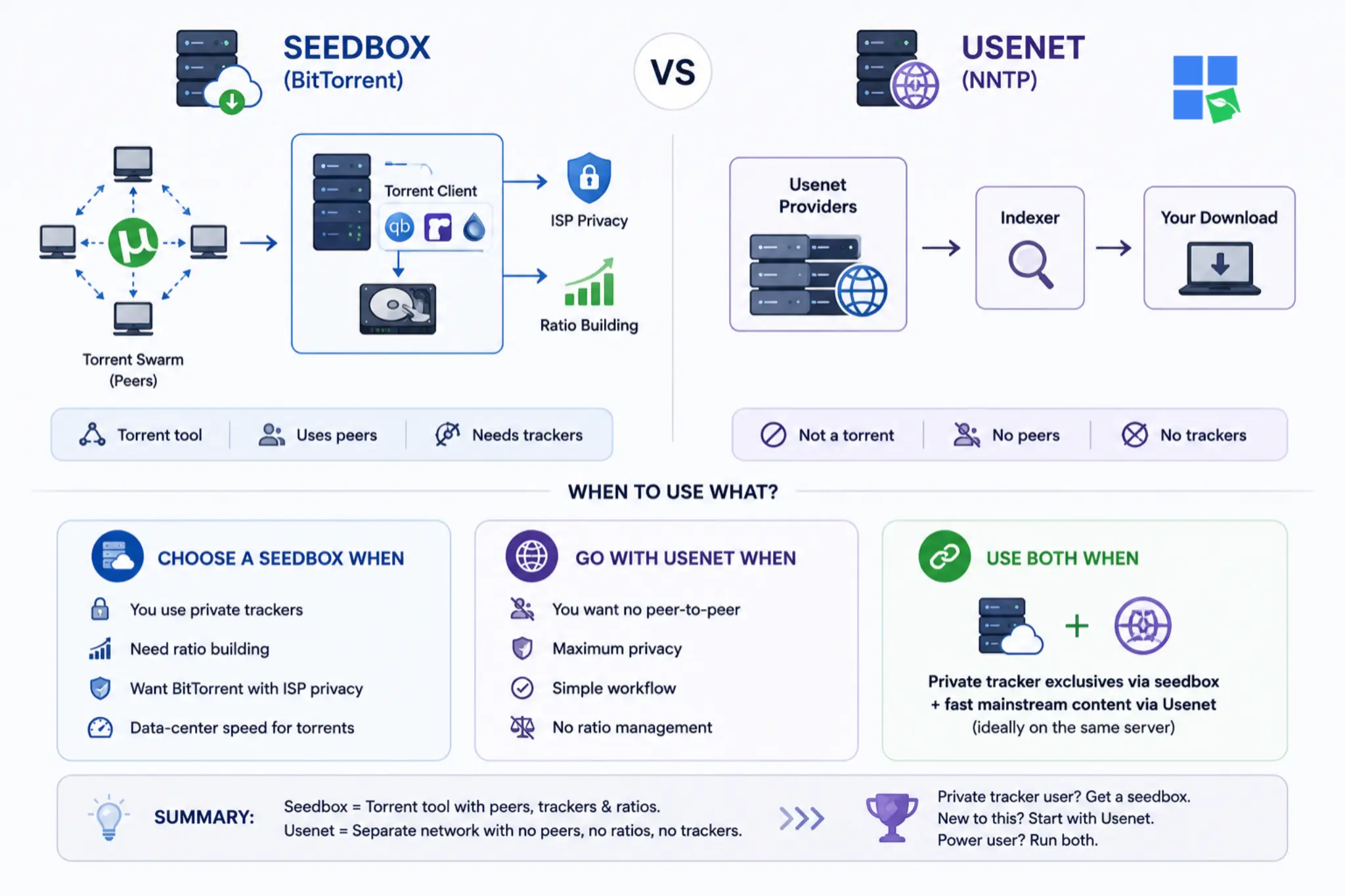
- Seedbox: It’s basically a remote BitTorrent server that downloads and seeds torrents from a data center for you. It’s perfect for private tracker members who need ratio management and ISP privacy. It costs between $5 and $30 a month, depending on how much storage you need and the speed you want.
- Usenet: It’s a network for sharing files that you download straight from the server using NNTP. It’s perfect for users who prioritize speed and privacy and don’t need torrent trackers. It costs ~$12–17/month (provider + indexer).
- Key difference: A seedbox is a torrent tool. Usenet isn’t related to torrenting at all – it’s a totally separate network with no peers, no ratios, and no tracker dependency.
- Choose a seedbox when: You’re using private trackers, need ratio building, or want BitTorrent at data-center speeds with ISP privacy.
- Go with Usenet when: You want to download without any peer-to-peer exposure, have maximum privacy, and a simpler workflow without ratio management.
- Use both when: You want complete coverage – private tracker exclusives via seedbox plus fast mainstream content via Usenet, ideally on the same server.
If you’re on a private tracker, get a seedbox. If you’ve never touched a private tracker and just want fast, private downloads of mainstream content, start with Usenet. Power users run both.
Frequently Asked Questions About Seedbox vs Usenet
What’s the main difference between a seedbox and Usenet?
A seedbox is a remote server that participates in BitTorrent swarms on your behalf, while Usenet is a completely separate binary file network with no peer-to-peer component. You’ll need a torrent tracker for seedboxes, a news server subscription for Usenet, and an NZB indexer. They’re different technologies, not different versions of the same thing.
Is Usenet faster than a seedbox?
They can both get you files super fast, but it depends on what’s slowing you down. A seedbox downloads at data-center speeds (1–10 Gbps), but your home connection limits how fast you can retrieve files. Usenet downloads straight to your home connection at full line speed. For most home users with 100–500Mbps connections, Usenet feels faster because you skip the step of fetching from a seedbox.
Do you need a VPN with a seedbox or Usenet?
No, a seedbox hides your home IP from torrent swarms automatically – your IP never appears in the swarm. Usenet uses encrypted SSL connections, so there’s no way for the peers to see each other. You don’t need a VPN to use either of these, but some users add one for extra privacy.
Can a seedbox access Usenet content?
Not necessarily. A seedbox is a BitTorrent tool, so it can’t download from Usenet by default. But some seedbox providers let you install SABnzbd or NZBGet on your server with your torrent client. That basically turns your seedbox into a Usenet client too.
Which is better for private trackers – seedbox or Usenet?
A seedbox is a better option for private trackers. Private tracker content (like BTN, PTP, RED, and similar) is only available in those tracker communities and never shows up on Usenet. Usenet doesn’t have anything to do with private trackers, ratios, or swarms – it’s a whole other ball game.
Which One Should You Actually Get?
I’ve tested both setups extensively, and the honest answer is that the choice almost always comes down to one question: Do you use private trackers?
Yes? Then a seedbox is the way to go. Private trackers are the best source of high-quality, well-seeded content, and a seedbox is the cleanest way to use them without burning your home bandwidth or exposing your IP.
For mainstream content, Usenet is really great. The setup is a bit more complicated at first (you need to configure SABnzbd, pick an indexer, and handle PAR2 repair files), but once it’s running, the workflow is simpler than torrenting.
If you’re serious about both, RapidSeedbox has plans where you can install SABnzbd alongside your torrent client and run both from the same server. That’s what I’d do.
Disclaimer: This article is for informational purposes only. RapidSeedbox does not endorse or encourage the use of seedboxes, Usenet, or any file-sharing technology for downloading or distributing copyrighted material without authorization. Always ensure you have the legal right to download and share any content. Laws regarding file sharing vary by country – it is your responsibility to comply with the laws applicable in your jurisdiction. RapidSeedbox provides infrastructure services only and is not responsible for how users choose to use those services.
Still deciding between Seedboxes and Usenet for secure, high-speed downloads?
If privacy, automation, and lightning-fast torrenting matter to you, a premium Seedbox is the smarter alternative. Enjoy ultra-fast downloads, anonymous torrenting, remote file management, and seamless media streaming – all without exposing your home IP. Whether you’re building a Plex library or maximizing ratio performance, RapidSeedbox gives you the speed and privacy Usenet users wish they had.
0Comments